Share your WhatsApp Business app number with your AI agent
Connect the number you already use in the WhatsApp Business app, so your AI agent and your team share it
WhatsApp Business App Coexistence lets you connect a phone number that’s already active in the WhatsApp Business app to your Chatbase AI agent, without deleting the account or changing numbers. It’s for businesses that already talk to customers from the WhatsApp Business app on a phone and want an AI agent to answer on the same number while the team keeps using the app. After you connect:
Your AI agent answers customers on that number.
You can still read and reply to chats from the WhatsApp Business app on your phone.
Your recent chat history and contacts are copied into Chatbase.
When you reply from the app, Chatbase sees the reply and stops the AI for that conversation, so you and the AI don’t talk over each other.
Is coexistence right for me?
Use coexistence if customers already know your WhatsApp Business app number and you want to keep answering from the app. If you’re connecting a new number, or a number you don’t use in the WhatsApp Business app, follow the regular WhatsApp setup instead.
Coexistence
Regular WhatsApp setup
The number
Stays active in the WhatsApp Business app
Used only by the AI agent, and can’t also be used in the WhatsApp or WhatsApp Business app
Replying yourself
From the app or from Chatbase. Replying from the app pauses the AI for that conversation
From Chatbase
Before you connect
Update the app to version 2.24.17 or later
Delete the number’s account in the app, if it has one, and have an approved display name
App features
Disappearing messages, view-once messages, live location, and broadcast lists stop working
Not applicable, since the number isn’t used in the app
Keeping it connected
Open the app at least once every 14 days
Not required
Coexistence also imports up to 6 months of your one-to-one chats from the app, once, and keeps your app contacts in sync with Chatbase.For example, a small store that has answered customers from the WhatsApp Business app for a year can connect with coexistence: the AI agent handles routine questions, the team sees the past six months of chats in Chatbase, and the owner can still step in from the phone.
Before you start
Make sure you have:
The WhatsApp Business app, version 2.24.17 or later, on the phone that uses the number. Update the app first if needed.
The phone with you during setup. You confirm the connection from the app.
A Facebook account that can manage your business on Meta.
A few minutes. Connecting and importing your history can take several minutes.
Connect at a time when few customers are messaging you. Messages that arrive while you connect and while your history imports can be lost, and your AI agent doesn’t reply until the import finishes.
Connecting changes a few things in the WhatsApp Business app. Disappearing messages, view-once messages, live location, and broadcast lists stop working. All linked devices are logged out and need to be linked again. See Limitations for the full list.
Connect your WhatsApp Business app number
1
Open the WhatsApp channel
Go to the AI agent you’d like to connect. Click Channels in the sidebar, then click Setup on the WhatsApp card. If you already have a WhatsApp number connected, open Channels → WhatsApp, go to the Connection tab, and click Connect a new number.
2
Log in with Facebook
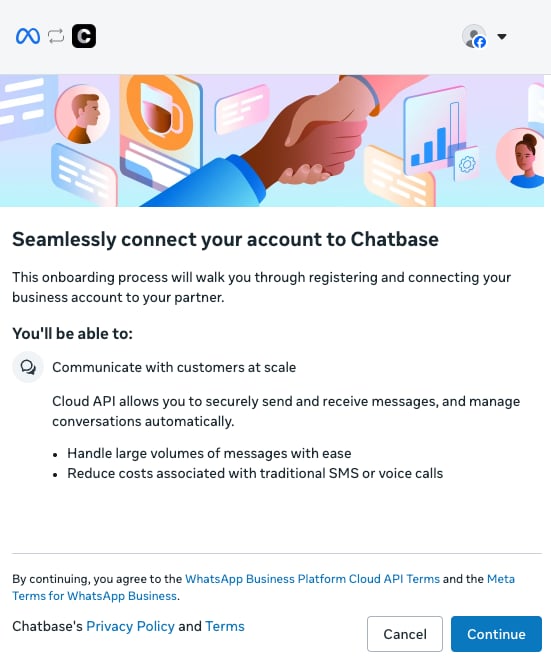
A Meta window opens. Log in with the Facebook account that manages your business, then click Continue.
3
Enter your WhatsApp Business app number
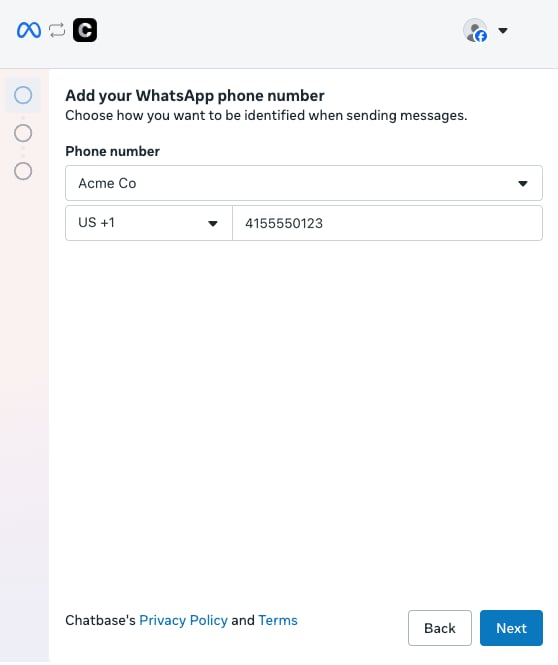
Choose your WhatsApp Business app profile, enter the phone number you use in the app, and click Next.
4
Verify your account details
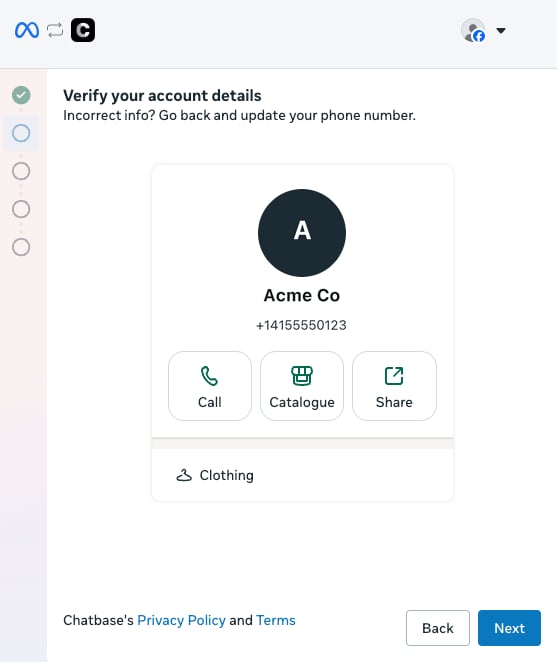
Meta shows the business profile from your WhatsApp Business app. Check that it’s the right one and click Next. If it isn’t, click Back and change the number.
5
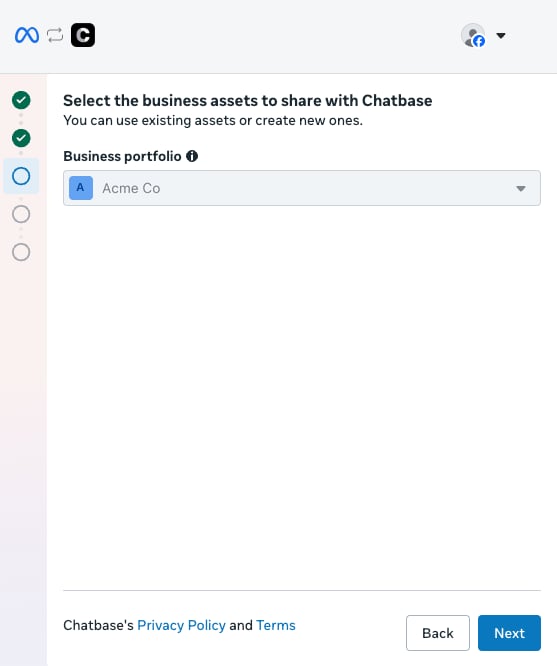
Choose your business portfolio
Select the business portfolio to share with Chatbase and click Next.
6
Connect from the WhatsApp Business app
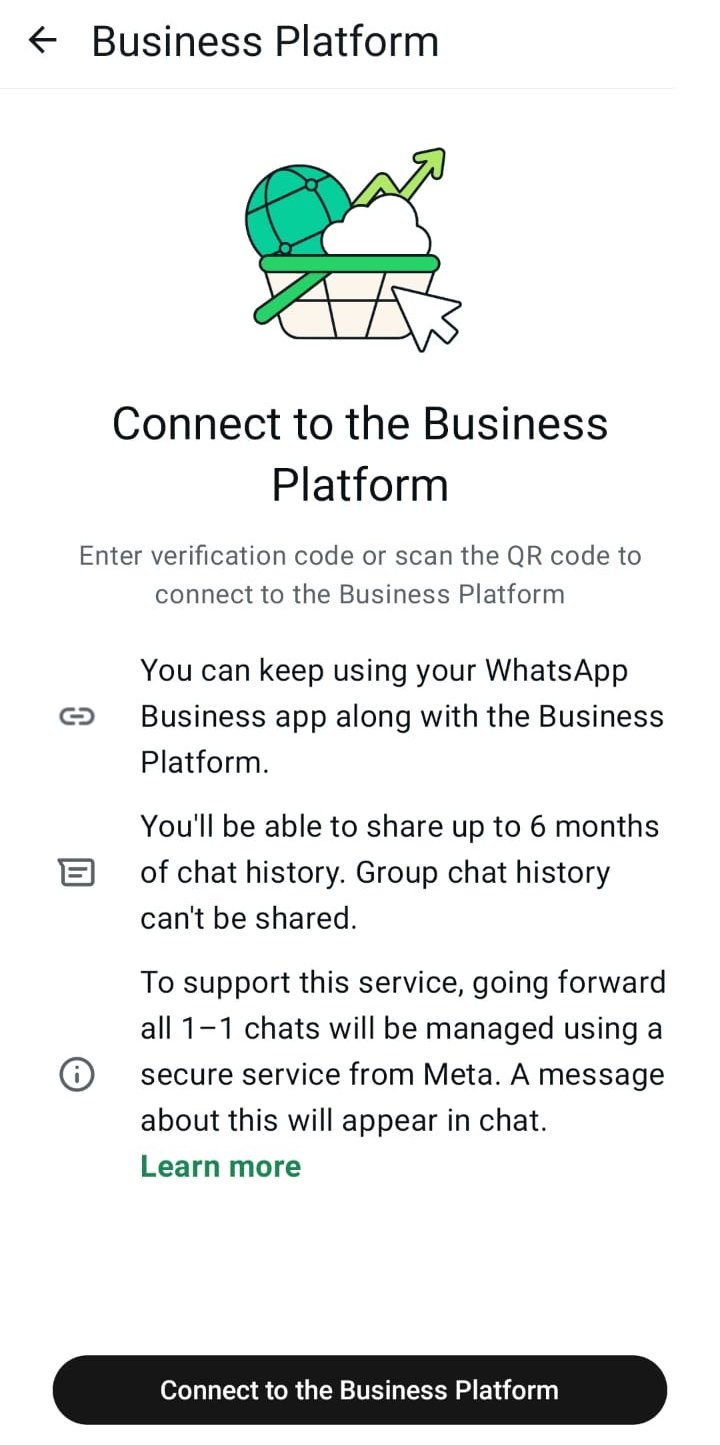
Meta shows a QR code. Keep this window open and pick up your phone.
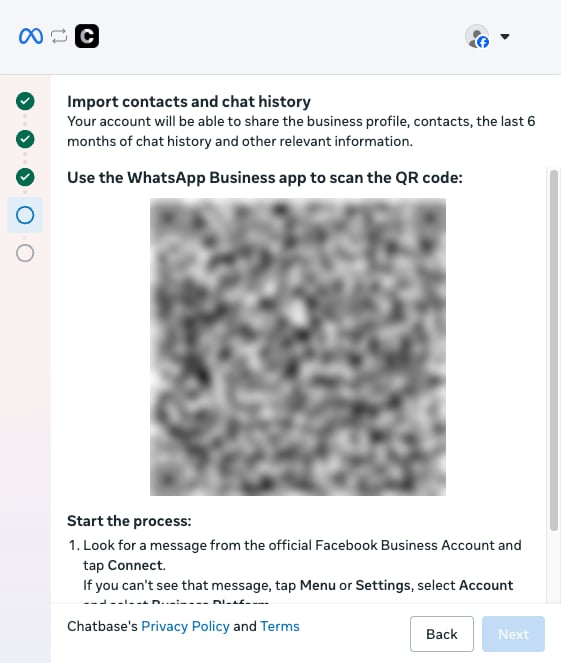
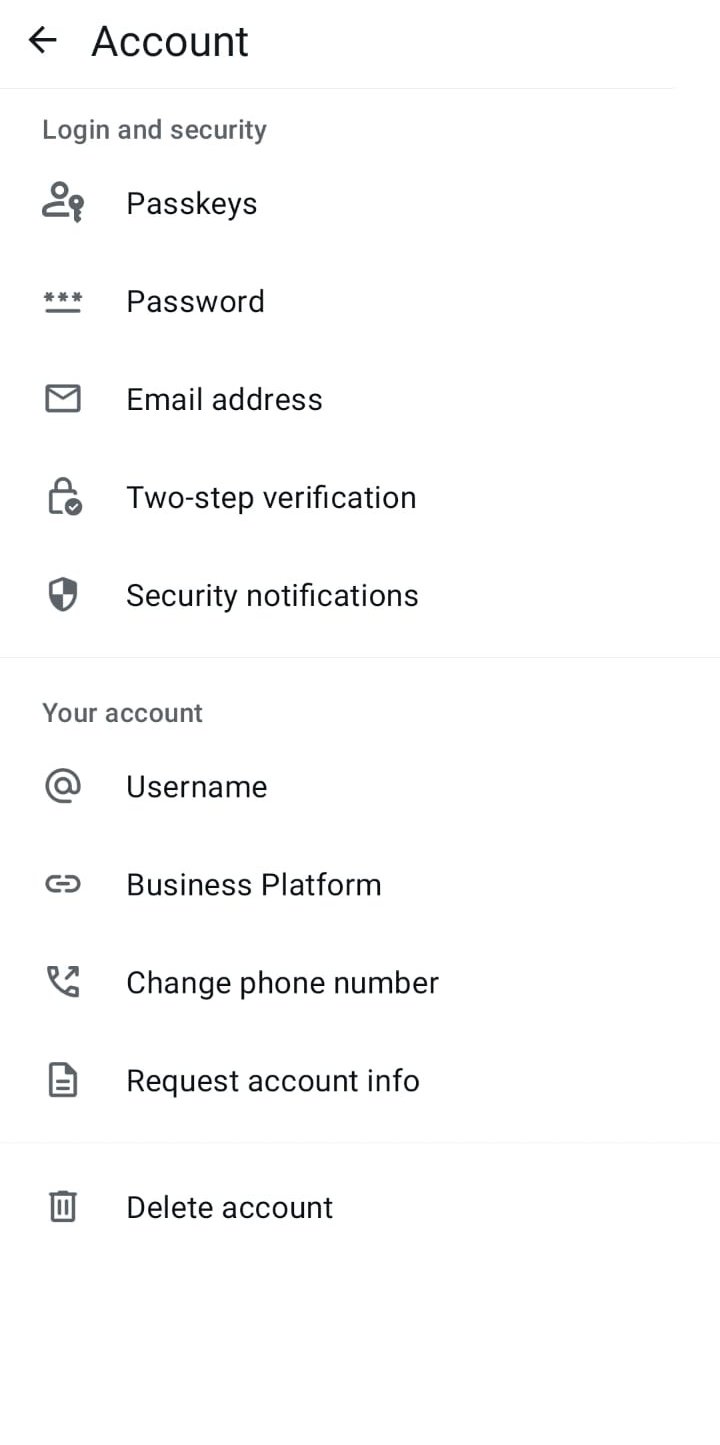
In the WhatsApp Business app, open the Business Platform screen:
If you see a message from the official Facebook Business account in your chats, tap Connect.
If there’s no message, go to Settings → Account → Business Platform.
Tap Connect to the Business Platform.
7
Choose whether to share your chat history
The app asks whether to share your chat history. Choose Share all chats to bring up to 6 months of one-to-one chats into Chatbase, so your AI agent and your team see what was said before. Group chats can’t be shared. Tap Confirm.
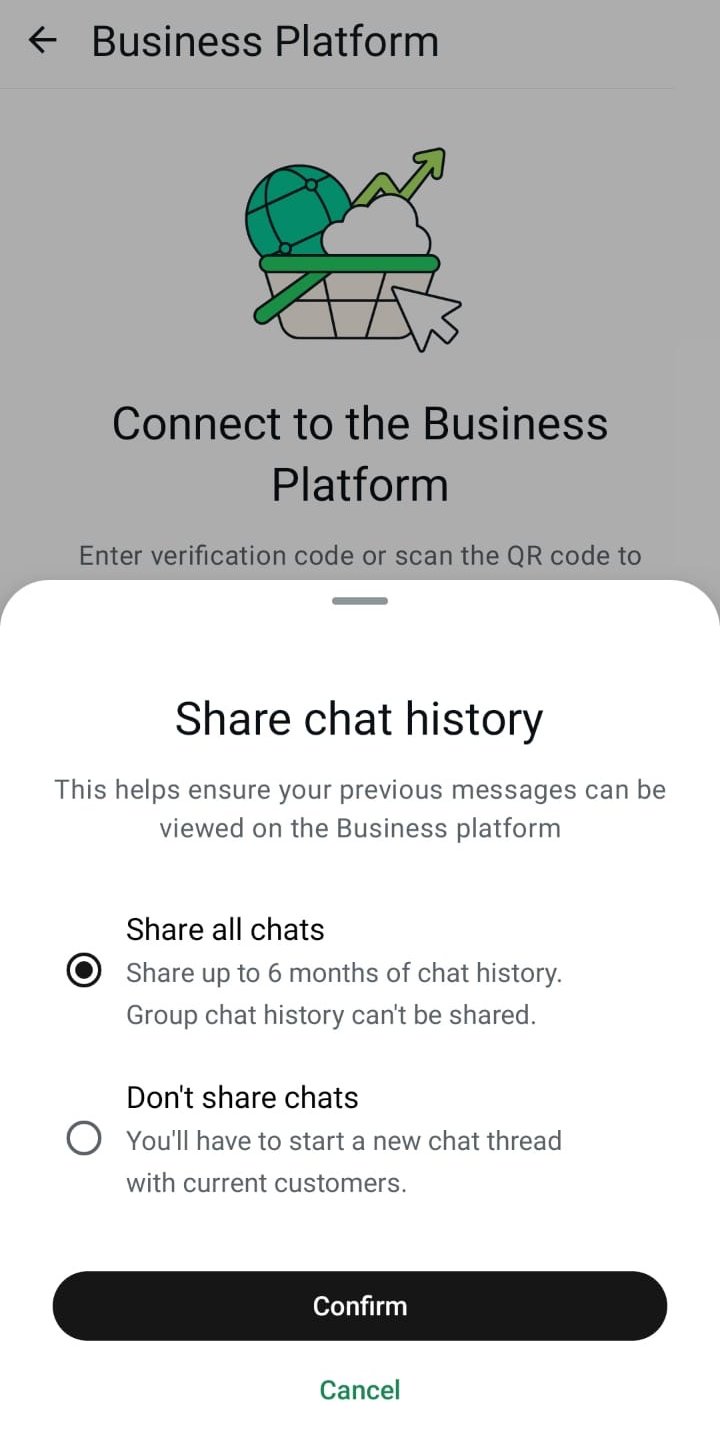
History can be shared only once. If you choose Don’t share chats, the only way to import it later is to disconnect and connect the number again.
8
Scan the QR code
The app opens the camera. Scan the QR code in the Meta window on your computer.
9
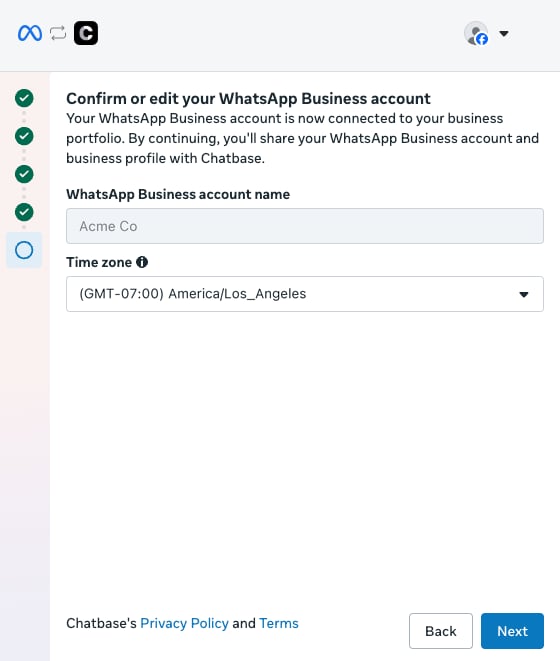
Confirm your WhatsApp Business account
Back on your computer, Meta shows your WhatsApp Business account. Check the time zone and click Next.
10
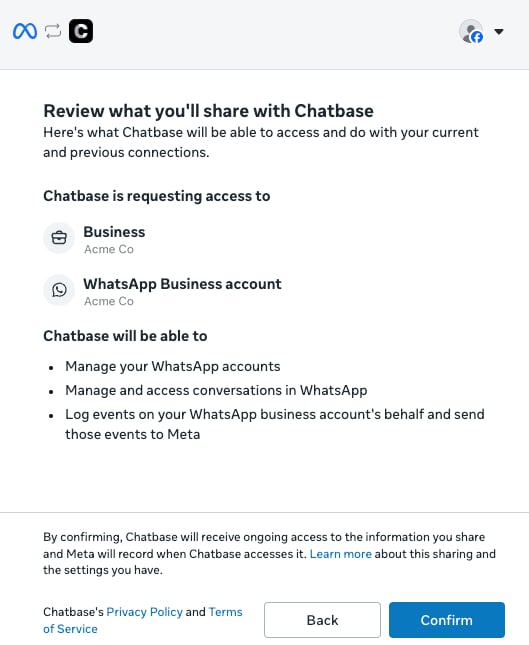
Review the access and confirm
Meta lists what Chatbase can access and do. Click Confirm.
11
Finish
Meta shows Connecting your account for a few moments, then Your account is connected to Chatbase. Click Finish.
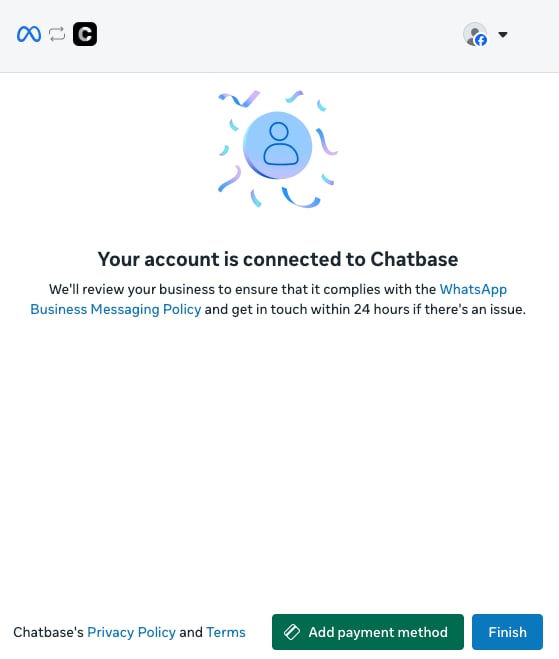
You can also click Add payment method here to set up Meta billing for the messages your AI agent sends, or add it later in Meta.
Importing your chat history and contacts
Right after you connect, Chatbase starts importing from the WhatsApp Business app:
Chat history: your recent conversations are added to Activity > Conversations, so your AI agent and your team can see what was said before.
Contacts: your WhatsApp Business app contacts are added to Contacts, and stay in sync when you add or remove them in the app.
You can follow the import on the number’s card in Channels → WhatsApp, on the Connection tab:
Status on the card
What it means
Preparing history import…
Chatbase asked Meta for your history and is waiting for it to arrive.
Importing history… N%
History is arriving. A progress bar shows how far along it is.
History sharing is off in WhatsApp
You chose not to share history in the app. Live messages still work.
History can’t be imported again
Meta allows one import, within 24 hours of connecting. See Import history again.
History import could not be started
Something went wrong when requesting history. Live messages still work. Contact support if you need the history.
When the import finishes, the status line disappears from the card and your AI agent starts replying.
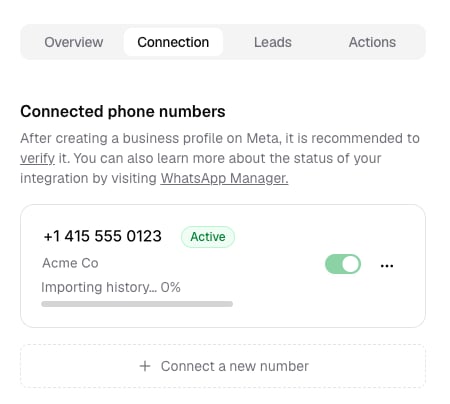
Your AI agent doesn’t reply to customers while history is importing, so it doesn’t answer before it has the conversation’s past. Messages that arrive during the import still show up in the WhatsApp Business app and in Activity > Conversations. The on/off toggle for the number is grayed out and can’t be changed until the import finishes.
Photos, videos, and files older than 14 days are not included in the history Meta sends. They appear as a placeholder in Activity > Conversations.
Replying from the WhatsApp Business app
You can keep replying to customers from the WhatsApp Business app. Chatbase sees each reply and treats it as you stepping into the conversation:
If you use the Helpdesk: Chatbase takes over the conversation and opens a ticket with your reply in it. The AI stays off for that customer until the ticket is closed. The customer’s next messages go to the same ticket.
If you don’t use the Helpdesk: Chatbase pauses the AI for that conversation. To hand it back to the AI, open the conversation in Activity > Conversations, open its menu, and click Resume conversation.
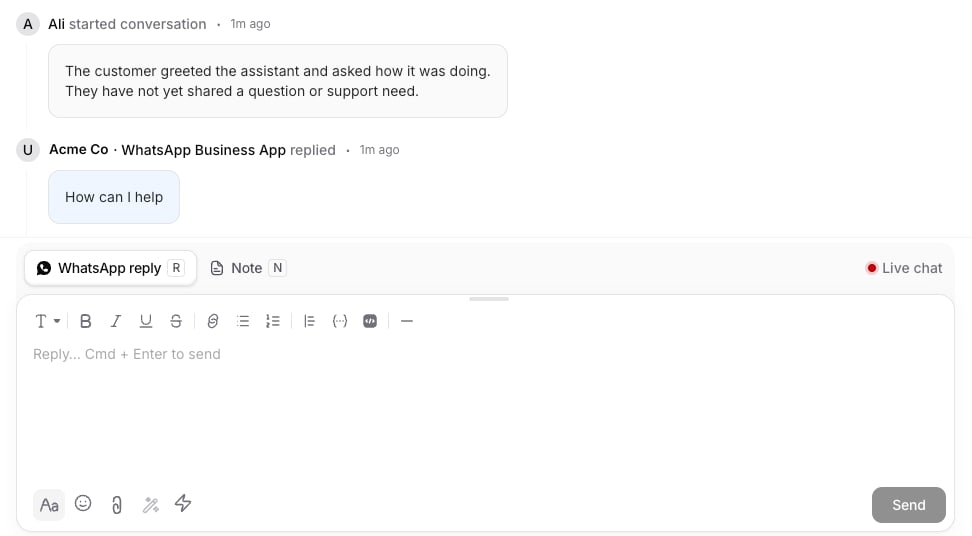
It works the other way too: replies your team sends from the Helpdesk also appear in the WhatsApp Business app, so the app shows the full conversation.Replies sent from the app are labeled with your business name and WhatsApp Business App (for example, Acme Co · WhatsApp Business App) in Activity > Conversations and tickets, so you can tell them apart from AI replies.
To keep the AI answering, reply only from Chatbase. Replying from the app is the way to take a conversation over yourself.
Disconnecting
There are two separate ways to disconnect, and they do different things.Remove the number from Chatbase. Open Channels → WhatsApp, go to the Connection tab, click the ⋯ menu on the number, choose Delete Number, then click Delete to confirm. This removes the number from Chatbase and stops your AI agent on it, but the number stays connected to the WhatsApp Business Platform.
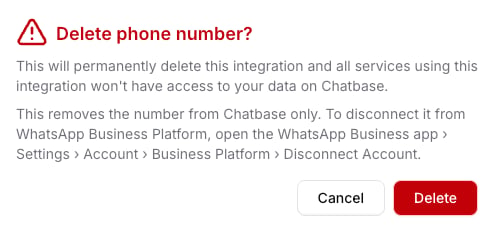
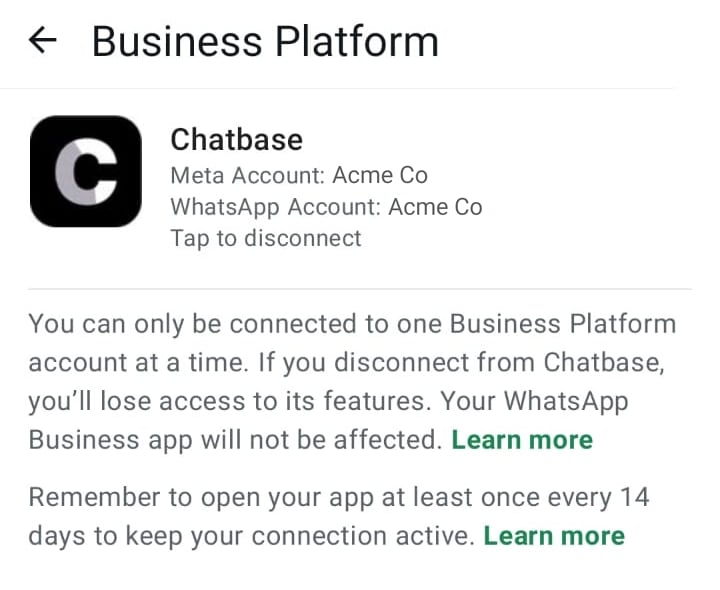
Disconnect from the WhatsApp Business Platform. In the WhatsApp Business app, go to Settings → Account → Business Platform, tap Chatbase, and confirm that you want to disconnect. Chatbase notices and the number’s card shows Disconnected from WhatsApp. Your AI agent stops replying on that number.
If the number is reconnected to the platform later, Chatbase picks it back up.
Import history again
Meta allows history to be imported once, within 24 hours of connecting. To import it again, disconnect in the WhatsApp Business app (Settings → Account → Business Platform), then go through Connect your WhatsApp Business app number again and share history when asked.
Limitations
In Chatbase
Group chats aren’t supported. Your AI agent only works in one-to-one chats, and group chats aren’t imported.
History is imported once. You can import up to about 6 months of one-to-one chats, once, right after connecting. To import it again, you need to disconnect and connect again.
Older media isn’t imported. Photos, videos, and files older than 14 days show up as placeholders in Activity > Conversations.
In the WhatsApp Business appOnce connected, Meta changes some things in the app:
Disappearing messages are turned off for one-to-one chats.
View-once messages and live location can’t be sent.
Broadcast lists are turned off. You can’t create new ones, and existing ones become read-only.
Linked devices are logged out during setup. You can link up to 4 again afterwards. WhatsApp for Windows and WhatsApp for Wear OS aren’t supported as linked devices.
Your catalog, labels, quick replies, greeting and away messages, calls, status, and channels keep working in the app.Keeping the connection active
Open the WhatsApp Business app at least once every 14 days. If you don’t, Meta disconnects the number from the platform and your AI agent stops replying.
Changing the number, deleting the account, or moving the number to regular WhatsApp also disconnects it.
If you reinstall the app or move to a new phone, keep the option to reconnect your connected platforms checked when you register again, and the connection comes back on its own.
PricingMessages you send from the WhatsApp Business app stay free. Messages your AI agent sends are charged at Meta’s WhatsApp Business Platform rates. The 24-hour window for free-form replies applies to your AI agent’s messages. Messages you send from the app don’t open or extend it.
Frequently asked questions
Can my team keep replying from the WhatsApp Business app?
Yes. Each reply from the app counts as stepping into the conversation: with the Helpdesk, Chatbase opens a ticket and the AI stays off until it’s closed. Without the Helpdesk, the AI pauses until you click Resume conversation in Activity > Conversations. See Replying from the WhatsApp Business app.
Do Helpdesk replies show up in the WhatsApp Business app?
Yes. Replies your team sends from the Chatbase Helpdesk appear in the WhatsApp Business app on your phone, alongside the customer’s messages.
Why isn't my AI agent replying right after I connect?
Your AI agent doesn’t reply while your chat history is importing. Follow the import on the number’s card in Channels → WhatsApp. When the status line disappears, your AI agent starts replying. See Importing your chat history and contacts.
What happens if I don't open the app for two weeks?
If you don’t open the WhatsApp Business app at least once every 14 days, Meta disconnects the number from the platform and your AI agent stops replying. Changing the number or deleting the account also disconnects it. See Limitations.
What does coexistence cost?
Messages you send from the app stay free. Messages your AI agent sends are charged at Meta’s rates, and each AI reply also uses Chatbase message credits based on your AI agent’s model, twice that when the reply triggers an Action.
Next steps
Takeover
Learn how taken-over conversations and tickets work.
WhatsApp Templates
Reach customers after the 24-hour window closes.
{"docsConfig":{"theme":"mint","$schema":"https://mintlify.com/docs.json","name":"Chatbase","colors":{"primary":"#18181b","light":"#f4f4f5","dark":"#18181b"},"logo":{"light":"https://mintcdn.com/chatbase/pJU9vM3D9oN_YQME/logo/light.svg?fit=max\u0026auto=format\u0026n=pJU9vM3D9oN_YQME\u0026q=85\u0026s=a45a73af7ac778cd0920dbb6ad1aaa93","dark":"https://mintcdn.com/chatbase/8k6_6eFSz4sj8EO0/logo/dark.svg?fit=max\u0026auto=format\u0026n=8k6_6eFSz4sj8EO0\u0026q=85\u0026s=c0c106d2f92f6a87f872a2be66706041","href":"https://chatbase.co"},"favicon":"https://mintcdn.com/chatbase/NsUPSmNqecm03uiz/favicon.ico?fit=max\u0026auto=format\u0026n=NsUPSmNqecm03uiz\u0026q=85\u0026s=b37388fc54cd76cfaf3efcb8ab4a4dc8","appearance":{},"navbar":{"links":[{"href":"https://chatbase.co/help","label":"Support"}],"primary":{"type":"button","label":"Dashboard","href":"https://www.chatbase.co/dashboard"}},"footer":{"socials":{"x":"https://x.com/chatbase_co","linkedin":"https://linkedin.com/company/chatbase-co","youtube":"https://www.youtube.com/@chatbase_"}},"seo":{"metatags":{"canonical":"https://www.chatbase.co/docs"}},"contextual":{"options":["copy","view","chatgpt","claude"],"display":"header"},"metadata":{"timestamp":false},"styling":{"latex":false},"navigation":{"pages":[]}},"deployment":{"deploymentMetadataValue":{"subdomain":"chatbase","hasAudioNarration":false,"actualSubdomain":"chatbase","customDomains":["chatbase.co"],"gitSource":{"type":"github","owner":"chatbase-co","repo":"docs","deployBranch":"main","contentDirectory":"","isPrivate":true,"mountPath":"","label":""},"entitlements":{"AI_CHAT":{"status":"ENABLED"},"WEB_MCP":{"status":"ENABLED"},"NARRATION":{"status":"ENABLED"}},"buildId":"6afb2ce1ad9313ad123bf3cb","clientVersion":"0.0.4149","searchFilterCounts":[{"language":"default","tag":"User Guide","count":109},{"language":"default","tag":"API Reference","count":92},{"language":"default","tag":"Endpoints","count":78},{"language":"default","tag":"API v2","count":71},{"language":"default","tag":"Helpdesk","count":40},{"language":"default","tag":"Integrations","count":35},{"language":"default","tag":"Developer Guide","count":32},{"language":"default","tag":"AI Agent Management","count":32},{"language":"default","tag":"SDKs","count":26},{"language":"default","tag":"Actions","count":22}]},"assistantConfig":{},"basePath":"/docs","hasChatPermissions":false,"hasWebMcpPermissions":true,"toggles":[{"name":"kill-isr","enabled":true,"variant":{"name":"disabled","enabled":false,"feature_enabled":true},"impressionData":false},{"name":"custom-rbac-roles","enabled":true,"variant":{"name":"disabled","enabled":false,"feature_enabled":true},"impressionData":false},{"name":"agent-mintlify-slack","enabled":true,"variant":{"name":"disabled","enabled":false,"feature_enabled":true},"impressionData":false},{"name":"agent-integrations-settings","enabled":true,"variant":{"name":"disabled","enabled":false,"feature_enabled":true},"impressionData":false},{"name":"rbac-expansion","enabled":true,"variant":{"name":"disabled","enabled":false,"feature_enabled":true},"impressionData":false},{"name":"automations-pr-grouping","enabled":true,"variant":{"name":"disabled","enabled":false,"feature_enabled":true},"impressionData":false},{"name":"custom-prefix","enabled":true,"variant":{"name":"disabled","enabled":false,"feature_enabled":true},"impressionData":false},{"name":"analytics-v7","enabled":true,"variant":{"name":"disabled","enabled":false,"feature_enabled":true},"impressionData":false},{"name":"user-flows-analytics","enabled":true,"variant":{"name":"disabled","enabled":false,"feature_enabled":true},"impressionData":false},{"name":"no-publish-flow","enabled":true,"variant":{"name":"disabled","enabled":false,"feature_enabled":true},"impressionData":false},{"name":"workos-onboarding","enabled":true,"variant":{"name":"disabled","enabled":false,"feature_enabled":true},"impressionData":false},{"name":"snapshot-serving-live","enabled":true,"variant":{"name":"disabled","enabled":false,"feature_enabled":true},"impressionData":false},{"name":"stripTemperatureMiddleware","enabled":true,"variant":{"name":"disabled","enabled":false,"feature_enabled":true},"impressionData":false},{"name":"support-platform-pylon-zendesk","enabled":true,"variant":{"name":"disabled","enabled":false,"feature_enabled":true},"impressionData":false},{"name":"snapshot-serving","enabled":true,"variant":{"name":"disabled","enabled":false,"feature_enabled":true},"impressionData":false},{"name":"instant-rollback","enabled":true,"variant":{"name":"disabled","enabled":false,"feature_enabled":true},"impressionData":false},{"name":"granular-notifications-server","enabled":true,"variant":{"name":"disabled","enabled":false,"feature_enabled":true},"impressionData":false},{"name":"granular-notifications","enabled":true,"variant":{"name":"disabled","enabled":false,"feature_enabled":true},"impressionData":false},{"name":"automations-fable","enabled":true,"variant":{"name":"disabled","enabled":false,"feature_enabled":true},"impressionData":false},{"name":"fixed-ai-action-pricing","enabled":true,"variant":{"name":"disabled","enabled":false,"feature_enabled":true},"impressionData":false},{"name":"automation-resolve-merge-conflict","enabled":true,"variant":{"name":"disabled","enabled":false,"feature_enabled":true},"impressionData":false},{"name":"scoped-publishing","enabled":true,"variant":{"name":"disabled","enabled":false,"feature_enabled":true},"impressionData":false},{"name":"mintql","enabled":true,"variant":{"name":"disabled","enabled":false,"feature_enabled":true},"impressionData":false},{"name":"page-level-analytics","enabled":true,"variant":{"name":"disabled","enabled":false,"feature_enabled":true},"impressionData":false},{"name":"editor-version-history-v2","enabled":true,"variant":{"name":"disabled","enabled":false,"feature_enabled":true},"impressionData":false},{"name":"billing-page-v2","enabled":true,"variant":{"name":"disabled","enabled":false,"feature_enabled":true},"impressionData":false},{"name":"full-page-search","enabled":true,"variant":{"name":"disabled","enabled":false,"feature_enabled":true},"impressionData":false},{"name":"workspace-projects","enabled":true,"variant":{"name":"disabled","enabled":false,"feature_enabled":true},"impressionData":false},{"name":"assistant-v5","enabled":true,"variant":{"name":"disabled","enabled":false,"feature_enabled":true},"impressionData":false},{"name":"fork-pr-previews","enabled":true,"variant":{"name":"disabled","enabled":false,"feature_enabled":true},"impressionData":false},{"name":"revalidation-jwt","enabled":true,"variant":{"name":"disabled","enabled":false,"feature_enabled":true},"impressionData":false},{"name":"workos-sso-scim","enabled":true,"variant":{"name":"disabled","enabled":false,"feature_enabled":true},"impressionData":false},{"name":"hobby-abuse-scan","enabled":true,"variant":{"name":"disabled","enabled":false,"feature_enabled":true},"impressionData":false},{"name":"dashboard-inbox","enabled":true,"variant":{"name":"disabled","enabled":false,"feature_enabled":true},"impressionData":false},{"name":"workos-signup","enabled":true,"variant":{"name":"disabled","enabled":false,"feature_enabled":true},"impressionData":false},{"name":"turbopuffer-dual-write","enabled":true,"variant":{"name":"disabled","enabled":false,"feature_enabled":true},"impressionData":false},{"name":"workos-enabled","enabled":true,"variant":{"name":"disabled","enabled":false,"feature_enabled":true},"impressionData":false},{"name":"approve-review-flow","enabled":true,"variant":{"name":"disabled","enabled":false,"feature_enabled":true},"impressionData":false},{"name":"editor-metadata","enabled":true,"variant":{"name":"disabled","enabled":false,"feature_enabled":true},"impressionData":false},{"name":"sso-setup-deadline-banner","enabled":true,"variant":{"name":"disabled","enabled":false,"feature_enabled":true},"impressionData":false},{"name":"turbopuffer-serve","enabled":true,"variant":{"name":"disabled","enabled":false,"feature_enabled":true},"impressionData":false},{"name":"live-agents","enabled":true,"variant":{"name":"disabled","enabled":false,"feature_enabled":true},"impressionData":false},{"name":"llms-txt-v2","enabled":true,"variant":{"name":"disabled","enabled":false,"feature_enabled":true},"impressionData":false}],"googleFontsInlined":false},"customCss":[{"filePath":"style.css","content":".nav-dropdown-trigger{border-color:transparent!important;border-bottom-color:rgb(var(--gray-500) / 0.2)!important;border-radius:0!important;padding:0.5rem 0.875rem 0.875rem 1rem!important}.nav-dropdown-trigger .nav-dropdown-item-icon{display:none!important}.nav-dropdown-trigger .nav-dropdown-item-text-container{padding-left:0!important}.nav-dropdown-trigger .nav-dropdown-item-title{font-weight:600!important}.nav-dropdown-item-title::after{display:inline-block;margin-left:0.5rem;padding:0.125rem 0.5rem;border-radius:0.375rem;font-size:0.7rem;font-weight:600;line-height:1.2;vertical-align:middle}:is(.nav-dropdown-trigger,.nav-dropdown-item):has([style*=\"/code.svg\"]) .nav-dropdown-item-title::after{content:\"Current\";color:rgb(22 163 74);background:rgb(22 163 74 / 0.12)}:is(.nav-dropdown-trigger,.nav-dropdown-item):has([style*=\"/box-archive.svg\"]) .nav-dropdown-item-title::after{content:\"Deprecated\";color:rgb(217 119 6);background:rgb(217 119 6 / 0.12)}"}],"page":{"pagePath":"user-guides/integrations/whatsapp-coexistence","slug":"/user-guides/integrations/whatsapp-coexistence","pageMetadata":{"title":"Share your WhatsApp Business app number with your AI agent","sidebarTitle":"Business App Coexistence","icon":"mobile-screen","description":"Connect the number you already use in the WhatsApp Business app, so your AI agent and your team share it","href":"/user-guides/integrations/whatsapp-coexistence"},"description":{"compiledSource":"\"use strict\";\nconst {jsx: _jsx} = arguments[0];\nconst {useMDXComponents: _provideComponents} = arguments[0];\nfunction _createMdxContent(props) {\n const _components = {\n p: \"p\",\n ..._provideComponents(),\n ...props.components\n };\n return _jsx(_components.p, {\n children: \"Connect the number you already use in the WhatsApp Business app, so your AI agent and your team share it\"\n });\n}\nfunction MDXContent(props = {}) {\n const {wrapper: MDXLayout} = {\n ..._provideComponents(),\n ...props.components\n };\n return MDXLayout ? _jsx(MDXLayout, {\n ...props,\n children: _jsx(_createMdxContent, {\n ...props\n })\n }) : _createMdxContent(props);\n}\nreturn {\n default: MDXContent\n};\n","frontmatter":{},"scope":{}},"pageType":"default","mdx":{"mdxSource":{"compiledSource":"\"use strict\";const{Fragment:_Fragment,jsx:_jsx,jsxs:_jsxs}=arguments[0];const{useMDXComponents:_provideComponents}=arguments[0];function _createMdxContent(props){const _components={a:`a`,em:`em`,li:`li`,p:`p`,strong:`strong`,tbody:`tbody`,td:`td`,th:`th`,thead:`thead`,tr:`tr`,ul:`ul`,..._provideComponents(),...props.components},{Accordion,AccordionGroup,Card,CardGroup,Frame,Heading,Info,OptimizedImage,Step,Steps,Table,Tip,Warning}=_components;if(!Accordion)_missingMdxReference(`Accordion`,true);if(!AccordionGroup)_missingMdxReference(`AccordionGroup`,true);if(!Card)_missingMdxReference(`Card`,true);if(!CardGroup)_missingMdxReference(`CardGroup`,true);if(!Frame)_missingMdxReference(`Frame`,true);if(!Heading)_missingMdxReference(`Heading`,true);if(!Info)_missingMdxReference(`Info`,true);if(!OptimizedImage)_missingMdxReference(`OptimizedImage`,true);if(!Step)_missingMdxReference(`Step`,true);if(!Steps)_missingMdxReference(`Steps`,true);if(!Table)_missingMdxReference(`Table`,true);if(!Tip)_missingMdxReference(`Tip`,true);if(!Warning)_missingMdxReference(`Warning`,true);return _jsxs(_Fragment,{children:[_jsxs(_components.p,{children:[`WhatsApp Business App Coexistence lets you connect a phone number that’s already active in the `,_jsx(_components.strong,{children:`WhatsApp Business app`}),` to your Chatbase AI agent, without deleting the account or changing numbers. It’s for businesses that already talk to customers from the WhatsApp Business app on a phone and want an AI agent to answer on the same number while the team keeps using the app. After you connect:`]}),`\n`,_jsxs(_components.ul,{children:[`\n`,_jsx(_components.li,{children:`Your AI agent answers customers on that number.`}),`\n`,_jsx(_components.li,{children:`You can still read and reply to chats from the WhatsApp Business app on your phone.`}),`\n`,_jsx(_components.li,{children:`Your recent chat history and contacts are copied into Chatbase.`}),`\n`,_jsx(_components.li,{children:`When you reply from the app, Chatbase sees the reply and stops the AI for that conversation, so you and the AI don’t talk over each other.`}),`\n`]}),`\n`,_jsx(Heading,{level:`2`,id:`is-coexistence-right-for-me`,children:`Is coexistence right for me?`}),`\n`,_jsxs(_components.p,{children:[`Use coexistence if customers already know your WhatsApp Business app number and you want to keep answering from the app. If you’re connecting a new number, or a number you don’t use in the WhatsApp Business app, follow the regular `,_jsx(_components.a,{href:`/user-guides/integrations/whatsapp`,children:`WhatsApp setup`}),` instead.`]}),`\n`,_jsxs(Table,{children:[_jsx(_components.thead,{children:_jsxs(_components.tr,{children:[_jsx(_components.th,{}),_jsx(_components.th,{children:`Coexistence`}),_jsx(_components.th,{children:`Regular WhatsApp setup`})]})}),_jsxs(_components.tbody,{children:[_jsxs(_components.tr,{children:[_jsx(_components.td,{children:_jsx(_components.strong,{children:`The number`})}),_jsx(_components.td,{children:`Stays active in the WhatsApp Business app`}),_jsx(_components.td,{children:`Used only by the AI agent, and can’t also be used in the WhatsApp or WhatsApp Business app`})]}),_jsxs(_components.tr,{children:[_jsx(_components.td,{children:_jsx(_components.strong,{children:`Replying yourself`})}),_jsx(_components.td,{children:`From the app or from Chatbase. Replying from the app pauses the AI for that conversation`}),_jsx(_components.td,{children:`From Chatbase`})]}),_jsxs(_components.tr,{children:[_jsx(_components.td,{children:_jsx(_components.strong,{children:`Before you connect`})}),_jsx(_components.td,{children:`Update the app to version 2.24.17 or later`}),_jsx(_components.td,{children:`Delete the number’s account in the app, if it has one, and have an approved display name`})]}),_jsxs(_components.tr,{children:[_jsx(_components.td,{children:_jsx(_components.strong,{children:`App features`})}),_jsx(_components.td,{children:`Disappearing messages, view-once messages, live location, and broadcast lists stop working`}),_jsx(_components.td,{children:`Not applicable, since the number isn’t used in the app`})]}),_jsxs(_components.tr,{children:[_jsx(_components.td,{children:_jsx(_components.strong,{children:`Keeping it connected`})}),_jsx(_components.td,{children:`Open the app at least once every 14 days`}),_jsx(_components.td,{children:`Not required`})]})]})]}),`\n`,_jsx(_components.p,{children:`Coexistence also imports up to 6 months of your one-to-one chats from the app, once, and keeps your app contacts in sync with Chatbase.`}),`\n`,_jsx(_components.p,{children:`For example, a small store that has answered customers from the WhatsApp Business app for a year can connect with coexistence: the AI agent handles routine questions, the team sees the past six months of chats in Chatbase, and the owner can still step in from the phone.`}),`\n`,_jsx(Heading,{level:`2`,id:`before-you-start`,children:`Before you start`}),`\n`,_jsx(_components.p,{children:`Make sure you have:`}),`\n`,_jsxs(_components.ul,{children:[`\n`,_jsxs(_components.li,{children:[`The `,_jsx(_components.strong,{children:`WhatsApp Business app, version 2.24.17 or later`}),`, on the phone that uses the number. Update the app first if needed.`]}),`\n`,_jsx(_components.li,{children:`The phone with you during setup. You confirm the connection from the app.`}),`\n`,_jsx(_components.li,{children:`A Facebook account that can manage your business on Meta.`}),`\n`,_jsx(_components.li,{children:`A few minutes. Connecting and importing your history can take several minutes.`}),`\n`]}),`\n`,_jsx(Tip,{children:_jsx(_components.p,{children:`Connect at a time when few customers are messaging you. Messages that arrive while you connect and while your history imports can be lost, and your AI agent doesn’t reply until the import finishes.`})}),`\n`,_jsx(Warning,{children:_jsxs(_components.p,{children:[`Connecting changes a few things in the WhatsApp Business app. Disappearing messages, view-once messages, live location, and broadcast lists stop working. All linked devices are logged out and need to be linked again. See `,_jsx(_components.a,{href:`#limitations`,children:`Limitations`}),` for the full list.`]})}),`\n`,_jsx(Heading,{level:`2`,id:`connect-your-whatsapp-business-app-number`,children:`Connect your WhatsApp Business app number`}),`\n`,_jsxs(Steps,{children:[_jsx(Step,{title:`Open the WhatsApp channel`,children:_jsxs(_components.p,{children:[`Go to the AI agent you’d like to connect. Click `,_jsx(_components.strong,{children:`Channels`}),` in the sidebar, then click `,_jsx(_components.strong,{children:`Setup`}),` on the `,_jsx(_components.strong,{children:`WhatsApp`}),` card. If you already have a WhatsApp number connected, open `,_jsx(_components.strong,{children:`Channels → WhatsApp`}),`, go to the `,_jsx(_components.strong,{children:`Connection`}),` tab, and click `,_jsx(_components.strong,{children:`Connect a new number`}),`.`]})}),_jsxs(Step,{title:`Log in with Facebook`,children:[_jsxs(_components.p,{children:[`A Meta window opens. Log in with the Facebook account that manages your business, then click `,_jsx(_components.strong,{children:`Continue`}),`.`]}),_jsx(Frame,{children:_jsx(OptimizedImage,{src:`https://mintcdn.com/chatbase/f5pv3Y829ArD0jj1/user-guides/integrations/images/whatsapp-coexistence/01-meta-connect-account.png?fit=max\u0026auto=format\u0026n=f5pv3Y829ArD0jj1\u0026q=85\u0026s=22046eec1ab8b97c2d5571bf31b4c983`,alt:`Meta's Seamlessly connect your account to Chatbase screen`,\"data-og-width\":`551`,width:`551`,\"data-og-height\":`660`,height:`660`,\"data-path\":`user-guides/integrations/images/whatsapp-coexistence/01-meta-connect-account.png`,\"data-optimize\":`true`,\"data-opv\":`3`,srcset:`https://mintcdn.com/chatbase/f5pv3Y829ArD0jj1/user-guides/integrations/images/whatsapp-coexistence/01-meta-connect-account.png?w=280\u0026fit=max\u0026auto=format\u0026n=f5pv3Y829ArD0jj1\u0026q=85\u0026s=bc00bb671dc7bf22d1546f1516f12e88 280w, https://mintcdn.com/chatbase/f5pv3Y829ArD0jj1/user-guides/integrations/images/whatsapp-coexistence/01-meta-connect-account.png?w=560\u0026fit=max\u0026auto=format\u0026n=f5pv3Y829ArD0jj1\u0026q=85\u0026s=8267919a7ca40d86bf852976fe9bb803 560w, https://mintcdn.com/chatbase/f5pv3Y829ArD0jj1/user-guides/integrations/images/whatsapp-coexistence/01-meta-connect-account.png?w=840\u0026fit=max\u0026auto=format\u0026n=f5pv3Y829ArD0jj1\u0026q=85\u0026s=aad2224903777139f3a8d98733391d20 840w, https://mintcdn.com/chatbase/f5pv3Y829ArD0jj1/user-guides/integrations/images/whatsapp-coexistence/01-meta-connect-account.png?w=1100\u0026fit=max\u0026auto=format\u0026n=f5pv3Y829ArD0jj1\u0026q=85\u0026s=00fc3ade7e50f8b2d72c54ffd618f2a1 1100w, https://mintcdn.com/chatbase/f5pv3Y829ArD0jj1/user-guides/integrations/images/whatsapp-coexistence/01-meta-connect-account.png?w=1650\u0026fit=max\u0026auto=format\u0026n=f5pv3Y829ArD0jj1\u0026q=85\u0026s=0315aa76dd0f81436a86b753c2ad5a2c 1650w, https://mintcdn.com/chatbase/f5pv3Y829ArD0jj1/user-guides/integrations/images/whatsapp-coexistence/01-meta-connect-account.png?w=2500\u0026fit=max\u0026auto=format\u0026n=f5pv3Y829ArD0jj1\u0026q=85\u0026s=a1110d20355b3b6abe2d1717d0a0e991 2500w`})})]}),_jsxs(Step,{title:`Enter your WhatsApp Business app number`,children:[_jsxs(_components.p,{children:[`Choose your WhatsApp Business app profile, enter the phone number you use in the app, and click `,_jsx(_components.strong,{children:`Next`}),`.`]}),_jsx(Frame,{children:_jsx(OptimizedImage,{src:`https://mintcdn.com/chatbase/aGkOPsJjgd5ecffB/user-guides/integrations/images/whatsapp-coexistence/02-meta-add-phone-number.png?fit=max\u0026auto=format\u0026n=aGkOPsJjgd5ecffB\u0026q=85\u0026s=9bc3c7bee7a088f2b7498b48eaf33651`,alt:`The Add your WhatsApp phone number screen`,\"data-og-width\":`558`,width:`558`,\"data-og-height\":`665`,height:`665`,\"data-path\":`user-guides/integrations/images/whatsapp-coexistence/02-meta-add-phone-number.png`,\"data-optimize\":`true`,\"data-opv\":`3`,srcset:`https://mintcdn.com/chatbase/aGkOPsJjgd5ecffB/user-guides/integrations/images/whatsapp-coexistence/02-meta-add-phone-number.png?w=280\u0026fit=max\u0026auto=format\u0026n=aGkOPsJjgd5ecffB\u0026q=85\u0026s=2114b10c9e985ff4c1dfab66b2d17860 280w, https://mintcdn.com/chatbase/aGkOPsJjgd5ecffB/user-guides/integrations/images/whatsapp-coexistence/02-meta-add-phone-number.png?w=560\u0026fit=max\u0026auto=format\u0026n=aGkOPsJjgd5ecffB\u0026q=85\u0026s=fb66e72417e6a6d01a1df40f62eaefac 560w, https://mintcdn.com/chatbase/aGkOPsJjgd5ecffB/user-guides/integrations/images/whatsapp-coexistence/02-meta-add-phone-number.png?w=840\u0026fit=max\u0026auto=format\u0026n=aGkOPsJjgd5ecffB\u0026q=85\u0026s=dd1f78608ceaef1f29656180b9ad29c8 840w, https://mintcdn.com/chatbase/aGkOPsJjgd5ecffB/user-guides/integrations/images/whatsapp-coexistence/02-meta-add-phone-number.png?w=1100\u0026fit=max\u0026auto=format\u0026n=aGkOPsJjgd5ecffB\u0026q=85\u0026s=e5eadf6d7364ae09b806451017cc37ee 1100w, https://mintcdn.com/chatbase/aGkOPsJjgd5ecffB/user-guides/integrations/images/whatsapp-coexistence/02-meta-add-phone-number.png?w=1650\u0026fit=max\u0026auto=format\u0026n=aGkOPsJjgd5ecffB\u0026q=85\u0026s=323aa1ee49cf1b519ec437871ec0c7cf 1650w, https://mintcdn.com/chatbase/aGkOPsJjgd5ecffB/user-guides/integrations/images/whatsapp-coexistence/02-meta-add-phone-number.png?w=2500\u0026fit=max\u0026auto=format\u0026n=aGkOPsJjgd5ecffB\u0026q=85\u0026s=22b44da4c01711179c34c6219a8bfee4 2500w`})})]}),_jsxs(Step,{title:`Verify your account details`,children:[_jsxs(_components.p,{children:[`Meta shows the business profile from your WhatsApp Business app. Check that it’s the right one and click `,_jsx(_components.strong,{children:`Next`}),`. If it isn’t, click `,_jsx(_components.strong,{children:`Back`}),` and change the number.`]}),_jsx(Frame,{children:_jsx(OptimizedImage,{src:`https://mintcdn.com/chatbase/aGkOPsJjgd5ecffB/user-guides/integrations/images/whatsapp-coexistence/03-meta-verify-account.png?fit=max\u0026auto=format\u0026n=aGkOPsJjgd5ecffB\u0026q=85\u0026s=30255efe76ffc121e9ecf68aa53954d7`,alt:`The Verify your account details screen showing the WhatsApp Business app profile`,\"data-og-width\":`557`,width:`557`,\"data-og-height\":`663`,height:`663`,\"data-path\":`user-guides/integrations/images/whatsapp-coexistence/03-meta-verify-account.png`,\"data-optimize\":`true`,\"data-opv\":`3`,srcset:`https://mintcdn.com/chatbase/aGkOPsJjgd5ecffB/user-guides/integrations/images/whatsapp-coexistence/03-meta-verify-account.png?w=280\u0026fit=max\u0026auto=format\u0026n=aGkOPsJjgd5ecffB\u0026q=85\u0026s=0f32bb02741f6085a3705b8a15c238a0 280w, https://mintcdn.com/chatbase/aGkOPsJjgd5ecffB/user-guides/integrations/images/whatsapp-coexistence/03-meta-verify-account.png?w=560\u0026fit=max\u0026auto=format\u0026n=aGkOPsJjgd5ecffB\u0026q=85\u0026s=013a5650cb6f5a4a9bdd7ae31efe7a8a 560w, https://mintcdn.com/chatbase/aGkOPsJjgd5ecffB/user-guides/integrations/images/whatsapp-coexistence/03-meta-verify-account.png?w=840\u0026fit=max\u0026auto=format\u0026n=aGkOPsJjgd5ecffB\u0026q=85\u0026s=5dbe364cf8f0649c9d6666f1868fbfc2 840w, https://mintcdn.com/chatbase/aGkOPsJjgd5ecffB/user-guides/integrations/images/whatsapp-coexistence/03-meta-verify-account.png?w=1100\u0026fit=max\u0026auto=format\u0026n=aGkOPsJjgd5ecffB\u0026q=85\u0026s=e7393813e4df577434e4eefbc0d74dc1 1100w, https://mintcdn.com/chatbase/aGkOPsJjgd5ecffB/user-guides/integrations/images/whatsapp-coexistence/03-meta-verify-account.png?w=1650\u0026fit=max\u0026auto=format\u0026n=aGkOPsJjgd5ecffB\u0026q=85\u0026s=5a437668c4fa57fc5ad718d48ed53337 1650w, https://mintcdn.com/chatbase/aGkOPsJjgd5ecffB/user-guides/integrations/images/whatsapp-coexistence/03-meta-verify-account.png?w=2500\u0026fit=max\u0026auto=format\u0026n=aGkOPsJjgd5ecffB\u0026q=85\u0026s=b889a12220b8d6bb5904e6fecbc0e5a7 2500w`})})]}),_jsxs(Step,{title:`Choose your business portfolio`,children:[_jsxs(_components.p,{children:[`Select the business portfolio to share with Chatbase and click `,_jsx(_components.strong,{children:`Next`}),`.`]}),_jsx(Frame,{children:_jsx(OptimizedImage,{src:`https://mintcdn.com/chatbase/aGkOPsJjgd5ecffB/user-guides/integrations/images/whatsapp-coexistence/04-meta-business-portfolio.png?fit=max\u0026auto=format\u0026n=aGkOPsJjgd5ecffB\u0026q=85\u0026s=754eed6ab80e551152f4026869618665`,alt:`Selecting the business portfolio to share with Chatbase`,\"data-og-width\":`557`,width:`557`,\"data-og-height\":`666`,height:`666`,\"data-path\":`user-guides/integrations/images/whatsapp-coexistence/04-meta-business-portfolio.png`,\"data-optimize\":`true`,\"data-opv\":`3`,srcset:`https://mintcdn.com/chatbase/aGkOPsJjgd5ecffB/user-guides/integrations/images/whatsapp-coexistence/04-meta-business-portfolio.png?w=280\u0026fit=max\u0026auto=format\u0026n=aGkOPsJjgd5ecffB\u0026q=85\u0026s=44f4bbb05d3132acece1012f46638a01 280w, https://mintcdn.com/chatbase/aGkOPsJjgd5ecffB/user-guides/integrations/images/whatsapp-coexistence/04-meta-business-portfolio.png?w=560\u0026fit=max\u0026auto=format\u0026n=aGkOPsJjgd5ecffB\u0026q=85\u0026s=394f0d8ea32d4be68095ad3295a129c1 560w, https://mintcdn.com/chatbase/aGkOPsJjgd5ecffB/user-guides/integrations/images/whatsapp-coexistence/04-meta-business-portfolio.png?w=840\u0026fit=max\u0026auto=format\u0026n=aGkOPsJjgd5ecffB\u0026q=85\u0026s=1127c73771503191d8d35f3a29d9ee33 840w, https://mintcdn.com/chatbase/aGkOPsJjgd5ecffB/user-guides/integrations/images/whatsapp-coexistence/04-meta-business-portfolio.png?w=1100\u0026fit=max\u0026auto=format\u0026n=aGkOPsJjgd5ecffB\u0026q=85\u0026s=51713a19828f2ae54fa713df4cafedb8 1100w, https://mintcdn.com/chatbase/aGkOPsJjgd5ecffB/user-guides/integrations/images/whatsapp-coexistence/04-meta-business-portfolio.png?w=1650\u0026fit=max\u0026auto=format\u0026n=aGkOPsJjgd5ecffB\u0026q=85\u0026s=80b26f89f153bd08478ae28c9a6ea1f4 1650w, https://mintcdn.com/chatbase/aGkOPsJjgd5ecffB/user-guides/integrations/images/whatsapp-coexistence/04-meta-business-portfolio.png?w=2500\u0026fit=max\u0026auto=format\u0026n=aGkOPsJjgd5ecffB\u0026q=85\u0026s=3be7261d241a4882ba8a2ed8010f7db7 2500w`})})]}),_jsxs(Step,{title:`Connect from the WhatsApp Business app`,children:[_jsx(_components.p,{children:`Meta shows a QR code. Keep this window open and pick up your phone.`}),_jsx(Frame,{children:_jsx(OptimizedImage,{src:`https://mintcdn.com/chatbase/f5pv3Y829ArD0jj1/user-guides/integrations/images/whatsapp-coexistence/05-meta-scan-qr.png?fit=max\u0026auto=format\u0026n=f5pv3Y829ArD0jj1\u0026q=85\u0026s=a2126e83a6d7ea8e11a780251a290812`,alt:`The Import contacts and chat history screen with a QR code`,\"data-og-width\":`561`,width:`561`,\"data-og-height\":`663`,height:`663`,\"data-path\":`user-guides/integrations/images/whatsapp-coexistence/05-meta-scan-qr.png`,\"data-optimize\":`true`,\"data-opv\":`3`,srcset:`https://mintcdn.com/chatbase/f5pv3Y829ArD0jj1/user-guides/integrations/images/whatsapp-coexistence/05-meta-scan-qr.png?w=280\u0026fit=max\u0026auto=format\u0026n=f5pv3Y829ArD0jj1\u0026q=85\u0026s=8ab73a0f15cd841b1454e4ec80a0f20f 280w, https://mintcdn.com/chatbase/f5pv3Y829ArD0jj1/user-guides/integrations/images/whatsapp-coexistence/05-meta-scan-qr.png?w=560\u0026fit=max\u0026auto=format\u0026n=f5pv3Y829ArD0jj1\u0026q=85\u0026s=752a937d3a76abd3cb283c198bdc9206 560w, https://mintcdn.com/chatbase/f5pv3Y829ArD0jj1/user-guides/integrations/images/whatsapp-coexistence/05-meta-scan-qr.png?w=840\u0026fit=max\u0026auto=format\u0026n=f5pv3Y829ArD0jj1\u0026q=85\u0026s=e583265a092b4f0c302bdbfdfa84a65c 840w, https://mintcdn.com/chatbase/f5pv3Y829ArD0jj1/user-guides/integrations/images/whatsapp-coexistence/05-meta-scan-qr.png?w=1100\u0026fit=max\u0026auto=format\u0026n=f5pv3Y829ArD0jj1\u0026q=85\u0026s=f98474fdcbd4d536e4d5876464e60fe4 1100w, https://mintcdn.com/chatbase/f5pv3Y829ArD0jj1/user-guides/integrations/images/whatsapp-coexistence/05-meta-scan-qr.png?w=1650\u0026fit=max\u0026auto=format\u0026n=f5pv3Y829ArD0jj1\u0026q=85\u0026s=4f1f29d0f59bb2c775b64c2dde7e910c 1650w, https://mintcdn.com/chatbase/f5pv3Y829ArD0jj1/user-guides/integrations/images/whatsapp-coexistence/05-meta-scan-qr.png?w=2500\u0026fit=max\u0026auto=format\u0026n=f5pv3Y829ArD0jj1\u0026q=85\u0026s=4d05f7bd69b0f9d7880a088baa156357 2500w`})}),_jsxs(_components.p,{children:[`In the WhatsApp Business app, open the `,_jsx(_components.strong,{children:`Business Platform`}),` screen:`]}),_jsxs(_components.ul,{children:[`\n`,_jsxs(_components.li,{children:[`If you see a message from the official Facebook Business account in your chats, tap `,_jsx(_components.strong,{children:`Connect`}),`.`]}),`\n`,_jsxs(_components.li,{children:[`If there’s no message, go to `,_jsx(_components.strong,{children:`Settings → Account → Business Platform`}),`.`]}),`\n`]}),_jsx(Frame,{children:_jsx(OptimizedImage,{src:`https://mintcdn.com/chatbase/f5pv3Y829ArD0jj1/user-guides/integrations/images/whatsapp-coexistence/06-app-account-business-platform.png?fit=max\u0026auto=format\u0026n=f5pv3Y829ArD0jj1\u0026q=85\u0026s=ee18174c50be599248bb46acfb71f52d`,alt:`Business Platform in the Account settings of the WhatsApp Business app`,width:`300`,\"data-og-width\":`720`,\"data-og-height\":`1445`,\"data-path\":`user-guides/integrations/images/whatsapp-coexistence/06-app-account-business-platform.png`,\"data-optimize\":`true`,\"data-opv\":`3`,srcset:`https://mintcdn.com/chatbase/f5pv3Y829ArD0jj1/user-guides/integrations/images/whatsapp-coexistence/06-app-account-business-platform.png?w=280\u0026fit=max\u0026auto=format\u0026n=f5pv3Y829ArD0jj1\u0026q=85\u0026s=aa82c55a6944cd7b97a1c43df0870005 280w, https://mintcdn.com/chatbase/f5pv3Y829ArD0jj1/user-guides/integrations/images/whatsapp-coexistence/06-app-account-business-platform.png?w=560\u0026fit=max\u0026auto=format\u0026n=f5pv3Y829ArD0jj1\u0026q=85\u0026s=266074ea40e3d8d74c96872b99cc2b1c 560w, https://mintcdn.com/chatbase/f5pv3Y829ArD0jj1/user-guides/integrations/images/whatsapp-coexistence/06-app-account-business-platform.png?w=840\u0026fit=max\u0026auto=format\u0026n=f5pv3Y829ArD0jj1\u0026q=85\u0026s=014c32880f39ffddfa8d0fb1d1419bc3 840w, https://mintcdn.com/chatbase/f5pv3Y829ArD0jj1/user-guides/integrations/images/whatsapp-coexistence/06-app-account-business-platform.png?w=1100\u0026fit=max\u0026auto=format\u0026n=f5pv3Y829ArD0jj1\u0026q=85\u0026s=725fd0e0f57d024535695ab348acb173 1100w, https://mintcdn.com/chatbase/f5pv3Y829ArD0jj1/user-guides/integrations/images/whatsapp-coexistence/06-app-account-business-platform.png?w=1650\u0026fit=max\u0026auto=format\u0026n=f5pv3Y829ArD0jj1\u0026q=85\u0026s=e16ad8476157b2bb023b196afbdbf522 1650w, https://mintcdn.com/chatbase/f5pv3Y829ArD0jj1/user-guides/integrations/images/whatsapp-coexistence/06-app-account-business-platform.png?w=2500\u0026fit=max\u0026auto=format\u0026n=f5pv3Y829ArD0jj1\u0026q=85\u0026s=248e40248ddcefb3612c7395aff5bf0a 2500w`})}),_jsxs(_components.p,{children:[`Tap `,_jsx(_components.strong,{children:`Connect to the Business Platform`}),`.`]}),_jsx(Frame,{children:_jsx(OptimizedImage,{src:`https://mintcdn.com/chatbase/f5pv3Y829ArD0jj1/user-guides/integrations/images/whatsapp-coexistence/07-app-connect-business-platform.png?fit=max\u0026auto=format\u0026n=f5pv3Y829ArD0jj1\u0026q=85\u0026s=70ee5cc7061025b8ef5c7954c014dc97`,alt:`The Connect to the Business Platform screen in the WhatsApp Business app`,width:`300`,\"data-og-width\":`720`,\"data-og-height\":`1445`,\"data-path\":`user-guides/integrations/images/whatsapp-coexistence/07-app-connect-business-platform.png`,\"data-optimize\":`true`,\"data-opv\":`3`,srcset:`https://mintcdn.com/chatbase/f5pv3Y829ArD0jj1/user-guides/integrations/images/whatsapp-coexistence/07-app-connect-business-platform.png?w=280\u0026fit=max\u0026auto=format\u0026n=f5pv3Y829ArD0jj1\u0026q=85\u0026s=b23f2153e3efce5fb81de32649d7487f 280w, https://mintcdn.com/chatbase/f5pv3Y829ArD0jj1/user-guides/integrations/images/whatsapp-coexistence/07-app-connect-business-platform.png?w=560\u0026fit=max\u0026auto=format\u0026n=f5pv3Y829ArD0jj1\u0026q=85\u0026s=c328eaf500243b2dc196aaefbadb769c 560w, https://mintcdn.com/chatbase/f5pv3Y829ArD0jj1/user-guides/integrations/images/whatsapp-coexistence/07-app-connect-business-platform.png?w=840\u0026fit=max\u0026auto=format\u0026n=f5pv3Y829ArD0jj1\u0026q=85\u0026s=386679e2650c4f5b50438de0be4ff97f 840w, https://mintcdn.com/chatbase/f5pv3Y829ArD0jj1/user-guides/integrations/images/whatsapp-coexistence/07-app-connect-business-platform.png?w=1100\u0026fit=max\u0026auto=format\u0026n=f5pv3Y829ArD0jj1\u0026q=85\u0026s=a848bdaa1851eda09ba951ee423f81d6 1100w, https://mintcdn.com/chatbase/f5pv3Y829ArD0jj1/user-guides/integrations/images/whatsapp-coexistence/07-app-connect-business-platform.png?w=1650\u0026fit=max\u0026auto=format\u0026n=f5pv3Y829ArD0jj1\u0026q=85\u0026s=89a963d241faec4eec85319e05591785 1650w, https://mintcdn.com/chatbase/f5pv3Y829ArD0jj1/user-guides/integrations/images/whatsapp-coexistence/07-app-connect-business-platform.png?w=2500\u0026fit=max\u0026auto=format\u0026n=f5pv3Y829ArD0jj1\u0026q=85\u0026s=52b4fdfd50172e08ee3293ba029db0f5 2500w`})})]}),_jsxs(Step,{title:`Choose whether to share your chat history`,children:[_jsxs(_components.p,{children:[`The app asks whether to share your chat history. Choose `,_jsx(_components.strong,{children:`Share all chats`}),` to bring up to 6 months of one-to-one chats into Chatbase, so your AI agent and your team see what was said before. Group chats can’t be shared. Tap `,_jsx(_components.strong,{children:`Confirm`}),`.`]}),_jsx(Frame,{children:_jsx(OptimizedImage,{src:`https://mintcdn.com/chatbase/f5pv3Y829ArD0jj1/user-guides/integrations/images/whatsapp-coexistence/08-app-share-history.png?fit=max\u0026auto=format\u0026n=f5pv3Y829ArD0jj1\u0026q=85\u0026s=5c3d28e1f49a24b88cffd147b85d5f92`,alt:`The Share chat history options in the WhatsApp Business app`,width:`300`,\"data-og-width\":`720`,\"data-og-height\":`1445`,\"data-path\":`user-guides/integrations/images/whatsapp-coexistence/08-app-share-history.png`,\"data-optimize\":`true`,\"data-opv\":`3`,srcset:`https://mintcdn.com/chatbase/f5pv3Y829ArD0jj1/user-guides/integrations/images/whatsapp-coexistence/08-app-share-history.png?w=280\u0026fit=max\u0026auto=format\u0026n=f5pv3Y829ArD0jj1\u0026q=85\u0026s=a2586f6c4dda437d4f10d62d2a21c30e 280w, https://mintcdn.com/chatbase/f5pv3Y829ArD0jj1/user-guides/integrations/images/whatsapp-coexistence/08-app-share-history.png?w=560\u0026fit=max\u0026auto=format\u0026n=f5pv3Y829ArD0jj1\u0026q=85\u0026s=585195002a508c03905ed54e4d291c2e 560w, https://mintcdn.com/chatbase/f5pv3Y829ArD0jj1/user-guides/integrations/images/whatsapp-coexistence/08-app-share-history.png?w=840\u0026fit=max\u0026auto=format\u0026n=f5pv3Y829ArD0jj1\u0026q=85\u0026s=7529769865ce0fe5c6f5f89308fc4cd2 840w, https://mintcdn.com/chatbase/f5pv3Y829ArD0jj1/user-guides/integrations/images/whatsapp-coexistence/08-app-share-history.png?w=1100\u0026fit=max\u0026auto=format\u0026n=f5pv3Y829ArD0jj1\u0026q=85\u0026s=621dba9f9c2780157a8cfb272c78a860 1100w, https://mintcdn.com/chatbase/f5pv3Y829ArD0jj1/user-guides/integrations/images/whatsapp-coexistence/08-app-share-history.png?w=1650\u0026fit=max\u0026auto=format\u0026n=f5pv3Y829ArD0jj1\u0026q=85\u0026s=8ccef8143c9f9e79c9cc471e15ae1789 1650w, https://mintcdn.com/chatbase/f5pv3Y829ArD0jj1/user-guides/integrations/images/whatsapp-coexistence/08-app-share-history.png?w=2500\u0026fit=max\u0026auto=format\u0026n=f5pv3Y829ArD0jj1\u0026q=85\u0026s=f2f45bf4b69eaae2dbed77bdc7963c98 2500w`})}),_jsx(Warning,{children:_jsxs(_components.p,{children:[`History can be shared only once. If you choose `,_jsx(_components.strong,{children:`Don’t share chats`}),`, the only way to import it later is to disconnect and connect the number again.`]})})]}),_jsx(Step,{title:`Scan the QR code`,children:_jsx(_components.p,{children:`The app opens the camera. Scan the QR code in the Meta window on your computer.`})}),_jsxs(Step,{title:`Confirm your WhatsApp Business account`,children:[_jsxs(_components.p,{children:[`Back on your computer, Meta shows your WhatsApp Business account. Check the time zone and click `,_jsx(_components.strong,{children:`Next`}),`.`]}),_jsx(Frame,{children:_jsx(OptimizedImage,{src:`https://mintcdn.com/chatbase/aGkOPsJjgd5ecffB/user-guides/integrations/images/whatsapp-coexistence/09-meta-confirm-account.png?fit=max\u0026auto=format\u0026n=aGkOPsJjgd5ecffB\u0026q=85\u0026s=c41846052e881928e1c8483fd40c1ec8`,alt:`The Confirm or edit your WhatsApp Business account screen`,\"data-og-width\":`560`,width:`560`,\"data-og-height\":`661`,height:`661`,\"data-path\":`user-guides/integrations/images/whatsapp-coexistence/09-meta-confirm-account.png`,\"data-optimize\":`true`,\"data-opv\":`3`,srcset:`https://mintcdn.com/chatbase/aGkOPsJjgd5ecffB/user-guides/integrations/images/whatsapp-coexistence/09-meta-confirm-account.png?w=280\u0026fit=max\u0026auto=format\u0026n=aGkOPsJjgd5ecffB\u0026q=85\u0026s=80a064f2af184d0c9192464c052c1ac9 280w, https://mintcdn.com/chatbase/aGkOPsJjgd5ecffB/user-guides/integrations/images/whatsapp-coexistence/09-meta-confirm-account.png?w=560\u0026fit=max\u0026auto=format\u0026n=aGkOPsJjgd5ecffB\u0026q=85\u0026s=c7835018f7abe37796e53ddcd44bee28 560w, https://mintcdn.com/chatbase/aGkOPsJjgd5ecffB/user-guides/integrations/images/whatsapp-coexistence/09-meta-confirm-account.png?w=840\u0026fit=max\u0026auto=format\u0026n=aGkOPsJjgd5ecffB\u0026q=85\u0026s=bd968fe39e727549ac66cdbdaa3ba0c3 840w, https://mintcdn.com/chatbase/aGkOPsJjgd5ecffB/user-guides/integrations/images/whatsapp-coexistence/09-meta-confirm-account.png?w=1100\u0026fit=max\u0026auto=format\u0026n=aGkOPsJjgd5ecffB\u0026q=85\u0026s=53677415518d38cdff66b35c9f108750 1100w, https://mintcdn.com/chatbase/aGkOPsJjgd5ecffB/user-guides/integrations/images/whatsapp-coexistence/09-meta-confirm-account.png?w=1650\u0026fit=max\u0026auto=format\u0026n=aGkOPsJjgd5ecffB\u0026q=85\u0026s=67020e0af2643d3d31626014676eeaaf 1650w, https://mintcdn.com/chatbase/aGkOPsJjgd5ecffB/user-guides/integrations/images/whatsapp-coexistence/09-meta-confirm-account.png?w=2500\u0026fit=max\u0026auto=format\u0026n=aGkOPsJjgd5ecffB\u0026q=85\u0026s=bfa50b7baa120486ae562ef8a9422231 2500w`})})]}),_jsxs(Step,{title:`Review the access and confirm`,children:[_jsxs(_components.p,{children:[`Meta lists what Chatbase can access and do. Click `,_jsx(_components.strong,{children:`Confirm`}),`.`]}),_jsx(Frame,{children:_jsx(OptimizedImage,{src:`https://mintcdn.com/chatbase/aGkOPsJjgd5ecffB/user-guides/integrations/images/whatsapp-coexistence/10-meta-review-access.png?fit=max\u0026auto=format\u0026n=aGkOPsJjgd5ecffB\u0026q=85\u0026s=83ebfa831d7935deb075ca8b50859239`,alt:`The Review what you'll share with Chatbase screen`,\"data-og-width\":`529`,width:`529`,\"data-og-height\":`645`,height:`645`,\"data-path\":`user-guides/integrations/images/whatsapp-coexistence/10-meta-review-access.png`,\"data-optimize\":`true`,\"data-opv\":`3`,srcset:`https://mintcdn.com/chatbase/aGkOPsJjgd5ecffB/user-guides/integrations/images/whatsapp-coexistence/10-meta-review-access.png?w=280\u0026fit=max\u0026auto=format\u0026n=aGkOPsJjgd5ecffB\u0026q=85\u0026s=ecd0f8bd3106273ac513455e90fb3be7 280w, https://mintcdn.com/chatbase/aGkOPsJjgd5ecffB/user-guides/integrations/images/whatsapp-coexistence/10-meta-review-access.png?w=560\u0026fit=max\u0026auto=format\u0026n=aGkOPsJjgd5ecffB\u0026q=85\u0026s=485bdbfcd727b11d33edc07c99f6682e 560w, https://mintcdn.com/chatbase/aGkOPsJjgd5ecffB/user-guides/integrations/images/whatsapp-coexistence/10-meta-review-access.png?w=840\u0026fit=max\u0026auto=format\u0026n=aGkOPsJjgd5ecffB\u0026q=85\u0026s=884e977e087fa4e9f1ccb556aae7b90f 840w, https://mintcdn.com/chatbase/aGkOPsJjgd5ecffB/user-guides/integrations/images/whatsapp-coexistence/10-meta-review-access.png?w=1100\u0026fit=max\u0026auto=format\u0026n=aGkOPsJjgd5ecffB\u0026q=85\u0026s=8464572d935ef3320605fda01c6fab97 1100w, https://mintcdn.com/chatbase/aGkOPsJjgd5ecffB/user-guides/integrations/images/whatsapp-coexistence/10-meta-review-access.png?w=1650\u0026fit=max\u0026auto=format\u0026n=aGkOPsJjgd5ecffB\u0026q=85\u0026s=634138743c1a184fd28a9970b241abb6 1650w, https://mintcdn.com/chatbase/aGkOPsJjgd5ecffB/user-guides/integrations/images/whatsapp-coexistence/10-meta-review-access.png?w=2500\u0026fit=max\u0026auto=format\u0026n=aGkOPsJjgd5ecffB\u0026q=85\u0026s=a4296209ed2d73af6637002da7a7b01a 2500w`})})]}),_jsxs(Step,{title:`Finish`,children:[_jsxs(_components.p,{children:[`Meta shows `,_jsx(_components.strong,{children:`Connecting your account`}),` for a few moments, then `,_jsx(_components.strong,{children:`Your account is connected to Chatbase`}),`. Click `,_jsx(_components.strong,{children:`Finish`}),`.`]}),_jsx(Frame,{children:_jsx(OptimizedImage,{src:`https://mintcdn.com/chatbase/f5pv3Y829ArD0jj1/user-guides/integrations/images/whatsapp-coexistence/11-meta-finish.png?fit=max\u0026auto=format\u0026n=f5pv3Y829ArD0jj1\u0026q=85\u0026s=5c43effb908f6d9833e7587999c8c2b3`,alt:`The Your account is connected to Chatbase screen`,\"data-og-width\":`559`,width:`559`,\"data-og-height\":`659`,height:`659`,\"data-path\":`user-guides/integrations/images/whatsapp-coexistence/11-meta-finish.png`,\"data-optimize\":`true`,\"data-opv\":`3`,srcset:`https://mintcdn.com/chatbase/f5pv3Y829ArD0jj1/user-guides/integrations/images/whatsapp-coexistence/11-meta-finish.png?w=280\u0026fit=max\u0026auto=format\u0026n=f5pv3Y829ArD0jj1\u0026q=85\u0026s=9321a154ca7d6e53169ea5d29eaafe59 280w, https://mintcdn.com/chatbase/f5pv3Y829ArD0jj1/user-guides/integrations/images/whatsapp-coexistence/11-meta-finish.png?w=560\u0026fit=max\u0026auto=format\u0026n=f5pv3Y829ArD0jj1\u0026q=85\u0026s=6274434492be8f0d29459f9e98ce0801 560w, https://mintcdn.com/chatbase/f5pv3Y829ArD0jj1/user-guides/integrations/images/whatsapp-coexistence/11-meta-finish.png?w=840\u0026fit=max\u0026auto=format\u0026n=f5pv3Y829ArD0jj1\u0026q=85\u0026s=b9915ea2be564858a1fa7521ad189cd4 840w, https://mintcdn.com/chatbase/f5pv3Y829ArD0jj1/user-guides/integrations/images/whatsapp-coexistence/11-meta-finish.png?w=1100\u0026fit=max\u0026auto=format\u0026n=f5pv3Y829ArD0jj1\u0026q=85\u0026s=ee4eb4c23f27e96016bdb94218ccf994 1100w, https://mintcdn.com/chatbase/f5pv3Y829ArD0jj1/user-guides/integrations/images/whatsapp-coexistence/11-meta-finish.png?w=1650\u0026fit=max\u0026auto=format\u0026n=f5pv3Y829ArD0jj1\u0026q=85\u0026s=7caa377536a7e2cd2ddd001bc9759e74 1650w, https://mintcdn.com/chatbase/f5pv3Y829ArD0jj1/user-guides/integrations/images/whatsapp-coexistence/11-meta-finish.png?w=2500\u0026fit=max\u0026auto=format\u0026n=f5pv3Y829ArD0jj1\u0026q=85\u0026s=f405a55790fc0df4c1efe947ddbf9251 2500w`})}),_jsxs(_components.p,{children:[`You can also click `,_jsx(_components.strong,{children:`Add payment method`}),` here to set up Meta billing for the messages your AI agent sends, or add it later in Meta.`]})]})]}),`\n`,_jsx(Heading,{level:`2`,id:`importing-your-chat-history-and-contacts`,children:`Importing your chat history and contacts`}),`\n`,_jsx(_components.p,{children:`Right after you connect, Chatbase starts importing from the WhatsApp Business app:`}),`\n`,_jsxs(_components.ul,{children:[`\n`,_jsxs(_components.li,{children:[_jsx(_components.strong,{children:`Chat history:`}),` your recent conversations are added to `,_jsx(_components.a,{href:`/user-guides/chatbot/activity`,children:`Activity > Conversations`}),`, so your AI agent and your team can see what was said before.`]}),`\n`,_jsxs(_components.li,{children:[_jsx(_components.strong,{children:`Contacts:`}),` your WhatsApp Business app contacts are added to `,_jsx(_components.a,{href:`/user-guides/chatbot/contacts/contacts-overview`,children:`Contacts`}),`, and stay in sync when you add or remove them in the app.`]}),`\n`]}),`\n`,_jsxs(_components.p,{children:[`You can follow the import on the number’s card in `,_jsx(_components.strong,{children:`Channels → WhatsApp`}),`, on the `,_jsx(_components.strong,{children:`Connection`}),` tab:`]}),`\n`,_jsxs(Table,{children:[_jsx(_components.thead,{children:_jsxs(_components.tr,{children:[_jsx(_components.th,{children:`Status on the card`}),_jsx(_components.th,{children:`What it means`})]})}),_jsxs(_components.tbody,{children:[_jsxs(_components.tr,{children:[_jsx(_components.td,{children:_jsx(_components.strong,{children:`Preparing history import…`})}),_jsx(_components.td,{children:`Chatbase asked Meta for your history and is waiting for it to arrive.`})]}),_jsxs(_components.tr,{children:[_jsx(_components.td,{children:_jsx(_components.strong,{children:`Importing history… N%`})}),_jsx(_components.td,{children:`History is arriving. A progress bar shows how far along it is.`})]}),_jsxs(_components.tr,{children:[_jsx(_components.td,{children:_jsx(_components.strong,{children:`History sharing is off in WhatsApp`})}),_jsx(_components.td,{children:`You chose not to share history in the app. Live messages still work.`})]}),_jsxs(_components.tr,{children:[_jsx(_components.td,{children:_jsx(_components.strong,{children:`History can’t be imported again`})}),_jsxs(_components.td,{children:[`Meta allows one import, within 24 hours of connecting. See `,_jsx(_components.a,{href:`#import-history-again`,children:`Import history again`}),`.`]})]}),_jsxs(_components.tr,{children:[_jsx(_components.td,{children:_jsx(_components.strong,{children:`History import could not be started`})}),_jsx(_components.td,{children:`Something went wrong when requesting history. Live messages still work. Contact support if you need the history.`})]})]})]}),`\n`,_jsx(_components.p,{children:`When the import finishes, the status line disappears from the card and your AI agent starts replying.`}),`\n`,_jsx(Frame,{children:_jsx(OptimizedImage,{src:`https://mintcdn.com/chatbase/aGkOPsJjgd5ecffB/user-guides/integrations/images/whatsapp-coexistence/12-manage-importing-history.png?fit=max\u0026auto=format\u0026n=aGkOPsJjgd5ecffB\u0026q=85\u0026s=3543454b4e3d9b4b29d3940255892219`,alt:`A WhatsApp number card showing the history import progress`,\"data-og-width\":`450`,width:`450`,\"data-og-height\":`404`,height:`404`,\"data-path\":`user-guides/integrations/images/whatsapp-coexistence/12-manage-importing-history.png`,\"data-optimize\":`true`,\"data-opv\":`3`,srcset:`https://mintcdn.com/chatbase/aGkOPsJjgd5ecffB/user-guides/integrations/images/whatsapp-coexistence/12-manage-importing-history.png?w=280\u0026fit=max\u0026auto=format\u0026n=aGkOPsJjgd5ecffB\u0026q=85\u0026s=c80a49dc2abeccc67d2b723ed028703a 280w, https://mintcdn.com/chatbase/aGkOPsJjgd5ecffB/user-guides/integrations/images/whatsapp-coexistence/12-manage-importing-history.png?w=560\u0026fit=max\u0026auto=format\u0026n=aGkOPsJjgd5ecffB\u0026q=85\u0026s=778f6eb98c7b6bf0b0eccd9a9390feca 560w, https://mintcdn.com/chatbase/aGkOPsJjgd5ecffB/user-guides/integrations/images/whatsapp-coexistence/12-manage-importing-history.png?w=840\u0026fit=max\u0026auto=format\u0026n=aGkOPsJjgd5ecffB\u0026q=85\u0026s=9f6ad9e90edeb24d590e699cf609be54 840w, https://mintcdn.com/chatbase/aGkOPsJjgd5ecffB/user-guides/integrations/images/whatsapp-coexistence/12-manage-importing-history.png?w=1100\u0026fit=max\u0026auto=format\u0026n=aGkOPsJjgd5ecffB\u0026q=85\u0026s=60c45137ae8cfbd6827cad29277768d5 1100w, https://mintcdn.com/chatbase/aGkOPsJjgd5ecffB/user-guides/integrations/images/whatsapp-coexistence/12-manage-importing-history.png?w=1650\u0026fit=max\u0026auto=format\u0026n=aGkOPsJjgd5ecffB\u0026q=85\u0026s=41ba400cf040a243250de34e8e369c6e 1650w, https://mintcdn.com/chatbase/aGkOPsJjgd5ecffB/user-guides/integrations/images/whatsapp-coexistence/12-manage-importing-history.png?w=2500\u0026fit=max\u0026auto=format\u0026n=aGkOPsJjgd5ecffB\u0026q=85\u0026s=de1b92591f8157176ce4c23878975761 2500w`})}),`\n`,_jsx(Info,{children:_jsxs(_components.p,{children:[`Your AI agent doesn’t reply to customers while history is importing, so it doesn’t answer before it has the conversation’s past. Messages that arrive during the import still show up in the WhatsApp Business app and in `,_jsx(_components.strong,{children:`Activity > Conversations`}),`. The on/off toggle for the number is grayed out and can’t be changed until the import finishes.`]})}),`\n`,_jsxs(_components.p,{children:[`Photos, videos, and files older than 14 days are not included in the history Meta sends. They appear as a placeholder in `,_jsx(_components.strong,{children:`Activity > Conversations`}),`.`]}),`\n`,_jsx(Heading,{level:`2`,id:`replying-from-the-whatsapp-business-app`,children:`Replying from the WhatsApp Business app`}),`\n`,_jsx(_components.p,{children:`You can keep replying to customers from the WhatsApp Business app. Chatbase sees each reply and treats it as you stepping into the conversation:`}),`\n`,_jsxs(_components.ul,{children:[`\n`,_jsxs(_components.li,{children:[_jsxs(_components.strong,{children:[`If you use the `,_jsx(_components.a,{href:`/user-guides/chatbot/help-desk/help-desk-overview`,children:`Helpdesk`}),`:`]}),` Chatbase `,_jsx(_components.a,{href:`/user-guides/chatbot/help-desk/takeover`,children:`takes over`}),` the conversation and opens a ticket with your reply in it. The AI stays off for that customer until the ticket is closed. The customer’s next messages go to the same ticket.`]}),`\n`,_jsxs(_components.li,{children:[_jsx(_components.strong,{children:`If you don’t use the Helpdesk:`}),` Chatbase pauses the AI for that conversation. To hand it back to the AI, open the conversation in `,_jsx(_components.strong,{children:`Activity > Conversations`}),`, open its menu, and click `,_jsx(_components.strong,{children:`Resume conversation`}),`.`]}),`\n`]}),`\n`,_jsx(Frame,{children:_jsx(OptimizedImage,{src:`https://mintcdn.com/chatbase/aGkOPsJjgd5ecffB/user-guides/integrations/images/whatsapp-coexistence/13-help-desk-ticket-business-app-reply.png?fit=max\u0026auto=format\u0026n=aGkOPsJjgd5ecffB\u0026q=85\u0026s=e1e21c8df254eb36d58c55f1a28f24ed`,alt:`A Helpdesk ticket containing a reply sent from the WhatsApp Business app`,\"data-og-width\":`972`,width:`972`,\"data-og-height\":`536`,height:`536`,\"data-path\":`user-guides/integrations/images/whatsapp-coexistence/13-help-desk-ticket-business-app-reply.png`,\"data-optimize\":`true`,\"data-opv\":`3`,srcset:`https://mintcdn.com/chatbase/aGkOPsJjgd5ecffB/user-guides/integrations/images/whatsapp-coexistence/13-help-desk-ticket-business-app-reply.png?w=280\u0026fit=max\u0026auto=format\u0026n=aGkOPsJjgd5ecffB\u0026q=85\u0026s=3b66b0df0ca84e6ab0172eede0927c88 280w, https://mintcdn.com/chatbase/aGkOPsJjgd5ecffB/user-guides/integrations/images/whatsapp-coexistence/13-help-desk-ticket-business-app-reply.png?w=560\u0026fit=max\u0026auto=format\u0026n=aGkOPsJjgd5ecffB\u0026q=85\u0026s=e0f30783ff5252cf7e2534b7738fe67c 560w, https://mintcdn.com/chatbase/aGkOPsJjgd5ecffB/user-guides/integrations/images/whatsapp-coexistence/13-help-desk-ticket-business-app-reply.png?w=840\u0026fit=max\u0026auto=format\u0026n=aGkOPsJjgd5ecffB\u0026q=85\u0026s=af006fdf2d196eaf6e135ec6830e0890 840w, https://mintcdn.com/chatbase/aGkOPsJjgd5ecffB/user-guides/integrations/images/whatsapp-coexistence/13-help-desk-ticket-business-app-reply.png?w=1100\u0026fit=max\u0026auto=format\u0026n=aGkOPsJjgd5ecffB\u0026q=85\u0026s=9db526141db547d7c036c3c93b036bba 1100w, https://mintcdn.com/chatbase/aGkOPsJjgd5ecffB/user-guides/integrations/images/whatsapp-coexistence/13-help-desk-ticket-business-app-reply.png?w=1650\u0026fit=max\u0026auto=format\u0026n=aGkOPsJjgd5ecffB\u0026q=85\u0026s=d5bfb711d6796ceb8bc4490a2a0f1f12 1650w, https://mintcdn.com/chatbase/aGkOPsJjgd5ecffB/user-guides/integrations/images/whatsapp-coexistence/13-help-desk-ticket-business-app-reply.png?w=2500\u0026fit=max\u0026auto=format\u0026n=aGkOPsJjgd5ecffB\u0026q=85\u0026s=6ebc15025c16b188f90b523c9d73715f 2500w`})}),`\n`,_jsx(_components.p,{children:`It works the other way too: replies your team sends from the Helpdesk also appear in the WhatsApp Business app, so the app shows the full conversation.`}),`\n`,_jsxs(_components.p,{children:[`Replies sent from the app are labeled with your business name and `,_jsx(_components.strong,{children:`WhatsApp Business App`}),` (for example, `,_jsx(_components.em,{children:`Acme Co · WhatsApp Business App`}),`) in `,_jsx(_components.strong,{children:`Activity > Conversations`}),` and tickets, so you can tell them apart from AI replies.`]}),`\n`,_jsx(Frame,{children:_jsx(OptimizedImage,{src:`https://mintcdn.com/chatbase/aGkOPsJjgd5ecffB/user-guides/integrations/images/whatsapp-coexistence/14-chat-logs-business-app-badge.png?fit=max\u0026auto=format\u0026n=aGkOPsJjgd5ecffB\u0026q=85\u0026s=90cea2e365c4fcb4d7e7ac00f329151b`,alt:`A reply in Conversations labeled as sent from the WhatsApp Business app`,\"data-og-width\":`1045`,width:`1045`,\"data-og-height\":`240`,height:`240`,\"data-path\":`user-guides/integrations/images/whatsapp-coexistence/14-chat-logs-business-app-badge.png`,\"data-optimize\":`true`,\"data-opv\":`3`,srcset:`https://mintcdn.com/chatbase/aGkOPsJjgd5ecffB/user-guides/integrations/images/whatsapp-coexistence/14-chat-logs-business-app-badge.png?w=280\u0026fit=max\u0026auto=format\u0026n=aGkOPsJjgd5ecffB\u0026q=85\u0026s=7b02099be8f8ccc8a06f61df19feadff 280w, https://mintcdn.com/chatbase/aGkOPsJjgd5ecffB/user-guides/integrations/images/whatsapp-coexistence/14-chat-logs-business-app-badge.png?w=560\u0026fit=max\u0026auto=format\u0026n=aGkOPsJjgd5ecffB\u0026q=85\u0026s=b8ea5a03656a3684e9fefd745924547e 560w, https://mintcdn.com/chatbase/aGkOPsJjgd5ecffB/user-guides/integrations/images/whatsapp-coexistence/14-chat-logs-business-app-badge.png?w=840\u0026fit=max\u0026auto=format\u0026n=aGkOPsJjgd5ecffB\u0026q=85\u0026s=4e626a4484781769c9def7d53c3826de 840w, https://mintcdn.com/chatbase/aGkOPsJjgd5ecffB/user-guides/integrations/images/whatsapp-coexistence/14-chat-logs-business-app-badge.png?w=1100\u0026fit=max\u0026auto=format\u0026n=aGkOPsJjgd5ecffB\u0026q=85\u0026s=4d007f29e5f253d7cbbdb7e187f60593 1100w, https://mintcdn.com/chatbase/aGkOPsJjgd5ecffB/user-guides/integrations/images/whatsapp-coexistence/14-chat-logs-business-app-badge.png?w=1650\u0026fit=max\u0026auto=format\u0026n=aGkOPsJjgd5ecffB\u0026q=85\u0026s=f6dfcc24aee1cddcd32d663c5e2a7f37 1650w, https://mintcdn.com/chatbase/aGkOPsJjgd5ecffB/user-guides/integrations/images/whatsapp-coexistence/14-chat-logs-business-app-badge.png?w=2500\u0026fit=max\u0026auto=format\u0026n=aGkOPsJjgd5ecffB\u0026q=85\u0026s=39e66cb17c67ee790d91bd830faa3da9 2500w`})}),`\n`,_jsx(Tip,{children:_jsx(_components.p,{children:`To keep the AI answering, reply only from Chatbase. Replying from the app is the way to take a conversation over yourself.`})}),`\n`,_jsx(Heading,{level:`2`,id:`disconnecting`,children:`Disconnecting`}),`\n`,_jsx(_components.p,{children:`There are two separate ways to disconnect, and they do different things.`}),`\n`,_jsxs(_components.p,{children:[_jsx(_components.strong,{children:`Remove the number from Chatbase.`}),` Open `,_jsx(_components.strong,{children:`Channels → WhatsApp`}),`, go to the `,_jsx(_components.strong,{children:`Connection`}),` tab, click the `,_jsx(_components.strong,{children:`⋯`}),` menu on the number, choose `,_jsx(_components.strong,{children:`Delete Number`}),`, then click `,_jsx(_components.strong,{children:`Delete`}),` to confirm. This removes the number from Chatbase and stops your AI agent on it, but the number stays connected to the WhatsApp Business Platform.`]}),`\n`,_jsx(Frame,{children:_jsx(OptimizedImage,{src:`https://mintcdn.com/chatbase/f5pv3Y829ArD0jj1/user-guides/integrations/images/whatsapp-coexistence/15-disconnect-dialog.png?fit=max\u0026auto=format\u0026n=f5pv3Y829ArD0jj1\u0026q=85\u0026s=8e6c417343e4ce42b16e6dea3bcd0cbc`,alt:`The delete dialog for a WhatsApp Business app number`,\"data-og-width\":`494`,width:`494`,\"data-og-height\":`232`,height:`232`,\"data-path\":`user-guides/integrations/images/whatsapp-coexistence/15-disconnect-dialog.png`,\"data-optimize\":`true`,\"data-opv\":`3`,srcset:`https://mintcdn.com/chatbase/f5pv3Y829ArD0jj1/user-guides/integrations/images/whatsapp-coexistence/15-disconnect-dialog.png?w=280\u0026fit=max\u0026auto=format\u0026n=f5pv3Y829ArD0jj1\u0026q=85\u0026s=f9d9f19d41c42314d3d213d1869431ca 280w, https://mintcdn.com/chatbase/f5pv3Y829ArD0jj1/user-guides/integrations/images/whatsapp-coexistence/15-disconnect-dialog.png?w=560\u0026fit=max\u0026auto=format\u0026n=f5pv3Y829ArD0jj1\u0026q=85\u0026s=cb145b85c9b6cde01b7ada70b7f30514 560w, https://mintcdn.com/chatbase/f5pv3Y829ArD0jj1/user-guides/integrations/images/whatsapp-coexistence/15-disconnect-dialog.png?w=840\u0026fit=max\u0026auto=format\u0026n=f5pv3Y829ArD0jj1\u0026q=85\u0026s=fe8d736999d78b6f6b32dedf38b1fd52 840w, https://mintcdn.com/chatbase/f5pv3Y829ArD0jj1/user-guides/integrations/images/whatsapp-coexistence/15-disconnect-dialog.png?w=1100\u0026fit=max\u0026auto=format\u0026n=f5pv3Y829ArD0jj1\u0026q=85\u0026s=42d265753c1594079fc0d0bd1b2d3a31 1100w, https://mintcdn.com/chatbase/f5pv3Y829ArD0jj1/user-guides/integrations/images/whatsapp-coexistence/15-disconnect-dialog.png?w=1650\u0026fit=max\u0026auto=format\u0026n=f5pv3Y829ArD0jj1\u0026q=85\u0026s=db6ec9903351765a56c16ec1b997e43d 1650w, https://mintcdn.com/chatbase/f5pv3Y829ArD0jj1/user-guides/integrations/images/whatsapp-coexistence/15-disconnect-dialog.png?w=2500\u0026fit=max\u0026auto=format\u0026n=f5pv3Y829ArD0jj1\u0026q=85\u0026s=493462bb5b6cc6ea53c9047ac37423ac 2500w`})}),`\n`,_jsxs(_components.p,{children:[_jsx(_components.strong,{children:`Disconnect from the WhatsApp Business Platform.`}),` In the WhatsApp Business app, go to `,_jsx(_components.strong,{children:`Settings → Account → Business Platform`}),`, tap `,_jsx(_components.strong,{children:`Chatbase`}),`, and confirm that you want to disconnect. Chatbase notices and the number’s card shows `,_jsx(_components.strong,{children:`Disconnected from WhatsApp`}),`. Your AI agent stops replying on that number.`]}),`\n`,_jsx(Frame,{children:_jsx(OptimizedImage,{src:`https://mintcdn.com/chatbase/aGkOPsJjgd5ecffB/user-guides/integrations/images/whatsapp-coexistence/16-app-business-platform-disconnect.png?fit=max\u0026auto=format\u0026n=aGkOPsJjgd5ecffB\u0026q=85\u0026s=c709843ab54b9314997c5fe8e357c4a1`,alt:`The Business Platform screen in the WhatsApp Business app, with Chatbase connected`,width:`300`,\"data-og-width\":`720`,\"data-og-height\":`590`,\"data-path\":`user-guides/integrations/images/whatsapp-coexistence/16-app-business-platform-disconnect.png`,\"data-optimize\":`true`,\"data-opv\":`3`,srcset:`https://mintcdn.com/chatbase/aGkOPsJjgd5ecffB/user-guides/integrations/images/whatsapp-coexistence/16-app-business-platform-disconnect.png?w=280\u0026fit=max\u0026auto=format\u0026n=aGkOPsJjgd5ecffB\u0026q=85\u0026s=7c14a19be769359f9b6dce9bc181f1f7 280w, https://mintcdn.com/chatbase/aGkOPsJjgd5ecffB/user-guides/integrations/images/whatsapp-coexistence/16-app-business-platform-disconnect.png?w=560\u0026fit=max\u0026auto=format\u0026n=aGkOPsJjgd5ecffB\u0026q=85\u0026s=a3df4eda492690c425e8c75a4cccb981 560w, https://mintcdn.com/chatbase/aGkOPsJjgd5ecffB/user-guides/integrations/images/whatsapp-coexistence/16-app-business-platform-disconnect.png?w=840\u0026fit=max\u0026auto=format\u0026n=aGkOPsJjgd5ecffB\u0026q=85\u0026s=e686aba5487a00837419bb3ffbc136cf 840w, https://mintcdn.com/chatbase/aGkOPsJjgd5ecffB/user-guides/integrations/images/whatsapp-coexistence/16-app-business-platform-disconnect.png?w=1100\u0026fit=max\u0026auto=format\u0026n=aGkOPsJjgd5ecffB\u0026q=85\u0026s=029df2033eb149efacf84a112ba69ba5 1100w, https://mintcdn.com/chatbase/aGkOPsJjgd5ecffB/user-guides/integrations/images/whatsapp-coexistence/16-app-business-platform-disconnect.png?w=1650\u0026fit=max\u0026auto=format\u0026n=aGkOPsJjgd5ecffB\u0026q=85\u0026s=36133afc8a11b27347cd87e86ab7907f 1650w, https://mintcdn.com/chatbase/aGkOPsJjgd5ecffB/user-guides/integrations/images/whatsapp-coexistence/16-app-business-platform-disconnect.png?w=2500\u0026fit=max\u0026auto=format\u0026n=aGkOPsJjgd5ecffB\u0026q=85\u0026s=d4e4dcc4cee22aff559f4c78e0a1c0ee 2500w`})}),`\n`,_jsx(_components.p,{children:`If the number is reconnected to the platform later, Chatbase picks it back up.`}),`\n`,_jsx(Heading,{level:`3`,id:`import-history-again`,children:`Import history again`}),`\n`,_jsxs(_components.p,{children:[`Meta allows history to be imported once, within 24 hours of connecting. To import it again, disconnect in the WhatsApp Business app (`,_jsx(_components.strong,{children:`Settings → Account → Business Platform`}),`), then go through `,_jsx(_components.a,{href:`#connect-your-whatsapp-business-app-number`,children:`Connect your WhatsApp Business app number`}),` again and share history when asked.`]}),`\n`,_jsx(Heading,{level:`2`,id:`limitations`,children:`Limitations`}),`\n`,_jsx(_components.p,{children:_jsx(_components.strong,{children:`In Chatbase`})}),`\n`,_jsxs(_components.ul,{children:[`\n`,_jsxs(_components.li,{children:[_jsx(_components.strong,{children:`Group chats aren’t supported.`}),` Your AI agent only works in one-to-one chats, and group chats aren’t imported.`]}),`\n`,_jsxs(_components.li,{children:[_jsx(_components.strong,{children:`History is imported once.`}),` You can import up to about 6 months of one-to-one chats, once, right after connecting. To import it again, you need to disconnect and connect again.`]}),`\n`,_jsxs(_components.li,{children:[_jsx(_components.strong,{children:`Older media isn’t imported.`}),` Photos, videos, and files older than 14 days show up as placeholders in `,_jsx(_components.strong,{children:`Activity > Conversations`}),`.`]}),`\n`,_jsxs(_components.li,{children:[_jsx(_components.strong,{children:`Replying from the app pauses the AI`}),` for that conversation. See `,_jsx(_components.a,{href:`#replying-from-the-whatsapp-business-app`,children:`Replying from the WhatsApp Business app`}),`.`]}),`\n`]}),`\n`,_jsx(_components.p,{children:_jsx(_components.strong,{children:`In the WhatsApp Business app`})}),`\n`,_jsx(_components.p,{children:`Once connected, Meta changes some things in the app:`}),`\n`,_jsxs(_components.ul,{children:[`\n`,_jsx(_components.li,{children:`Disappearing messages are turned off for one-to-one chats.`}),`\n`,_jsx(_components.li,{children:`View-once messages and live location can’t be sent.`}),`\n`,_jsx(_components.li,{children:`Broadcast lists are turned off. You can’t create new ones, and existing ones become read-only.`}),`\n`,_jsx(_components.li,{children:`Linked devices are logged out during setup. You can link up to 4 again afterwards. WhatsApp for Windows and WhatsApp for Wear OS aren’t supported as linked devices.`}),`\n`]}),`\n`,_jsx(_components.p,{children:`Your catalog, labels, quick replies, greeting and away messages, calls, status, and channels keep working in the app.`}),`\n`,_jsx(_components.p,{children:_jsx(_components.strong,{children:`Keeping the connection active`})}),`\n`,_jsxs(_components.ul,{children:[`\n`,_jsxs(_components.li,{children:[_jsx(_components.strong,{children:`Open the WhatsApp Business app at least once every 14 days.`}),` If you don’t, Meta disconnects the number from the platform and your AI agent stops replying.`]}),`\n`,_jsx(_components.li,{children:`Changing the number, deleting the account, or moving the number to regular WhatsApp also disconnects it.`}),`\n`,_jsx(_components.li,{children:`If you reinstall the app or move to a new phone, keep the option to reconnect your connected platforms checked when you register again, and the connection comes back on its own.`}),`\n`]}),`\n`,_jsx(_components.p,{children:_jsx(_components.strong,{children:`Pricing`})}),`\n`,_jsxs(_components.p,{children:[`Messages you send from the WhatsApp Business app stay free. Messages your AI agent sends are charged at Meta’s `,_jsx(_components.a,{href:`https://developers.facebook.com/documentation/business-messaging/whatsapp/pricing`,children:`WhatsApp Business Platform rates`}),`. The 24-hour window for free-form replies applies to your AI agent’s messages. Messages you send from the app don’t open or extend it.`]}),`\n`,_jsx(Heading,{level:`2`,id:`frequently-asked-questions`,children:`Frequently asked questions`}),`\n`,_jsxs(AccordionGroup,{children:[_jsx(Accordion,{title:`Can my team keep replying from the WhatsApp Business app?`,id:`can-my-team-keep-replying-from-the-whatsapp-business-app`,children:_jsxs(_components.p,{children:[`Yes. Each reply from the app counts as stepping into the conversation: with the Helpdesk, Chatbase opens a ticket and the AI stays off until it’s closed. Without the Helpdesk, the AI pauses until you click `,_jsx(_components.strong,{children:`Resume conversation`}),` in `,_jsx(_components.strong,{children:`Activity > Conversations`}),`. See `,_jsx(_components.a,{href:`#replying-from-the-whatsapp-business-app`,children:`Replying from the WhatsApp Business app`}),`.`]})}),_jsx(Accordion,{title:`Do Helpdesk replies show up in the WhatsApp Business app?`,id:`do-helpdesk-replies-show-up-in-the-whatsapp-business-app`,children:_jsx(_components.p,{children:`Yes. Replies your team sends from the Chatbase Helpdesk appear in the WhatsApp Business app on your phone, alongside the customer’s messages.`})}),_jsx(Accordion,{title:`Why isn't my AI agent replying right after I connect?`,id:`why-isnt-my-ai-agent-replying-right-after-i-connect`,children:_jsxs(_components.p,{children:[`Your AI agent doesn’t reply while your chat history is importing. Follow the import on the number’s card in `,_jsx(_components.strong,{children:`Channels → WhatsApp`}),`. When the status line disappears, your AI agent starts replying. See `,_jsx(_components.a,{href:`#importing-your-chat-history-and-contacts`,children:`Importing your chat history and contacts`}),`.`]})}),_jsx(Accordion,{title:`What happens if I don't open the app for two weeks?`,id:`what-happens-if-i-dont-open-the-app-for-two-weeks`,children:_jsxs(_components.p,{children:[`If you don’t open the WhatsApp Business app at least once every 14 days, Meta disconnects the number from the platform and your AI agent stops replying. Changing the number or deleting the account also disconnects it. See `,_jsx(_components.a,{href:`#limitations`,children:`Limitations`}),`.`]})}),_jsx(Accordion,{title:`What does coexistence cost?`,id:`what-does-coexistence-cost`,children:_jsxs(_components.p,{children:[`Messages you send from the app stay free. Messages your AI agent sends are charged at Meta’s rates, and each AI reply also uses Chatbase message credits based on your AI agent’s `,_jsx(_components.a,{href:`/user-guides/chatbot/models-comparison`,children:`model`}),`, twice that when the reply triggers an Action.`]})})]}),`\n`,_jsx(Heading,{level:`2`,id:`next-steps`,children:`Next steps`}),`\n`,_jsxs(CardGroup,{cols:2,children:[_jsx(Card,{icon:`hand`,href:`/user-guides/chatbot/help-desk/takeover`,title:`Takeover`,children:_jsx(_components.p,{children:`Learn how taken-over conversations and tickets work.`})}),_jsx(Card,{icon:`whatsapp`,href:`/user-guides/integrations/whatsapp-templates`,title:`WhatsApp Templates`,children:_jsx(_components.p,{children:`Reach customers after the 24-hour window closes.`})})]})]})}function MDXContent(props={}){const{wrapper:MDXLayout}={..._provideComponents(),...props.components};return MDXLayout?_jsx(MDXLayout,{...props,children:_jsx(_createMdxContent,{...props})}):_createMdxContent(props)}return{default:MDXContent};function _missingMdxReference(id,component){throw new Error(`Expected `+(component?`component`:`object`)+\" `\"+id+\"` to be defined: you likely forgot to import, pass, or provide it.\")}","frontmatter":{},"scope":{"config":{},"pageMetadata":{"title":"Share your WhatsApp Business app number with your AI agent","sidebarTitle":"Business App Coexistence","icon":"mobile-screen","description":"Connect the number you already use in the WhatsApp Business app, so your AI agent and your team share it","href":"/user-guides/integrations/whatsapp-coexistence"}}},"mdxSourceWithNoJs":null},"mdxExtracts":{"tableOfContents":[{"title":"Is coexistence right for me?","slug":"is-coexistence-right-for-me","depth":2,"children":[]},{"title":"Before you start","slug":"before-you-start","depth":2,"children":[]},{"title":"Connect your WhatsApp Business app number","slug":"connect-your-whatsapp-business-app-number","depth":2,"children":[]},{"title":"Importing your chat history and contacts","slug":"importing-your-chat-history-and-contacts","depth":2,"children":[]},{"title":"Replying from the WhatsApp Business app","slug":"replying-from-the-whatsapp-business-app","depth":2,"children":[]},{"title":"Disconnecting","slug":"disconnecting","depth":2,"children":[{"title":"Import history again","slug":"import-history-again","depth":3,"children":[]}]},{"title":"Limitations","slug":"limitations","depth":2,"children":[]},{"title":"Frequently asked questions","slug":"frequently-asked-questions","depth":2,"children":[]},{"title":"Next steps","slug":"next-steps","depth":2,"children":[]}],"codeExamples":{}},"jsLinks":[],"subdomain":"chatbase","siteName":"Chatbase","title":"Share your WhatsApp Business app number with your AI agent - Chatbase","navMaps":{"firstHrefInVersion":{},"firstHrefInLanguage":{}},"lastModified":"2026-11-16T00:13:14.932Z","originalFileLocation":"user-guides/integrations/whatsapp-coexistence.mdx"},"headHtml":"\u003cscript data-mint-head>(function(){var d=document.documentElement,p=null;if(!p){try{p=localStorage.getItem(\"isDarkMode\")}catch(e){}if(p==='true')p='dark';else if(p==='false')p='light';if(p!=='light'\u0026\u0026p!=='dark'\u0026\u0026p!=='system')p=\"system\"}var r=p==='system'?(matchMedia(\"(prefers-color-scheme: dark)\").matches?'dark':'light'):p;d.classList.remove(r==='dark'?'light':'dark');d.classList.add(r);d.setAttribute(\"data-theme-preference\",p)})();\u003c/script>\u003cmeta data-mint-head name=\"description\" content=\"Connect the number you already use in the WhatsApp Business app, so your AI agent and your team share it\">\u003cmeta data-mint-head name=\"application-name\" content=\"Chatbase\">\u003cmeta data-mint-head name=\"generator\" content=\"Mintlify\">\u003clink data-mint-head rel=\"icon\" type=\"image/png\" sizes=\"192x192\" href=\"/docs/mintlify-assets/_mintlify/favicons/chatbase/sZYcuOsK-Dv6V9lc/_generated/favicon/android-chrome-192x192.png\" media=\"(prefers-color-scheme: light)\">\u003clink data-mint-head rel=\"apple-touch-icon\" type=\"image/png\" sizes=\"180x180\" href=\"/docs/mintlify-assets/_mintlify/favicons/chatbase/sZYcuOsK-Dv6V9lc/_generated/favicon/apple-touch-icon.png\">\u003clink data-mint-head rel=\"icon\" type=\"image/png\" sizes=\"16x16\" href=\"/docs/mintlify-assets/_mintlify/favicons/chatbase/sZYcuOsK-Dv6V9lc/_generated/favicon/favicon-16x16.png\" media=\"(prefers-color-scheme: light)\">\u003clink data-mint-head rel=\"icon\" type=\"image/png\" sizes=\"32x32\" href=\"/docs/mintlify-assets/_mintlify/favicons/chatbase/sZYcuOsK-Dv6V9lc/_generated/favicon/favicon-32x32.png\" media=\"(prefers-color-scheme: light)\">\u003clink data-mint-head rel=\"shortcut icon\" type=\"image/x-icon\" href=\"/docs/mintlify-assets/_mintlify/favicons/chatbase/sZYcuOsK-Dv6V9lc/_generated/favicon/favicon.ico\" media=\"(prefers-color-scheme: light)\">\u003clink data-mint-head rel=\"icon\" type=\"image/png\" sizes=\"192x192\" href=\"/docs/mintlify-assets/_mintlify/favicons/chatbase/sZYcuOsK-Dv6V9lc/_generated/favicon-dark/android-chrome-192x192.png\" media=\"(prefers-color-scheme: dark)\">\u003clink data-mint-head rel=\"icon\" type=\"image/png\" sizes=\"16x16\" href=\"/docs/mintlify-assets/_mintlify/favicons/chatbase/sZYcuOsK-Dv6V9lc/_generated/favicon-dark/favicon-16x16.png\" media=\"(prefers-color-scheme: dark)\">\u003clink data-mint-head rel=\"icon\" type=\"image/png\" sizes=\"32x32\" href=\"/docs/mintlify-assets/_mintlify/favicons/chatbase/sZYcuOsK-Dv6V9lc/_generated/favicon-dark/favicon-32x32.png\" media=\"(prefers-color-scheme: dark)\">\u003clink data-mint-head rel=\"shortcut icon\" type=\"image/x-icon\" href=\"/docs/mintlify-assets/_mintlify/favicons/chatbase/sZYcuOsK-Dv6V9lc/_generated/favicon-dark/favicon.ico\" media=\"(prefers-color-scheme: dark)\">\u003cmeta data-mint-head property=\"og:title\" content=\"Share your WhatsApp Business app number with your AI agent - Chatbase\">\u003cmeta data-mint-head property=\"og:description\" content=\"Connect the number you already use in the WhatsApp Business app, so your AI agent and your team share it\">\u003cmeta data-mint-head property=\"og:site_name\" content=\"Chatbase\">\u003cmeta data-mint-head property=\"og:url\" content=\"https://www.chatbase.co/docs/user-guides/integrations/whatsapp-coexistence\">\u003cmeta data-mint-head property=\"og:type\" content=\"website\">\u003cmeta data-mint-head property=\"og:image\" content=\"https://chatbase.mintlify.site/docs/_mintlify/api/og/v2?division=WhatsApp\u0026amp;title=Share+your+WhatsApp+Business+app+number+with+your+AI+agent\u0026amp;description=Connect+the+number+you+already+use+in+the+WhatsApp+Business+app%2C+so+your+AI+agent+and+your+team+share+it\u0026amp;theme=430b654938fc40910c40f1cb\u0026amp;signature=26150b902b599eefd7cec210538406e6d4af9f90c2c1fce58161d5f06b0d04ae\">\u003cmeta data-mint-head property=\"og:image:width\" content=\"1200\">\u003cmeta data-mint-head property=\"og:image:height\" content=\"630\">\u003cmeta data-mint-head name=\"twitter:card\" content=\"summary_large_image\">\u003cmeta data-mint-head name=\"twitter:title\" content=\"Share your WhatsApp Business app number with your AI agent - Chatbase\">\u003cmeta data-mint-head name=\"twitter:description\" content=\"Connect the number you already use in the WhatsApp Business app, so your AI agent and your team share it\">\u003cmeta data-mint-head name=\"twitter:image\" content=\"https://chatbase.mintlify.site/docs/_mintlify/api/og/v2?division=WhatsApp\u0026amp;title=Share+your+WhatsApp+Business+app+number+with+your+AI+agent\u0026amp;description=Connect+the+number+you+already+use+in+the+WhatsApp+Business+app%2C+so+your+AI+agent+and+your+team+share+it\u0026amp;theme=430b654938fc40910c40f1cb\u0026amp;signature=26150b902b599eefd7cec210538406e6d4af9f90c2c1fce58161d5f06b0d04ae\">\u003cmeta data-mint-head name=\"twitter:image:width\" content=\"1200\">\u003cmeta data-mint-head name=\"twitter:image:height\" content=\"630\">\u003cmeta data-mint-head name=\"msapplication-config\" content=\"/docs/mintlify-assets/_mintlify/favicons/chatbase/sZYcuOsK-Dv6V9lc/_generated/favicon/browserconfig.xml\">\u003cmeta data-mint-head name=\"apple-mobile-web-app-title\" content=\"Chatbase\">\u003cmeta data-mint-head name=\"msapplication-TileColor\" content=\"#18181b\">\u003clink data-mint-head rel=\"canonical\" href=\"https://www.chatbase.co/docs/user-guides/integrations/whatsapp-coexistence\">\u003clink data-mint-head rel=\"alternate\" type=\"application/xml\" href=\"/docs/sitemap.xml\">\u003clink data-mint-head rel=\"alternate\" type=\"text/markdown\" href=\"/docs/user-guides/integrations/whatsapp-coexistence.md\">\u003cscript data-mint-head type=\"application/ld+json\">{\"@context\":\"https://schema.org\",\"@graph\":[{\"@type\":\"Organization\",\"@id\":\"https://www.chatbase.co/#organization\",\"name\":\"Chatbase\",\"url\":\"https://www.chatbase.co\",\"logo\":{\"@type\":\"ImageObject\",\"url\":\"https://mintcdn.com/chatbase/pJU9vM3D9oN_YQME/logo/light.svg?fit=max\u0026auto=format\u0026n=pJU9vM3D9oN_YQME\u0026q=85\u0026s=a45a73af7ac778cd0920dbb6ad1aaa93\"}},{\"@type\":\"WebSite\",\"@id\":\"https://www.chatbase.co/docs#website\",\"name\":\"Chatbase\",\"url\":\"https://www.chatbase.co/docs\",\"publisher\":{\"@id\":\"https://www.chatbase.co/#organization\"}},{\"@type\":\"WebPage\",\"@id\":\"https://www.chatbase.co/docs/user-guides/integrations/whatsapp-coexistence#webpage\",\"url\":\"https://www.chatbase.co/docs/user-guides/integrations/whatsapp-coexistence\",\"name\":\"Share your WhatsApp Business app number with your AI agent\",\"description\":\"Connect the number you already use in the WhatsApp Business app, so your AI agent and your team share it\",\"dateModified\":\"2026-11-16T00:13:14.932Z\",\"isPartOf\":{\"@id\":\"https://www.chatbase.co/docs#website\"},\"breadcrumb\":{\"@id\":\"https://www.chatbase.co/docs/user-guides/integrations/whatsapp-coexistence#breadcrumb\"}},{\"@type\":\"BreadcrumbList\",\"@id\":\"https://www.chatbase.co/docs/user-guides/integrations/whatsapp-coexistence#breadcrumb\",\"itemListElement\":[{\"@type\":\"ListItem\",\"position\":1,\"name\":\"Integrations\",\"item\":\"https://www.chatbase.co/docs/user-guides/integrations/integrations-overview\"},{\"@type\":\"ListItem\",\"position\":2,\"name\":\"Messaging Platforms\",\"item\":\"https://www.chatbase.co/docs/user-guides/integrations/whatsapp\"},{\"@type\":\"ListItem\",\"position\":3,\"name\":\"WhatsApp\",\"item\":\"https://www.chatbase.co/docs/user-guides/integrations/whatsapp\"},{\"@type\":\"ListItem\",\"position\":4,\"name\":\"Share your WhatsApp Business app number with your AI agent\",\"item\":\"https://www.chatbase.co/docs/user-guides/integrations/whatsapp-coexistence\"}]},{\"@type\":[\"Article\",\"TechArticle\"],\"@id\":\"https://www.chatbase.co/docs/user-guides/integrations/whatsapp-coexistence#article\",\"headline\":\"Share your WhatsApp Business app number with your AI agent\",\"name\":\"Share your WhatsApp Business app number with your AI agent\",\"description\":\"Connect the number you already use in the WhatsApp Business app, so your AI agent and your team share it\",\"url\":\"https://www.chatbase.co/docs/user-guides/integrations/whatsapp-coexistence\",\"mainEntityOfPage\":{\"@id\":\"https://www.chatbase.co/docs/user-guides/integrations/whatsapp-coexistence#webpage\"},\"dateModified\":\"2026-11-16T00:13:14.932Z\",\"publisher\":{\"@id\":\"https://www.chatbase.co/#organization\"},\"isPartOf\":{\"@id\":\"https://www.chatbase.co/docs#website\"}}]}\u003c/script>\u003cscript data-mint-head type=\"application/ld+json\">{\"@context\":\"https://schema.org\",\"@type\":\"WebSite\",\"name\":\"Chatbase\",\"publisher\":{\"@type\":\"Organization\",\"name\":\"Chatbase\"},\"provider\":{\"@type\":\"Organization\",\"name\":\"Mintlify\",\"url\":\"https://mintlify.com\"}}\u003c/script>","agentPointerHref":"/docs/user-guides/integrations/whatsapp-coexistence.md","siteName":"Chatbase","nav":{"global":null,"tabs":[{"tab":"User Guide","groups":[{"group":"Quick Start","pages":[{"title":"What is Chatbase? AI agents for customer support","sidebarTitle":"Welcome to Chatbase","icon":"sparkles","href":"/user-guides/quick-start/introduction"},{"title":"Build your first AI agent in minutes","sidebarTitle":"Build Your First AI Agent","icon":"rocket","href":"/user-guides/quick-start/your-first-agent"},{"title":"Best practices to improve your AI agent's answers","sidebarTitle":"Best Practices","icon":"star","href":"/user-guides/quick-start/best-practices"}]},{"group":"AI Agent Management","pages":[{"title":"Backstage: manage your AI agent with an AI assistant","sidebarTitle":"Backstage","icon":"sparkles","href":"/user-guides/chatbot/backstage"},{"title":"Preview and test your AI agent in the Playground","sidebarTitle":"Playground","icon":"play","href":"/user-guides/chatbot/playground"},{"title":"Write your AI agent's instructions and choose its model","sidebarTitle":"Build","icon":"wrench","href":"/user-guides/chatbot/build"},{"title":"Save drafts, publish changes, and restore versions of your AI agent","sidebarTitle":"Drafts and versions","icon":"clock-rotate-left","href":"/user-guides/chatbot/versions"},{"title":"Train your AI agent on your website, files, and data","sidebarTitle":"Data Sources","icon":"database","href":"/user-guides/chatbot/data-sources"},{"title":"Deploy your AI agent on your website, messaging apps, and phone","sidebarTitle":"Channels","icon":"signal-stream","href":"/user-guides/chatbot/channels"},{"group":"Actions","icon":"bolt","pages":[{"title":"AI agent Actions: let your agent take action for customers","sidebarTitle":"Overview","icon":"book","href":"/user-guides/chatbot/actions/actions-overview"},{"title":"Hand off AI agent conversations to a human","sidebarTitle":"Escalations","icon":"users","href":"/user-guides/chatbot/actions/escalate-to-human"},{"title":"Hand off conversations to live chat in Chatbase Helpdesk","sidebarTitle":"Chatbase Live Chat","icon":"circle-dot","href":"/user-guides/chatbot/actions/chatbase-live-chat"},{"title":"Hand off conversations to live chat in Freshchat","sidebarTitle":"Freshchat Live Chat","icon":"headset","href":"/user-guides/chatbot/actions/freshchat-live-chat"},{"title":"Custom Actions: connect your AI agent to any API","sidebarTitle":"Custom Action","icon":"sparkles","href":"/user-guides/chatbot/actions/custom-action"},{"title":"Stripe Actions: let customers manage subscriptions and billing in chat","sidebarTitle":"Stripe","icon":"stripe","href":"/user-guides/chatbot/actions/stripe-action"},{"title":"Custom Button: send customers a link button in chat","sidebarTitle":"Custom Button","icon":"command","href":"/user-guides/chatbot/actions/custom-button"},{"title":"Collect leads with your AI agent","sidebarTitle":"Collect Leads","icon":"person","href":"/user-guides/chatbot/actions/collect-leads"},{"title":"Collect custom details from customers in chat","sidebarTitle":"Collect Data","icon":"database","href":"/user-guides/chatbot/actions/collect-data"},{"title":"Suggested Messages: show clickable reply suggestions in chat","sidebarTitle":"Suggested Messages","icon":"message","href":"/user-guides/chatbot/actions/suggested-messages"},{"title":"Give your AI agent real-time web search","sidebarTitle":"Web Search","icon":"globe","href":"/user-guides/chatbot/actions/web-search"},{"title":"Book meetings on Cal.com from your AI agent","sidebarTitle":"Cal.com","icon":"calendar","href":"/user-guides/chatbot/actions/cal"},{"title":"Book meetings on Calendly from your AI agent","sidebarTitle":"Calendly","icon":"calendar","href":"/user-guides/chatbot/actions/calendly"},{"title":"Send Slack notifications from your AI agent","sidebarTitle":"Slack","icon":"slack","href":"/user-guides/chatbot/actions/slack"},{"title":"Salesforce Actions: create cases and hand off to live agents","sidebarTitle":"Salesforce","icon":"salesforce","href":"/user-guides/chatbot/actions/salesforce-actions"},{"title":"Shopify Actions: products, cart, orders, and returns in chat","sidebarTitle":"Shopify","icon":"shopify","href":"/user-guides/chatbot/actions/shopify-actions"},{"title":"Show Shopify products as WhatsApp product cards","sidebarTitle":"WhatsApp Catalog","icon":"whatsapp","href":"/user-guides/chatbot/actions/whatsapp-catalog"},{"title":"Transfer a voice call from your AI agent to a phone number","sidebarTitle":"Transfer to phone number","icon":"phone","href":"/user-guides/chatbot/actions/transfer-to-phone"}]},{"group":"Procedures","icon":"book","pages":[{"title":"Procedures: step-by-step workflows for your AI agent","sidebarTitle":"Overview","icon":"book","href":"/user-guides/chatbot/procedures/procedures-overview"},{"title":"How your AI agent chooses and runs Procedures","sidebarTitle":"How Procedures Run","icon":"route","href":"/user-guides/chatbot/procedures/how-procedures-run"}]},{"title":"Voice AI agent: set how your agent sounds and behaves on calls","sidebarTitle":"Voice","icon":"microphone","href":"/user-guides/chatbot/voice"},{"title":"Guardrails: protect your AI agent from spam and abuse","sidebarTitle":"Guardrails","icon":"shield-halved","href":"/user-guides/chatbot/guardrails"},{"group":"Contacts","icon":"book-user","pages":[{"title":"Contacts: personalize your AI agent for known users","sidebarTitle":"Contacts Overview","icon":"book","href":"/user-guides/chatbot/contacts/contacts-overview"},{"title":"Upload and manage contacts in Chatbase","sidebarTitle":"Uploading Contacts","icon":"upload","href":"/user-guides/chatbot/contacts/uploading-contacts"}]},{"title":"AI agent settings: general, email, Helpdesk, domains, and webhooks","sidebarTitle":"Settings","icon":"gear","href":"/user-guides/chatbot/settings"},{"title":"Set up your AI agent to answer email","sidebarTitle":"Email settings","icon":"envelope","href":"/user-guides/chatbot/email-settings"}]},{"group":"Analytics \u0026 Monitoring","pages":[{"title":"Review your AI agent's conversations, leads, and collected data","sidebarTitle":"Activity","icon":"chart-area","href":"/user-guides/chatbot/activity"},{"title":"AI agent analytics: chats, topics, sentiment, and Helpdesk metrics","sidebarTitle":"Analytics","icon":"chart-scatter","href":"/user-guides/chatbot/analytics"}]},{"group":"Outbound","pages":[{"title":"Outbound campaigns: message your contacts at scale","sidebarTitle":"Outbound Campaigns","icon":"bullhorn","href":"/user-guides/chatbot/outbound-campaigns"},{"title":"Send WhatsApp campaigns with approved message templates","sidebarTitle":"WhatsApp Campaigns","icon":"whatsapp","iconType":"brands","href":"/user-guides/chatbot/outbound-whatsapp"}]},{"group":"Workspace Management","pages":[{"title":"Manage workspaces, AI agents, and member permissions","sidebarTitle":"Manage","icon":"users-gear","href":"/user-guides/workspace/manage"},{"title":"Track message credit usage across your workspace","sidebarTitle":"Usage","icon":"chart-line","href":"/user-guides/workspace/usage"},{"title":"Workspace settings: members, plan, billing, and API keys","sidebarTitle":"Workspace settings","icon":"sliders","href":"/user-guides/workspace/settings"}]},{"group":"Security \u0026 Compliance","pages":[{"title":"Set up two-factor authentication (2FA) in Chatbase","sidebarTitle":"Two-factor authentication (2FA)","icon":"shield","href":"/user-guides/workspace/two-factor-auth"},{"title":"HIPAA compliance for AI agents on Chatbase","sidebarTitle":"HIPAA compliance","icon":"shield-check","href":"/user-guides/workspace/hipaa-compliance"}]},{"group":"Integrations","pages":[{"title":"Chatbase integrations: connect your AI agent to your tools","sidebarTitle":"Overview","icon":"puzzle-piece","href":"/user-guides/integrations/integrations-overview"},{"group":"Website Platforms","pages":[{"title":"Add an AI agent to your Webflow site","sidebarTitle":"Webflow","icon":"webflow","href":"/user-guides/integrations/webflow"},{"title":"Add an AI agent to your WordPress site","sidebarTitle":"WordPress","icon":"wordpress","href":"/user-guides/integrations/wordpress"},{"title":"Add an AI agent to your Wix site","sidebarTitle":"Wix","icon":"wix","href":"/user-guides/integrations/wix"},{"title":"Add an AI agent to your Weebly site","sidebarTitle":"Weebly","icon":"weebly","href":"/user-guides/integrations/weebly"},{"title":"Add an AI agent to your Framer site","sidebarTitle":"Framer","icon":"code","href":"/user-guides/integrations/framer"},{"title":"Add an AI agent to your Bubble app","sidebarTitle":"Bubble","icon":"code","href":"/user-guides/integrations/bubble"},{"title":"Install Chatbase on Vercel from the Vercel Marketplace","sidebarTitle":"Vercel","icon":"cloud-arrow-up","href":"/user-guides/integrations/vercel"}]},{"group":"Messaging Platforms","pages":[{"group":"WhatsApp","pages":[{"title":"Add an AI agent to WhatsApp","sidebarTitle":"WhatsApp","icon":"whatsapp","description":"Connect a WhatsApp number so your AI agent can handle customer conversations on WhatsApp","href":"/user-guides/integrations/whatsapp"},{"title":"Share your WhatsApp Business app number with your AI agent","sidebarTitle":"Business App Coexistence","icon":"mobile-screen","href":"/user-guides/integrations/whatsapp-coexistence"},{"title":"Create and send WhatsApp message templates","sidebarTitle":"WhatsApp Templates","icon":"whatsapp","description":"Create approved WhatsApp message templates in WhatsApp Manager and send them from the Chatbase Helpdesk","href":"/user-guides/integrations/whatsapp-templates"}]},{"title":"Add an AI agent to Facebook Messenger","sidebarTitle":"Messenger","icon":"facebook-messenger","href":"/user-guides/integrations/messenger"},{"title":"Add an AI agent to Instagram direct messages","sidebarTitle":"Instagram","icon":"instagram","href":"/user-guides/integrations/instagram"},{"title":"Answer phone calls with your AI agent using Twilio","sidebarTitle":"Twilio (Phone)","icon":"phone","href":"/user-guides/integrations/twilio"},{"title":"Answer phone calls with your AI agent using a SIP trunk","sidebarTitle":"SIP Trunk (Phone)","icon":"phone-volume","href":"/user-guides/integrations/sip-trunk"},{"title":"Add your AI agent to Slack","sidebarTitle":"Slack","icon":"slack","href":"/user-guides/integrations/slack"}]},{"group":"Business Tools","pages":[{"title":"Add an AI agent to your Shopify store","sidebarTitle":"Shopify","icon":"shopify","href":"/user-guides/integrations/shopify"},{"title":"Connect Stripe to your AI agent","sidebarTitle":"Stripe","icon":"stripe","href":"/user-guides/integrations/stripe"},{"group":"Zendesk","icon":"ticket","pages":[{"title":"Connect your AI agent to Zendesk tickets","sidebarTitle":"Zendesk Ticketing","icon":"ticket","href":"/user-guides/integrations/zendesk"},{"title":"Use your AI agent in Zendesk Messaging","sidebarTitle":"Zendesk Messaging","icon":"comments","href":"/user-guides/integrations/zendesk-messaging"},{"title":"Hand off to live Zendesk agents with Sunshine Conversations","sidebarTitle":"Sunshine","icon":"headset","href":"/user-guides/integrations/sunshine"}]},{"title":"Escalate AI agent conversations to Freshdesk","sidebarTitle":"Freshdesk","icon":"ticket","href":"/user-guides/integrations/freshdesk"},{"title":"Hand off AI agent conversations to Freshchat","sidebarTitle":"Freshchat","icon":"headset","href":"/user-guides/integrations/freshchat"},{"title":"Escalate AI agent conversations to Gorgias","sidebarTitle":"Gorgias","icon":"ticket","href":"/user-guides/integrations/gorgias"},{"title":"Escalate AI agent conversations to Zoho Desk","sidebarTitle":"Zoho Desk","icon":"ticket","href":"/user-guides/integrations/zohodesk"},{"title":"Escalate AI agent conversations to Intercom","sidebarTitle":"Intercom","icon":"ticket","href":"/user-guides/integrations/intercom"},{"title":"Escalate AI agent conversations to HubSpot","sidebarTitle":"HubSpot","icon":"hubspot","href":"/user-guides/integrations/hubspot"},{"title":"Connect your AI agent to Salesforce cases","sidebarTitle":"Salesforce","icon":"salesforce","href":"/user-guides/integrations/salesforce"},{"title":"Escalate AI agent conversations to Help Scout","sidebarTitle":"Help Scout","icon":"ticket","href":"/user-guides/integrations/helpscout"},{"title":"Escalate AI agent conversations to Odoo Helpdesk","sidebarTitle":"Odoo","icon":"ticket","href":"/user-guides/integrations/odoo"},{"title":"Answer customer emails with your AI agent","sidebarTitle":"Email","icon":"envelope","href":"/user-guides/integrations/email"},{"title":"Connect your AI agent to Zapier","sidebarTitle":"Zapier","icon":"bolt","href":"/user-guides/integrations/zapier"},{"title":"Connect your AI agent to viaSocket","sidebarTitle":"viaSocket","icon":"bolt","href":"/user-guides/integrations/viasocket"}]}]},{"group":"AI Performance \u0026 Quality","pages":[{"title":"Test your AI agent with simulated customers","sidebarTitle":"Tests","icon":"flask","href":"/user-guides/chatbot/tests"},{"title":"Which AI model should your agent use? Models and credits compared","sidebarTitle":"Models Comparison","icon":"scale-balanced","href":"/user-guides/chatbot/models-comparison"}]},{"group":"Helpdesk","pages":[{"title":"Chatbase Helpdesk: AI-powered ticketing and live chat","sidebarTitle":"Helpdesk Overview","icon":"headset","href":"/user-guides/chatbot/help-desk/help-desk-overview"},{"title":"How a Helpdesk ticket moves from start to finish","sidebarTitle":"Ticket lifecycle","icon":"arrows-spin","href":"/user-guides/chatbot/help-desk/ticket-lifecycle"},{"title":"Ticket statuses in the Helpdesk","sidebarTitle":"Ticket statuses","icon":"list-check","href":"/user-guides/chatbot/help-desk/ticket-statuses"},{"title":"Filter tickets in the Helpdesk inbox","sidebarTitle":"Filters","icon":"filter","href":"/user-guides/chatbot/help-desk/filters"},{"title":"Save custom inbox views in the Helpdesk","sidebarTitle":"Saved Views","icon":"bookmark","href":"/user-guides/chatbot/help-desk/saved-views"},{"title":"Export Helpdesk tickets to CSV","sidebarTitle":"Exporting tickets","icon":"file-export","href":"/user-guides/chatbot/help-desk/exporting-tickets"},{"title":"Set ticket priority in the Helpdesk","sidebarTitle":"Priority","icon":"signal","href":"/user-guides/chatbot/help-desk/priority"},{"title":"Tag tickets in the Helpdesk","sidebarTitle":"Tags","icon":"tag","href":"/user-guides/chatbot/help-desk/tags"},{"title":"Merge duplicate tickets in the Helpdesk","sidebarTitle":"Merging tickets","icon":"code-merge","href":"/user-guides/chatbot/help-desk/merging-tickets"},{"title":"Add follow-ups to a customer's open ticket","sidebarTitle":"Ticket reuse","icon":"rotate","href":"/user-guides/chatbot/help-desk/ticket-reuse"},{"title":"Helpdesk email settings: addresses, signatures, and display names","sidebarTitle":"Email Settings","icon":"envelope","href":"/user-guides/chatbot/help-desk/email-settings"},{"title":"Create support teams in the Helpdesk","sidebarTitle":"Teams","icon":"users-gear","href":"/user-guides/chatbot/help-desk/teams"},{"title":"Assign Helpdesk tickets automatically","sidebarTitle":"Ticket Assignment","icon":"users","href":"/user-guides/chatbot/help-desk/assignment-algorithm"},{"title":"Schedule agent shifts and time off in the Helpdesk","sidebarTitle":"Scheduling","icon":"calendar-clock","href":"/user-guides/chatbot/help-desk/scheduling"},{"title":"Track agent attendance in the Helpdesk","sidebarTitle":"Attendance","icon":"user-clock","href":"/user-guides/chatbot/help-desk/attendance"},{"title":"See each Helpdesk agent's daily activity","sidebarTitle":"Activity","icon":"chart-gantt","href":"/user-guides/chatbot/help-desk/activity"},{"title":"See what each Helpdesk agent is doing right now","sidebarTitle":"Live Status","icon":"signal","href":"/user-guides/chatbot/help-desk/live-status"},{"title":"Automate the Helpdesk with triggers","sidebarTitle":"Triggers","icon":"bolt","href":"/user-guides/chatbot/help-desk/triggers"},{"title":"Automations","icon":"clock","href":"/user-guides/chatbot/help-desk/automations"},{"title":"Reply to Helpdesk tickets from Slack threads","sidebarTitle":"Slack Ticket Threads","icon":"slack","href":"/user-guides/chatbot/help-desk/slack-ticket-threads"},{"title":"Collect custom ticket fields with your AI agent","sidebarTitle":"Custom Fields","icon":"tag","href":"/user-guides/chatbot/help-desk/custom-fields"},{"title":"Translate customer messages automatically in the Helpdesk","sidebarTitle":"Translation","icon":"language","href":"/user-guides/chatbot/help-desk/translation"},{"title":"Draft ticket replies with AI in the Helpdesk","sidebarTitle":"AI Draft Replies","icon":"robot","href":"/user-guides/chatbot/help-desk/ai-draft-replies"},{"title":"Save reply templates (macros) in the Helpdesk","sidebarTitle":"Macros","icon":"bolt","href":"/user-guides/chatbot/help-desk/macros"},{"title":"Helpdesk keyboard shortcuts","sidebarTitle":"Keyboard shortcuts","icon":"keyboard","href":"/user-guides/chatbot/help-desk/keyboard-shortcuts"},{"title":"Send customer satisfaction (CSAT) surveys after tickets close","sidebarTitle":"CSAT surveys","icon":"face-smile","href":"/user-guides/chatbot/help-desk/satisfaction-surveys"},{"title":"Take over AI agent conversations as a human","sidebarTitle":"Takeover","icon":"hand","href":"/user-guides/chatbot/help-desk/takeover"},{"group":"Integrations","icon":"puzzle-piece","pages":[{"title":"See Shopify orders inside Helpdesk tickets","sidebarTitle":"Shopify Orders","icon":"bag-shopping","href":"/user-guides/chatbot/help-desk/integrations/shopify"},{"title":"Create Linear issues from Helpdesk tickets","sidebarTitle":"Linear","icon":"list-check","href":"/user-guides/chatbot/help-desk/integrations/linear"}]}]},{"group":"Chatbase Experts","pages":[{"title":"Chatbase Experts Program for agencies and freelancers","sidebarTitle":"Chatbase Experts Program","href":"/user-guides/chatbase-experts/experts-program"}]}]},{"tab":"Developer Guide","pages":[{"title":"Developer Guide","href":"/developer-guides/overview"}]},{"tab":"API Reference","dropdowns":[{"dropdown":"API v2","icon":"code","groups":[{"group":"Getting Started","pages":[{"title":"API v2 Overview","sidebarTitle":"Overview","href":"/api-reference/v2/overview"},{"title":"Authentication","href":"/api-reference/v2/authentication"},{"title":"Streaming","href":"/api-reference/v2/streaming"},{"title":"Error Handling","href":"/api-reference/v2/error-handling"},{"title":"Pagination","href":"/api-reference/v2/pagination"}]},{"group":"Guides","pages":[{"title":"Agents","href":"/api-reference/v2/agents"},{"title":"User Conversations","href":"/api-reference/v2/user-conversations"},{"title":"Conversation Search","href":"/api-reference/v2/conversation-search"},{"title":"Sources","href":"/api-reference/v2/sources"},{"title":"Helpdesk","href":"/api-reference/v2/helpdesk"},{"title":"WhatsApp","href":"/api-reference/v2/whatsapp"},{"title":"Voice Sessions","href":"/api-reference/v2/voice"},{"title":"Client Actions","href":"/api-reference/v2/client-actions"}]},{"group":"Endpoints","pages":[{"group":"Health","pages":[{"title":"Health check","deprecated":null,"version":null,"openapi":"/api-v2-openapi.json get /health","href":"/api-reference/v2/health/health-check"}]},{"group":"Agents","pages":[{"title":"List agents","deprecated":null,"version":null,"openapi":"/api-v2-openapi.json get /agents","href":"/api-reference/v2/agents/list-agents"},{"title":"Create agent","deprecated":null,"version":null,"openapi":"/api-v2-openapi.json post /agents","href":"/api-reference/v2/agents/create-agent"},{"title":"Get agent","deprecated":null,"version":null,"openapi":"/api-v2-openapi.json get /agents/{agentId}","href":"/api-reference/v2/agents/get-agent"},{"title":"Update agent","deprecated":null,"version":null,"openapi":"/api-v2-openapi.json put /agents/{agentId}","href":"/api-reference/v2/agents/update-agent"},{"title":"Delete agent","deprecated":null,"version":null,"openapi":"/api-v2-openapi.json delete /agents/{agentId}","href":"/api-reference/v2/agents/delete-agent"},{"title":"Update agent styles","deprecated":null,"version":null,"openapi":"/api-v2-openapi.json put /agents/{agentId}/styles","href":"/api-reference/v2/agents/update-agent-styles"},{"title":"Toggle auto-retrain","deprecated":null,"version":null,"openapi":"/api-v2-openapi.json put /agents/{agentId}/auto-retrain","href":"/api-reference/v2/agents/toggle-auto-retrain"},{"title":"Clone agent","deprecated":null,"version":null,"openapi":"/api-v2-openapi.json post /agents/{agentId}/clone","href":"/api-reference/v2/agents/clone-agent"},{"title":"Train agent (deprecated)","deprecated":true,"version":null,"openapi":"/api-v2-openapi.json post /agents/{agentId}/train","href":"/api-reference/v2/agents/train-agent-deprecated"},{"title":"Get agent analytics","deprecated":null,"version":null,"openapi":"/api-v2-openapi.json get /agents/{agentId}/analytics","href":"/api-reference/v2/agents/get-agent-analytics"},{"title":"Chat with an agent","deprecated":null,"version":null,"openapi":"/api-v2-openapi.json post /agents/{agentId}/chat","href":"/api-reference/v2/agents/chat-with-an-agent"},{"title":"Retry a message","deprecated":null,"version":null,"openapi":"/api-v2-openapi.json post /agents/{agentId}/conversations/{conversationId}/retry","href":"/api-reference/v2/agents/retry-a-message"},{"title":"Start a voice session","deprecated":null,"version":null,"openapi":"/api-v2-openapi.json post /agents/{agentId}/voice/sessions","href":"/api-reference/v2/agents/start-a-voice-session"},{"title":"Submit a tool result","deprecated":null,"version":null,"openapi":"/api-v2-openapi.json post /agents/{agentId}/conversations/{conversationId}/tool-result","href":"/api-reference/v2/agents/submit-a-tool-result"}]},{"group":"Conversations","pages":[{"title":"List conversations","deprecated":null,"version":null,"openapi":"/api-v2-openapi.json get /agents/{agentId}/conversations","href":"/api-reference/v2/conversations/list-conversations"},{"title":"Export conversations","deprecated":null,"version":null,"openapi":"/api-v2-openapi.json get /agents/{agentId}/conversations/export","href":"/api-reference/v2/conversations/export-conversations"},{"title":"Search conversations","deprecated":null,"version":null,"openapi":"/api-v2-openapi.json get /agents/{agentId}/conversations/search","href":"/api-reference/v2/conversations/search-conversations"},{"title":"Get a conversation","deprecated":null,"version":null,"openapi":"/api-v2-openapi.json get /agents/{agentId}/conversations/{conversationId}","href":"/api-reference/v2/conversations/get-a-conversation"},{"title":"Delete conversation","deprecated":null,"version":null,"openapi":"/api-v2-openapi.json delete /agents/{agentId}/conversations/{conversationId}","href":"/api-reference/v2/conversations/delete-conversation"},{"title":"Update conversation status","deprecated":null,"version":null,"openapi":"/api-v2-openapi.json patch /agents/{agentId}/conversations/{conversationId}","href":"/api-reference/v2/conversations/update-conversation-status"},{"title":"List conversation messages","deprecated":null,"version":null,"openapi":"/api-v2-openapi.json get /agents/{agentId}/conversations/{conversationId}/messages","href":"/api-reference/v2/conversations/list-conversation-messages"},{"title":"List conversations for a user","deprecated":null,"version":null,"openapi":"/api-v2-openapi.json get /agents/{agentId}/users/{userId}/conversations","href":"/api-reference/v2/conversations/list-conversations-for-a-user"},{"title":"Delete all conversations for a user","deprecated":null,"version":null,"openapi":"/api-v2-openapi.json delete /agents/{agentId}/users/{userId}/conversations","href":"/api-reference/v2/conversations/delete-all-conversations-for-a-user"},{"title":"Update message feedback","deprecated":null,"version":null,"openapi":"/api-v2-openapi.json patch /agents/{agentId}/conversations/{conversationId}/messages/{messageId}/feedback","href":"/api-reference/v2/conversations/update-message-feedback"}]},{"group":"Collected Data","pages":[{"title":"List collected data","deprecated":null,"version":null,"openapi":"/api-v2-openapi.json get /agents/{agentId}/collected-data","href":"/api-reference/v2/collected-data/list-collected-data"}]},{"group":"Sources","pages":[{"title":"Get sources summary","deprecated":null,"version":null,"openapi":"/api-v2-openapi.json get /agents/{agentId}/sources/summary","href":"/api-reference/v2/sources/get-sources-summary"},{"title":"List sources","deprecated":null,"version":null,"openapi":"/api-v2-openapi.json get /agents/{agentId}/sources","href":"/api-reference/v2/sources/list-sources"},{"title":"Create source","deprecated":null,"version":null,"openapi":"/api-v2-openapi.json post /agents/{agentId}/sources","href":"/api-reference/v2/sources/create-source"},{"title":"Get source","deprecated":null,"version":null,"openapi":"/api-v2-openapi.json get /agents/{agentId}/sources/{sourceId}","href":"/api-reference/v2/sources/get-source"},{"title":"Update source","deprecated":null,"version":null,"openapi":"/api-v2-openapi.json put /agents/{agentId}/sources/{sourceId}","href":"/api-reference/v2/sources/update-source"},{"title":"Delete source","deprecated":null,"version":null,"openapi":"/api-v2-openapi.json delete /agents/{agentId}/sources/{sourceId}","href":"/api-reference/v2/sources/delete-source"},{"title":"Restore source (deprecated)","deprecated":true,"version":null,"openapi":"/api-v2-openapi.json post /agents/{agentId}/sources/{sourceId}/restore","href":"/api-reference/v2/sources/restore-source-deprecated"},{"title":"Create file source","deprecated":null,"version":null,"openapi":"/api-v2-openapi.json post /api/v2/agents/{agentId}/sources","href":"/api-reference/v2/sources/create-file-source"},{"title":"Update file source","deprecated":null,"version":null,"openapi":"/api-v2-openapi.json put /api/v2/agents/{agentId}/sources/{sourceId}","href":"/api-reference/v2/sources/update-file-source"}]},{"group":"Actions","pages":[{"title":"List actions","deprecated":null,"version":null,"openapi":"/api-v2-openapi.json get /agents/{agentId}/actions","href":"/api-reference/v2/actions/list-actions"},{"title":"Get an action","deprecated":null,"version":null,"openapi":"/api-v2-openapi.json get /agents/{agentId}/actions/{actionId}","href":"/api-reference/v2/actions/get-an-action"},{"title":"Delete an action","deprecated":null,"version":null,"openapi":"/api-v2-openapi.json delete /agents/{agentId}/actions/{actionId}","href":"/api-reference/v2/actions/delete-an-action"},{"title":"Update an action","deprecated":null,"version":null,"openapi":"/api-v2-openapi.json patch /agents/{agentId}/actions/{actionId}","href":"/api-reference/v2/actions/update-an-action"}]},{"group":"Procedures","pages":[{"title":"List procedures","deprecated":null,"version":null,"openapi":"/api-v2-openapi.json get /agents/{agentId}/procedures","href":"/api-reference/v2/procedures/list-procedures"},{"title":"Create a procedure","deprecated":null,"version":null,"openapi":"/api-v2-openapi.json post /agents/{agentId}/procedures","href":"/api-reference/v2/procedures/create-a-procedure"},{"title":"Get a procedure","deprecated":null,"version":null,"openapi":"/api-v2-openapi.json get /agents/{agentId}/procedures/{procedureId}","href":"/api-reference/v2/procedures/get-a-procedure"},{"title":"Delete a procedure","deprecated":null,"version":null,"openapi":"/api-v2-openapi.json delete /agents/{agentId}/procedures/{procedureId}","href":"/api-reference/v2/procedures/delete-a-procedure"},{"title":"Update a procedure","deprecated":null,"version":null,"openapi":"/api-v2-openapi.json patch /agents/{agentId}/procedures/{procedureId}","href":"/api-reference/v2/procedures/update-a-procedure"}]},{"group":"WhatsApp","pages":[{"title":"List WhatsApp templates","deprecated":null,"version":null,"openapi":"/api-v2-openapi.json get /agents/{agentId}/whatsapp/templates","href":"/api-reference/v2/whatsapp/list-whatsapp-templates"},{"title":"Send a WhatsApp template message","deprecated":null,"version":null,"openapi":"/api-v2-openapi.json post /agents/{agentId}/whatsapp/messages/template","href":"/api-reference/v2/whatsapp/send-a-whatsapp-template-message"}]},{"group":"Events","pages":[{"title":"Send an event","deprecated":null,"version":null,"openapi":"/api-v2-openapi.json post /agents/{agentId}/missions/events","href":"/api-reference/v2/events/send-an-event"}]},{"group":"Helpdesk","pages":[{"title":"List ticket statuses","deprecated":null,"version":null,"openapi":"/api-v2-openapi.json get /agents/{agentId}/helpdesk/ticket-statuses","href":"/api-reference/v2/helpdesk/list-ticket-statuses"},{"title":"List teams","deprecated":null,"version":null,"openapi":"/api-v2-openapi.json get /agents/{agentId}/helpdesk/teams","href":"/api-reference/v2/helpdesk/list-teams"},{"title":"List attendance rows","deprecated":null,"version":null,"openapi":"/api-v2-openapi.json get /agents/{agentId}/helpdesk/attendance","href":"/api-reference/v2/helpdesk/list-attendance-rows"},{"title":"List activity segments","deprecated":null,"version":null,"openapi":"/api-v2-openapi.json get /agents/{agentId}/helpdesk/activity","href":"/api-reference/v2/helpdesk/list-activity-segments"},{"title":"List tickets","deprecated":null,"version":null,"openapi":"/api-v2-openapi.json get /agents/{agentId}/helpdesk/tickets","href":"/api-reference/v2/helpdesk/list-tickets"},{"title":"Create a ticket","deprecated":null,"version":null,"openapi":"/api-v2-openapi.json post /agents/{agentId}/helpdesk/tickets","href":"/api-reference/v2/helpdesk/create-a-ticket"},{"title":"Search tickets","deprecated":null,"version":null,"openapi":"/api-v2-openapi.json post /agents/{agentId}/helpdesk/tickets/search","href":"/api-reference/v2/helpdesk/search-tickets"},{"title":"Get a ticket","deprecated":null,"version":null,"openapi":"/api-v2-openapi.json get /agents/{agentId}/helpdesk/tickets/{ticketNumber}","href":"/api-reference/v2/helpdesk/get-a-ticket"},{"title":"Update a ticket","deprecated":null,"version":null,"openapi":"/api-v2-openapi.json patch /agents/{agentId}/helpdesk/tickets/{ticketNumber}","href":"/api-reference/v2/helpdesk/update-a-ticket"},{"title":"List ticket messages","deprecated":null,"version":null,"openapi":"/api-v2-openapi.json get /agents/{agentId}/helpdesk/tickets/{ticketNumber}/messages","href":"/api-reference/v2/helpdesk/list-ticket-messages"},{"title":"Add a message to a ticket","deprecated":null,"version":null,"openapi":"/api-v2-openapi.json post /agents/{agentId}/helpdesk/tickets/{ticketNumber}/messages","href":"/api-reference/v2/helpdesk/add-a-message-to-a-ticket"}]}]}]},{"dropdown":"API v1","icon":"box-archive","groups":[{"group":"Getting Started","pages":[{"title":"API v1 Overview","sidebarTitle":"Overview","href":"/api-reference/v1/overview"}]},{"group":"Endpoints","pages":[{"group":"Chat","pages":[{"title":"Chat with a chatbot","deprecated":null,"version":null,"openapi":"/openapi.yaml post /chat","href":"/api-reference/v1/chat/chat-with-a-chatbot"}]},{"group":"Chatbots","pages":[{"title":"Create a new chatbot","deprecated":null,"version":null,"openapi":"/openapi.yaml post /create-chatbot","href":"/api-reference/v1/chatbots/create-a-new-chatbot"},{"title":"Get all chatbots","deprecated":null,"version":null,"openapi":"/openapi.yaml get /get-chatbots","href":"/api-reference/v1/chatbots/get-all-chatbots"},{"title":"Delete a chatbot","deprecated":null,"version":null,"openapi":"/openapi.yaml delete /delete-chatbot","href":"/api-reference/v1/chatbots/delete-a-chatbot"},{"title":"Update a chatbot","deprecated":null,"version":null,"openapi":"/openapi.yaml post /update-chatbot-data","href":"/api-reference/v1/chatbots/update-a-chatbot"},{"title":"Update chatbot settings","deprecated":null,"version":null,"openapi":"/openapi.yaml post /update-chatbot-settings","href":"/api-reference/v1/chatbots/update-chatbot-settings"}]},{"group":"Conversations","pages":[{"title":"Get conversations for a chatbot","deprecated":null,"version":null,"openapi":"/openapi.yaml get /get-conversations","href":"/api-reference/v1/conversations/get-conversations-for-a-chatbot"}]},{"group":"Leads","pages":[{"title":"Get leads for a chatbot","deprecated":null,"version":null,"openapi":"/openapi.yaml get /get-leads","href":"/api-reference/v1/leads/get-leads-for-a-chatbot"}]},{"group":"Assets","pages":[{"title":"Upload chatbot icon","deprecated":null,"version":null,"openapi":"/openapi.yaml post /upload-chatbot-icon","href":"/api-reference/v1/assets/upload-chatbot-icon"},{"title":"Upload chatbot profile picture","deprecated":null,"version":null,"openapi":"/openapi.yaml post /upload-chatbot-profile-picture","href":"/api-reference/v1/assets/upload-chatbot-profile-picture"},{"title":"Delete chatbot icon","deprecated":null,"version":null,"openapi":"/openapi.yaml delete /delete-chatbot-icon","href":"/api-reference/v1/assets/delete-chatbot-icon"},{"title":"Delete chatbot profile picture","deprecated":null,"version":null,"openapi":"/openapi.yaml delete /delete-chatbot-profile-picture","href":"/api-reference/v1/assets/delete-chatbot-profile-picture"}]},{"group":"Contacts","pages":[{"title":"Get contacts for a chatbot","deprecated":null,"version":null,"openapi":"/openapi.yaml get /chatbots/{chatbotId}/contacts","href":"/api-reference/v1/contacts/get-contacts-for-a-chatbot"},{"title":"Create contacts for a chatbot","deprecated":null,"version":null,"openapi":"/openapi.yaml post /chatbots/{chatbotId}/contacts","href":"/api-reference/v1/contacts/create-contacts-for-a-chatbot"},{"title":"Get a specific contact","deprecated":null,"version":null,"openapi":"/openapi.yaml get /chatbots/{chatbotId}/contacts/{contactId}","href":"/api-reference/v1/contacts/get-a-specific-contact"},{"title":"Delete a contact","deprecated":null,"version":null,"openapi":"/openapi.yaml delete /chatbots/{chatbotId}/contacts/{contactId}","href":"/api-reference/v1/contacts/delete-a-contact"},{"title":"Update a contact","deprecated":null,"version":null,"openapi":"/openapi.yaml patch /chatbots/{chatbotId}/contacts/{contactId}","href":"/api-reference/v1/contacts/update-a-contact"},{"title":"Get custom attributes schema","deprecated":null,"version":null,"openapi":"/openapi.yaml get /chatbots/{chatbotId}/custom-attributes","href":"/api-reference/v1/contacts/get-custom-attributes-schema"},{"title":"Create custom attribute","deprecated":null,"version":null,"openapi":"/openapi.yaml post /chatbots/{chatbotId}/custom-attributes","href":"/api-reference/v1/contacts/create-custom-attribute"},{"title":"Update custom attribute","deprecated":null,"version":null,"openapi":"/openapi.yaml put /chatbots/{chatbotId}/custom-attributes/{name}","href":"/api-reference/v1/contacts/update-custom-attribute"}]}]}]}]},{"tab":"CLI","pages":[{"title":"CLI","href":"/cli/overview"}]},{"tab":"SDKs","pages":[{"title":"SDKs","href":"/sdks/overview"}]},{"tab":"Help \u0026 Support","pages":[{"title":"Help \u0026 Support","href":"/faq/faq"}]}]},"basePath":"","title":"Share your WhatsApp Business app number with your AI agent - Chatbase","buildId":"dpl_D8DZMbLzBJDPJxA2oBvSn4nDSCwT","deploymentId":"dpl_D8DZMbLzBJDPJxA2oBvSn4nDSCwT","dynamics":["07c022d89b","a74be98ba7"],"chunks":["Frame-CkFelEEw.js","DynamicMarkdown-D3jXSqrh.js","zoom-image-lightbox-HfAMkbr-.js","lightbox-handle-r17bVUz3.js"]}