Let customers check your availability and book meetings on your Cal.com calendar without leaving the chat
The Cal.com Action lets your Chatbase AI agent show live availability from one of your Cal.com events and book a meeting inside the conversation. The customer picks a date and time in a slot picker, fills in your event’s booking form, and the booking is created on your Cal.com calendar without leaving the chat. It works on the Chat Bubble, Help Page, and Center Stage.
Best for:
Booking demos, consultations, and support calls without sending the customer off to a separate scheduling page.
Common Use Cases:
“I’d like to book a call”
“What times are you free this week?”
“Can I schedule a demo for Thursday?”
No integration required. Cal.com works from your event URL alone, so you don’t need to connect anything under Integrations. If you use Calendly instead, that one does require an integration.
How it works
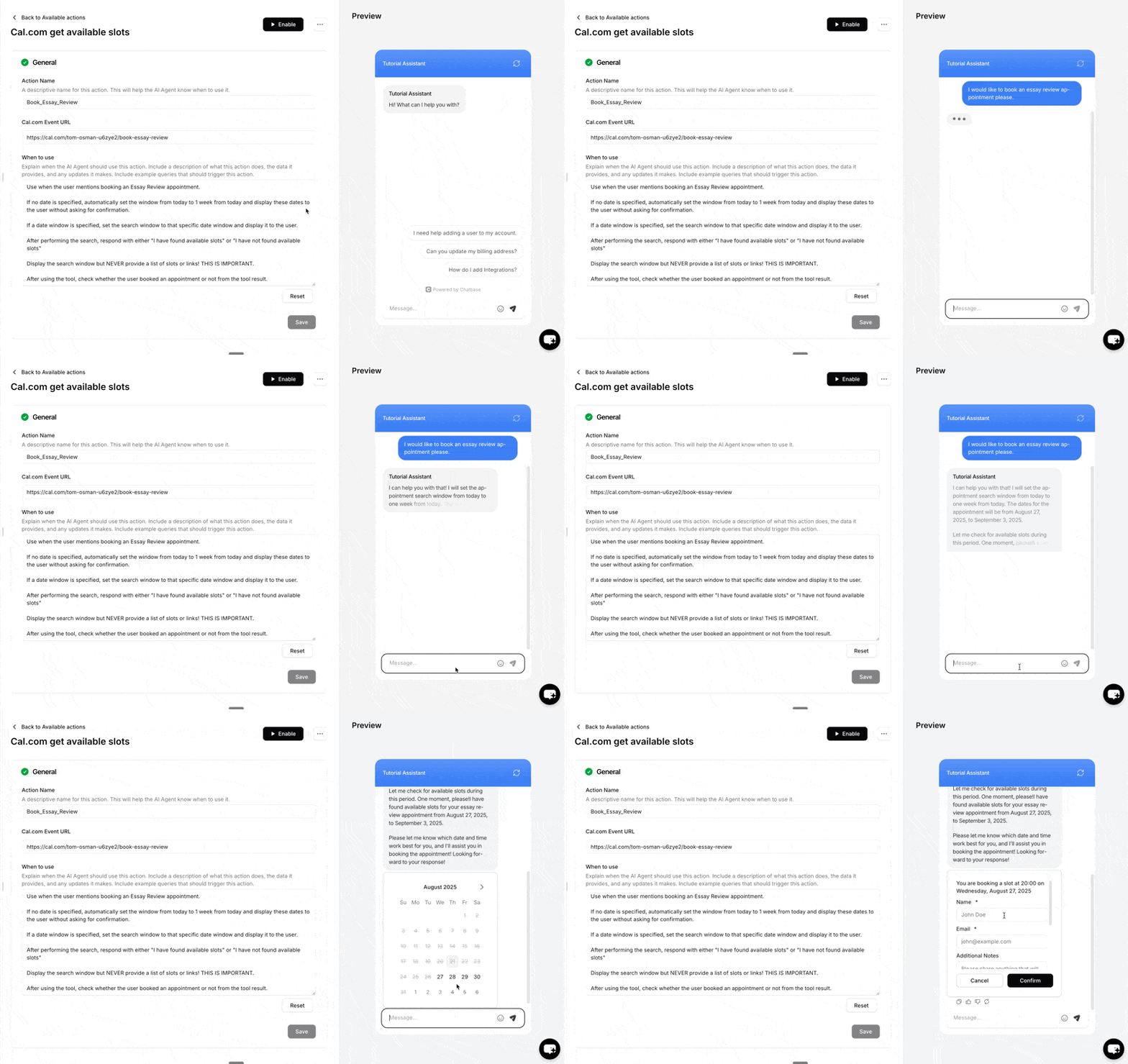
The customer asks to book a meeting. Based on your When to use instructions, the AI agent calls the Action and picks a search window. By default, the window runs from today to 28 days later.
A slot picker card appears in the chat. The customer picks a date, then a time. Times are shown in the customer’s browser time zone.
The customer fills in the booking form. It shows your Cal.com event’s own booking questions. If the event returns none, the form asks for name and email.
If your Cal.com event requires email verification, Cal.com emails the customer a 6-digit code, which they enter in the form.
Chatbase creates the booking through Cal.com, and the card confirms: “Your appointment has been booked successfully on at ”.
The AI agent never sees the individual times. It only learns whether slots were found and whether a booking was made, and it’s told never to list times or booking links in its own reply, because the picker already shows them.
Example
An example conversation on the Chat Bubble:
Customer: Can I book a demo next week?AI agent: I have found available slots. Pick a time that works for you below.(The slot picker opens. Jane Doe picks Tuesday at 10:00, enters jane@example.com, and submits.)Card: Your appointment has been booked successfully on Tuesday at 10:00.
How to create the Action
1
Navigate to Actions
Go to your Chatbase dashboard and select your AI agent. Click Build > Actions in the left sidebar.
2
Create the Action
Click Create Action, select the Cal card, then choose Retrieve and book slots and click Start customizing. The editor opens with the header Cal.com get available slots.
3
Configure General Settings
Action Name: Give the Action a descriptive name. The AI agent uses this name to help decide when the Action applies, so make it specific.When to use: Describe when the Action should be triggered and the kind of customer queries that should trigger it. See Examples below.To restrict the Action to Procedure steps only, turn on Only use in Procedures. When it’s on, the When to use field is hidden, because the AI agent no longer decides when to call the Action.
4
Add your Cal.com Event URL
Enter your event URL in the Cal.com Event URL field, for example https://cal.com/jane-doe/30min. This tells the Action which event to make bookings into. See Supported event links for which URLs work.
5
Choose Channels
This Action is compatible with the Chat Bubble, Help Page, and Center Stage channels only. Every other channel is incompatible and can’t be selected. Toggle it on or off for each configured channel. See Channels for what configured, unconfigured, and incompatible mean.
6
Enable and Test
Ensure the Action is toggled to Enabled, then test it.
Settings
Time format: You can display Cal.com meeting times in a 12-hour format (AM/PM) instead of the default 24-hour format.
Test the Action by asking your AI agent to book an appointment, and confirm the booking appears on your Cal.com calendar.
Supported event links
The event URL must be a personal event link on cal.com itself, such as https://cal.com/jane-doe/30min. These don’t work:
Self-hosted Cal.com instances and custom domains
Team links (cal.com/team/...)
Group links that combine several users (cal.com/jane-doe+john-doe/...)
Required booking questions work when they use one of these field types: text, textarea, number, email, phone, address, name, url, select, multiselect, radio, checkbox, boolean, or multiemail. Hidden fields and the location field aren’t shown in the chat form. If one of those is required on your event, Cal.com rejects the booking with “Please ensure all information is correct…”.
Examples
Use these as starting points for the When to use field:
Call this action when the user mentions that he/she wants to book an appointment.
Check if the user booked an appointment or not from the tool result.
Troubleshooting
The card shows "No slots found."
The event has no free time in the searched window, or every slot in it has already passed. The AI agent says the window has no availability and offers a wider or later date range. Check your availability in Cal.com, or ask for a later date.
The card shows "Something went wrong. Please try again."
Cal.com returned an error or couldn’t find the event, for example because the event slug in the URL is wrong or the event was deleted. Check that the Cal.com Event URL opens your booking page and is a supported event link.
The booking fails with "Please ensure all information is correct…"
Your event has a required field the chat form can’t show, such as a hidden field or location. Make that field optional in Cal.com, or remove it.
Best Practices
Clear Action Triggers
Write a specific When to use description so the AI agent knows exactly which requests should open the booking flow. Include example phrases customers actually type.
Use a Descriptive Name
The Action name helps the AI agent understand what the Action does. Name it for the meeting type, such as Book_Demo or Book_Support_Call.
Confirm the Outcome
Instruct the AI agent to check the tool result and tell the customer whether the booking went through, rather than assuming it did.
Test Thoroughly
Test the Action with several phrasings before going live, and verify each booking lands on the right Cal.com event.
Frequently asked questions
Is the meeting booked inside the chat?
Yes. The customer picks a slot and fills in the booking form in the chat, and Chatbase creates the booking on your Cal.com calendar. The customer fills in the form themselves; the AI agent doesn’t collect their name or email.
Which time zone are the slots shown in?
The customer’s browser time zone.
How far ahead does it search for slots?
The AI agent picks the search window. By default it’s today to 28 days later. You can steer it in When to use, for example by telling it to search the next 7 days when the customer gives no date.
Can I use a team event or a self-hosted Cal.com?
No. Only personal event links on cal.com work. Team links, group links, custom domains, and self-hosted Cal.com aren’t supported.
Why doesn't the AI agent list the available times in its reply?
The slot picker card shows them, so the AI agent doesn’t list times or booking links in its reply.
Does Cal.com work on WhatsApp or other messaging channels?
No. The slot picker only works on the Chat Bubble, Help Page, and Center Stage.
{"docsConfig":{"theme":"mint","$schema":"https://mintlify.com/docs.json","name":"Chatbase","colors":{"primary":"#18181b","light":"#f4f4f5","dark":"#18181b"},"logo":{"light":"https://mintcdn.com/chatbase/pJU9vM3D9oN_YQME/logo/light.svg?fit=max\u0026auto=format\u0026n=pJU9vM3D9oN_YQME\u0026q=85\u0026s=a45a73af7ac778cd0920dbb6ad1aaa93","dark":"https://mintcdn.com/chatbase/8k6_6eFSz4sj8EO0/logo/dark.svg?fit=max\u0026auto=format\u0026n=8k6_6eFSz4sj8EO0\u0026q=85\u0026s=c0c106d2f92f6a87f872a2be66706041","href":"https://chatbase.co"},"favicon":"https://mintcdn.com/chatbase/NsUPSmNqecm03uiz/favicon.ico?fit=max\u0026auto=format\u0026n=NsUPSmNqecm03uiz\u0026q=85\u0026s=b37388fc54cd76cfaf3efcb8ab4a4dc8","appearance":{},"navbar":{"links":[{"href":"https://chatbase.co/help","label":"Support"}],"primary":{"type":"button","label":"Dashboard","href":"https://www.chatbase.co/dashboard"}},"footer":{"socials":{"x":"https://x.com/chatbase_co","linkedin":"https://linkedin.com/company/chatbase-co","youtube":"https://www.youtube.com/@chatbase_"}},"seo":{"metatags":{"canonical":"https://www.chatbase.co/docs"}},"contextual":{"options":["copy","view","chatgpt","claude"],"display":"header"},"metadata":{"timestamp":false},"styling":{"latex":false},"navigation":{"pages":[]}},"deployment":{"deploymentMetadataValue":{"subdomain":"chatbase","hasAudioNarration":false,"actualSubdomain":"chatbase","customDomains":["chatbase.co"],"gitSource":{"type":"github","owner":"chatbase-co","repo":"docs","deployBranch":"main","contentDirectory":"","isPrivate":true,"mountPath":"","label":""},"entitlements":{"AI_CHAT":{"status":"ENABLED"},"WEB_MCP":{"status":"ENABLED"},"NARRATION":{"status":"ENABLED"}},"buildId":"6afb2ce1ad9313ad123bf3cb","clientVersion":"0.0.4149","searchFilterCounts":[{"language":"default","tag":"User Guide","count":109},{"language":"default","tag":"API Reference","count":92},{"language":"default","tag":"Endpoints","count":78},{"language":"default","tag":"API v2","count":71},{"language":"default","tag":"Helpdesk","count":40},{"language":"default","tag":"Integrations","count":35},{"language":"default","tag":"Developer Guide","count":32},{"language":"default","tag":"AI Agent Management","count":32},{"language":"default","tag":"SDKs","count":26},{"language":"default","tag":"Actions","count":22}]},"assistantConfig":{},"basePath":"/docs","hasChatPermissions":false,"hasWebMcpPermissions":true,"toggles":[{"name":"kill-isr","enabled":true,"variant":{"name":"disabled","enabled":false,"feature_enabled":true},"impressionData":false},{"name":"custom-rbac-roles","enabled":true,"variant":{"name":"disabled","enabled":false,"feature_enabled":true},"impressionData":false},{"name":"agent-mintlify-slack","enabled":true,"variant":{"name":"disabled","enabled":false,"feature_enabled":true},"impressionData":false},{"name":"agent-integrations-settings","enabled":true,"variant":{"name":"disabled","enabled":false,"feature_enabled":true},"impressionData":false},{"name":"rbac-expansion","enabled":true,"variant":{"name":"disabled","enabled":false,"feature_enabled":true},"impressionData":false},{"name":"automations-pr-grouping","enabled":true,"variant":{"name":"disabled","enabled":false,"feature_enabled":true},"impressionData":false},{"name":"custom-prefix","enabled":true,"variant":{"name":"disabled","enabled":false,"feature_enabled":true},"impressionData":false},{"name":"analytics-v7","enabled":true,"variant":{"name":"disabled","enabled":false,"feature_enabled":true},"impressionData":false},{"name":"user-flows-analytics","enabled":true,"variant":{"name":"disabled","enabled":false,"feature_enabled":true},"impressionData":false},{"name":"no-publish-flow","enabled":true,"variant":{"name":"disabled","enabled":false,"feature_enabled":true},"impressionData":false},{"name":"workos-onboarding","enabled":true,"variant":{"name":"disabled","enabled":false,"feature_enabled":true},"impressionData":false},{"name":"snapshot-serving-live","enabled":true,"variant":{"name":"disabled","enabled":false,"feature_enabled":true},"impressionData":false},{"name":"stripTemperatureMiddleware","enabled":true,"variant":{"name":"disabled","enabled":false,"feature_enabled":true},"impressionData":false},{"name":"support-platform-pylon-zendesk","enabled":true,"variant":{"name":"disabled","enabled":false,"feature_enabled":true},"impressionData":false},{"name":"snapshot-serving","enabled":true,"variant":{"name":"disabled","enabled":false,"feature_enabled":true},"impressionData":false},{"name":"instant-rollback","enabled":true,"variant":{"name":"disabled","enabled":false,"feature_enabled":true},"impressionData":false},{"name":"granular-notifications-server","enabled":true,"variant":{"name":"disabled","enabled":false,"feature_enabled":true},"impressionData":false},{"name":"granular-notifications","enabled":true,"variant":{"name":"disabled","enabled":false,"feature_enabled":true},"impressionData":false},{"name":"automations-fable","enabled":true,"variant":{"name":"disabled","enabled":false,"feature_enabled":true},"impressionData":false},{"name":"fixed-ai-action-pricing","enabled":true,"variant":{"name":"disabled","enabled":false,"feature_enabled":true},"impressionData":false},{"name":"automation-resolve-merge-conflict","enabled":true,"variant":{"name":"disabled","enabled":false,"feature_enabled":true},"impressionData":false},{"name":"scoped-publishing","enabled":true,"variant":{"name":"disabled","enabled":false,"feature_enabled":true},"impressionData":false},{"name":"mintql","enabled":true,"variant":{"name":"disabled","enabled":false,"feature_enabled":true},"impressionData":false},{"name":"page-level-analytics","enabled":true,"variant":{"name":"disabled","enabled":false,"feature_enabled":true},"impressionData":false},{"name":"editor-version-history-v2","enabled":true,"variant":{"name":"disabled","enabled":false,"feature_enabled":true},"impressionData":false},{"name":"billing-page-v2","enabled":true,"variant":{"name":"disabled","enabled":false,"feature_enabled":true},"impressionData":false},{"name":"full-page-search","enabled":true,"variant":{"name":"disabled","enabled":false,"feature_enabled":true},"impressionData":false},{"name":"workspace-projects","enabled":true,"variant":{"name":"disabled","enabled":false,"feature_enabled":true},"impressionData":false},{"name":"assistant-v5","enabled":true,"variant":{"name":"disabled","enabled":false,"feature_enabled":true},"impressionData":false},{"name":"fork-pr-previews","enabled":true,"variant":{"name":"disabled","enabled":false,"feature_enabled":true},"impressionData":false},{"name":"revalidation-jwt","enabled":true,"variant":{"name":"disabled","enabled":false,"feature_enabled":true},"impressionData":false},{"name":"workos-sso-scim","enabled":true,"variant":{"name":"disabled","enabled":false,"feature_enabled":true},"impressionData":false},{"name":"hobby-abuse-scan","enabled":true,"variant":{"name":"disabled","enabled":false,"feature_enabled":true},"impressionData":false},{"name":"dashboard-inbox","enabled":true,"variant":{"name":"disabled","enabled":false,"feature_enabled":true},"impressionData":false},{"name":"workos-signup","enabled":true,"variant":{"name":"disabled","enabled":false,"feature_enabled":true},"impressionData":false},{"name":"turbopuffer-dual-write","enabled":true,"variant":{"name":"disabled","enabled":false,"feature_enabled":true},"impressionData":false},{"name":"workos-enabled","enabled":true,"variant":{"name":"disabled","enabled":false,"feature_enabled":true},"impressionData":false},{"name":"approve-review-flow","enabled":true,"variant":{"name":"disabled","enabled":false,"feature_enabled":true},"impressionData":false},{"name":"editor-metadata","enabled":true,"variant":{"name":"disabled","enabled":false,"feature_enabled":true},"impressionData":false},{"name":"sso-setup-deadline-banner","enabled":true,"variant":{"name":"disabled","enabled":false,"feature_enabled":true},"impressionData":false},{"name":"turbopuffer-serve","enabled":true,"variant":{"name":"disabled","enabled":false,"feature_enabled":true},"impressionData":false},{"name":"live-agents","enabled":true,"variant":{"name":"disabled","enabled":false,"feature_enabled":true},"impressionData":false},{"name":"llms-txt-v2","enabled":true,"variant":{"name":"disabled","enabled":false,"feature_enabled":true},"impressionData":false}],"googleFontsInlined":false},"customCss":[{"filePath":"style.css","content":".nav-dropdown-trigger{border-color:transparent!important;border-bottom-color:rgb(var(--gray-500) / 0.2)!important;border-radius:0!important;padding:0.5rem 0.875rem 0.875rem 1rem!important}.nav-dropdown-trigger .nav-dropdown-item-icon{display:none!important}.nav-dropdown-trigger .nav-dropdown-item-text-container{padding-left:0!important}.nav-dropdown-trigger .nav-dropdown-item-title{font-weight:600!important}.nav-dropdown-item-title::after{display:inline-block;margin-left:0.5rem;padding:0.125rem 0.5rem;border-radius:0.375rem;font-size:0.7rem;font-weight:600;line-height:1.2;vertical-align:middle}:is(.nav-dropdown-trigger,.nav-dropdown-item):has([style*=\"/code.svg\"]) .nav-dropdown-item-title::after{content:\"Current\";color:rgb(22 163 74);background:rgb(22 163 74 / 0.12)}:is(.nav-dropdown-trigger,.nav-dropdown-item):has([style*=\"/box-archive.svg\"]) .nav-dropdown-item-title::after{content:\"Deprecated\";color:rgb(217 119 6);background:rgb(217 119 6 / 0.12)}"}],"page":{"pagePath":"user-guides/chatbot/actions/cal","slug":"/user-guides/chatbot/actions/cal","pageMetadata":{"title":"Book meetings on Cal.com from your AI agent","sidebarTitle":"Cal.com","icon":"calendar","description":"Let customers check your availability and book meetings on your Cal.com calendar without leaving the chat","href":"/user-guides/chatbot/actions/cal"},"description":{"compiledSource":"\"use strict\";\nconst {jsx: _jsx} = arguments[0];\nconst {useMDXComponents: _provideComponents} = arguments[0];\nfunction _createMdxContent(props) {\n const _components = {\n p: \"p\",\n ..._provideComponents(),\n ...props.components\n };\n return _jsx(_components.p, {\n children: \"Let customers check your availability and book meetings on your Cal.com calendar without leaving the chat\"\n });\n}\nfunction MDXContent(props = {}) {\n const {wrapper: MDXLayout} = {\n ..._provideComponents(),\n ...props.components\n };\n return MDXLayout ? _jsx(MDXLayout, {\n ...props,\n children: _jsx(_createMdxContent, {\n ...props\n })\n }) : _createMdxContent(props);\n}\nreturn {\n default: MDXContent\n};\n","frontmatter":{},"scope":{}},"pageType":"default","mdx":{"mdxSource":{"compiledSource":"\"use strict\";const{Fragment:_Fragment,jsx:_jsx,jsxs:_jsxs}=arguments[0];const{useMDXComponents:_provideComponents}=arguments[0];function _createMdxContent(props){const _components={a:`a`,blockquote:`blockquote`,code:`code`,em:`em`,li:`li`,ol:`ol`,p:`p`,pre:`pre`,span:`span`,strong:`strong`,ul:`ul`,..._provideComponents(),...props.components},{Accordion,AccordionGroup,Card,CardGroup,Check,CodeBlock,Frame,Heading,Info,OptimizedImage,Step,Steps}=_components;if(!Accordion)_missingMdxReference(`Accordion`,true);if(!AccordionGroup)_missingMdxReference(`AccordionGroup`,true);if(!Card)_missingMdxReference(`Card`,true);if(!CardGroup)_missingMdxReference(`CardGroup`,true);if(!Check)_missingMdxReference(`Check`,true);if(!CodeBlock)_missingMdxReference(`CodeBlock`,true);if(!Frame)_missingMdxReference(`Frame`,true);if(!Heading)_missingMdxReference(`Heading`,true);if(!Info)_missingMdxReference(`Info`,true);if(!OptimizedImage)_missingMdxReference(`OptimizedImage`,true);if(!Step)_missingMdxReference(`Step`,true);if(!Steps)_missingMdxReference(`Steps`,true);return _jsxs(_Fragment,{children:[_jsxs(_components.p,{children:[`The Cal.com Action lets your Chatbase AI agent show live availability from one of your Cal.com events and book a meeting inside the conversation. The customer picks a date and time in a slot picker, fills in your event’s booking form, and the booking is created on your Cal.com calendar without leaving the chat. It works on the `,_jsx(_components.strong,{children:`Chat Bubble`}),`, `,_jsx(_components.strong,{children:`Help Page`}),`, and `,_jsx(_components.strong,{children:`Center Stage`}),`.`]}),`\n`,_jsx(Card,{title:`Best for:`,icon:`calendar-check`,children:_jsx(_components.p,{children:`Booking demos, consultations, and support calls without sending the customer off to a separate scheduling page.`})}),`\n`,_jsx(_components.p,{children:_jsx(_components.strong,{children:`Common Use Cases:`})}),`\n`,_jsxs(_components.ul,{children:[`\n`,_jsx(_components.li,{children:`“I’d like to book a call”`}),`\n`,_jsx(_components.li,{children:`“What times are you free this week?”`}),`\n`,_jsx(_components.li,{children:`“Can I schedule a demo for Thursday?”`}),`\n`]}),`\n`,_jsx(Info,{children:_jsxs(_components.p,{children:[_jsx(_components.strong,{children:`No integration required.`}),` Cal.com works from your event URL alone, so you don’t need to connect anything under `,_jsx(_components.strong,{children:`Integrations`}),`. If you use `,_jsx(_components.a,{href:`/user-guides/chatbot/actions/calendly`,children:`Calendly`}),` instead, that one does require an integration.`]})}),`\n`,_jsx(Heading,{level:`2`,id:`how-it-works`,children:`How it works`}),`\n`,_jsxs(_components.ol,{children:[`\n`,_jsxs(_components.li,{children:[`The customer asks to book a meeting. Based on your `,_jsx(_components.strong,{children:`When to use`}),` instructions, the AI agent calls the Action and picks a search window. By default, the window runs from today to 28 days later.`]}),`\n`,_jsx(_components.li,{children:`A slot picker card appears in the chat. The customer picks a date, then a time. Times are shown in the customer’s browser time zone.`}),`\n`,_jsx(_components.li,{children:`The customer fills in the booking form. It shows your Cal.com event’s own booking questions. If the event returns none, the form asks for name and email.`}),`\n`,_jsx(_components.li,{children:`If your Cal.com event requires email verification, Cal.com emails the customer a 6-digit code, which they enter in the form.`}),`\n`,_jsxs(_components.li,{children:[`Chatbase creates the booking through Cal.com, and the card confirms: “Your appointment has been booked successfully on `,` at `,`”.`]}),`\n`]}),`\n`,_jsx(_components.p,{children:`The AI agent never sees the individual times. It only learns whether slots were found and whether a booking was made, and it’s told never to list times or booking links in its own reply, because the picker already shows them.`}),`\n`,_jsx(Heading,{level:`3`,id:`example`,children:`Example`}),`\n`,_jsx(_components.p,{children:`An example conversation on the Chat Bubble:`}),`\n`,_jsxs(_components.blockquote,{children:[`\n`,_jsxs(_components.p,{children:[_jsx(_components.strong,{children:`Customer:`}),` Can I book a demo next week?`]}),`\n`,_jsxs(_components.p,{children:[_jsx(_components.strong,{children:`AI agent:`}),` I have found available slots. Pick a time that works for you below.`]}),`\n`,_jsx(_components.p,{children:_jsxs(_components.em,{children:[`(The slot picker opens. Jane Doe picks Tuesday at 10:00, enters `,_jsx(_components.a,{href:`mailto:jane@example.com`,children:`jane@example.com`}),`, and submits.)`]})}),`\n`,_jsxs(_components.p,{children:[_jsx(_components.strong,{children:`Card:`}),` Your appointment has been booked successfully on Tuesday at 10:00.`]}),`\n`]}),`\n`,_jsx(Heading,{level:`2`,id:`how-to-create-the-action`,children:`How to create the Action`}),`\n`,_jsxs(Steps,{children:[_jsx(Step,{title:`Navigate to Actions`,children:_jsxs(_components.p,{children:[`Go to your `,_jsx(_components.a,{href:`https://www.chatbase.co/dashboard/`,children:`Chatbase dashboard`}),` and select your AI agent. Click `,_jsx(_components.strong,{children:`Build > Actions`}),` in the left sidebar.`]})}),_jsx(Step,{title:`Create the Action`,children:_jsxs(_components.p,{children:[`Click `,_jsx(_components.strong,{children:`Create Action`}),`, select the `,_jsx(_components.strong,{children:`Cal`}),` card, then choose `,_jsx(_components.strong,{children:`Retrieve and book slots`}),` and click `,_jsx(_components.strong,{children:`Start customizing`}),`. The editor opens with the header `,_jsx(_components.strong,{children:`Cal.com get available slots`}),`.`]})}),_jsxs(Step,{title:`Configure General Settings`,children:[_jsxs(_components.p,{children:[_jsx(_components.strong,{children:`Action Name:`}),` Give the Action a descriptive name. The AI agent uses this name to help decide when the Action applies, so make it specific.`]}),_jsxs(_components.p,{children:[_jsx(_components.strong,{children:`When to use:`}),` Describe when the Action should be triggered and the kind of customer queries that should trigger it. See `,_jsx(_components.a,{href:`#examples`,children:`Examples`}),` below.`]}),_jsxs(_components.p,{children:[`To restrict the Action to `,_jsx(_components.a,{href:`/user-guides/chatbot/procedures/procedures-overview`,children:`Procedure`}),` steps only, turn on `,_jsx(_components.a,{href:`/user-guides/chatbot/actions/actions-overview#only-use-in-procedures`,children:_jsx(_components.strong,{children:`Only use in Procedures`})}),`. When it’s on, the `,_jsx(_components.strong,{children:`When to use`}),` field is hidden, because the AI agent no longer decides when to call the Action.`]})]}),_jsxs(Step,{title:`Add your Cal.com Event URL`,children:[_jsxs(_components.p,{children:[`Enter your event URL in the `,_jsx(_components.strong,{children:`Cal.com Event URL`}),` field, for example `,_jsx(_components.code,{children:`https://cal.com/jane-doe/30min`}),`. This tells the Action which event to make bookings into. See `,_jsx(_components.a,{href:`#supported-event-links`,children:`Supported event links`}),` for which URLs work.`]}),_jsx(Frame,{children:_jsx(OptimizedImage,{src:`https://mintcdn.com/chatbase/EhvCUQ4ZmSlhciUK/user-guides/chatbot/images/actions/actions-46.png?fit=max\u0026auto=format\u0026n=EhvCUQ4ZmSlhciUK\u0026q=85\u0026s=0475ccb458d8a9b2bf1f8517c8a97a67`,alt:`The Cal.com Event URL field in the Action configuration`,\"data-og-width\":`2930`,width:`2930`,\"data-og-height\":`1846`,height:`1846`,\"data-path\":`user-guides/chatbot/images/actions/actions-46.png`,\"data-optimize\":`true`,\"data-opv\":`3`,srcset:`https://mintcdn.com/chatbase/EhvCUQ4ZmSlhciUK/user-guides/chatbot/images/actions/actions-46.png?w=280\u0026fit=max\u0026auto=format\u0026n=EhvCUQ4ZmSlhciUK\u0026q=85\u0026s=9627d1636814f9d23bc3fb8495dea629 280w, https://mintcdn.com/chatbase/EhvCUQ4ZmSlhciUK/user-guides/chatbot/images/actions/actions-46.png?w=560\u0026fit=max\u0026auto=format\u0026n=EhvCUQ4ZmSlhciUK\u0026q=85\u0026s=fecd96cdf2e2eda4dbcdaf965d2ff2c1 560w, https://mintcdn.com/chatbase/EhvCUQ4ZmSlhciUK/user-guides/chatbot/images/actions/actions-46.png?w=840\u0026fit=max\u0026auto=format\u0026n=EhvCUQ4ZmSlhciUK\u0026q=85\u0026s=b14c0788ed9de8cd423207f815325fca 840w, https://mintcdn.com/chatbase/EhvCUQ4ZmSlhciUK/user-guides/chatbot/images/actions/actions-46.png?w=1100\u0026fit=max\u0026auto=format\u0026n=EhvCUQ4ZmSlhciUK\u0026q=85\u0026s=8058628e1b32efa8baab53a61df25423 1100w, https://mintcdn.com/chatbase/EhvCUQ4ZmSlhciUK/user-guides/chatbot/images/actions/actions-46.png?w=1650\u0026fit=max\u0026auto=format\u0026n=EhvCUQ4ZmSlhciUK\u0026q=85\u0026s=0f78ef6937e0577b75da42a899d14493 1650w, https://mintcdn.com/chatbase/EhvCUQ4ZmSlhciUK/user-guides/chatbot/images/actions/actions-46.png?w=2500\u0026fit=max\u0026auto=format\u0026n=EhvCUQ4ZmSlhciUK\u0026q=85\u0026s=fbc70b119caa5584a3ddf31f67fb3005 2500w`})})]}),_jsx(Step,{title:`Choose Channels`,children:_jsxs(_components.p,{children:[`This Action is compatible with the `,_jsx(_components.strong,{children:`Chat Bubble`}),`, `,_jsx(_components.strong,{children:`Help Page`}),`, and `,_jsx(_components.strong,{children:`Center Stage`}),` channels only. Every other channel is incompatible and can’t be selected. Toggle it on or off for each configured channel. See `,_jsx(_components.a,{href:`/user-guides/chatbot/actions/actions-overview#channels`,children:`Channels`}),` for what configured, unconfigured, and incompatible mean.`]})}),_jsx(Step,{title:`Enable and Test`,children:_jsxs(_components.p,{children:[`Ensure the Action is toggled to `,_jsx(_components.strong,{children:`Enabled`}),`, then test it.`]})})]}),`\n`,_jsx(Heading,{level:`2`,id:`settings`,children:`Settings`}),`\n`,_jsxs(_components.p,{children:[_jsx(_components.strong,{children:`Time format:`}),` You can display Cal.com meeting times in a `,_jsx(_components.strong,{children:`12-hour format (AM/PM)`}),` instead of the default 24-hour format.`]}),`\n`,_jsx(Check,{children:_jsx(_components.p,{children:`Test the Action by asking your AI agent to book an appointment, and confirm the booking appears on your Cal.com calendar.`})}),`\n`,_jsx(Frame,{children:_jsx(OptimizedImage,{src:`https://mintcdn.com/chatbase/DIWSTyTSabxfVW3B/user-guides/chatbot/images/actions/actions-47.gif?s=a20f577135e6ec0f83396f0deab9de9d`,alt:`The AI agent showing Cal.com slots and booking a meeting in chat`,\"data-og-width\":`800`,width:`800`,\"data-og-height\":`504`,height:`504`,\"data-path\":`user-guides/chatbot/images/actions/actions-47.gif`,\"data-optimize\":`true`,\"data-opv\":`3`})}),`\n`,_jsx(Heading,{level:`2`,id:`supported-event-links`,children:`Supported event links`}),`\n`,_jsxs(_components.p,{children:[`The event URL must be a personal event link on `,_jsx(_components.code,{children:`cal.com`}),` itself, such as `,_jsx(_components.code,{children:`https://cal.com/jane-doe/30min`}),`. These don’t work:`]}),`\n`,_jsxs(_components.ul,{children:[`\n`,_jsx(_components.li,{children:`Self-hosted Cal.com instances and custom domains`}),`\n`,_jsxs(_components.li,{children:[`Team links (`,_jsx(_components.code,{children:`cal.com/team/...`}),`)`]}),`\n`,_jsxs(_components.li,{children:[`Group links that combine several users (`,_jsx(_components.code,{children:`cal.com/jane-doe+john-doe/...`}),`)`]}),`\n`]}),`\n`,_jsxs(_components.p,{children:[`Required booking questions work when they use one of these field types: text, textarea, number, email, phone, address, name, url, select, multiselect, radio, checkbox, boolean, or multiemail. Hidden fields and the `,_jsx(_components.code,{children:`location`}),` field aren’t shown in the chat form. If one of those is required on your event, Cal.com rejects the booking with “Please ensure all information is correct…”.`]}),`\n`,_jsx(Heading,{level:`2`,id:`examples`,children:`Examples`}),`\n`,_jsxs(_components.p,{children:[`Use these as starting points for the `,_jsx(_components.strong,{children:`When to use`}),` field:`]}),`\n`,_jsx(CodeBlock,{filename:``,numberOfLines:`2`,language:`text`,children:_jsx(_components.pre,{className:`shiki shiki-themes github-light-default dark-plus`,style:{backgroundColor:`#ffffff`,\"--shiki-dark-bg\":`#0B0C0E`,color:`#1f2328`,\"--shiki-dark\":`#D4D4D4`},language:`text`,children:_jsxs(_components.code,{language:`text`,numberOfLines:`2`,children:[_jsx(_components.span,{className:`line`,children:_jsx(_components.span,{children:`Call this action when the user mentions that he/she wants to book an appointment.`})}),`\n`,_jsx(_components.span,{className:`line`,children:_jsx(_components.span,{})})]})})}),`\n`,_jsx(CodeBlock,{filename:``,numberOfLines:`2`,language:`text`,children:_jsx(_components.pre,{className:`shiki shiki-themes github-light-default dark-plus`,style:{backgroundColor:`#ffffff`,\"--shiki-dark-bg\":`#0B0C0E`,color:`#1f2328`,\"--shiki-dark\":`#D4D4D4`},language:`text`,children:_jsxs(_components.code,{language:`text`,numberOfLines:`2`,children:[_jsx(_components.span,{className:`line`,children:_jsx(_components.span,{children:`Check if the user booked an appointment or not from the tool result.`})}),`\n`,_jsx(_components.span,{className:`line`,children:_jsx(_components.span,{})})]})})}),`\n`,_jsx(Heading,{level:`2`,id:`troubleshooting`,children:`Troubleshooting`}),`\n`,_jsxs(AccordionGroup,{children:[_jsx(Accordion,{title:`The card shows \"No slots found.\"`,id:`the-card-shows-no-slots-found`,children:_jsx(_components.p,{children:`The event has no free time in the searched window, or every slot in it has already passed. The AI agent says the window has no availability and offers a wider or later date range. Check your availability in Cal.com, or ask for a later date.`})}),_jsx(Accordion,{title:`The card shows \"Something went wrong. Please try again.\"`,id:`the-card-shows-something-went-wrong-please-try-again`,children:_jsxs(_components.p,{children:[`Cal.com returned an error or couldn’t find the event, for example because the event slug in the URL is wrong or the event was deleted. Check that the `,_jsx(_components.strong,{children:`Cal.com Event URL`}),` opens your booking page and is a `,_jsx(_components.a,{href:`#supported-event-links`,children:`supported event link`}),`.`]})}),_jsx(Accordion,{title:`The booking fails with \"Please ensure all information is correct…\"`,id:`the-booking-fails-with-please-ensure-all-information-is-correct`,children:_jsxs(_components.p,{children:[`Your event has a required field the chat form can’t show, such as a hidden field or `,_jsx(_components.code,{children:`location`}),`. Make that field optional in Cal.com, or remove it.`]})})]}),`\n`,_jsx(Heading,{level:`2`,id:`best-practices`,children:`Best Practices`}),`\n`,_jsxs(CardGroup,{cols:2,children:[_jsx(Card,{title:`Clear Action Triggers`,icon:`bullseye`,children:_jsxs(_components.p,{children:[`Write a specific `,_jsx(_components.strong,{children:`When to use`}),` description so the AI agent knows exactly which requests should open the booking flow. Include example phrases customers actually type.`]})}),_jsx(Card,{title:`Use a Descriptive Name`,icon:`tag`,children:_jsxs(_components.p,{children:[`The Action name helps the AI agent understand what the Action does. Name it for the meeting type, such as `,_jsx(_components.code,{children:`Book_Demo`}),` or `,_jsx(_components.code,{children:`Book_Support_Call`}),`.`]})}),_jsx(Card,{title:`Confirm the Outcome`,icon:`circle-check`,children:_jsx(_components.p,{children:`Instruct the AI agent to check the tool result and tell the customer whether the booking went through, rather than assuming it did.`})}),_jsx(Card,{title:`Test Thoroughly`,icon:`flask`,children:_jsx(_components.p,{children:`Test the Action with several phrasings before going live, and verify each booking lands on the right Cal.com event.`})})]}),`\n`,_jsx(Heading,{level:`2`,id:`frequently-asked-questions`,children:`Frequently asked questions`}),`\n`,_jsxs(AccordionGroup,{children:[_jsx(Accordion,{title:`Is the meeting booked inside the chat?`,id:`is-the-meeting-booked-inside-the-chat`,children:_jsx(_components.p,{children:`Yes. The customer picks a slot and fills in the booking form in the chat, and Chatbase creates the booking on your Cal.com calendar. The customer fills in the form themselves; the AI agent doesn’t collect their name or email.`})}),_jsx(Accordion,{title:`Which time zone are the slots shown in?`,id:`which-time-zone-are-the-slots-shown-in`,children:_jsx(_components.p,{children:`The customer’s browser time zone.`})}),_jsx(Accordion,{title:`How far ahead does it search for slots?`,id:`how-far-ahead-does-it-search-for-slots`,children:_jsxs(_components.p,{children:[`The AI agent picks the search window. By default it’s today to 28 days later. You can steer it in `,_jsx(_components.strong,{children:`When to use`}),`, for example by telling it to search the next 7 days when the customer gives no date.`]})}),_jsx(Accordion,{title:`Can I use a team event or a self-hosted Cal.com?`,id:`can-i-use-a-team-event-or-a-self-hosted-cal-com`,children:_jsxs(_components.p,{children:[`No. Only personal event links on `,_jsx(_components.code,{children:`cal.com`}),` work. Team links, group links, custom domains, and self-hosted Cal.com aren’t supported.`]})}),_jsx(Accordion,{title:`Why doesn't the AI agent list the available times in its reply?`,id:`why-doesnt-the-ai-agent-list-the-available-times-in-its-reply`,children:_jsx(_components.p,{children:`The slot picker card shows them, so the AI agent doesn’t list times or booking links in its reply.`})}),_jsx(Accordion,{title:`Does Cal.com work on WhatsApp or other messaging channels?`,id:`does-cal-com-work-on-whatsapp-or-other-messaging-channels`,children:_jsxs(_components.p,{children:[`No. The slot picker only works on the `,_jsx(_components.strong,{children:`Chat Bubble`}),`, `,_jsx(_components.strong,{children:`Help Page`}),`, and `,_jsx(_components.strong,{children:`Center Stage`}),`.`]})})]})]})}function MDXContent(props={}){const{wrapper:MDXLayout}={..._provideComponents(),...props.components};return MDXLayout?_jsx(MDXLayout,{...props,children:_jsx(_createMdxContent,{...props})}):_createMdxContent(props)}return{default:MDXContent};function _missingMdxReference(id,component){throw new Error(`Expected `+(component?`component`:`object`)+\" `\"+id+\"` to be defined: you likely forgot to import, pass, or provide it.\")}","frontmatter":{},"scope":{"config":{},"pageMetadata":{"title":"Book meetings on Cal.com from your AI agent","sidebarTitle":"Cal.com","icon":"calendar","description":"Let customers check your availability and book meetings on your Cal.com calendar without leaving the chat","href":"/user-guides/chatbot/actions/cal"}}},"mdxSourceWithNoJs":null},"mdxExtracts":{"tableOfContents":[{"title":"How it works","slug":"how-it-works","depth":2,"children":[{"title":"Example","slug":"example","depth":3,"children":[]}]},{"title":"How to create the Action","slug":"how-to-create-the-action","depth":2,"children":[]},{"title":"Settings","slug":"settings","depth":2,"children":[]},{"title":"Supported event links","slug":"supported-event-links","depth":2,"children":[]},{"title":"Examples","slug":"examples","depth":2,"children":[]},{"title":"Troubleshooting","slug":"troubleshooting","depth":2,"children":[]},{"title":"Best Practices","slug":"best-practices","depth":2,"children":[]},{"title":"Frequently asked questions","slug":"frequently-asked-questions","depth":2,"children":[]}],"codeExamples":{}},"jsLinks":[],"subdomain":"chatbase","siteName":"Chatbase","title":"Book meetings on Cal.com from your AI agent - Chatbase","navMaps":{"firstHrefInVersion":{},"firstHrefInLanguage":{}},"lastModified":"2026-11-16T00:13:14.932Z","originalFileLocation":"user-guides/chatbot/actions/cal.mdx"},"headHtml":"\u003cscript data-mint-head>(function(){var d=document.documentElement,p=null;if(!p){try{p=localStorage.getItem(\"isDarkMode\")}catch(e){}if(p==='true')p='dark';else if(p==='false')p='light';if(p!=='light'\u0026\u0026p!=='dark'\u0026\u0026p!=='system')p=\"system\"}var r=p==='system'?(matchMedia(\"(prefers-color-scheme: dark)\").matches?'dark':'light'):p;d.classList.remove(r==='dark'?'light':'dark');d.classList.add(r);d.setAttribute(\"data-theme-preference\",p)})();\u003c/script>\u003cmeta data-mint-head name=\"description\" content=\"Let customers check your availability and book meetings on your Cal.com calendar without leaving the chat\">\u003cmeta data-mint-head name=\"application-name\" content=\"Chatbase\">\u003cmeta data-mint-head name=\"generator\" content=\"Mintlify\">\u003clink data-mint-head rel=\"icon\" type=\"image/png\" sizes=\"192x192\" href=\"/docs/mintlify-assets/_mintlify/favicons/chatbase/sZYcuOsK-Dv6V9lc/_generated/favicon/android-chrome-192x192.png\" media=\"(prefers-color-scheme: light)\">\u003clink data-mint-head rel=\"apple-touch-icon\" type=\"image/png\" sizes=\"180x180\" href=\"/docs/mintlify-assets/_mintlify/favicons/chatbase/sZYcuOsK-Dv6V9lc/_generated/favicon/apple-touch-icon.png\">\u003clink data-mint-head rel=\"icon\" type=\"image/png\" sizes=\"16x16\" href=\"/docs/mintlify-assets/_mintlify/favicons/chatbase/sZYcuOsK-Dv6V9lc/_generated/favicon/favicon-16x16.png\" media=\"(prefers-color-scheme: light)\">\u003clink data-mint-head rel=\"icon\" type=\"image/png\" sizes=\"32x32\" href=\"/docs/mintlify-assets/_mintlify/favicons/chatbase/sZYcuOsK-Dv6V9lc/_generated/favicon/favicon-32x32.png\" media=\"(prefers-color-scheme: light)\">\u003clink data-mint-head rel=\"shortcut icon\" type=\"image/x-icon\" href=\"/docs/mintlify-assets/_mintlify/favicons/chatbase/sZYcuOsK-Dv6V9lc/_generated/favicon/favicon.ico\" media=\"(prefers-color-scheme: light)\">\u003clink data-mint-head rel=\"icon\" type=\"image/png\" sizes=\"192x192\" href=\"/docs/mintlify-assets/_mintlify/favicons/chatbase/sZYcuOsK-Dv6V9lc/_generated/favicon-dark/android-chrome-192x192.png\" media=\"(prefers-color-scheme: dark)\">\u003clink data-mint-head rel=\"icon\" type=\"image/png\" sizes=\"16x16\" href=\"/docs/mintlify-assets/_mintlify/favicons/chatbase/sZYcuOsK-Dv6V9lc/_generated/favicon-dark/favicon-16x16.png\" media=\"(prefers-color-scheme: dark)\">\u003clink data-mint-head rel=\"icon\" type=\"image/png\" sizes=\"32x32\" href=\"/docs/mintlify-assets/_mintlify/favicons/chatbase/sZYcuOsK-Dv6V9lc/_generated/favicon-dark/favicon-32x32.png\" media=\"(prefers-color-scheme: dark)\">\u003clink data-mint-head rel=\"shortcut icon\" type=\"image/x-icon\" href=\"/docs/mintlify-assets/_mintlify/favicons/chatbase/sZYcuOsK-Dv6V9lc/_generated/favicon-dark/favicon.ico\" media=\"(prefers-color-scheme: dark)\">\u003cmeta data-mint-head property=\"og:title\" content=\"Book meetings on Cal.com from your AI agent - Chatbase\">\u003cmeta data-mint-head property=\"og:description\" content=\"Let customers check your availability and book meetings on your Cal.com calendar without leaving the chat\">\u003cmeta data-mint-head property=\"og:site_name\" content=\"Chatbase\">\u003cmeta data-mint-head property=\"og:url\" content=\"https://www.chatbase.co/docs/user-guides/chatbot/actions/cal\">\u003cmeta data-mint-head property=\"og:type\" content=\"website\">\u003cmeta data-mint-head property=\"og:image\" content=\"https://chatbase.mintlify.site/docs/_mintlify/api/og/v2?division=Actions\u0026amp;title=Book+meetings+on+Cal.com+from+your+AI+agent\u0026amp;description=Let+customers+check+your+availability+and+book+meetings+on+your+Cal.com+calendar+without+leaving+the+chat\u0026amp;theme=430b654938fc40910c40f1cb\u0026amp;signature=42673969d22fdddd2a601ef048a2ad85722012c464ea9efb36e936f727eb707a\">\u003cmeta data-mint-head property=\"og:image:width\" content=\"1200\">\u003cmeta data-mint-head property=\"og:image:height\" content=\"630\">\u003cmeta data-mint-head name=\"twitter:card\" content=\"summary_large_image\">\u003cmeta data-mint-head name=\"twitter:title\" content=\"Book meetings on Cal.com from your AI agent - Chatbase\">\u003cmeta data-mint-head name=\"twitter:description\" content=\"Let customers check your availability and book meetings on your Cal.com calendar without leaving the chat\">\u003cmeta data-mint-head name=\"twitter:image\" content=\"https://chatbase.mintlify.site/docs/_mintlify/api/og/v2?division=Actions\u0026amp;title=Book+meetings+on+Cal.com+from+your+AI+agent\u0026amp;description=Let+customers+check+your+availability+and+book+meetings+on+your+Cal.com+calendar+without+leaving+the+chat\u0026amp;theme=430b654938fc40910c40f1cb\u0026amp;signature=42673969d22fdddd2a601ef048a2ad85722012c464ea9efb36e936f727eb707a\">\u003cmeta data-mint-head name=\"twitter:image:width\" content=\"1200\">\u003cmeta data-mint-head name=\"twitter:image:height\" content=\"630\">\u003cmeta data-mint-head name=\"msapplication-config\" content=\"/docs/mintlify-assets/_mintlify/favicons/chatbase/sZYcuOsK-Dv6V9lc/_generated/favicon/browserconfig.xml\">\u003cmeta data-mint-head name=\"apple-mobile-web-app-title\" content=\"Chatbase\">\u003cmeta data-mint-head name=\"msapplication-TileColor\" content=\"#18181b\">\u003clink data-mint-head rel=\"canonical\" href=\"https://www.chatbase.co/docs/user-guides/chatbot/actions/cal\">\u003clink data-mint-head rel=\"alternate\" type=\"application/xml\" href=\"/docs/sitemap.xml\">\u003clink data-mint-head rel=\"alternate\" type=\"text/markdown\" href=\"/docs/user-guides/chatbot/actions/cal.md\">\u003cscript data-mint-head type=\"application/ld+json\">{\"@context\":\"https://schema.org\",\"@graph\":[{\"@type\":\"Organization\",\"@id\":\"https://www.chatbase.co/#organization\",\"name\":\"Chatbase\",\"url\":\"https://www.chatbase.co\",\"logo\":{\"@type\":\"ImageObject\",\"url\":\"https://mintcdn.com/chatbase/pJU9vM3D9oN_YQME/logo/light.svg?fit=max\u0026auto=format\u0026n=pJU9vM3D9oN_YQME\u0026q=85\u0026s=a45a73af7ac778cd0920dbb6ad1aaa93\"}},{\"@type\":\"WebSite\",\"@id\":\"https://www.chatbase.co/docs#website\",\"name\":\"Chatbase\",\"url\":\"https://www.chatbase.co/docs\",\"publisher\":{\"@id\":\"https://www.chatbase.co/#organization\"}},{\"@type\":\"WebPage\",\"@id\":\"https://www.chatbase.co/docs/user-guides/chatbot/actions/cal#webpage\",\"url\":\"https://www.chatbase.co/docs/user-guides/chatbot/actions/cal\",\"name\":\"Book meetings on Cal.com from your AI agent\",\"description\":\"Let customers check your availability and book meetings on your Cal.com calendar without leaving the chat\",\"dateModified\":\"2026-11-16T00:13:14.932Z\",\"isPartOf\":{\"@id\":\"https://www.chatbase.co/docs#website\"},\"breadcrumb\":{\"@id\":\"https://www.chatbase.co/docs/user-guides/chatbot/actions/cal#breadcrumb\"}},{\"@type\":\"BreadcrumbList\",\"@id\":\"https://www.chatbase.co/docs/user-guides/chatbot/actions/cal#breadcrumb\",\"itemListElement\":[{\"@type\":\"ListItem\",\"position\":1,\"name\":\"AI Agent Management\",\"item\":\"https://www.chatbase.co/docs/user-guides/chatbot/backstage\"},{\"@type\":\"ListItem\",\"position\":2,\"name\":\"Actions\",\"item\":\"https://www.chatbase.co/docs/user-guides/chatbot/actions/actions-overview\"},{\"@type\":\"ListItem\",\"position\":3,\"name\":\"Book meetings on Cal.com from your AI agent\",\"item\":\"https://www.chatbase.co/docs/user-guides/chatbot/actions/cal\"}]},{\"@type\":[\"Article\",\"TechArticle\"],\"@id\":\"https://www.chatbase.co/docs/user-guides/chatbot/actions/cal#article\",\"headline\":\"Book meetings on Cal.com from your AI agent\",\"name\":\"Book meetings on Cal.com from your AI agent\",\"description\":\"Let customers check your availability and book meetings on your Cal.com calendar without leaving the chat\",\"url\":\"https://www.chatbase.co/docs/user-guides/chatbot/actions/cal\",\"mainEntityOfPage\":{\"@id\":\"https://www.chatbase.co/docs/user-guides/chatbot/actions/cal#webpage\"},\"dateModified\":\"2026-11-16T00:13:14.932Z\",\"publisher\":{\"@id\":\"https://www.chatbase.co/#organization\"},\"isPartOf\":{\"@id\":\"https://www.chatbase.co/docs#website\"}}]}\u003c/script>\u003cscript data-mint-head type=\"application/ld+json\">{\"@context\":\"https://schema.org\",\"@type\":\"WebSite\",\"name\":\"Chatbase\",\"publisher\":{\"@type\":\"Organization\",\"name\":\"Chatbase\"},\"provider\":{\"@type\":\"Organization\",\"name\":\"Mintlify\",\"url\":\"https://mintlify.com\"}}\u003c/script>","agentPointerHref":"/docs/user-guides/chatbot/actions/cal.md","siteName":"Chatbase","nav":{"global":null,"tabs":[{"tab":"User Guide","groups":[{"group":"Quick Start","pages":[{"title":"What is Chatbase? AI agents for customer support","sidebarTitle":"Welcome to Chatbase","icon":"sparkles","href":"/user-guides/quick-start/introduction"},{"title":"Build your first AI agent in minutes","sidebarTitle":"Build Your First AI Agent","icon":"rocket","href":"/user-guides/quick-start/your-first-agent"},{"title":"Best practices to improve your AI agent's answers","sidebarTitle":"Best Practices","icon":"star","href":"/user-guides/quick-start/best-practices"}]},{"group":"AI Agent Management","pages":[{"title":"Backstage: manage your AI agent with an AI assistant","sidebarTitle":"Backstage","icon":"sparkles","href":"/user-guides/chatbot/backstage"},{"title":"Preview and test your AI agent in the Playground","sidebarTitle":"Playground","icon":"play","href":"/user-guides/chatbot/playground"},{"title":"Write your AI agent's instructions and choose its model","sidebarTitle":"Build","icon":"wrench","href":"/user-guides/chatbot/build"},{"title":"Save drafts, publish changes, and restore versions of your AI agent","sidebarTitle":"Drafts and versions","icon":"clock-rotate-left","href":"/user-guides/chatbot/versions"},{"title":"Train your AI agent on your website, files, and data","sidebarTitle":"Data Sources","icon":"database","href":"/user-guides/chatbot/data-sources"},{"title":"Deploy your AI agent on your website, messaging apps, and phone","sidebarTitle":"Channels","icon":"signal-stream","href":"/user-guides/chatbot/channels"},{"group":"Actions","icon":"bolt","pages":[{"title":"AI agent Actions: let your agent take action for customers","sidebarTitle":"Overview","icon":"book","href":"/user-guides/chatbot/actions/actions-overview"},{"title":"Hand off AI agent conversations to a human","sidebarTitle":"Escalations","icon":"users","href":"/user-guides/chatbot/actions/escalate-to-human"},{"title":"Hand off conversations to live chat in Chatbase Helpdesk","sidebarTitle":"Chatbase Live Chat","icon":"circle-dot","href":"/user-guides/chatbot/actions/chatbase-live-chat"},{"title":"Hand off conversations to live chat in Freshchat","sidebarTitle":"Freshchat Live Chat","icon":"headset","href":"/user-guides/chatbot/actions/freshchat-live-chat"},{"title":"Custom Actions: connect your AI agent to any API","sidebarTitle":"Custom Action","icon":"sparkles","href":"/user-guides/chatbot/actions/custom-action"},{"title":"Stripe Actions: let customers manage subscriptions and billing in chat","sidebarTitle":"Stripe","icon":"stripe","href":"/user-guides/chatbot/actions/stripe-action"},{"title":"Custom Button: send customers a link button in chat","sidebarTitle":"Custom Button","icon":"command","href":"/user-guides/chatbot/actions/custom-button"},{"title":"Collect leads with your AI agent","sidebarTitle":"Collect Leads","icon":"person","href":"/user-guides/chatbot/actions/collect-leads"},{"title":"Collect custom details from customers in chat","sidebarTitle":"Collect Data","icon":"database","href":"/user-guides/chatbot/actions/collect-data"},{"title":"Suggested Messages: show clickable reply suggestions in chat","sidebarTitle":"Suggested Messages","icon":"message","href":"/user-guides/chatbot/actions/suggested-messages"},{"title":"Give your AI agent real-time web search","sidebarTitle":"Web Search","icon":"globe","description":"Give your AI agent real-time web search so it can answer questions your training sources don't cover","href":"/user-guides/chatbot/actions/web-search"},{"title":"Book meetings on Cal.com from your AI agent","sidebarTitle":"Cal.com","icon":"calendar","href":"/user-guides/chatbot/actions/cal"},{"title":"Book meetings on Calendly from your AI agent","sidebarTitle":"Calendly","icon":"calendar","description":"Let customers see your Calendly availability in the chat and pick a slot to book on Calendly","href":"/user-guides/chatbot/actions/calendly"},{"title":"Send Slack notifications from your AI agent","sidebarTitle":"Slack","icon":"slack","href":"/user-guides/chatbot/actions/slack"},{"title":"Salesforce Actions: create cases and hand off to live agents","sidebarTitle":"Salesforce","icon":"salesforce","href":"/user-guides/chatbot/actions/salesforce-actions"},{"title":"Shopify Actions: products, cart, orders, and returns in chat","sidebarTitle":"Shopify","icon":"shopify","href":"/user-guides/chatbot/actions/shopify-actions"},{"title":"Show Shopify products as WhatsApp product cards","sidebarTitle":"WhatsApp Catalog","icon":"whatsapp","href":"/user-guides/chatbot/actions/whatsapp-catalog"},{"title":"Transfer a voice call from your AI agent to a phone number","sidebarTitle":"Transfer to phone number","icon":"phone","href":"/user-guides/chatbot/actions/transfer-to-phone"}]},{"group":"Procedures","icon":"book","pages":[{"title":"Procedures: step-by-step workflows for your AI agent","sidebarTitle":"Overview","icon":"book","href":"/user-guides/chatbot/procedures/procedures-overview"},{"title":"How your AI agent chooses and runs Procedures","sidebarTitle":"How Procedures Run","icon":"route","href":"/user-guides/chatbot/procedures/how-procedures-run"}]},{"title":"Voice AI agent: set how your agent sounds and behaves on calls","sidebarTitle":"Voice","icon":"microphone","href":"/user-guides/chatbot/voice"},{"title":"Guardrails: protect your AI agent from spam and abuse","sidebarTitle":"Guardrails","icon":"shield-halved","href":"/user-guides/chatbot/guardrails"},{"group":"Contacts","icon":"book-user","pages":[{"title":"Contacts: personalize your AI agent for known users","sidebarTitle":"Contacts Overview","icon":"book","href":"/user-guides/chatbot/contacts/contacts-overview"},{"title":"Upload and manage contacts in Chatbase","sidebarTitle":"Uploading Contacts","icon":"upload","href":"/user-guides/chatbot/contacts/uploading-contacts"}]},{"title":"AI agent settings: general, email, Helpdesk, domains, and webhooks","sidebarTitle":"Settings","icon":"gear","href":"/user-guides/chatbot/settings"},{"title":"Set up your AI agent to answer email","sidebarTitle":"Email settings","icon":"envelope","href":"/user-guides/chatbot/email-settings"}]},{"group":"Analytics \u0026 Monitoring","pages":[{"title":"Review your AI agent's conversations, leads, and collected data","sidebarTitle":"Activity","icon":"chart-area","href":"/user-guides/chatbot/activity"},{"title":"AI agent analytics: chats, topics, sentiment, and Helpdesk metrics","sidebarTitle":"Analytics","icon":"chart-scatter","href":"/user-guides/chatbot/analytics"}]},{"group":"Outbound","pages":[{"title":"Outbound campaigns: message your contacts at scale","sidebarTitle":"Outbound Campaigns","icon":"bullhorn","href":"/user-guides/chatbot/outbound-campaigns"},{"title":"Send WhatsApp campaigns with approved message templates","sidebarTitle":"WhatsApp Campaigns","icon":"whatsapp","iconType":"brands","href":"/user-guides/chatbot/outbound-whatsapp"}]},{"group":"Workspace Management","pages":[{"title":"Manage workspaces, AI agents, and member permissions","sidebarTitle":"Manage","icon":"users-gear","href":"/user-guides/workspace/manage"},{"title":"Track message credit usage across your workspace","sidebarTitle":"Usage","icon":"chart-line","href":"/user-guides/workspace/usage"},{"title":"Workspace settings: members, plan, billing, and API keys","sidebarTitle":"Workspace settings","icon":"sliders","href":"/user-guides/workspace/settings"}]},{"group":"Security \u0026 Compliance","pages":[{"title":"Set up two-factor authentication (2FA) in Chatbase","sidebarTitle":"Two-factor authentication (2FA)","icon":"shield","href":"/user-guides/workspace/two-factor-auth"},{"title":"HIPAA compliance for AI agents on Chatbase","sidebarTitle":"HIPAA compliance","icon":"shield-check","href":"/user-guides/workspace/hipaa-compliance"}]},{"group":"Integrations","pages":[{"title":"Chatbase integrations: connect your AI agent to your tools","sidebarTitle":"Overview","icon":"puzzle-piece","href":"/user-guides/integrations/integrations-overview"},{"group":"Website Platforms","pages":[{"title":"Add an AI agent to your Webflow site","sidebarTitle":"Webflow","icon":"webflow","href":"/user-guides/integrations/webflow"},{"title":"Add an AI agent to your WordPress site","sidebarTitle":"WordPress","icon":"wordpress","href":"/user-guides/integrations/wordpress"},{"title":"Add an AI agent to your Wix site","sidebarTitle":"Wix","icon":"wix","href":"/user-guides/integrations/wix"},{"title":"Add an AI agent to your Weebly site","sidebarTitle":"Weebly","icon":"weebly","href":"/user-guides/integrations/weebly"},{"title":"Add an AI agent to your Framer site","sidebarTitle":"Framer","icon":"code","href":"/user-guides/integrations/framer"},{"title":"Add an AI agent to your Bubble app","sidebarTitle":"Bubble","icon":"code","href":"/user-guides/integrations/bubble"},{"title":"Install Chatbase on Vercel from the Vercel Marketplace","sidebarTitle":"Vercel","icon":"cloud-arrow-up","href":"/user-guides/integrations/vercel"}]},{"group":"Messaging Platforms","pages":[{"group":"WhatsApp","pages":[{"title":"Add an AI agent to WhatsApp","sidebarTitle":"WhatsApp","icon":"whatsapp","href":"/user-guides/integrations/whatsapp"},{"title":"Share your WhatsApp Business app number with your AI agent","sidebarTitle":"Business App Coexistence","icon":"mobile-screen","href":"/user-guides/integrations/whatsapp-coexistence"},{"title":"Create and send WhatsApp message templates","sidebarTitle":"WhatsApp Templates","icon":"whatsapp","href":"/user-guides/integrations/whatsapp-templates"}]},{"title":"Add an AI agent to Facebook Messenger","sidebarTitle":"Messenger","icon":"facebook-messenger","href":"/user-guides/integrations/messenger"},{"title":"Add an AI agent to Instagram direct messages","sidebarTitle":"Instagram","icon":"instagram","href":"/user-guides/integrations/instagram"},{"title":"Answer phone calls with your AI agent using Twilio","sidebarTitle":"Twilio (Phone)","icon":"phone","href":"/user-guides/integrations/twilio"},{"title":"Answer phone calls with your AI agent using a SIP trunk","sidebarTitle":"SIP Trunk (Phone)","icon":"phone-volume","href":"/user-guides/integrations/sip-trunk"},{"title":"Add your AI agent to Slack","sidebarTitle":"Slack","icon":"slack","href":"/user-guides/integrations/slack"}]},{"group":"Business Tools","pages":[{"title":"Add an AI agent to your Shopify store","sidebarTitle":"Shopify","icon":"shopify","href":"/user-guides/integrations/shopify"},{"title":"Connect Stripe to your AI agent","sidebarTitle":"Stripe","icon":"stripe","href":"/user-guides/integrations/stripe"},{"group":"Zendesk","icon":"ticket","pages":[{"title":"Connect your AI agent to Zendesk tickets","sidebarTitle":"Zendesk Ticketing","icon":"ticket","href":"/user-guides/integrations/zendesk"},{"title":"Use your AI agent in Zendesk Messaging","sidebarTitle":"Zendesk Messaging","icon":"comments","href":"/user-guides/integrations/zendesk-messaging"},{"title":"Hand off to live Zendesk agents with Sunshine Conversations","sidebarTitle":"Sunshine","icon":"headset","href":"/user-guides/integrations/sunshine"}]},{"title":"Escalate AI agent conversations to Freshdesk","sidebarTitle":"Freshdesk","icon":"ticket","href":"/user-guides/integrations/freshdesk"},{"title":"Hand off AI agent conversations to Freshchat","sidebarTitle":"Freshchat","icon":"headset","href":"/user-guides/integrations/freshchat"},{"title":"Escalate AI agent conversations to Gorgias","sidebarTitle":"Gorgias","icon":"ticket","href":"/user-guides/integrations/gorgias"},{"title":"Escalate AI agent conversations to Zoho Desk","sidebarTitle":"Zoho Desk","icon":"ticket","href":"/user-guides/integrations/zohodesk"},{"title":"Escalate AI agent conversations to Intercom","sidebarTitle":"Intercom","icon":"ticket","href":"/user-guides/integrations/intercom"},{"title":"Escalate AI agent conversations to HubSpot","sidebarTitle":"HubSpot","icon":"hubspot","href":"/user-guides/integrations/hubspot"},{"title":"Connect your AI agent to Salesforce cases","sidebarTitle":"Salesforce","icon":"salesforce","href":"/user-guides/integrations/salesforce"},{"title":"Escalate AI agent conversations to Help Scout","sidebarTitle":"Help Scout","icon":"ticket","href":"/user-guides/integrations/helpscout"},{"title":"Escalate AI agent conversations to Odoo Helpdesk","sidebarTitle":"Odoo","icon":"ticket","href":"/user-guides/integrations/odoo"},{"title":"Answer customer emails with your AI agent","sidebarTitle":"Email","icon":"envelope","href":"/user-guides/integrations/email"},{"title":"Connect your AI agent to Zapier","sidebarTitle":"Zapier","icon":"bolt","href":"/user-guides/integrations/zapier"},{"title":"Connect your AI agent to viaSocket","sidebarTitle":"viaSocket","icon":"bolt","href":"/user-guides/integrations/viasocket"}]}]},{"group":"AI Performance \u0026 Quality","pages":[{"title":"Test your AI agent with simulated customers","sidebarTitle":"Tests","icon":"flask","href":"/user-guides/chatbot/tests"},{"title":"Which AI model should your agent use? Models and credits compared","sidebarTitle":"Models Comparison","icon":"scale-balanced","href":"/user-guides/chatbot/models-comparison"}]},{"group":"Helpdesk","pages":[{"title":"Chatbase Helpdesk: AI-powered ticketing and live chat","sidebarTitle":"Helpdesk Overview","icon":"headset","href":"/user-guides/chatbot/help-desk/help-desk-overview"},{"title":"How a Helpdesk ticket moves from start to finish","sidebarTitle":"Ticket lifecycle","icon":"arrows-spin","href":"/user-guides/chatbot/help-desk/ticket-lifecycle"},{"title":"Ticket statuses in the Helpdesk","sidebarTitle":"Ticket statuses","icon":"list-check","href":"/user-guides/chatbot/help-desk/ticket-statuses"},{"title":"Filter tickets in the Helpdesk inbox","sidebarTitle":"Filters","icon":"filter","href":"/user-guides/chatbot/help-desk/filters"},{"title":"Save custom inbox views in the Helpdesk","sidebarTitle":"Saved Views","icon":"bookmark","href":"/user-guides/chatbot/help-desk/saved-views"},{"title":"Export Helpdesk tickets to CSV","sidebarTitle":"Exporting tickets","icon":"file-export","href":"/user-guides/chatbot/help-desk/exporting-tickets"},{"title":"Set ticket priority in the Helpdesk","sidebarTitle":"Priority","icon":"signal","href":"/user-guides/chatbot/help-desk/priority"},{"title":"Tag tickets in the Helpdesk","sidebarTitle":"Tags","icon":"tag","href":"/user-guides/chatbot/help-desk/tags"},{"title":"Merge duplicate tickets in the Helpdesk","sidebarTitle":"Merging tickets","icon":"code-merge","href":"/user-guides/chatbot/help-desk/merging-tickets"},{"title":"Add follow-ups to a customer's open ticket","sidebarTitle":"Ticket reuse","icon":"rotate","href":"/user-guides/chatbot/help-desk/ticket-reuse"},{"title":"Helpdesk email settings: addresses, signatures, and display names","sidebarTitle":"Email Settings","icon":"envelope","href":"/user-guides/chatbot/help-desk/email-settings"},{"title":"Create support teams in the Helpdesk","sidebarTitle":"Teams","icon":"users-gear","href":"/user-guides/chatbot/help-desk/teams"},{"title":"Assign Helpdesk tickets automatically","sidebarTitle":"Ticket Assignment","icon":"users","href":"/user-guides/chatbot/help-desk/assignment-algorithm"},{"title":"Schedule agent shifts and time off in the Helpdesk","sidebarTitle":"Scheduling","icon":"calendar-clock","href":"/user-guides/chatbot/help-desk/scheduling"},{"title":"Track agent attendance in the Helpdesk","sidebarTitle":"Attendance","icon":"user-clock","href":"/user-guides/chatbot/help-desk/attendance"},{"title":"See each Helpdesk agent's daily activity","sidebarTitle":"Activity","icon":"chart-gantt","href":"/user-guides/chatbot/help-desk/activity"},{"title":"See what each Helpdesk agent is doing right now","sidebarTitle":"Live Status","icon":"signal","href":"/user-guides/chatbot/help-desk/live-status"},{"title":"Automate the Helpdesk with triggers","sidebarTitle":"Triggers","icon":"bolt","href":"/user-guides/chatbot/help-desk/triggers"},{"title":"Automations","icon":"clock","href":"/user-guides/chatbot/help-desk/automations"},{"title":"Reply to Helpdesk tickets from Slack threads","sidebarTitle":"Slack Ticket Threads","icon":"slack","href":"/user-guides/chatbot/help-desk/slack-ticket-threads"},{"title":"Collect custom ticket fields with your AI agent","sidebarTitle":"Custom Fields","icon":"tag","href":"/user-guides/chatbot/help-desk/custom-fields"},{"title":"Translate customer messages automatically in the Helpdesk","sidebarTitle":"Translation","icon":"language","href":"/user-guides/chatbot/help-desk/translation"},{"title":"Draft ticket replies with AI in the Helpdesk","sidebarTitle":"AI Draft Replies","icon":"robot","href":"/user-guides/chatbot/help-desk/ai-draft-replies"},{"title":"Save reply templates (macros) in the Helpdesk","sidebarTitle":"Macros","icon":"bolt","href":"/user-guides/chatbot/help-desk/macros"},{"title":"Helpdesk keyboard shortcuts","sidebarTitle":"Keyboard shortcuts","icon":"keyboard","href":"/user-guides/chatbot/help-desk/keyboard-shortcuts"},{"title":"Send customer satisfaction (CSAT) surveys after tickets close","sidebarTitle":"CSAT surveys","icon":"face-smile","href":"/user-guides/chatbot/help-desk/satisfaction-surveys"},{"title":"Take over AI agent conversations as a human","sidebarTitle":"Takeover","icon":"hand","href":"/user-guides/chatbot/help-desk/takeover"},{"group":"Integrations","icon":"puzzle-piece","pages":[{"title":"See Shopify orders inside Helpdesk tickets","sidebarTitle":"Shopify Orders","icon":"bag-shopping","href":"/user-guides/chatbot/help-desk/integrations/shopify"},{"title":"Create Linear issues from Helpdesk tickets","sidebarTitle":"Linear","icon":"list-check","href":"/user-guides/chatbot/help-desk/integrations/linear"}]}]},{"group":"Chatbase Experts","pages":[{"title":"Chatbase Experts Program for agencies and freelancers","sidebarTitle":"Chatbase Experts Program","href":"/user-guides/chatbase-experts/experts-program"}]}]},{"tab":"Developer Guide","pages":[{"title":"Developer Guide","href":"/developer-guides/overview"}]},{"tab":"API Reference","dropdowns":[{"dropdown":"API v2","icon":"code","groups":[{"group":"Getting Started","pages":[{"title":"API v2 Overview","sidebarTitle":"Overview","href":"/api-reference/v2/overview"},{"title":"Authentication","href":"/api-reference/v2/authentication"},{"title":"Streaming","href":"/api-reference/v2/streaming"},{"title":"Error Handling","href":"/api-reference/v2/error-handling"},{"title":"Pagination","href":"/api-reference/v2/pagination"}]},{"group":"Guides","pages":[{"title":"Agents","href":"/api-reference/v2/agents"},{"title":"User Conversations","href":"/api-reference/v2/user-conversations"},{"title":"Conversation Search","href":"/api-reference/v2/conversation-search"},{"title":"Sources","href":"/api-reference/v2/sources"},{"title":"Helpdesk","href":"/api-reference/v2/helpdesk"},{"title":"WhatsApp","href":"/api-reference/v2/whatsapp"},{"title":"Voice Sessions","href":"/api-reference/v2/voice"},{"title":"Client Actions","href":"/api-reference/v2/client-actions"}]},{"group":"Endpoints","pages":[{"group":"Health","pages":[{"title":"Health check","deprecated":null,"version":null,"openapi":"/api-v2-openapi.json get /health","href":"/api-reference/v2/health/health-check"}]},{"group":"Agents","pages":[{"title":"List agents","deprecated":null,"version":null,"openapi":"/api-v2-openapi.json get /agents","href":"/api-reference/v2/agents/list-agents"},{"title":"Create agent","deprecated":null,"version":null,"openapi":"/api-v2-openapi.json post /agents","href":"/api-reference/v2/agents/create-agent"},{"title":"Get agent","deprecated":null,"version":null,"openapi":"/api-v2-openapi.json get /agents/{agentId}","href":"/api-reference/v2/agents/get-agent"},{"title":"Update agent","deprecated":null,"version":null,"openapi":"/api-v2-openapi.json put /agents/{agentId}","href":"/api-reference/v2/agents/update-agent"},{"title":"Delete agent","deprecated":null,"version":null,"openapi":"/api-v2-openapi.json delete /agents/{agentId}","href":"/api-reference/v2/agents/delete-agent"},{"title":"Update agent styles","deprecated":null,"version":null,"openapi":"/api-v2-openapi.json put /agents/{agentId}/styles","href":"/api-reference/v2/agents/update-agent-styles"},{"title":"Toggle auto-retrain","deprecated":null,"version":null,"openapi":"/api-v2-openapi.json put /agents/{agentId}/auto-retrain","href":"/api-reference/v2/agents/toggle-auto-retrain"},{"title":"Clone agent","deprecated":null,"version":null,"openapi":"/api-v2-openapi.json post /agents/{agentId}/clone","href":"/api-reference/v2/agents/clone-agent"},{"title":"Train agent (deprecated)","deprecated":true,"version":null,"openapi":"/api-v2-openapi.json post /agents/{agentId}/train","href":"/api-reference/v2/agents/train-agent-deprecated"},{"title":"Get agent analytics","deprecated":null,"version":null,"openapi":"/api-v2-openapi.json get /agents/{agentId}/analytics","href":"/api-reference/v2/agents/get-agent-analytics"},{"title":"Chat with an agent","deprecated":null,"version":null,"openapi":"/api-v2-openapi.json post /agents/{agentId}/chat","href":"/api-reference/v2/agents/chat-with-an-agent"},{"title":"Retry a message","deprecated":null,"version":null,"openapi":"/api-v2-openapi.json post /agents/{agentId}/conversations/{conversationId}/retry","href":"/api-reference/v2/agents/retry-a-message"},{"title":"Start a voice session","deprecated":null,"version":null,"openapi":"/api-v2-openapi.json post /agents/{agentId}/voice/sessions","href":"/api-reference/v2/agents/start-a-voice-session"},{"title":"Submit a tool result","deprecated":null,"version":null,"openapi":"/api-v2-openapi.json post /agents/{agentId}/conversations/{conversationId}/tool-result","href":"/api-reference/v2/agents/submit-a-tool-result"}]},{"group":"Conversations","pages":[{"title":"List conversations","deprecated":null,"version":null,"openapi":"/api-v2-openapi.json get /agents/{agentId}/conversations","href":"/api-reference/v2/conversations/list-conversations"},{"title":"Export conversations","deprecated":null,"version":null,"openapi":"/api-v2-openapi.json get /agents/{agentId}/conversations/export","href":"/api-reference/v2/conversations/export-conversations"},{"title":"Search conversations","deprecated":null,"version":null,"openapi":"/api-v2-openapi.json get /agents/{agentId}/conversations/search","href":"/api-reference/v2/conversations/search-conversations"},{"title":"Get a conversation","deprecated":null,"version":null,"openapi":"/api-v2-openapi.json get /agents/{agentId}/conversations/{conversationId}","href":"/api-reference/v2/conversations/get-a-conversation"},{"title":"Delete conversation","deprecated":null,"version":null,"openapi":"/api-v2-openapi.json delete /agents/{agentId}/conversations/{conversationId}","href":"/api-reference/v2/conversations/delete-conversation"},{"title":"Update conversation status","deprecated":null,"version":null,"openapi":"/api-v2-openapi.json patch /agents/{agentId}/conversations/{conversationId}","href":"/api-reference/v2/conversations/update-conversation-status"},{"title":"List conversation messages","deprecated":null,"version":null,"openapi":"/api-v2-openapi.json get /agents/{agentId}/conversations/{conversationId}/messages","href":"/api-reference/v2/conversations/list-conversation-messages"},{"title":"List conversations for a user","deprecated":null,"version":null,"openapi":"/api-v2-openapi.json get /agents/{agentId}/users/{userId}/conversations","href":"/api-reference/v2/conversations/list-conversations-for-a-user"},{"title":"Delete all conversations for a user","deprecated":null,"version":null,"openapi":"/api-v2-openapi.json delete /agents/{agentId}/users/{userId}/conversations","href":"/api-reference/v2/conversations/delete-all-conversations-for-a-user"},{"title":"Update message feedback","deprecated":null,"version":null,"openapi":"/api-v2-openapi.json patch /agents/{agentId}/conversations/{conversationId}/messages/{messageId}/feedback","href":"/api-reference/v2/conversations/update-message-feedback"}]},{"group":"Collected Data","pages":[{"title":"List collected data","deprecated":null,"version":null,"openapi":"/api-v2-openapi.json get /agents/{agentId}/collected-data","href":"/api-reference/v2/collected-data/list-collected-data"}]},{"group":"Sources","pages":[{"title":"Get sources summary","deprecated":null,"version":null,"openapi":"/api-v2-openapi.json get /agents/{agentId}/sources/summary","href":"/api-reference/v2/sources/get-sources-summary"},{"title":"List sources","deprecated":null,"version":null,"openapi":"/api-v2-openapi.json get /agents/{agentId}/sources","href":"/api-reference/v2/sources/list-sources"},{"title":"Create source","deprecated":null,"version":null,"openapi":"/api-v2-openapi.json post /agents/{agentId}/sources","href":"/api-reference/v2/sources/create-source"},{"title":"Get source","deprecated":null,"version":null,"openapi":"/api-v2-openapi.json get /agents/{agentId}/sources/{sourceId}","href":"/api-reference/v2/sources/get-source"},{"title":"Update source","deprecated":null,"version":null,"openapi":"/api-v2-openapi.json put /agents/{agentId}/sources/{sourceId}","href":"/api-reference/v2/sources/update-source"},{"title":"Delete source","deprecated":null,"version":null,"openapi":"/api-v2-openapi.json delete /agents/{agentId}/sources/{sourceId}","href":"/api-reference/v2/sources/delete-source"},{"title":"Restore source (deprecated)","deprecated":true,"version":null,"openapi":"/api-v2-openapi.json post /agents/{agentId}/sources/{sourceId}/restore","href":"/api-reference/v2/sources/restore-source-deprecated"},{"title":"Create file source","deprecated":null,"version":null,"openapi":"/api-v2-openapi.json post /api/v2/agents/{agentId}/sources","href":"/api-reference/v2/sources/create-file-source"},{"title":"Update file source","deprecated":null,"version":null,"openapi":"/api-v2-openapi.json put /api/v2/agents/{agentId}/sources/{sourceId}","href":"/api-reference/v2/sources/update-file-source"}]},{"group":"Actions","pages":[{"title":"List actions","deprecated":null,"version":null,"openapi":"/api-v2-openapi.json get /agents/{agentId}/actions","href":"/api-reference/v2/actions/list-actions"},{"title":"Get an action","deprecated":null,"version":null,"openapi":"/api-v2-openapi.json get /agents/{agentId}/actions/{actionId}","href":"/api-reference/v2/actions/get-an-action"},{"title":"Delete an action","deprecated":null,"version":null,"openapi":"/api-v2-openapi.json delete /agents/{agentId}/actions/{actionId}","href":"/api-reference/v2/actions/delete-an-action"},{"title":"Update an action","deprecated":null,"version":null,"openapi":"/api-v2-openapi.json patch /agents/{agentId}/actions/{actionId}","href":"/api-reference/v2/actions/update-an-action"}]},{"group":"Procedures","pages":[{"title":"List procedures","deprecated":null,"version":null,"openapi":"/api-v2-openapi.json get /agents/{agentId}/procedures","href":"/api-reference/v2/procedures/list-procedures"},{"title":"Create a procedure","deprecated":null,"version":null,"openapi":"/api-v2-openapi.json post /agents/{agentId}/procedures","href":"/api-reference/v2/procedures/create-a-procedure"},{"title":"Get a procedure","deprecated":null,"version":null,"openapi":"/api-v2-openapi.json get /agents/{agentId}/procedures/{procedureId}","href":"/api-reference/v2/procedures/get-a-procedure"},{"title":"Delete a procedure","deprecated":null,"version":null,"openapi":"/api-v2-openapi.json delete /agents/{agentId}/procedures/{procedureId}","href":"/api-reference/v2/procedures/delete-a-procedure"},{"title":"Update a procedure","deprecated":null,"version":null,"openapi":"/api-v2-openapi.json patch /agents/{agentId}/procedures/{procedureId}","href":"/api-reference/v2/procedures/update-a-procedure"}]},{"group":"WhatsApp","pages":[{"title":"List WhatsApp templates","deprecated":null,"version":null,"openapi":"/api-v2-openapi.json get /agents/{agentId}/whatsapp/templates","href":"/api-reference/v2/whatsapp/list-whatsapp-templates"},{"title":"Send a WhatsApp template message","deprecated":null,"version":null,"openapi":"/api-v2-openapi.json post /agents/{agentId}/whatsapp/messages/template","href":"/api-reference/v2/whatsapp/send-a-whatsapp-template-message"}]},{"group":"Events","pages":[{"title":"Send an event","deprecated":null,"version":null,"openapi":"/api-v2-openapi.json post /agents/{agentId}/missions/events","href":"/api-reference/v2/events/send-an-event"}]},{"group":"Helpdesk","pages":[{"title":"List ticket statuses","deprecated":null,"version":null,"openapi":"/api-v2-openapi.json get /agents/{agentId}/helpdesk/ticket-statuses","href":"/api-reference/v2/helpdesk/list-ticket-statuses"},{"title":"List teams","deprecated":null,"version":null,"openapi":"/api-v2-openapi.json get /agents/{agentId}/helpdesk/teams","href":"/api-reference/v2/helpdesk/list-teams"},{"title":"List attendance rows","deprecated":null,"version":null,"openapi":"/api-v2-openapi.json get /agents/{agentId}/helpdesk/attendance","href":"/api-reference/v2/helpdesk/list-attendance-rows"},{"title":"List activity segments","deprecated":null,"version":null,"openapi":"/api-v2-openapi.json get /agents/{agentId}/helpdesk/activity","href":"/api-reference/v2/helpdesk/list-activity-segments"},{"title":"List tickets","deprecated":null,"version":null,"openapi":"/api-v2-openapi.json get /agents/{agentId}/helpdesk/tickets","href":"/api-reference/v2/helpdesk/list-tickets"},{"title":"Create a ticket","deprecated":null,"version":null,"openapi":"/api-v2-openapi.json post /agents/{agentId}/helpdesk/tickets","href":"/api-reference/v2/helpdesk/create-a-ticket"},{"title":"Search tickets","deprecated":null,"version":null,"openapi":"/api-v2-openapi.json post /agents/{agentId}/helpdesk/tickets/search","href":"/api-reference/v2/helpdesk/search-tickets"},{"title":"Get a ticket","deprecated":null,"version":null,"openapi":"/api-v2-openapi.json get /agents/{agentId}/helpdesk/tickets/{ticketNumber}","href":"/api-reference/v2/helpdesk/get-a-ticket"},{"title":"Update a ticket","deprecated":null,"version":null,"openapi":"/api-v2-openapi.json patch /agents/{agentId}/helpdesk/tickets/{ticketNumber}","href":"/api-reference/v2/helpdesk/update-a-ticket"},{"title":"List ticket messages","deprecated":null,"version":null,"openapi":"/api-v2-openapi.json get /agents/{agentId}/helpdesk/tickets/{ticketNumber}/messages","href":"/api-reference/v2/helpdesk/list-ticket-messages"},{"title":"Add a message to a ticket","deprecated":null,"version":null,"openapi":"/api-v2-openapi.json post /agents/{agentId}/helpdesk/tickets/{ticketNumber}/messages","href":"/api-reference/v2/helpdesk/add-a-message-to-a-ticket"}]}]}]},{"dropdown":"API v1","icon":"box-archive","groups":[{"group":"Getting Started","pages":[{"title":"API v1 Overview","sidebarTitle":"Overview","href":"/api-reference/v1/overview"}]},{"group":"Endpoints","pages":[{"group":"Chat","pages":[{"title":"Chat with a chatbot","deprecated":null,"version":null,"openapi":"/openapi.yaml post /chat","href":"/api-reference/v1/chat/chat-with-a-chatbot"}]},{"group":"Chatbots","pages":[{"title":"Create a new chatbot","deprecated":null,"version":null,"openapi":"/openapi.yaml post /create-chatbot","href":"/api-reference/v1/chatbots/create-a-new-chatbot"},{"title":"Get all chatbots","deprecated":null,"version":null,"openapi":"/openapi.yaml get /get-chatbots","href":"/api-reference/v1/chatbots/get-all-chatbots"},{"title":"Delete a chatbot","deprecated":null,"version":null,"openapi":"/openapi.yaml delete /delete-chatbot","href":"/api-reference/v1/chatbots/delete-a-chatbot"},{"title":"Update a chatbot","deprecated":null,"version":null,"openapi":"/openapi.yaml post /update-chatbot-data","href":"/api-reference/v1/chatbots/update-a-chatbot"},{"title":"Update chatbot settings","deprecated":null,"version":null,"openapi":"/openapi.yaml post /update-chatbot-settings","href":"/api-reference/v1/chatbots/update-chatbot-settings"}]},{"group":"Conversations","pages":[{"title":"Get conversations for a chatbot","deprecated":null,"version":null,"openapi":"/openapi.yaml get /get-conversations","href":"/api-reference/v1/conversations/get-conversations-for-a-chatbot"}]},{"group":"Leads","pages":[{"title":"Get leads for a chatbot","deprecated":null,"version":null,"openapi":"/openapi.yaml get /get-leads","href":"/api-reference/v1/leads/get-leads-for-a-chatbot"}]},{"group":"Assets","pages":[{"title":"Upload chatbot icon","deprecated":null,"version":null,"openapi":"/openapi.yaml post /upload-chatbot-icon","href":"/api-reference/v1/assets/upload-chatbot-icon"},{"title":"Upload chatbot profile picture","deprecated":null,"version":null,"openapi":"/openapi.yaml post /upload-chatbot-profile-picture","href":"/api-reference/v1/assets/upload-chatbot-profile-picture"},{"title":"Delete chatbot icon","deprecated":null,"version":null,"openapi":"/openapi.yaml delete /delete-chatbot-icon","href":"/api-reference/v1/assets/delete-chatbot-icon"},{"title":"Delete chatbot profile picture","deprecated":null,"version":null,"openapi":"/openapi.yaml delete /delete-chatbot-profile-picture","href":"/api-reference/v1/assets/delete-chatbot-profile-picture"}]},{"group":"Contacts","pages":[{"title":"Get contacts for a chatbot","deprecated":null,"version":null,"openapi":"/openapi.yaml get /chatbots/{chatbotId}/contacts","href":"/api-reference/v1/contacts/get-contacts-for-a-chatbot"},{"title":"Create contacts for a chatbot","deprecated":null,"version":null,"openapi":"/openapi.yaml post /chatbots/{chatbotId}/contacts","href":"/api-reference/v1/contacts/create-contacts-for-a-chatbot"},{"title":"Get a specific contact","deprecated":null,"version":null,"openapi":"/openapi.yaml get /chatbots/{chatbotId}/contacts/{contactId}","href":"/api-reference/v1/contacts/get-a-specific-contact"},{"title":"Delete a contact","deprecated":null,"version":null,"openapi":"/openapi.yaml delete /chatbots/{chatbotId}/contacts/{contactId}","href":"/api-reference/v1/contacts/delete-a-contact"},{"title":"Update a contact","deprecated":null,"version":null,"openapi":"/openapi.yaml patch /chatbots/{chatbotId}/contacts/{contactId}","href":"/api-reference/v1/contacts/update-a-contact"},{"title":"Get custom attributes schema","deprecated":null,"version":null,"openapi":"/openapi.yaml get /chatbots/{chatbotId}/custom-attributes","href":"/api-reference/v1/contacts/get-custom-attributes-schema"},{"title":"Create custom attribute","deprecated":null,"version":null,"openapi":"/openapi.yaml post /chatbots/{chatbotId}/custom-attributes","href":"/api-reference/v1/contacts/create-custom-attribute"},{"title":"Update custom attribute","deprecated":null,"version":null,"openapi":"/openapi.yaml put /chatbots/{chatbotId}/custom-attributes/{name}","href":"/api-reference/v1/contacts/update-custom-attribute"}]}]}]}]},{"tab":"CLI","pages":[{"title":"CLI","href":"/cli/overview"}]},{"tab":"SDKs","pages":[{"title":"SDKs","href":"/sdks/overview"}]},{"tab":"Help \u0026 Support","pages":[{"title":"Help \u0026 Support","href":"/faq/faq"}]}]},"basePath":"","title":"Book meetings on Cal.com from your AI agent - Chatbase","buildId":"dpl_D8DZMbLzBJDPJxA2oBvSn4nDSCwT","deploymentId":"dpl_D8DZMbLzBJDPJxA2oBvSn4nDSCwT","dynamics":["07c022d89b","a74be98ba7"],"chunks":["Frame-CkFelEEw.js","DynamicMarkdown-D3jXSqrh.js","zoom-image-lightbox-HfAMkbr-.js","lightbox-handle-r17bVUz3.js"]}