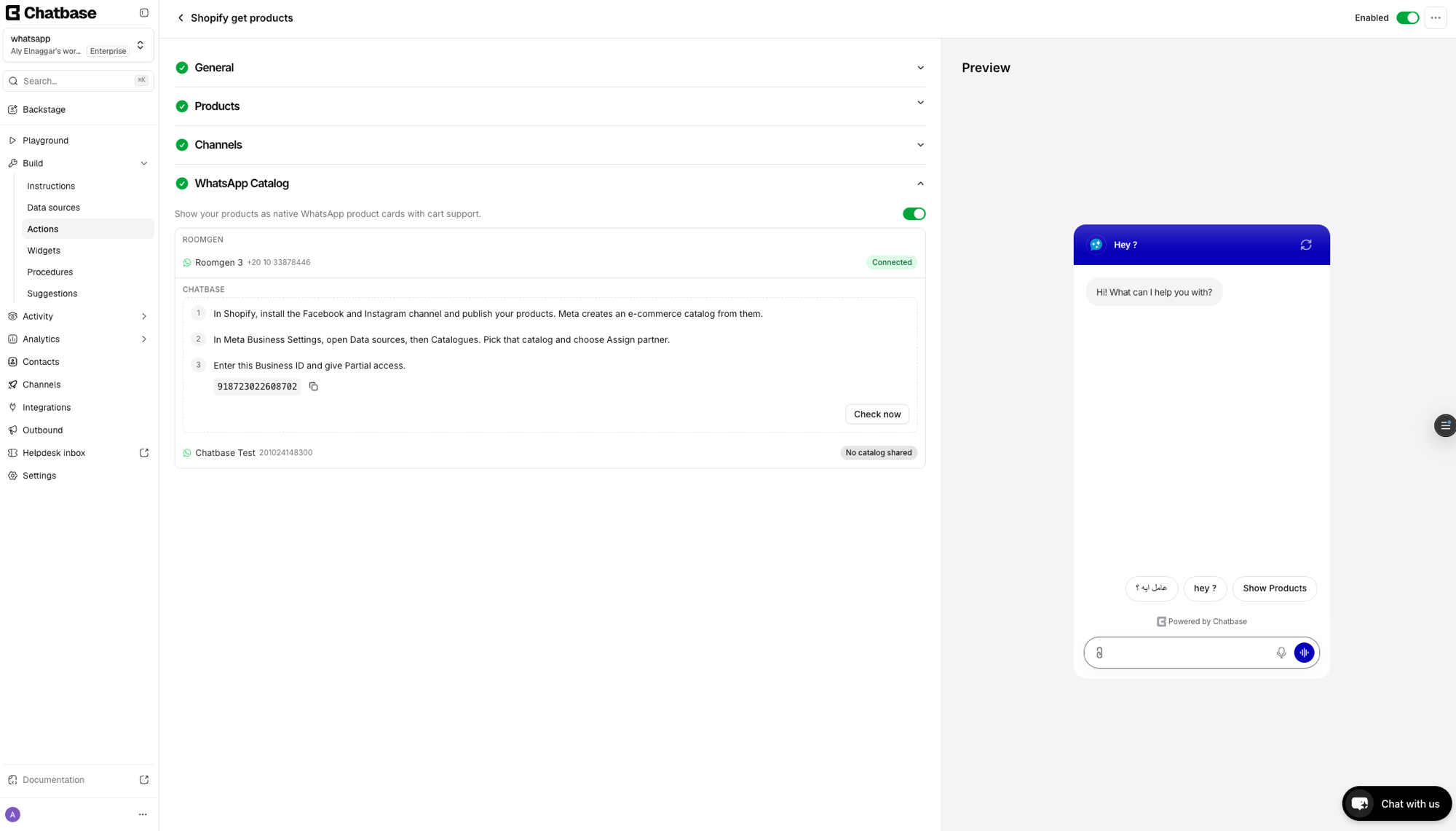
Show your Shopify products as native WhatsApp product cards with cart support
WhatsApp Catalog lets your Chatbase AI agent sell your Shopify products on WhatsApp by sending them as native WhatsApp product cards. It’s for Shopify stores that take customer conversations on WhatsApp and want shoppers to browse, fill a cart, and order in the same chat. When a shopper asks to see products, they get product cards with images, titles, and prices instead of plain text links, and the AI agent carries the cart through to the order.This feature connects your Shopify product catalog to WhatsApp through Meta’s commerce infrastructure. Products sync from Shopify to a Meta catalog, which WhatsApp then uses to render native product cards.
The setup involves six parts: installing Meta’s Facebook & Instagram app on Shopify, creating a Meta catalog, publishing your products, assigning Chatbase as a partner, connecting the catalog in WhatsApp Manager, and confirming the connection in Chatbase.
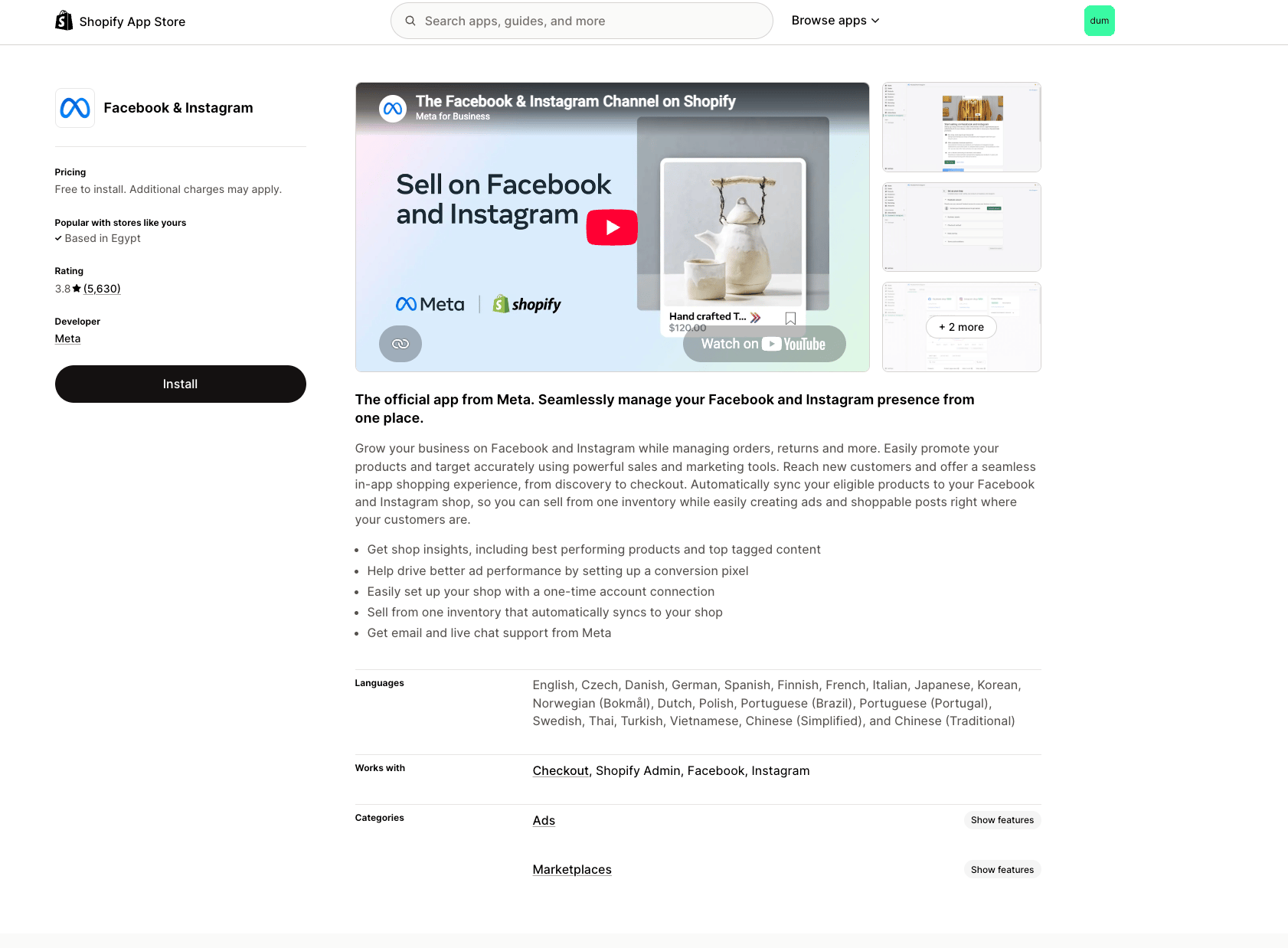
Part 1: Install the Facebook & Instagram app on Shopify
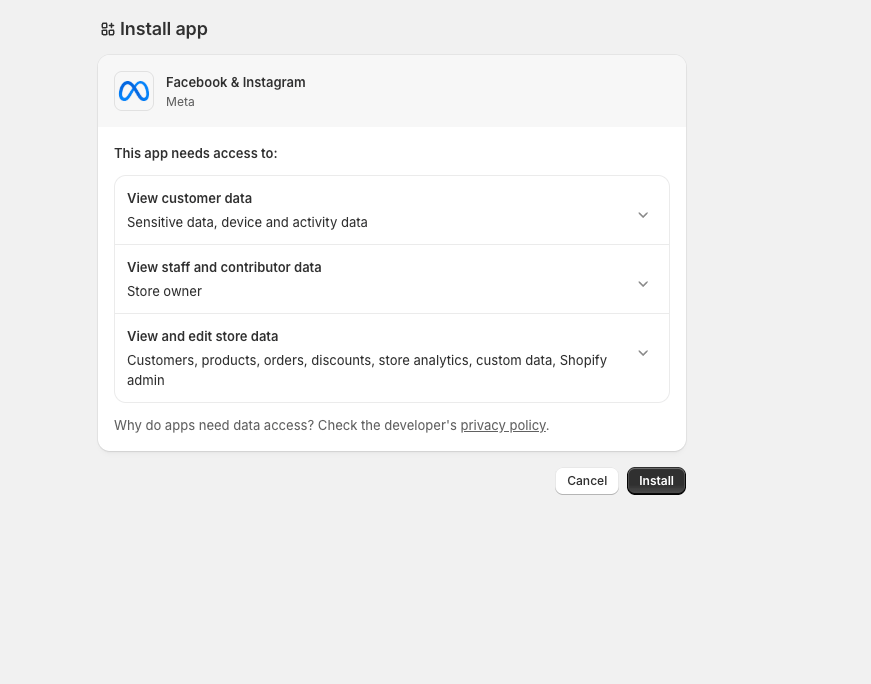
Review the permissions the app needs (customer data, staff data, store data) and click Install.
3
Get started
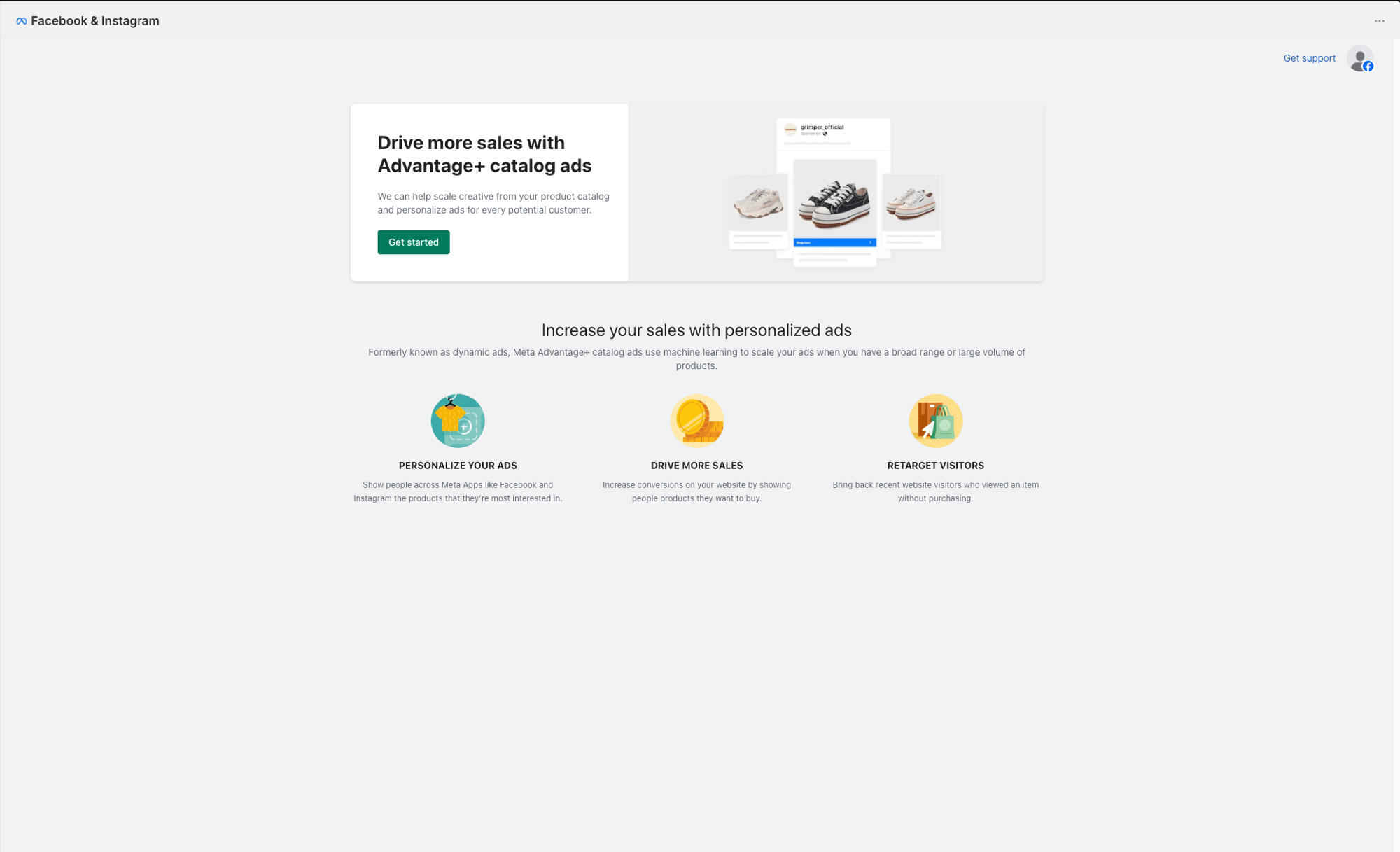
Once installed, the app opens in your Shopify admin. Click Get started.
Part 2: Connect your Meta account and create a catalog
1
Connect your account
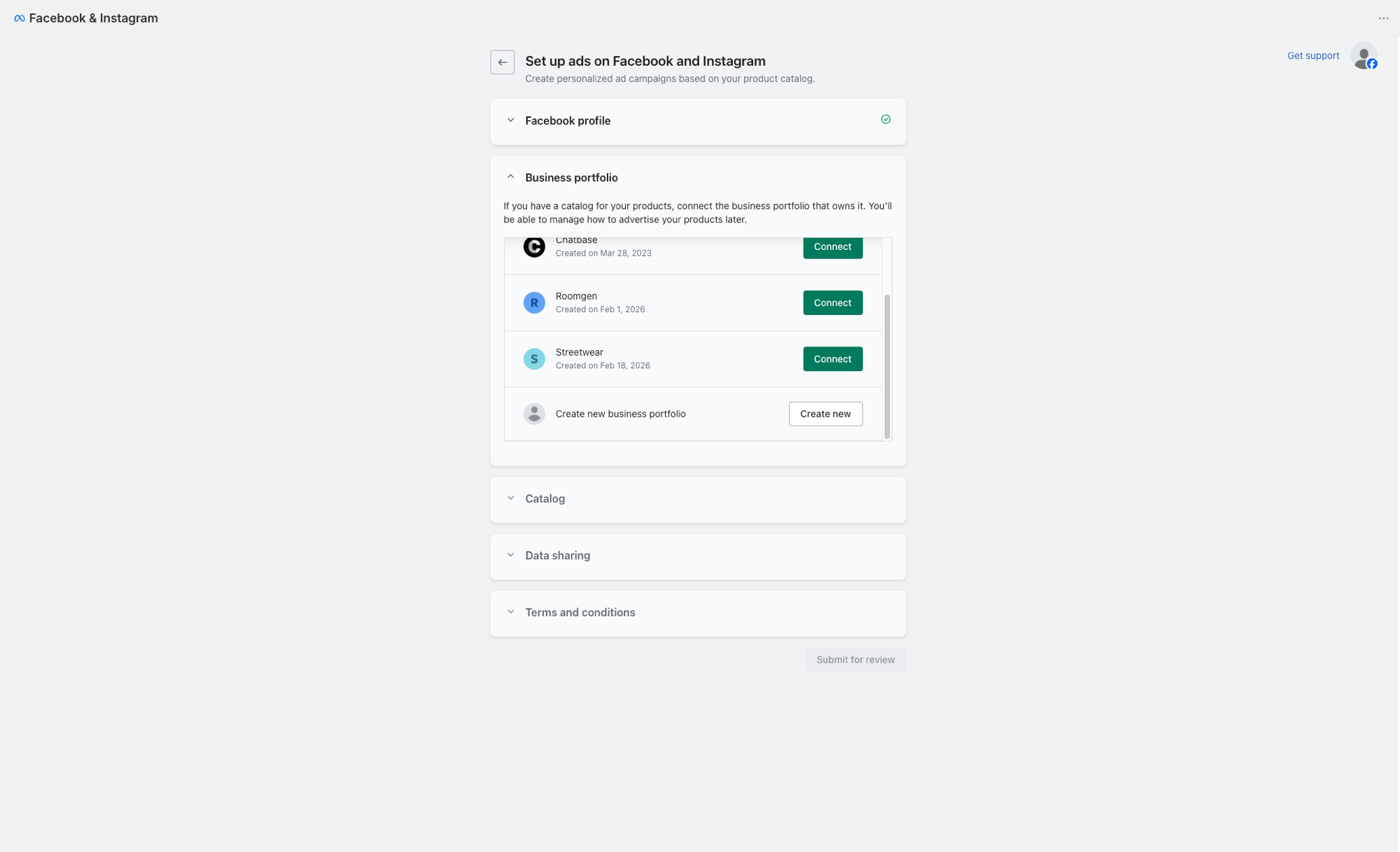
Connect your Facebook profile and choose the business portfolio that owns your products. If you don’t have one, click Create new.
2
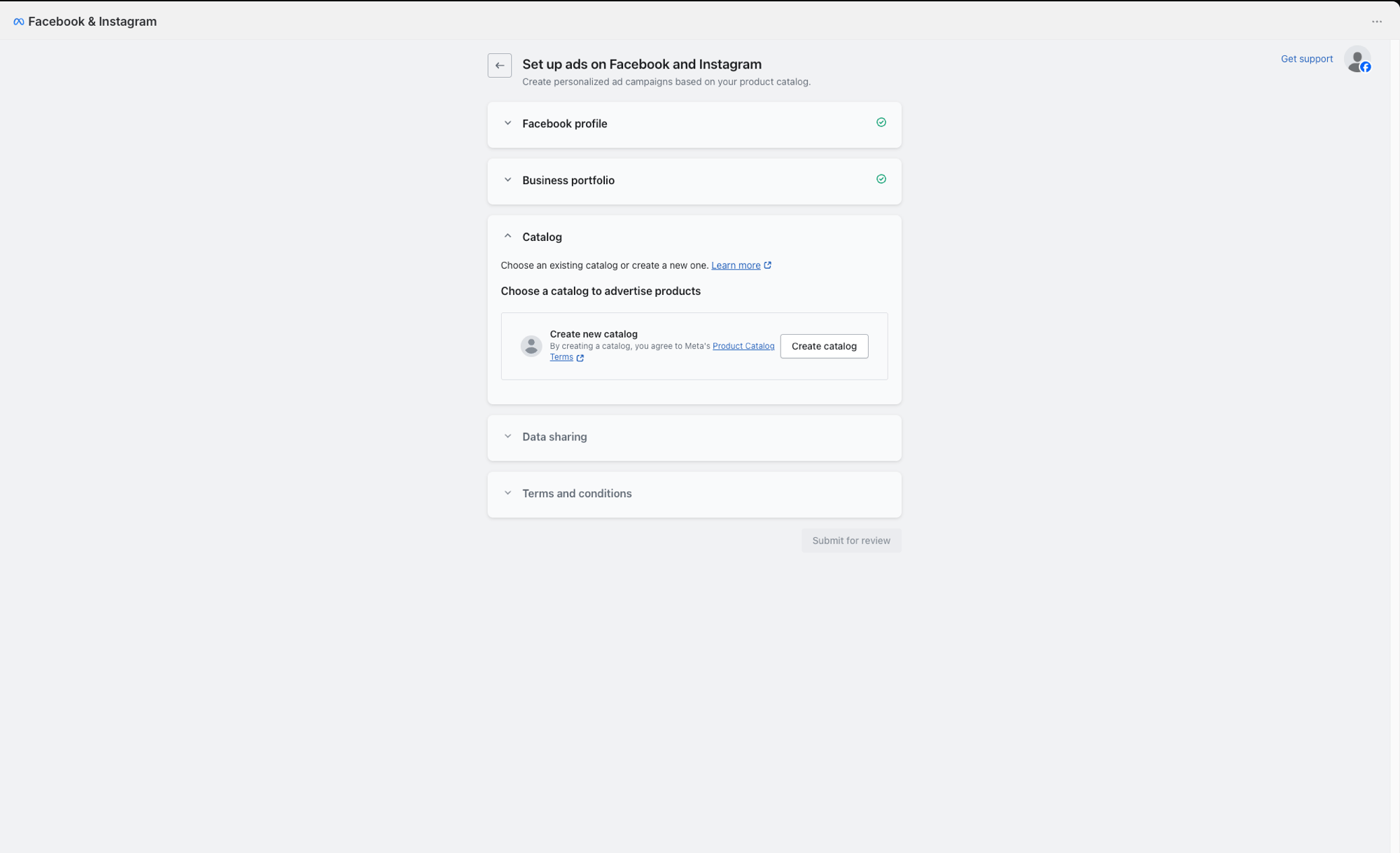
Create a catalog
Expand the Catalog section and click Create catalog. This creates a Meta product catalog that your Shopify products will sync to.
3
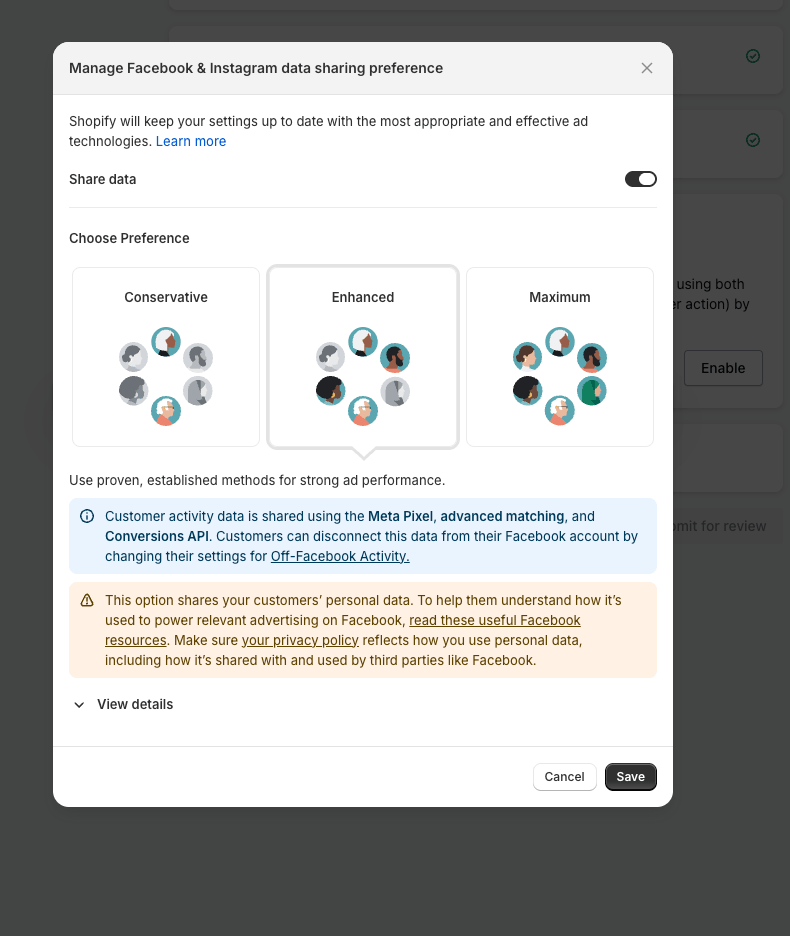
Choose data sharing preference
Expand Data sharing and choose your preferred level (Conservative, Enhanced, or Maximum). This controls how customer activity data is shared with Meta. Click Save.
4
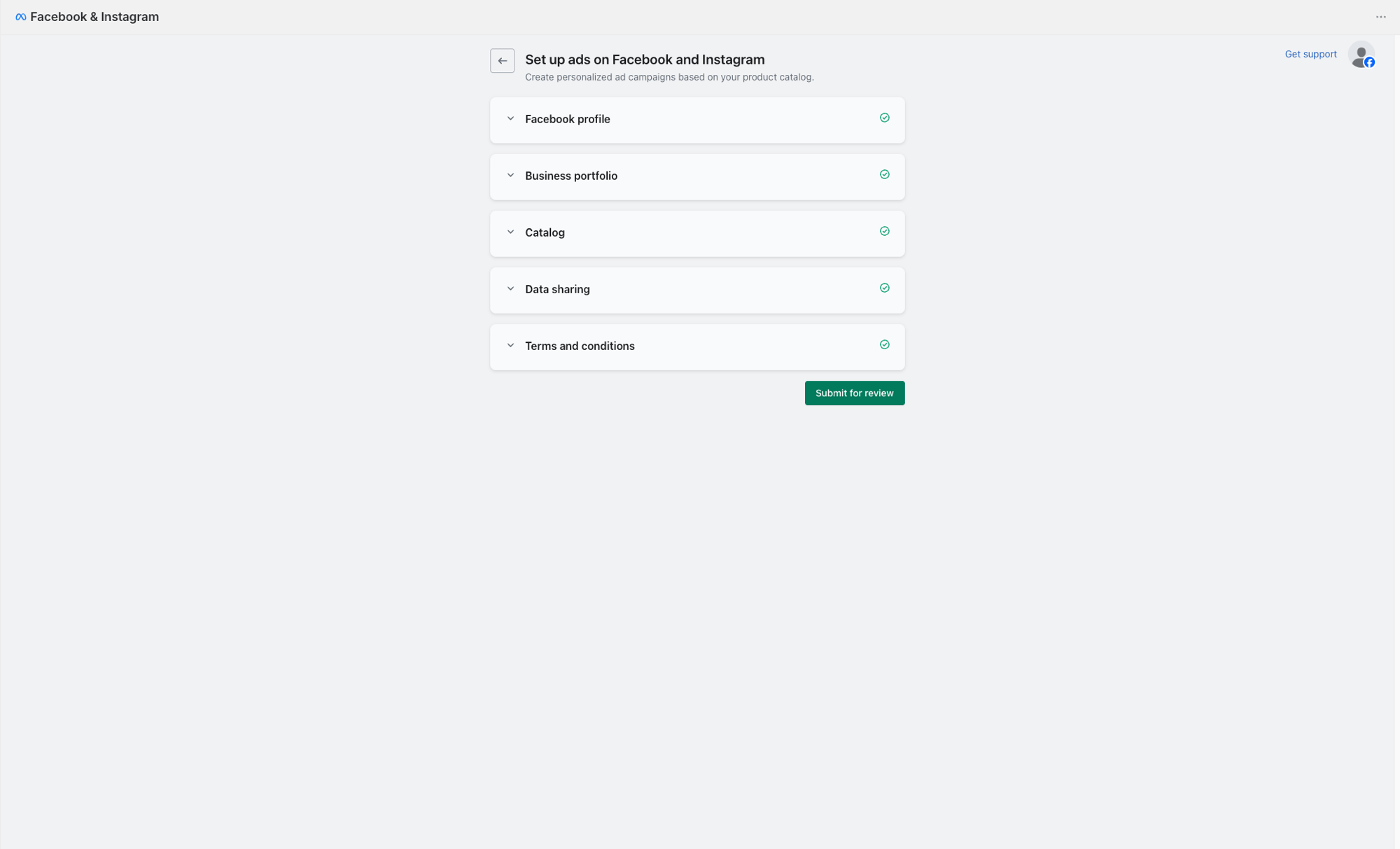
Submit for review
Once all sections show a green checkmark (Facebook profile, Business portfolio, Catalog, Data sharing, Terms and conditions), click Submit for review.
5
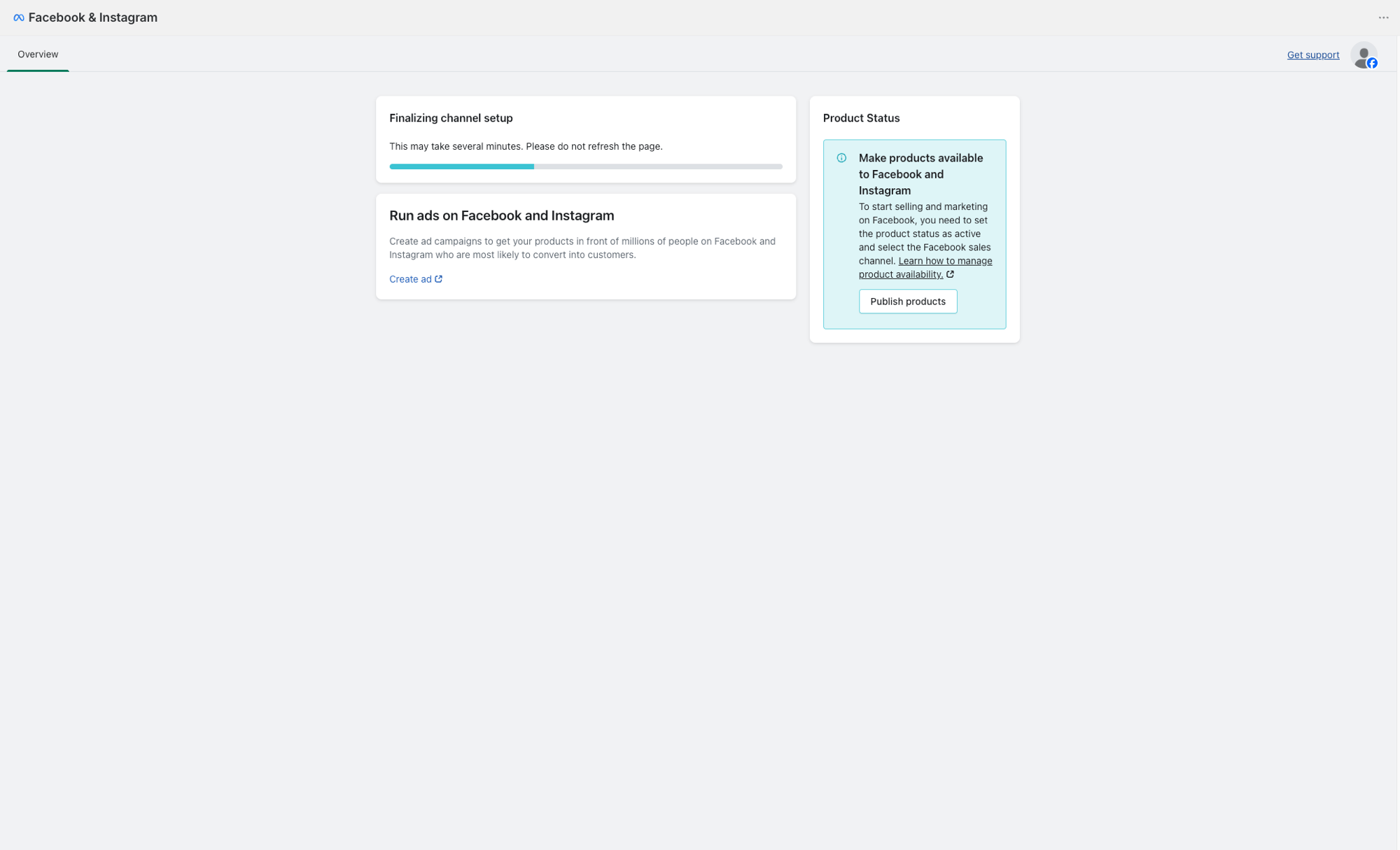
Wait for setup to finalize
The channel setup takes several minutes. Do not refresh the page. Once it finishes, the Overview tab appears.
Part 3: Publish your products to the Meta catalog
1
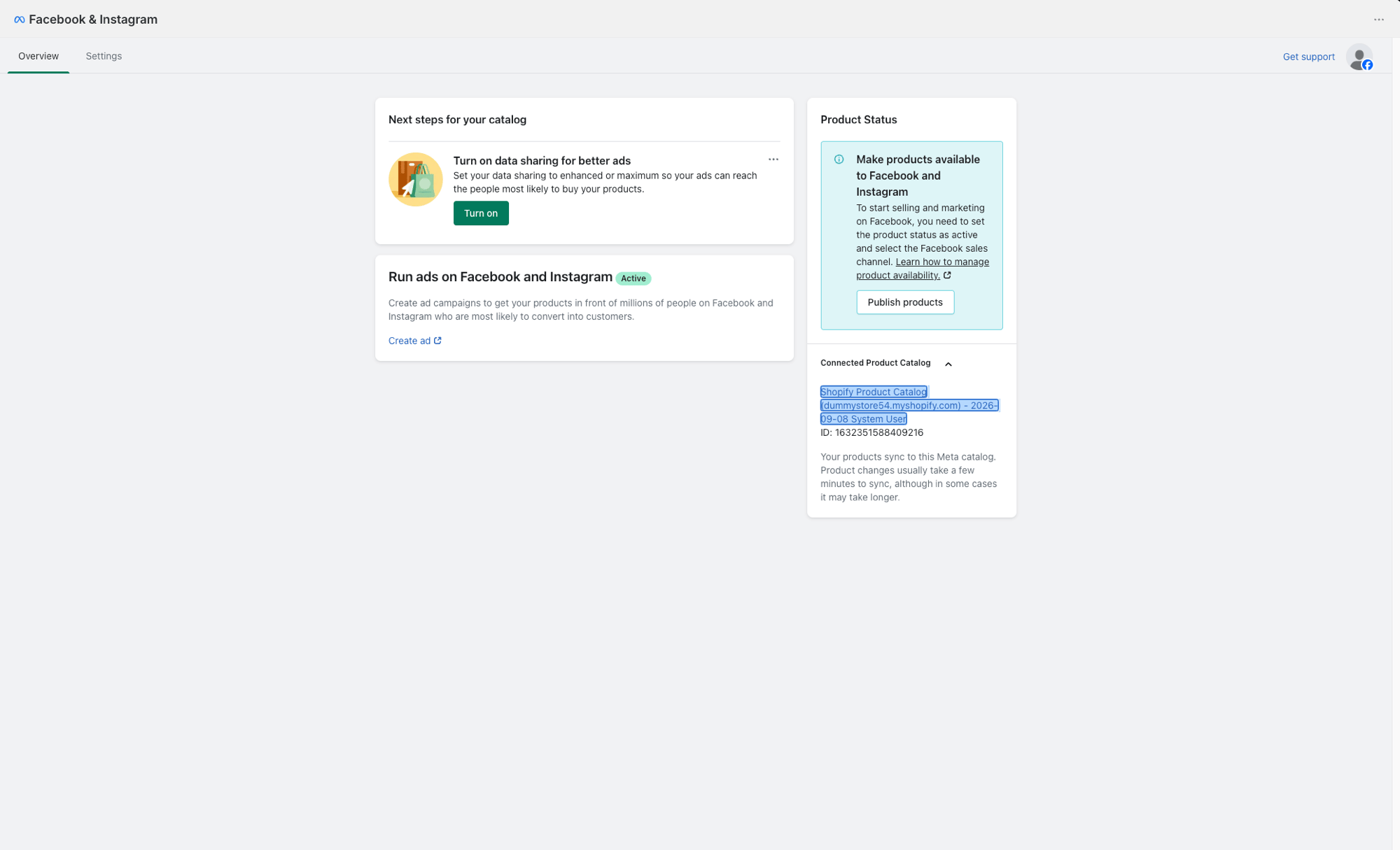
Click Publish products
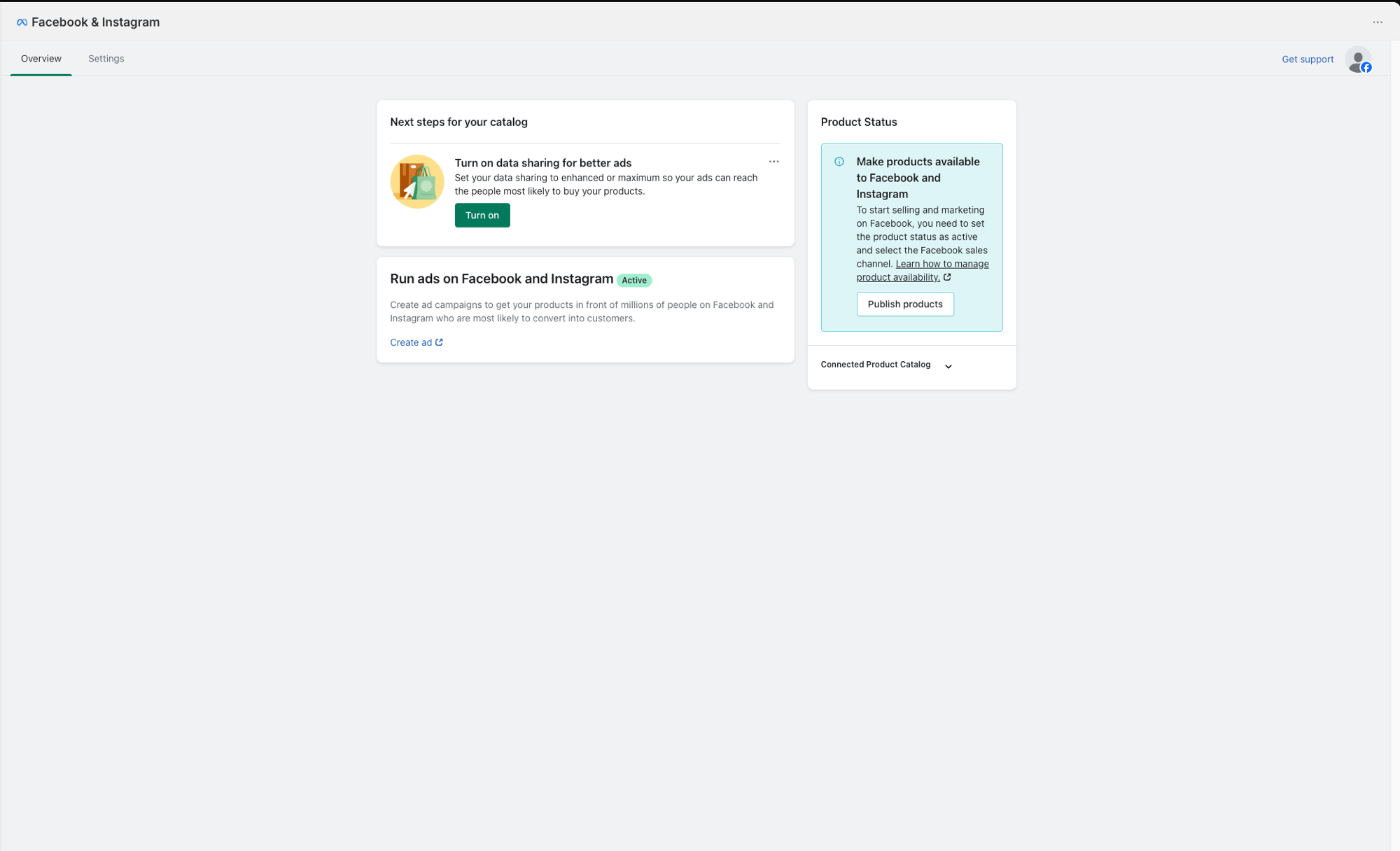
On the Facebook & Instagram Overview page, find the Product Status card and click Publish products. This opens the Shopify Products page.
2
Select all products
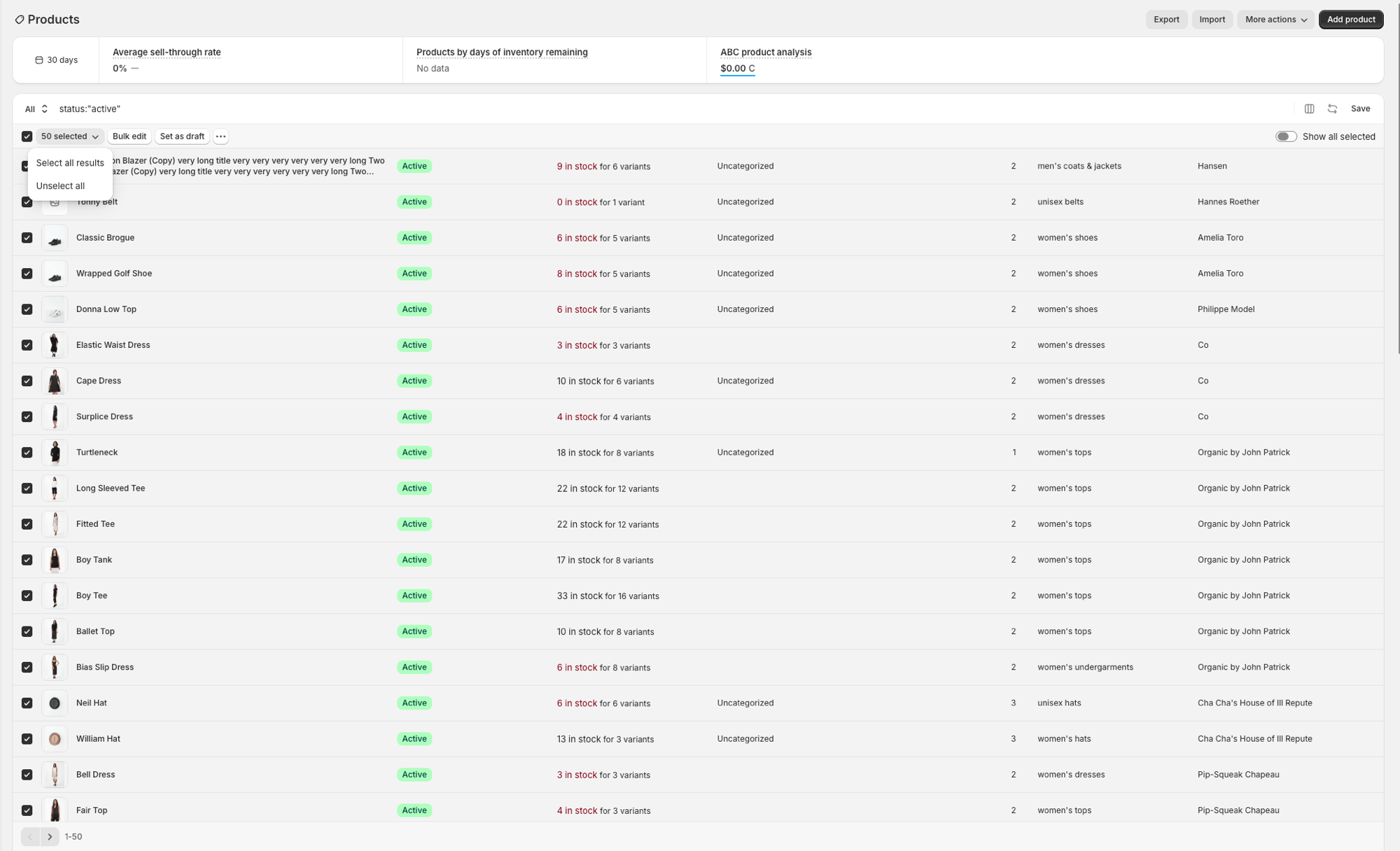
On the Products page, click the checkbox in the header row, then click Select all results to select every product in your store.
3
Include in sales channels
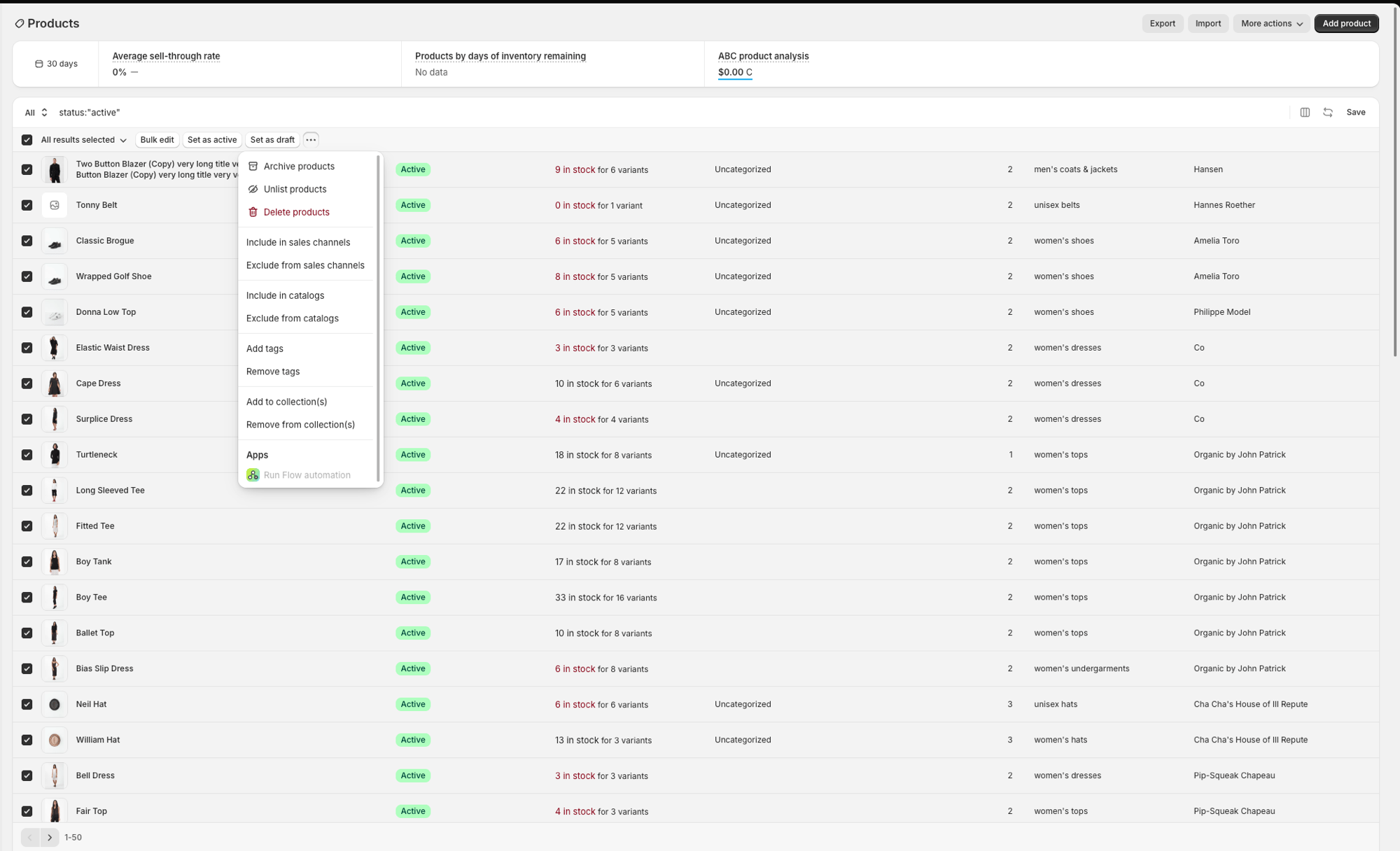
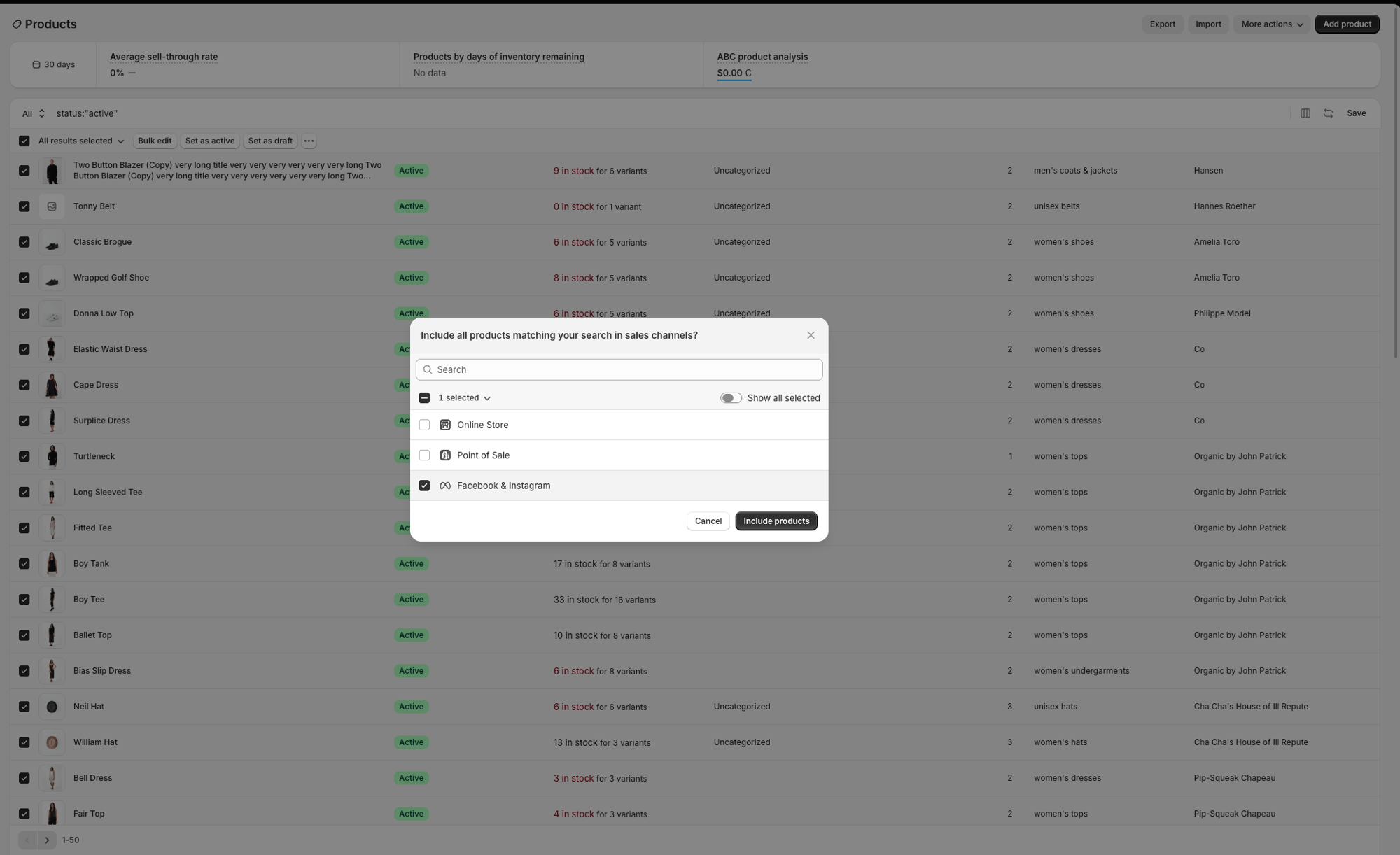
Click the … menu, then Include in sales channels. In the dialog that appears, check Facebook & Instagram and click Include products.
4
Verify products are syncing
Go back to the Facebook & Instagram app in Shopify. Expand Connected Product Catalog to see your catalog details and confirm products are syncing.
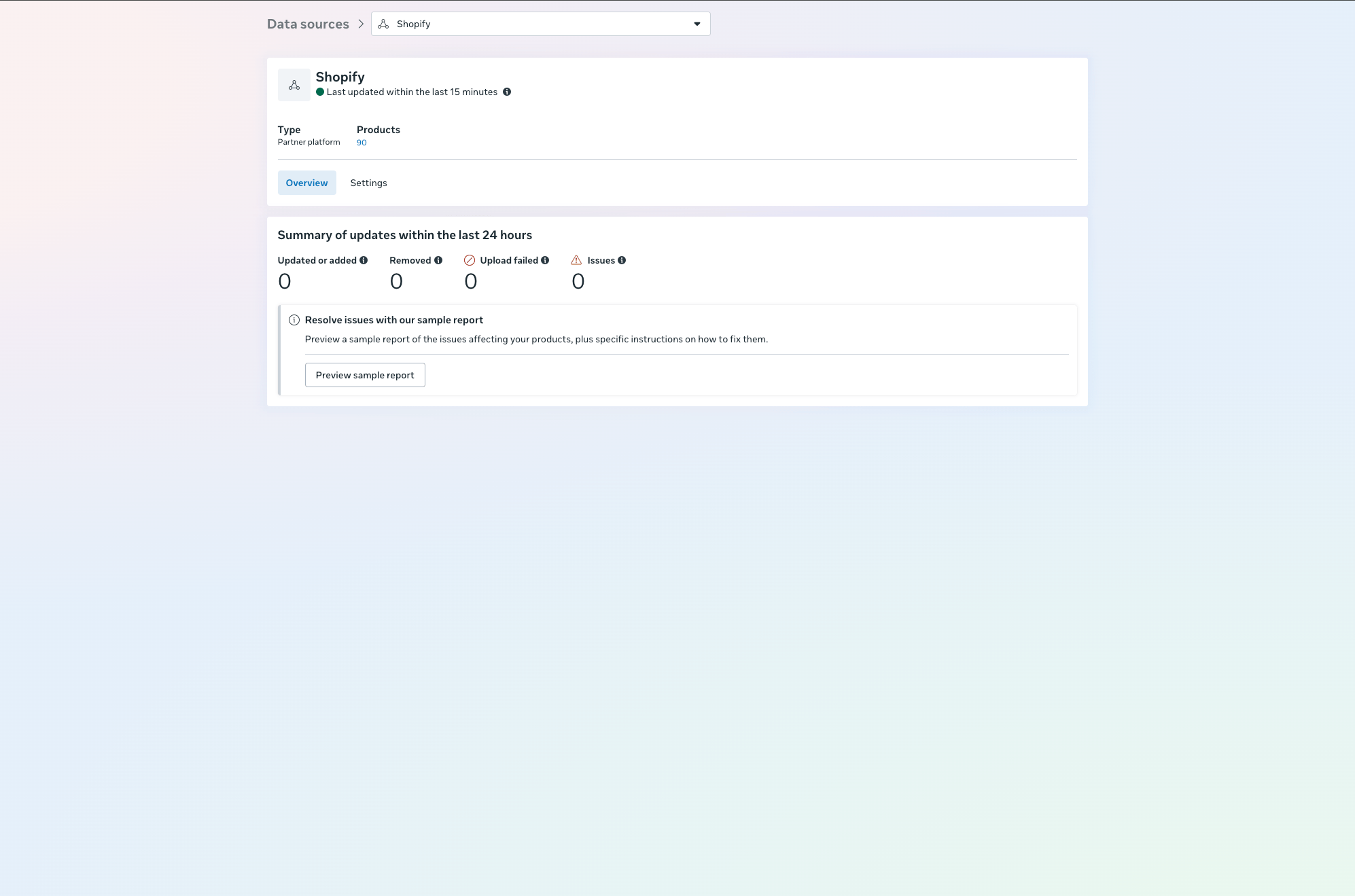
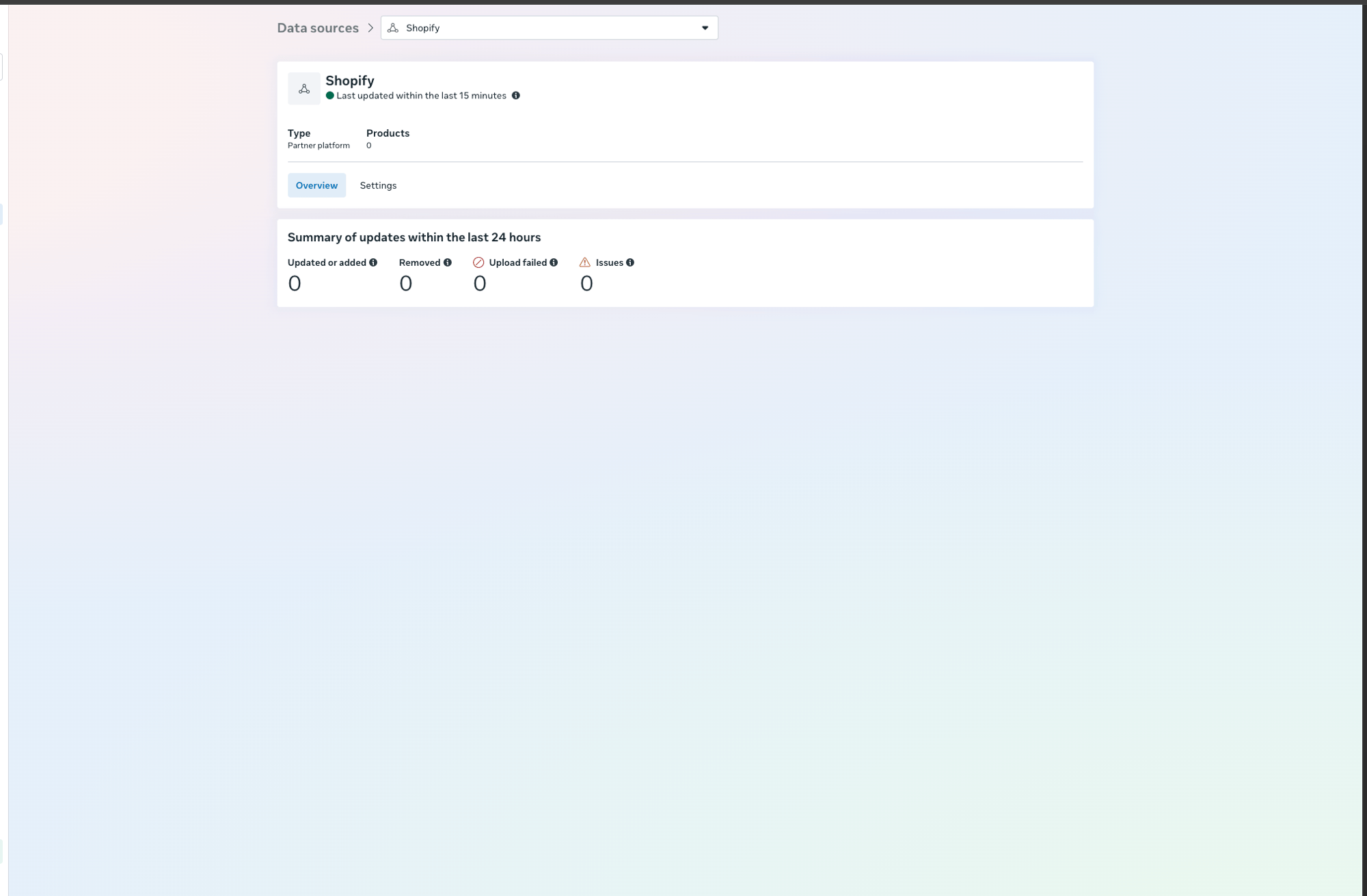
You can also verify in Meta Commerce Manager by navigating to your catalog’s Data sources section. The product count should match your Shopify store.
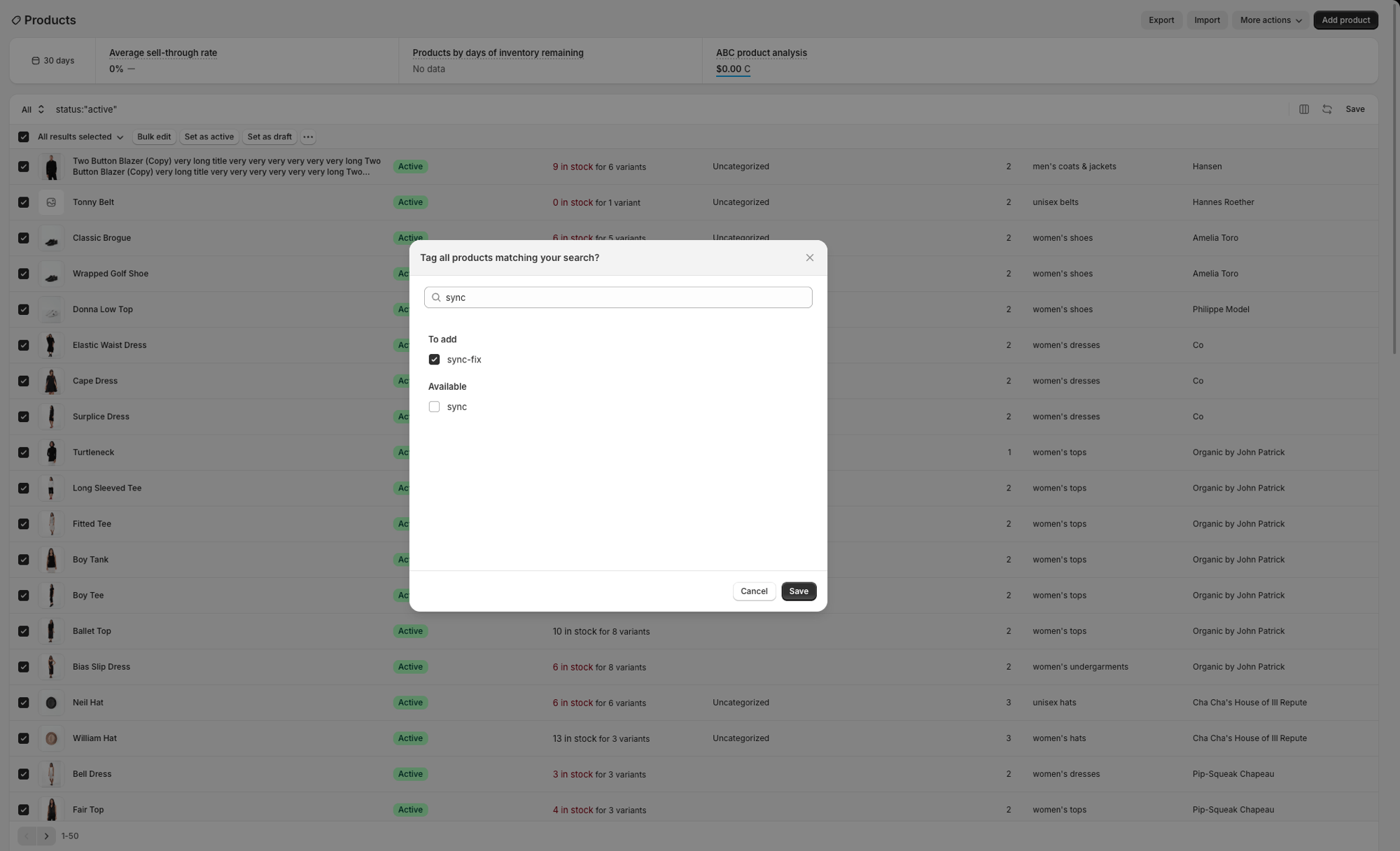
Products showing 0 in Commerce Manager? The initial sync can take a few minutes. If products still don’t appear after waiting, go back to Shopify Products, select all products, click … > Add tags, add any tag (e.g. sync-fix), and save. Adding or removing a tag triggers Shopify to re-push the products to Meta. You can remove the tag afterwards.
Part 4: Assign Chatbase as a partner
Chatbase needs partner access to your Meta catalog to serve products through WhatsApp.
1
Open Meta Business Settings
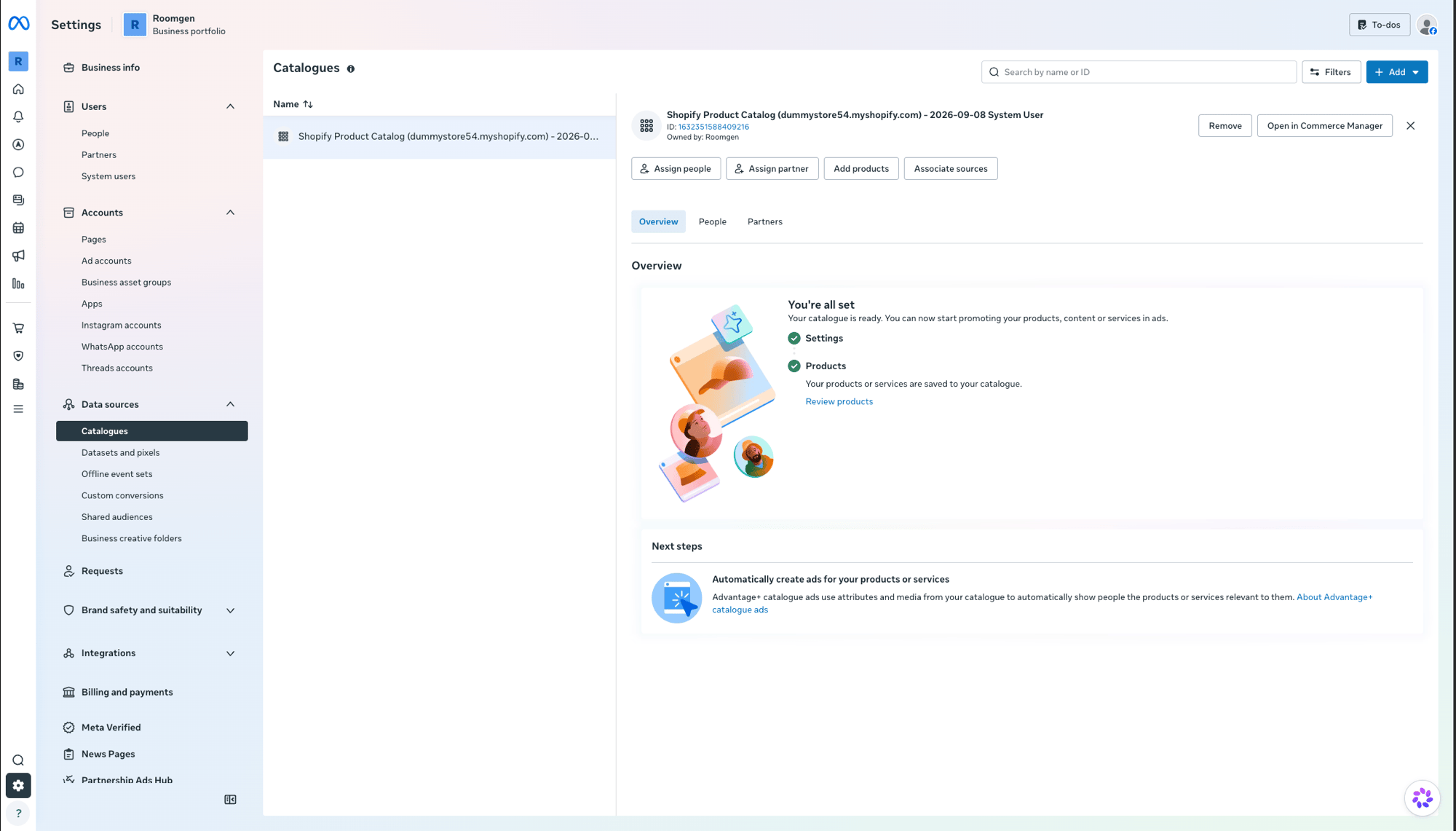
Go to Meta Business Settings and navigate to Data sources > Catalogues in the left sidebar. Select your Shopify Product Catalog.
2
Assign Chatbase as a partner
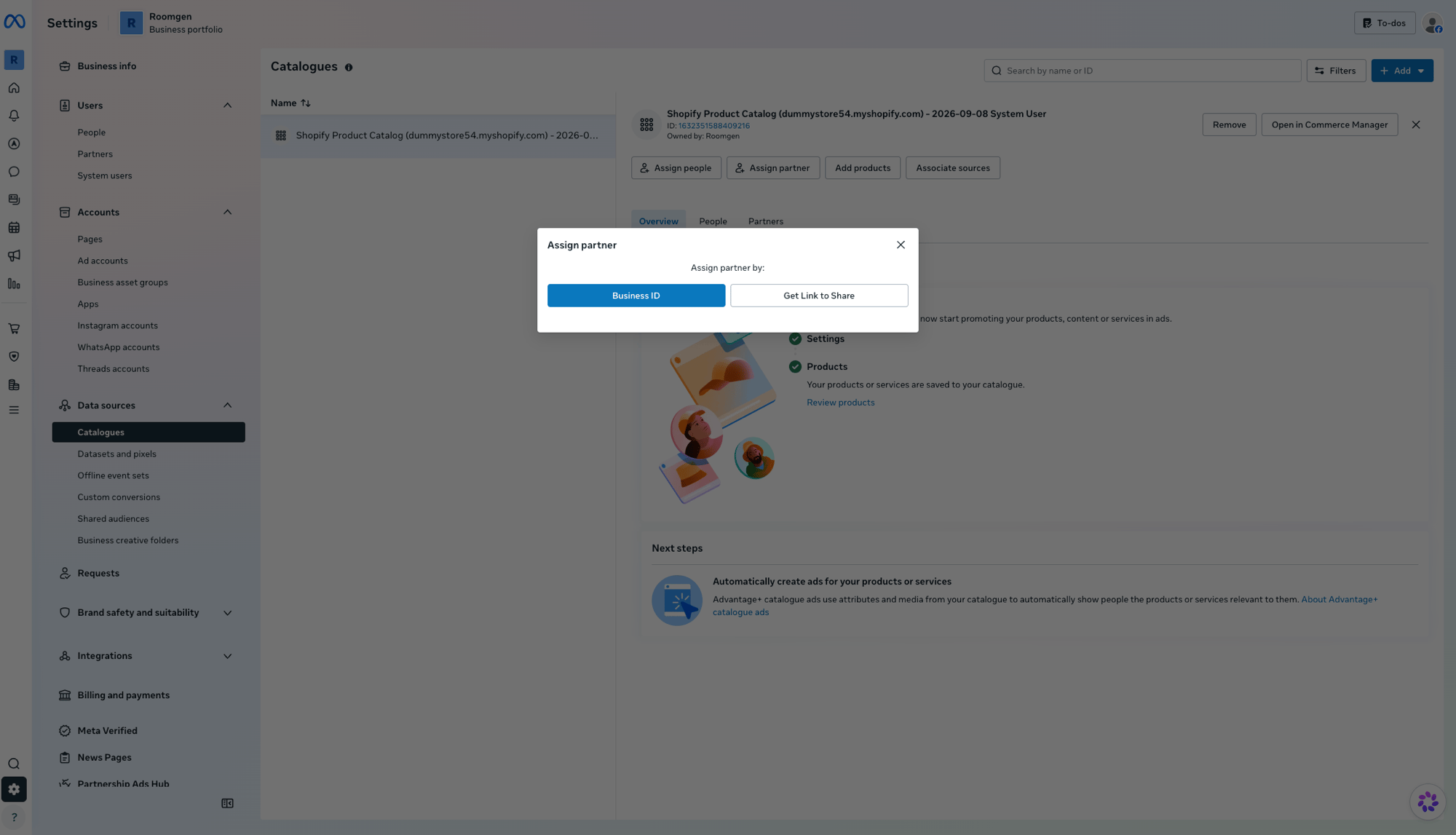
Click Assign partner, choose Business ID, and enter Chatbase’s Business ID:
918723022608702
Give Partial access and confirm.
Part 5: Confirm the connection in Chatbase
1
Open the Show Products Action
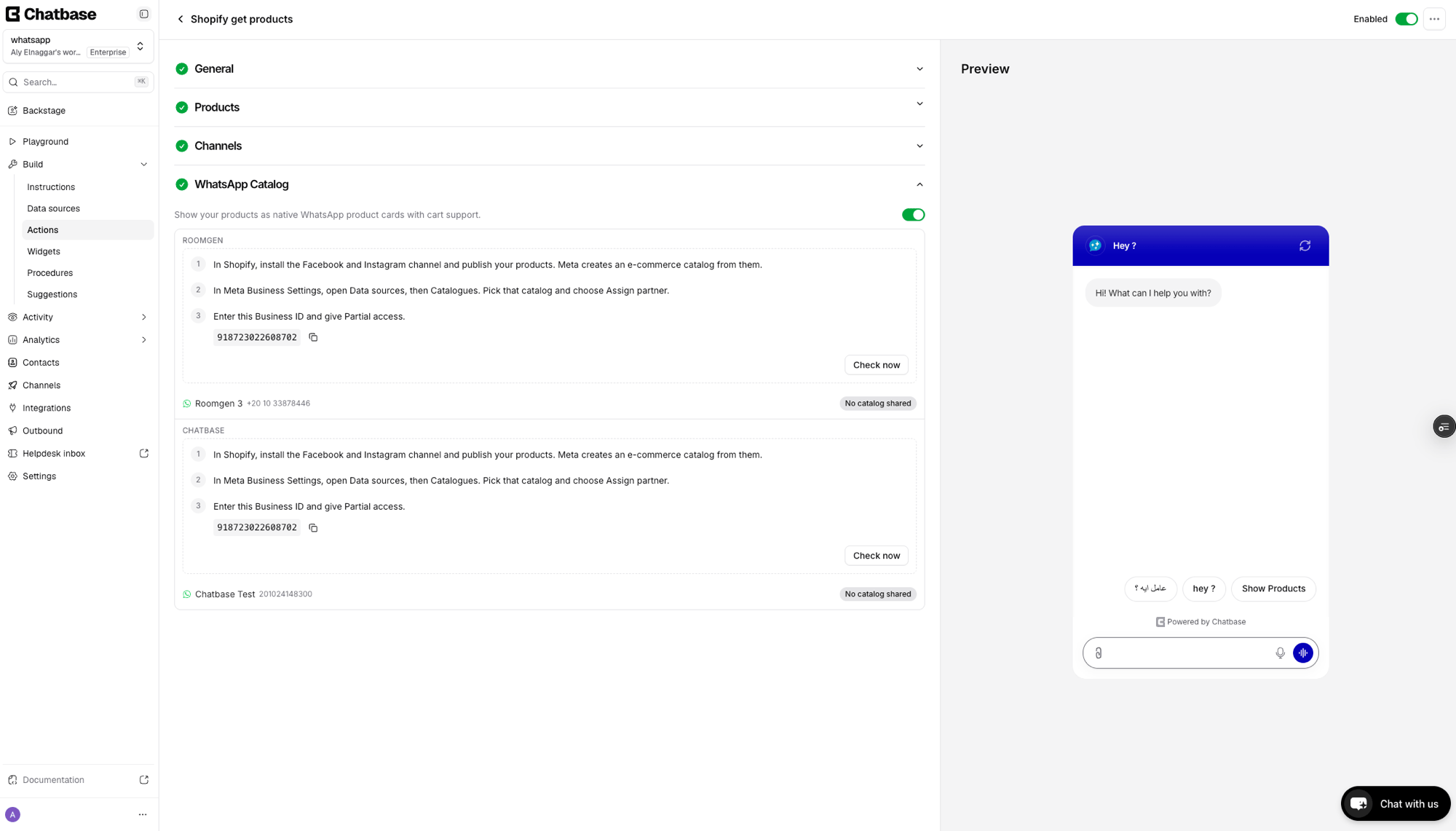
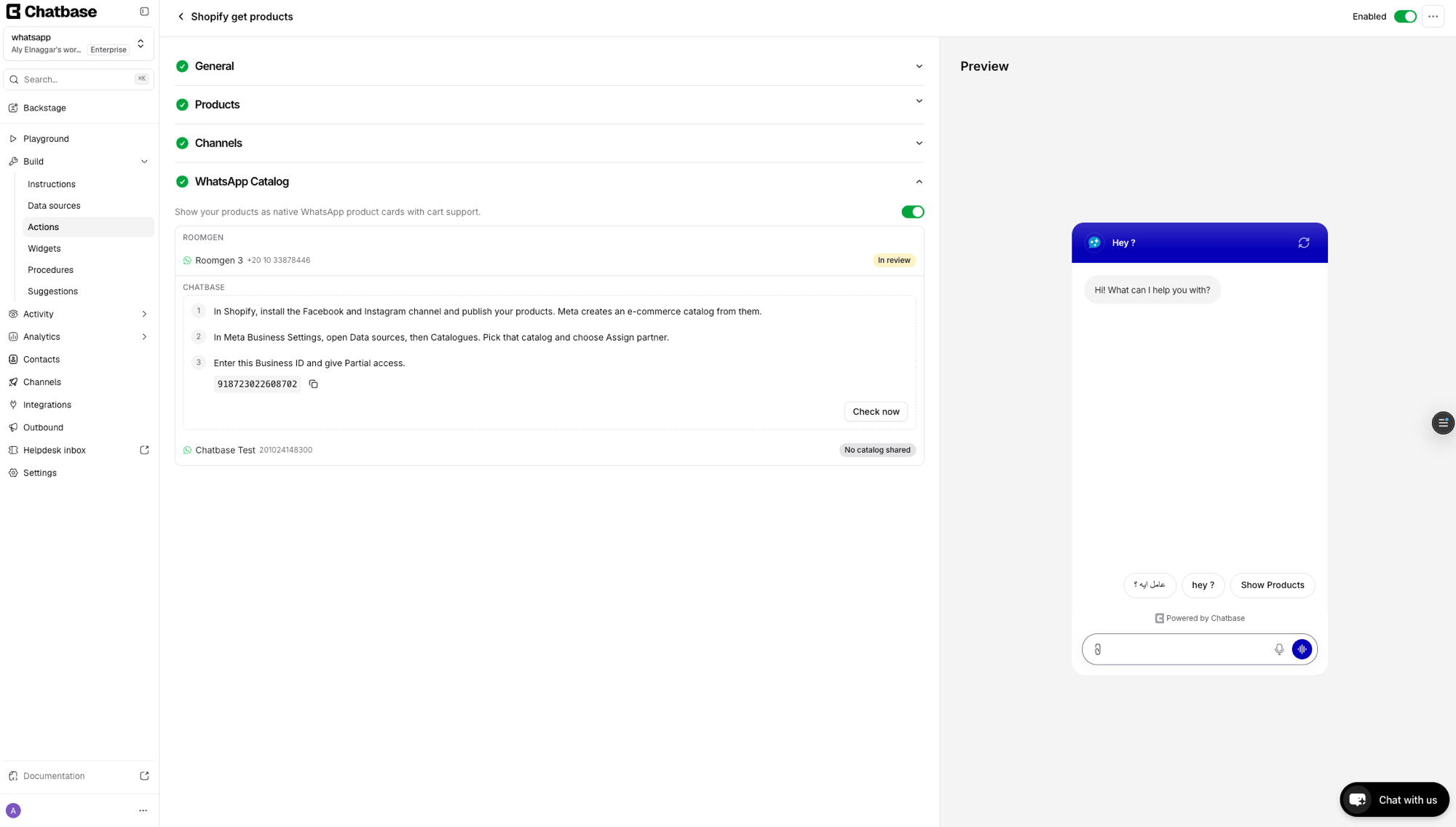
In your Chatbase dashboard, go to Build > Actions and open the Shopify get products Action. Scroll down to the WhatsApp Catalog section. You’ll see the setup steps listed for each WhatsApp Business Account (WABA). Click Check now or wait for it to refresh automatically.
Part 6: Connect the catalog in WhatsApp Manager
1
Open WhatsApp Manager
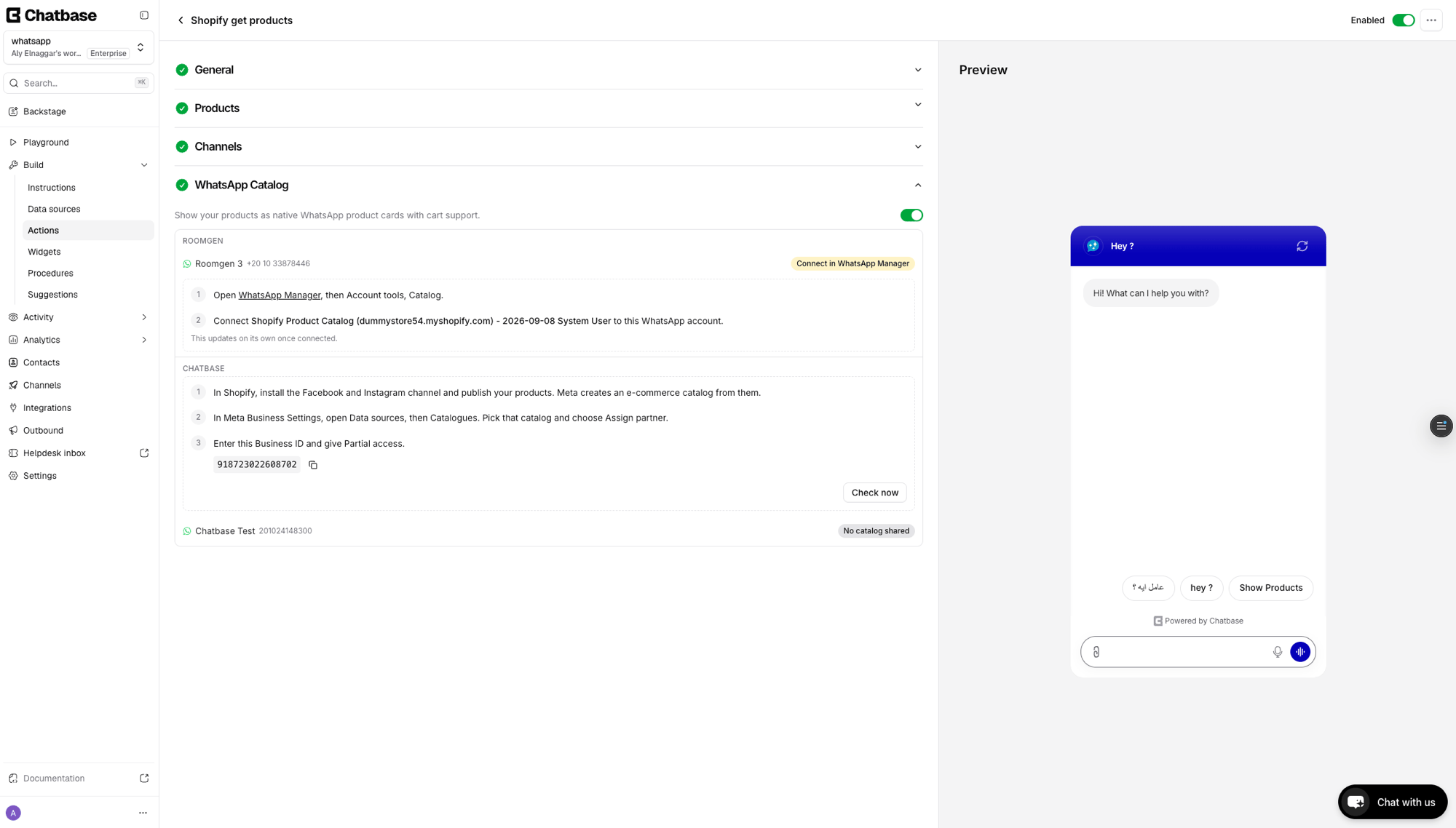
Once the partner assignment is detected, Chatbase shows a Connect in WhatsApp Manager button next to your WhatsApp number. Click it to open WhatsApp Manager.
2
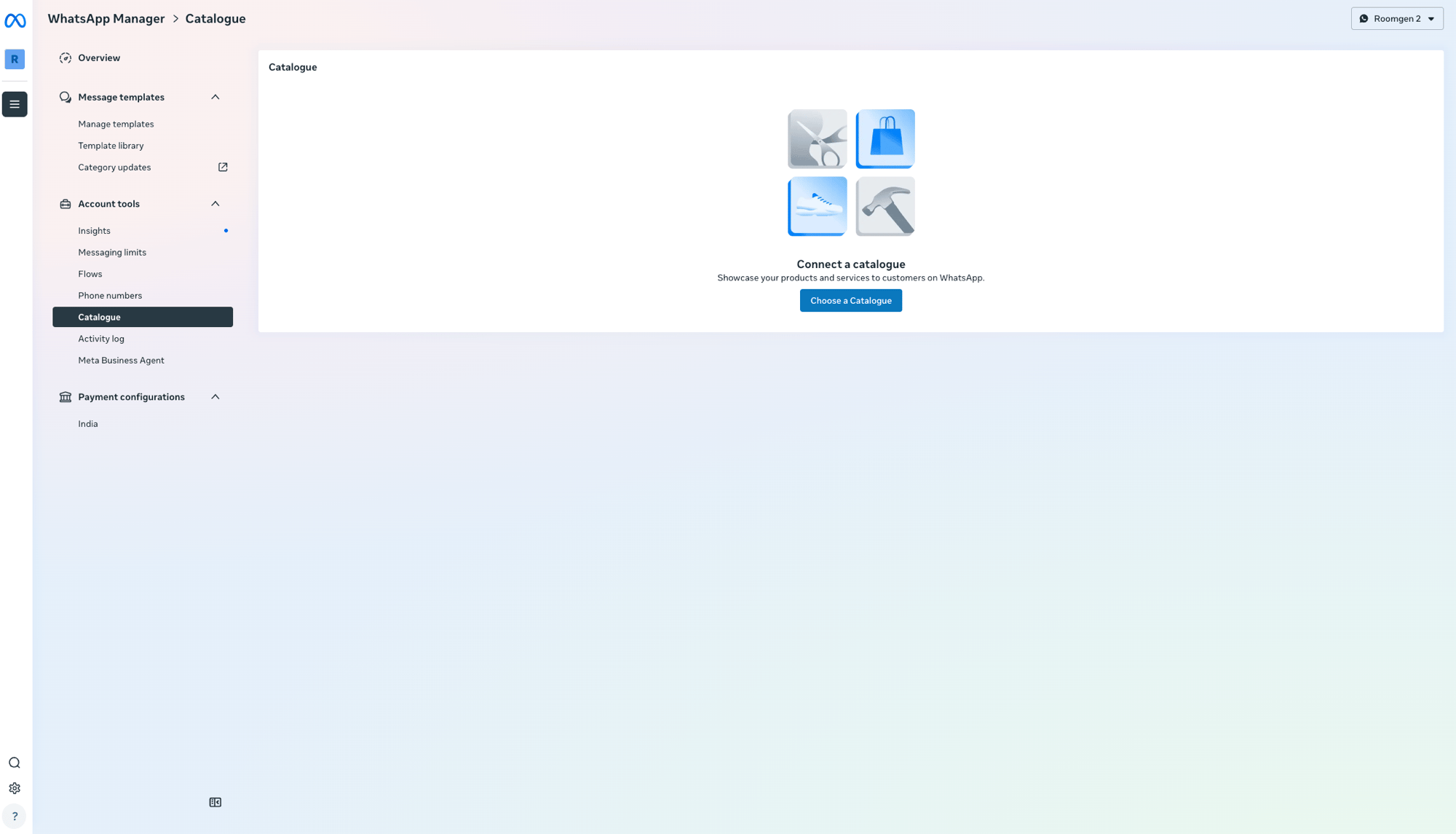
Go to Catalogue
In WhatsApp Manager, navigate to Account tools > Catalogue in the left sidebar. Make sure you are viewing the correct WhatsApp Business Account (WABA) in the top-right dropdown. Click Choose a Catalogue.
3
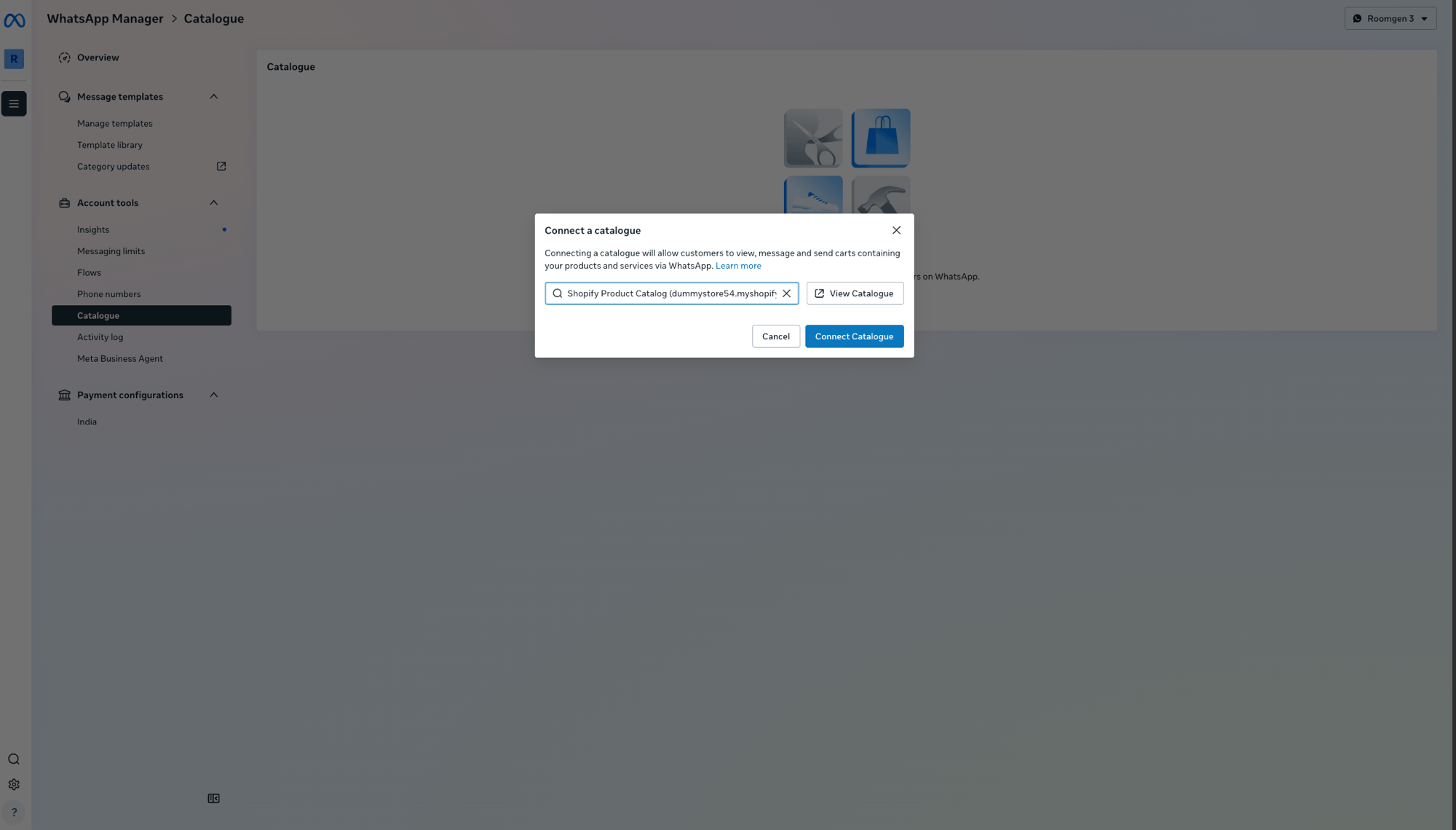
Select and connect your catalog
In the Connect a catalogue dialog, search for your Shopify Product Catalog, select it, and click Connect Catalogue.
4
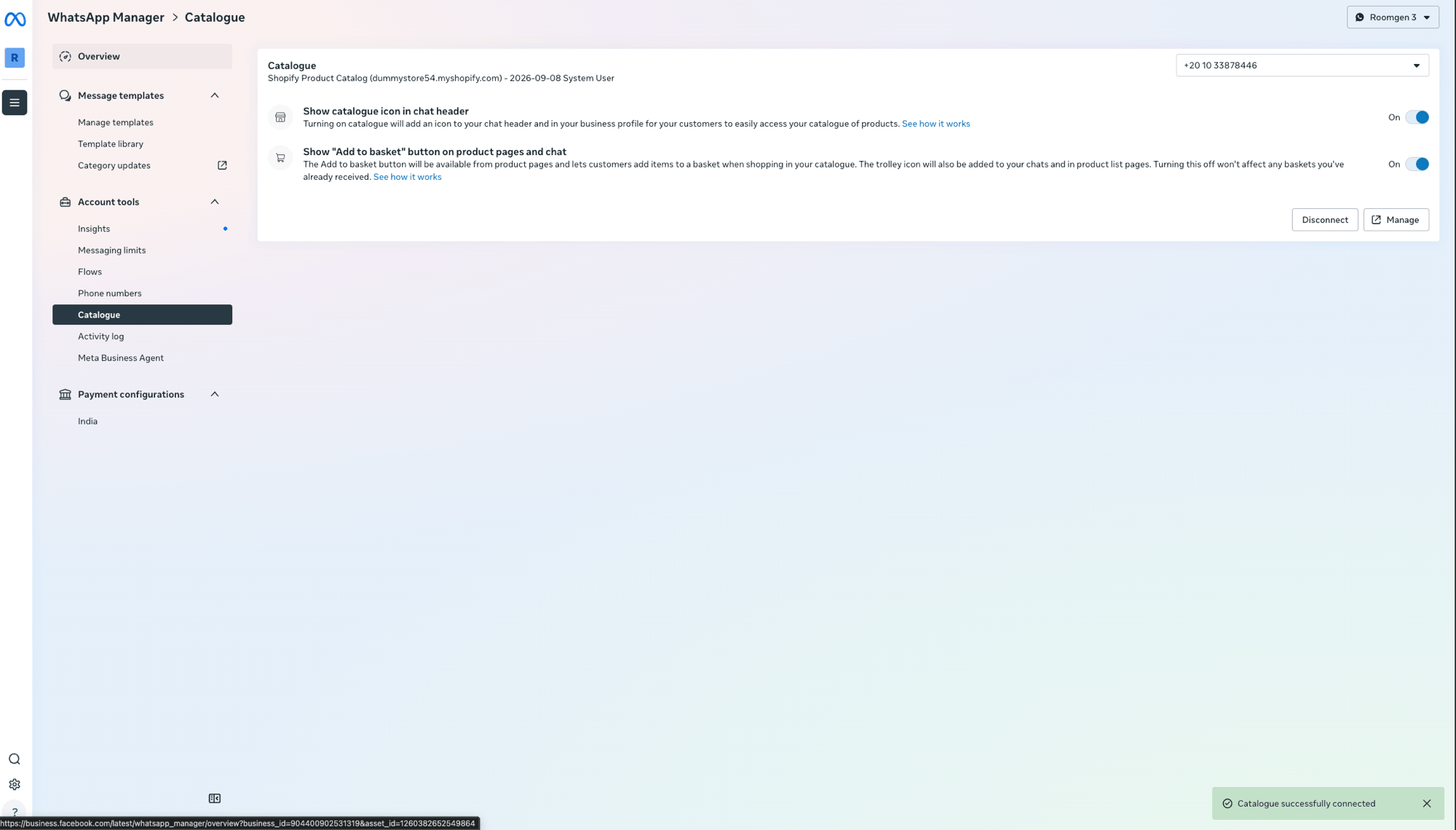
Catalogue connected
You’ll see a confirmation toast: Catalogue successfully connected. The page now shows your catalog details and options for showing the catalogue icon in the chat header and the “Add to basket” button.
Part 7: Wait for Meta review
Return to the Shopify get products Action in Chatbase. The WhatsApp Catalog section now shows In review for your WhatsApp number. Meta reviews the products that were pushed from Shopify. This is part of Meta’s standard review process and may take some time.
Once Meta approves the catalog, the status changes to Connected. Your AI agent will now send native WhatsApp product cards with cart support when the Show Products Action is triggered.
Test the integration by opening a WhatsApp conversation with your AI agent and asking to see products. The AI agent should respond with native product cards that customers can browse and add to a cart.
How it works
Once connected, the Retrieve and display products Action automatically detects the WhatsApp channel and sends products as native WhatsApp catalog cards instead of plain text. Customers can:
Browse product cards with images, titles, and prices
Add items to a WhatsApp cart
Send the cart to your AI agent to continue to checkout
How the WhatsApp cart and the chat cart work together
Customers can fill their cart two ways: by tapping Add to cart on the catalog cards, or by asking the AI agent in chat (for example, “add two of these to my cart”), which uses the Update cart Action. Both end up in the same Shopify cart, but they don’t show up in the same places:
Items added in chat don’t appear in the WhatsApp catalog cart. WhatsApp’s cart only exists on the customer’s phone, and Meta doesn’t let businesses add items to it. Items the AI agent adds are saved to the Shopify cart, not the WhatsApp cart.
Items from the WhatsApp cart reach the Shopify cart once the customer sends it. Chatbase adds the items the customer sent to the same Shopify cart the AI agent uses. Sending the cart doesn’t place an order by itself. The AI agent picks up from there, and the order is placed with Create order.
“View my cart” shows everything. When the customer asks to see their cart, the Get cart Action lists every product in one place, whether it was added in chat or sent from the WhatsApp cart.
Enable Update cart, Get cart, and Create order along with Retrieve and display products on your WhatsApp channel. Customers can then move between the catalog cards and the chat and still check out in one order.
Example: a shopper buys on WhatsApp
Here’s how a purchase runs once the catalog is Connected and the Actions in the tip above are on:
A shopper messages your WhatsApp number: “Do you have running shoes?” The AI agent uses Retrieve and display products and replies with WhatsApp product cards showing images, titles, and prices.
The shopper taps Add to cart on a pair of shoes. The item goes into their WhatsApp cart on their phone.
They type, “Add a pair of running socks too.” The AI agent uses Update cart and adds the socks to the shopper’s Shopify cart. The socks don’t appear in the WhatsApp cart, because Meta doesn’t let businesses add items to it.
The shopper sends their WhatsApp cart. Chatbase adds the shoes to the same Shopify cart. No order is placed yet.
They ask, “What’s in my cart?” The AI agent uses Get cart and lists both the shoes and the socks in one place.
The shopper says, “Check out.” The AI agent uses Create order to place one order for everything. With Online payment, the shopper gets a secure Shopify checkout link. See Create order for the payment options.
Product data stays in sync with your Shopify store through the Meta catalog. Changes in Shopify (price updates, new products, stock changes) sync to Meta automatically, though it may take a few minutes.
Troubleshooting
Products show 0 in Meta Commerce Manager
The initial sync from Shopify to Meta can take several minutes. If products still show 0 after waiting, go to Shopify Admin > Products, select all products, and use … > Add tags to add a temporary tag (e.g. sync-fix). This triggers Shopify to re-push the product data. You can remove the tag afterwards.
Catalog not appearing in WhatsApp Manager
Make sure you assigned Chatbase as a partner (Business ID 918723022608702) with Partial access in Meta Business Settings > Catalogues. Also verify you are viewing the correct WhatsApp Business Account (WABA) in the WhatsApp Manager dropdown.
Status stuck on 'In review'
Meta reviews catalog products before they can be served on WhatsApp. This is a standard Meta review process and is outside of Chatbase’s control. Review times vary. Ensure your products comply with Meta’s commerce policies.
'No catalog shared' still showing in Chatbase
After assigning the partner in Meta Business Settings, return to the Shopify get products Action in Chatbase and click Check now to refresh the status. It may take a moment for Meta to propagate the partner assignment.
Frequently asked questions
Do I need the Shopify integration to use WhatsApp Catalog?
Why don't items the AI agent added show up in the shopper's WhatsApp cart?
WhatsApp’s cart only exists on the shopper’s phone, and Meta doesn’t let businesses add items to it. Items the AI agent adds in chat go to the shopper’s Shopify cart instead. When the shopper asks to see their cart, the AI agent lists everything with Get cart.
Does sending the WhatsApp cart place an order?
No. Sending the cart adds its items to the shopper’s Shopify cart. The AI agent continues the conversation, and the order is placed with Create order.
Do shoppers pay inside WhatsApp?
No. With Online payment, the AI agent sends a Shopify checkout link that opens in the shopper’s browser, and the order is completed once they pay there. A Create order Action set to Cash on delivery or Free order places the order without a checkout link.
How quickly do price and stock changes reach WhatsApp?
Changes you make in Shopify, such as price updates, new products, and stock changes, sync to the Meta catalog automatically. This can take a few minutes.
Can shoppers track their order on WhatsApp?
Yes, with the Retrieve and display orders Action turned on for WhatsApp. Shoppers on WhatsApp aren’t signed in to your store, so they verify the order with their checkout email or phone number plus the order number. See Signed-in and guest customers.
Related
Retrieve and display products
Configure the Show Products Action that powers WhatsApp Catalog.
WhatsApp integration
Set up your WhatsApp channel connection.
Shopify integration
Connect your Shopify store to Chatbase.
Meta Catalogs documentation
Official Meta documentation on WhatsApp catalogs.
{"docsConfig":{"theme":"mint","$schema":"https://mintlify.com/docs.json","name":"Chatbase","colors":{"primary":"#18181b","light":"#f4f4f5","dark":"#18181b"},"logo":{"light":"https://mintcdn.com/chatbase/pJU9vM3D9oN_YQME/logo/light.svg?fit=max\u0026auto=format\u0026n=pJU9vM3D9oN_YQME\u0026q=85\u0026s=a45a73af7ac778cd0920dbb6ad1aaa93","dark":"https://mintcdn.com/chatbase/8k6_6eFSz4sj8EO0/logo/dark.svg?fit=max\u0026auto=format\u0026n=8k6_6eFSz4sj8EO0\u0026q=85\u0026s=c0c106d2f92f6a87f872a2be66706041","href":"https://chatbase.co"},"favicon":"https://mintcdn.com/chatbase/NsUPSmNqecm03uiz/favicon.ico?fit=max\u0026auto=format\u0026n=NsUPSmNqecm03uiz\u0026q=85\u0026s=b37388fc54cd76cfaf3efcb8ab4a4dc8","appearance":{},"navbar":{"links":[{"href":"https://chatbase.co/help","label":"Support"}],"primary":{"type":"button","label":"Dashboard","href":"https://www.chatbase.co/dashboard"}},"footer":{"socials":{"x":"https://x.com/chatbase_co","linkedin":"https://linkedin.com/company/chatbase-co","youtube":"https://www.youtube.com/@chatbase_"}},"seo":{"metatags":{"canonical":"https://www.chatbase.co/docs"}},"contextual":{"options":["copy","view","chatgpt","claude"],"display":"header"},"metadata":{"timestamp":false},"styling":{"latex":false},"navigation":{"pages":[]}},"deployment":{"deploymentMetadataValue":{"subdomain":"chatbase","hasAudioNarration":false,"actualSubdomain":"chatbase","customDomains":["chatbase.co"],"gitSource":{"type":"github","owner":"chatbase-co","repo":"docs","deployBranch":"main","contentDirectory":"","isPrivate":true,"mountPath":"","label":""},"entitlements":{"AI_CHAT":{"status":"ENABLED"},"WEB_MCP":{"status":"ENABLED"},"NARRATION":{"status":"ENABLED"}},"buildId":"6afb2ce1ad9313ad123bf3cb","clientVersion":"0.0.4149","searchFilterCounts":[{"language":"default","tag":"User Guide","count":109},{"language":"default","tag":"API Reference","count":92},{"language":"default","tag":"Endpoints","count":78},{"language":"default","tag":"API v2","count":71},{"language":"default","tag":"Helpdesk","count":40},{"language":"default","tag":"Integrations","count":35},{"language":"default","tag":"Developer Guide","count":32},{"language":"default","tag":"AI Agent Management","count":32},{"language":"default","tag":"SDKs","count":26},{"language":"default","tag":"Actions","count":22}]},"assistantConfig":{},"basePath":"/docs","hasChatPermissions":false,"hasWebMcpPermissions":true,"toggles":[{"name":"kill-isr","enabled":true,"variant":{"name":"disabled","enabled":false,"feature_enabled":true},"impressionData":false},{"name":"custom-rbac-roles","enabled":true,"variant":{"name":"disabled","enabled":false,"feature_enabled":true},"impressionData":false},{"name":"agent-mintlify-slack","enabled":true,"variant":{"name":"disabled","enabled":false,"feature_enabled":true},"impressionData":false},{"name":"agent-integrations-settings","enabled":true,"variant":{"name":"disabled","enabled":false,"feature_enabled":true},"impressionData":false},{"name":"rbac-expansion","enabled":true,"variant":{"name":"disabled","enabled":false,"feature_enabled":true},"impressionData":false},{"name":"automations-pr-grouping","enabled":true,"variant":{"name":"disabled","enabled":false,"feature_enabled":true},"impressionData":false},{"name":"custom-prefix","enabled":true,"variant":{"name":"disabled","enabled":false,"feature_enabled":true},"impressionData":false},{"name":"analytics-v7","enabled":true,"variant":{"name":"disabled","enabled":false,"feature_enabled":true},"impressionData":false},{"name":"user-flows-analytics","enabled":true,"variant":{"name":"disabled","enabled":false,"feature_enabled":true},"impressionData":false},{"name":"no-publish-flow","enabled":true,"variant":{"name":"disabled","enabled":false,"feature_enabled":true},"impressionData":false},{"name":"workos-onboarding","enabled":true,"variant":{"name":"disabled","enabled":false,"feature_enabled":true},"impressionData":false},{"name":"snapshot-serving-live","enabled":true,"variant":{"name":"disabled","enabled":false,"feature_enabled":true},"impressionData":false},{"name":"stripTemperatureMiddleware","enabled":true,"variant":{"name":"disabled","enabled":false,"feature_enabled":true},"impressionData":false},{"name":"support-platform-pylon-zendesk","enabled":true,"variant":{"name":"disabled","enabled":false,"feature_enabled":true},"impressionData":false},{"name":"snapshot-serving","enabled":true,"variant":{"name":"disabled","enabled":false,"feature_enabled":true},"impressionData":false},{"name":"instant-rollback","enabled":true,"variant":{"name":"disabled","enabled":false,"feature_enabled":true},"impressionData":false},{"name":"granular-notifications-server","enabled":true,"variant":{"name":"disabled","enabled":false,"feature_enabled":true},"impressionData":false},{"name":"granular-notifications","enabled":true,"variant":{"name":"disabled","enabled":false,"feature_enabled":true},"impressionData":false},{"name":"automations-fable","enabled":true,"variant":{"name":"disabled","enabled":false,"feature_enabled":true},"impressionData":false},{"name":"fixed-ai-action-pricing","enabled":true,"variant":{"name":"disabled","enabled":false,"feature_enabled":true},"impressionData":false},{"name":"automation-resolve-merge-conflict","enabled":true,"variant":{"name":"disabled","enabled":false,"feature_enabled":true},"impressionData":false},{"name":"scoped-publishing","enabled":true,"variant":{"name":"disabled","enabled":false,"feature_enabled":true},"impressionData":false},{"name":"mintql","enabled":true,"variant":{"name":"disabled","enabled":false,"feature_enabled":true},"impressionData":false},{"name":"page-level-analytics","enabled":true,"variant":{"name":"disabled","enabled":false,"feature_enabled":true},"impressionData":false},{"name":"editor-version-history-v2","enabled":true,"variant":{"name":"disabled","enabled":false,"feature_enabled":true},"impressionData":false},{"name":"billing-page-v2","enabled":true,"variant":{"name":"disabled","enabled":false,"feature_enabled":true},"impressionData":false},{"name":"full-page-search","enabled":true,"variant":{"name":"disabled","enabled":false,"feature_enabled":true},"impressionData":false},{"name":"workspace-projects","enabled":true,"variant":{"name":"disabled","enabled":false,"feature_enabled":true},"impressionData":false},{"name":"assistant-v5","enabled":true,"variant":{"name":"disabled","enabled":false,"feature_enabled":true},"impressionData":false},{"name":"fork-pr-previews","enabled":true,"variant":{"name":"disabled","enabled":false,"feature_enabled":true},"impressionData":false},{"name":"revalidation-jwt","enabled":true,"variant":{"name":"disabled","enabled":false,"feature_enabled":true},"impressionData":false},{"name":"workos-sso-scim","enabled":true,"variant":{"name":"disabled","enabled":false,"feature_enabled":true},"impressionData":false},{"name":"hobby-abuse-scan","enabled":true,"variant":{"name":"disabled","enabled":false,"feature_enabled":true},"impressionData":false},{"name":"dashboard-inbox","enabled":true,"variant":{"name":"disabled","enabled":false,"feature_enabled":true},"impressionData":false},{"name":"workos-signup","enabled":true,"variant":{"name":"disabled","enabled":false,"feature_enabled":true},"impressionData":false},{"name":"turbopuffer-dual-write","enabled":true,"variant":{"name":"disabled","enabled":false,"feature_enabled":true},"impressionData":false},{"name":"workos-enabled","enabled":true,"variant":{"name":"disabled","enabled":false,"feature_enabled":true},"impressionData":false},{"name":"approve-review-flow","enabled":true,"variant":{"name":"disabled","enabled":false,"feature_enabled":true},"impressionData":false},{"name":"editor-metadata","enabled":true,"variant":{"name":"disabled","enabled":false,"feature_enabled":true},"impressionData":false},{"name":"sso-setup-deadline-banner","enabled":true,"variant":{"name":"disabled","enabled":false,"feature_enabled":true},"impressionData":false},{"name":"turbopuffer-serve","enabled":true,"variant":{"name":"disabled","enabled":false,"feature_enabled":true},"impressionData":false},{"name":"live-agents","enabled":true,"variant":{"name":"disabled","enabled":false,"feature_enabled":true},"impressionData":false},{"name":"llms-txt-v2","enabled":true,"variant":{"name":"disabled","enabled":false,"feature_enabled":true},"impressionData":false}],"googleFontsInlined":false},"customCss":[{"filePath":"style.css","content":".nav-dropdown-trigger{border-color:transparent!important;border-bottom-color:rgb(var(--gray-500) / 0.2)!important;border-radius:0!important;padding:0.5rem 0.875rem 0.875rem 1rem!important}.nav-dropdown-trigger .nav-dropdown-item-icon{display:none!important}.nav-dropdown-trigger .nav-dropdown-item-text-container{padding-left:0!important}.nav-dropdown-trigger .nav-dropdown-item-title{font-weight:600!important}.nav-dropdown-item-title::after{display:inline-block;margin-left:0.5rem;padding:0.125rem 0.5rem;border-radius:0.375rem;font-size:0.7rem;font-weight:600;line-height:1.2;vertical-align:middle}:is(.nav-dropdown-trigger,.nav-dropdown-item):has([style*=\"/code.svg\"]) .nav-dropdown-item-title::after{content:\"Current\";color:rgb(22 163 74);background:rgb(22 163 74 / 0.12)}:is(.nav-dropdown-trigger,.nav-dropdown-item):has([style*=\"/box-archive.svg\"]) .nav-dropdown-item-title::after{content:\"Deprecated\";color:rgb(217 119 6);background:rgb(217 119 6 / 0.12)}"}],"page":{"pagePath":"user-guides/chatbot/actions/whatsapp-catalog","slug":"/user-guides/chatbot/actions/whatsapp-catalog","pageMetadata":{"title":"Show Shopify products as WhatsApp product cards","sidebarTitle":"WhatsApp Catalog","icon":"whatsapp","description":"Show your Shopify products as native WhatsApp product cards with cart support","href":"/user-guides/chatbot/actions/whatsapp-catalog"},"description":{"compiledSource":"\"use strict\";\nconst {jsx: _jsx} = arguments[0];\nconst {useMDXComponents: _provideComponents} = arguments[0];\nfunction _createMdxContent(props) {\n const _components = {\n p: \"p\",\n ..._provideComponents(),\n ...props.components\n };\n return _jsx(_components.p, {\n children: \"Show your Shopify products as native WhatsApp product cards with cart support\"\n });\n}\nfunction MDXContent(props = {}) {\n const {wrapper: MDXLayout} = {\n ..._provideComponents(),\n ...props.components\n };\n return MDXLayout ? _jsx(MDXLayout, {\n ...props,\n children: _jsx(_createMdxContent, {\n ...props\n })\n }) : _createMdxContent(props);\n}\nreturn {\n default: MDXContent\n};\n","frontmatter":{},"scope":{}},"pageType":"default","mdx":{"mdxSource":{"compiledSource":"\"use strict\";const{Fragment:_Fragment,jsx:_jsx,jsxs:_jsxs}=arguments[0];const{useMDXComponents:_provideComponents}=arguments[0];function _createMdxContent(props){const _components={a:`a`,code:`code`,li:`li`,ol:`ol`,p:`p`,pre:`pre`,span:`span`,strong:`strong`,ul:`ul`,..._provideComponents(),...props.components},{Accordion,AccordionGroup,Card,CardGroup,Check,CodeBlock,Frame,Heading,Info,OptimizedImage,Step,Steps,Tip,Warning}=_components;if(!Accordion)_missingMdxReference(`Accordion`,true);if(!AccordionGroup)_missingMdxReference(`AccordionGroup`,true);if(!Card)_missingMdxReference(`Card`,true);if(!CardGroup)_missingMdxReference(`CardGroup`,true);if(!Check)_missingMdxReference(`Check`,true);if(!CodeBlock)_missingMdxReference(`CodeBlock`,true);if(!Frame)_missingMdxReference(`Frame`,true);if(!Heading)_missingMdxReference(`Heading`,true);if(!Info)_missingMdxReference(`Info`,true);if(!OptimizedImage)_missingMdxReference(`OptimizedImage`,true);if(!Step)_missingMdxReference(`Step`,true);if(!Steps)_missingMdxReference(`Steps`,true);if(!Tip)_missingMdxReference(`Tip`,true);if(!Warning)_missingMdxReference(`Warning`,true);return _jsxs(_Fragment,{children:[_jsx(_components.p,{children:`WhatsApp Catalog lets your Chatbase AI agent sell your Shopify products on WhatsApp by sending them as native WhatsApp product cards. It’s for Shopify stores that take customer conversations on WhatsApp and want shoppers to browse, fill a cart, and order in the same chat. When a shopper asks to see products, they get product cards with images, titles, and prices instead of plain text links, and the AI agent carries the cart through to the order.`}),`\n`,_jsx(_components.p,{children:`This feature connects your Shopify product catalog to WhatsApp through Meta’s commerce infrastructure. Products sync from Shopify to a Meta catalog, which WhatsApp then uses to render native product cards.`}),`\n`,_jsxs(Info,{children:[_jsx(_components.p,{children:_jsx(_components.strong,{children:`Prerequisites:`})}),_jsxs(_components.ul,{children:[`\n`,_jsxs(_components.li,{children:[`Your `,_jsx(_components.a,{href:`/user-guides/integrations/shopify`,children:`Shopify integration`}),` must be set up.`]}),`\n`,_jsxs(_components.li,{children:[`The `,_jsx(_components.a,{href:`/user-guides/chatbot/actions/shopify-actions#1-retrieve-and-display-products`,children:`Retrieve and display products`}),` Action must be enabled on your AI agent.`]}),`\n`,_jsxs(_components.li,{children:[`Your `,_jsx(_components.a,{href:`/user-guides/integrations/whatsapp`,children:`WhatsApp channel`}),` must be connected.`]}),`\n`]})]}),`\n`,_jsx(Heading,{level:`2`,id:`setup`,children:`Setup`}),`\n`,_jsx(_components.p,{children:`The setup involves six parts: installing Meta’s Facebook \u0026 Instagram app on Shopify, creating a Meta catalog, publishing your products, assigning Chatbase as a partner, connecting the catalog in WhatsApp Manager, and confirming the connection in Chatbase.`}),`\n`,_jsx(Heading,{level:`3`,id:`part-1-install-the-facebook-\u0026-instagram-app-on-shopify`,children:`Part 1: Install the Facebook \u0026 Instagram app on Shopify`}),`\n`,_jsxs(Steps,{children:[_jsxs(Step,{title:`Open the Shopify App Store`,children:[_jsxs(_components.p,{children:[`Go to the `,_jsx(_components.a,{href:`https://apps.shopify.com/facebook`,children:`Facebook \u0026 Instagram app`}),` on the Shopify App Store and click `,_jsx(_components.strong,{children:`Install`}),`.`]}),_jsx(Frame,{children:_jsx(OptimizedImage,{src:`https://mintcdn.com/chatbase/SshlV6jouna8lZa9/images/whatsapp-catalog/shopify-app-store.png?fit=max\u0026auto=format\u0026n=SshlV6jouna8lZa9\u0026q=85\u0026s=1ec1938fb81212f201d01297b8531d1f`,alt:`Facebook \u0026 Instagram app on the Shopify App Store`,\"data-og-width\":`1682`,width:`1682`,\"data-og-height\":`1238`,height:`1238`,\"data-path\":`images/whatsapp-catalog/shopify-app-store.png`,\"data-optimize\":`true`,\"data-opv\":`3`,srcset:`https://mintcdn.com/chatbase/SshlV6jouna8lZa9/images/whatsapp-catalog/shopify-app-store.png?w=280\u0026fit=max\u0026auto=format\u0026n=SshlV6jouna8lZa9\u0026q=85\u0026s=0943e639a5ad94e44fd01447b8fe9730 280w, https://mintcdn.com/chatbase/SshlV6jouna8lZa9/images/whatsapp-catalog/shopify-app-store.png?w=560\u0026fit=max\u0026auto=format\u0026n=SshlV6jouna8lZa9\u0026q=85\u0026s=f0bdd9401de99fa684bf67b1fccac53c 560w, https://mintcdn.com/chatbase/SshlV6jouna8lZa9/images/whatsapp-catalog/shopify-app-store.png?w=840\u0026fit=max\u0026auto=format\u0026n=SshlV6jouna8lZa9\u0026q=85\u0026s=1d6662ac1e9890633d678c6011eff1d2 840w, https://mintcdn.com/chatbase/SshlV6jouna8lZa9/images/whatsapp-catalog/shopify-app-store.png?w=1100\u0026fit=max\u0026auto=format\u0026n=SshlV6jouna8lZa9\u0026q=85\u0026s=9a8b0dc9c5f1e8001fe5f68aefc08b1d 1100w, https://mintcdn.com/chatbase/SshlV6jouna8lZa9/images/whatsapp-catalog/shopify-app-store.png?w=1650\u0026fit=max\u0026auto=format\u0026n=SshlV6jouna8lZa9\u0026q=85\u0026s=7aebc62f3882ae5ac76bed70f79b2eb1 1650w, https://mintcdn.com/chatbase/SshlV6jouna8lZa9/images/whatsapp-catalog/shopify-app-store.png?w=2500\u0026fit=max\u0026auto=format\u0026n=SshlV6jouna8lZa9\u0026q=85\u0026s=0fb43c19be7f77a2920d861d626995f2 2500w`})})]}),_jsxs(Step,{title:`Approve permissions`,children:[_jsxs(_components.p,{children:[`Review the permissions the app needs (customer data, staff data, store data) and click `,_jsx(_components.strong,{children:`Install`}),`.`]}),_jsx(Frame,{children:_jsx(OptimizedImage,{src:`https://mintcdn.com/chatbase/SshlV6jouna8lZa9/images/whatsapp-catalog/install-app.png?fit=max\u0026auto=format\u0026n=SshlV6jouna8lZa9\u0026q=85\u0026s=3e641efaa999a8ddd44cfd81fc82c36e`,alt:`Install app permissions dialog`,\"data-og-width\":`871`,width:`871`,\"data-og-height\":`684`,height:`684`,\"data-path\":`images/whatsapp-catalog/install-app.png`,\"data-optimize\":`true`,\"data-opv\":`3`,srcset:`https://mintcdn.com/chatbase/SshlV6jouna8lZa9/images/whatsapp-catalog/install-app.png?w=280\u0026fit=max\u0026auto=format\u0026n=SshlV6jouna8lZa9\u0026q=85\u0026s=e71961ade7d8ca558836391f4585298e 280w, https://mintcdn.com/chatbase/SshlV6jouna8lZa9/images/whatsapp-catalog/install-app.png?w=560\u0026fit=max\u0026auto=format\u0026n=SshlV6jouna8lZa9\u0026q=85\u0026s=aef6095c1a1cdb5ed2b1a2bc007f1c78 560w, https://mintcdn.com/chatbase/SshlV6jouna8lZa9/images/whatsapp-catalog/install-app.png?w=840\u0026fit=max\u0026auto=format\u0026n=SshlV6jouna8lZa9\u0026q=85\u0026s=a8644d1ae6aff10079505153adb61308 840w, https://mintcdn.com/chatbase/SshlV6jouna8lZa9/images/whatsapp-catalog/install-app.png?w=1100\u0026fit=max\u0026auto=format\u0026n=SshlV6jouna8lZa9\u0026q=85\u0026s=8eaeb02ef450c0160041649127dfa5dd 1100w, https://mintcdn.com/chatbase/SshlV6jouna8lZa9/images/whatsapp-catalog/install-app.png?w=1650\u0026fit=max\u0026auto=format\u0026n=SshlV6jouna8lZa9\u0026q=85\u0026s=86cfa55273345fda276bb957615cd65e 1650w, https://mintcdn.com/chatbase/SshlV6jouna8lZa9/images/whatsapp-catalog/install-app.png?w=2500\u0026fit=max\u0026auto=format\u0026n=SshlV6jouna8lZa9\u0026q=85\u0026s=eaa18fe2ade0eb112ea15d7d28bc1af0 2500w`})})]}),_jsxs(Step,{title:`Get started`,children:[_jsxs(_components.p,{children:[`Once installed, the app opens in your Shopify admin. Click `,_jsx(_components.strong,{children:`Get started`}),`.`]}),_jsx(Frame,{children:_jsx(OptimizedImage,{src:`https://mintcdn.com/chatbase/SshlV6jouna8lZa9/images/whatsapp-catalog/get-started.png?fit=max\u0026auto=format\u0026n=SshlV6jouna8lZa9\u0026q=85\u0026s=715ff3d66996a625a9826108e6e2c4b8`,alt:`Facebook \u0026 Instagram Get started page`,\"data-og-width\":`2000`,width:`2000`,\"data-og-height\":`1217`,height:`1217`,\"data-path\":`images/whatsapp-catalog/get-started.png`,\"data-optimize\":`true`,\"data-opv\":`3`,srcset:`https://mintcdn.com/chatbase/SshlV6jouna8lZa9/images/whatsapp-catalog/get-started.png?w=280\u0026fit=max\u0026auto=format\u0026n=SshlV6jouna8lZa9\u0026q=85\u0026s=3655985996b88f32fcd7b15eb4b30879 280w, https://mintcdn.com/chatbase/SshlV6jouna8lZa9/images/whatsapp-catalog/get-started.png?w=560\u0026fit=max\u0026auto=format\u0026n=SshlV6jouna8lZa9\u0026q=85\u0026s=0e20e291c0a2bcd56d9ccc02fc0c7d87 560w, https://mintcdn.com/chatbase/SshlV6jouna8lZa9/images/whatsapp-catalog/get-started.png?w=840\u0026fit=max\u0026auto=format\u0026n=SshlV6jouna8lZa9\u0026q=85\u0026s=4945a2026120ee233c82ded9fe21e903 840w, https://mintcdn.com/chatbase/SshlV6jouna8lZa9/images/whatsapp-catalog/get-started.png?w=1100\u0026fit=max\u0026auto=format\u0026n=SshlV6jouna8lZa9\u0026q=85\u0026s=24b00c303b0c1cf43365053c75f405f5 1100w, https://mintcdn.com/chatbase/SshlV6jouna8lZa9/images/whatsapp-catalog/get-started.png?w=1650\u0026fit=max\u0026auto=format\u0026n=SshlV6jouna8lZa9\u0026q=85\u0026s=8e0f28163c99bb0478648e95d6d9b74f 1650w, https://mintcdn.com/chatbase/SshlV6jouna8lZa9/images/whatsapp-catalog/get-started.png?w=2500\u0026fit=max\u0026auto=format\u0026n=SshlV6jouna8lZa9\u0026q=85\u0026s=81bfa236a199bdfd76e026bee5ad0edd 2500w`})})]})]}),`\n`,_jsx(Heading,{level:`3`,id:`part-2-connect-your-meta-account-and-create-a-catalog`,children:`Part 2: Connect your Meta account and create a catalog`}),`\n`,_jsxs(Steps,{children:[_jsxs(Step,{title:`Connect your account`,children:[_jsxs(_components.p,{children:[`Connect your Facebook profile and choose the business portfolio that owns your products. If you don’t have one, click `,_jsx(_components.strong,{children:`Create new`}),`.`]}),_jsx(Frame,{children:_jsx(OptimizedImage,{src:`https://mintcdn.com/chatbase/SshlV6jouna8lZa9/images/whatsapp-catalog/connect-account.png?fit=max\u0026auto=format\u0026n=SshlV6jouna8lZa9\u0026q=85\u0026s=32d00651a7cab1bb92b7979a025b14c7`,alt:`Connect business portfolio`,\"data-og-width\":`2000`,width:`2000`,\"data-og-height\":`1217`,height:`1217`,\"data-path\":`images/whatsapp-catalog/connect-account.png`,\"data-optimize\":`true`,\"data-opv\":`3`,srcset:`https://mintcdn.com/chatbase/SshlV6jouna8lZa9/images/whatsapp-catalog/connect-account.png?w=280\u0026fit=max\u0026auto=format\u0026n=SshlV6jouna8lZa9\u0026q=85\u0026s=8196dc7a1f8446612b21c7b9162f3a46 280w, https://mintcdn.com/chatbase/SshlV6jouna8lZa9/images/whatsapp-catalog/connect-account.png?w=560\u0026fit=max\u0026auto=format\u0026n=SshlV6jouna8lZa9\u0026q=85\u0026s=aacec0c489f71cd7233230426c88792d 560w, https://mintcdn.com/chatbase/SshlV6jouna8lZa9/images/whatsapp-catalog/connect-account.png?w=840\u0026fit=max\u0026auto=format\u0026n=SshlV6jouna8lZa9\u0026q=85\u0026s=037f4461892e528b226a6c9b75be5095 840w, https://mintcdn.com/chatbase/SshlV6jouna8lZa9/images/whatsapp-catalog/connect-account.png?w=1100\u0026fit=max\u0026auto=format\u0026n=SshlV6jouna8lZa9\u0026q=85\u0026s=0f98059fa104a3bb9305ecb87242e95d 1100w, https://mintcdn.com/chatbase/SshlV6jouna8lZa9/images/whatsapp-catalog/connect-account.png?w=1650\u0026fit=max\u0026auto=format\u0026n=SshlV6jouna8lZa9\u0026q=85\u0026s=af76e6c25151c657bccde2c8ddb73185 1650w, https://mintcdn.com/chatbase/SshlV6jouna8lZa9/images/whatsapp-catalog/connect-account.png?w=2500\u0026fit=max\u0026auto=format\u0026n=SshlV6jouna8lZa9\u0026q=85\u0026s=fb91faa7fd6324fa81abaf4699def0a9 2500w`})})]}),_jsxs(Step,{title:`Create a catalog`,children:[_jsxs(_components.p,{children:[`Expand the `,_jsx(_components.strong,{children:`Catalog`}),` section and click `,_jsx(_components.strong,{children:`Create catalog`}),`. This creates a Meta product catalog that your Shopify products will sync to.`]}),_jsx(Frame,{children:_jsx(OptimizedImage,{src:`https://mintcdn.com/chatbase/SshlV6jouna8lZa9/images/whatsapp-catalog/create-catalog.png?fit=max\u0026auto=format\u0026n=SshlV6jouna8lZa9\u0026q=85\u0026s=c2084b1819a92dac3e695cb62f379a4e`,alt:`Create catalog in Meta`,\"data-og-width\":`2000`,width:`2000`,\"data-og-height\":`1218`,height:`1218`,\"data-path\":`images/whatsapp-catalog/create-catalog.png`,\"data-optimize\":`true`,\"data-opv\":`3`,srcset:`https://mintcdn.com/chatbase/SshlV6jouna8lZa9/images/whatsapp-catalog/create-catalog.png?w=280\u0026fit=max\u0026auto=format\u0026n=SshlV6jouna8lZa9\u0026q=85\u0026s=d8a50f764ba56bb674e26c97c3892494 280w, https://mintcdn.com/chatbase/SshlV6jouna8lZa9/images/whatsapp-catalog/create-catalog.png?w=560\u0026fit=max\u0026auto=format\u0026n=SshlV6jouna8lZa9\u0026q=85\u0026s=5d99b65aecc2cbce8a4ae84b8ee41635 560w, https://mintcdn.com/chatbase/SshlV6jouna8lZa9/images/whatsapp-catalog/create-catalog.png?w=840\u0026fit=max\u0026auto=format\u0026n=SshlV6jouna8lZa9\u0026q=85\u0026s=ea0db1115721cefbba4ab7cae696e447 840w, https://mintcdn.com/chatbase/SshlV6jouna8lZa9/images/whatsapp-catalog/create-catalog.png?w=1100\u0026fit=max\u0026auto=format\u0026n=SshlV6jouna8lZa9\u0026q=85\u0026s=881adecf58e2486aea40081825c1cb67 1100w, https://mintcdn.com/chatbase/SshlV6jouna8lZa9/images/whatsapp-catalog/create-catalog.png?w=1650\u0026fit=max\u0026auto=format\u0026n=SshlV6jouna8lZa9\u0026q=85\u0026s=7804ae78bdb32e31ac3ab326cf4c0896 1650w, https://mintcdn.com/chatbase/SshlV6jouna8lZa9/images/whatsapp-catalog/create-catalog.png?w=2500\u0026fit=max\u0026auto=format\u0026n=SshlV6jouna8lZa9\u0026q=85\u0026s=b129ab37adbba3586dd3fa5fcaf01ead 2500w`})})]}),_jsxs(Step,{title:`Choose data sharing preference`,children:[_jsxs(_components.p,{children:[`Expand `,_jsx(_components.strong,{children:`Data sharing`}),` and choose your preferred level (Conservative, Enhanced, or Maximum). This controls how customer activity data is shared with Meta. Click `,_jsx(_components.strong,{children:`Save`}),`.`]}),_jsx(Frame,{children:_jsx(OptimizedImage,{src:`https://mintcdn.com/chatbase/SshlV6jouna8lZa9/images/whatsapp-catalog/data-sharing.png?fit=max\u0026auto=format\u0026n=SshlV6jouna8lZa9\u0026q=85\u0026s=870ad4018117d0d1f031b3bc79076e5a`,alt:`Data sharing preference dialog`,\"data-og-width\":`790`,width:`790`,\"data-og-height\":`936`,height:`936`,\"data-path\":`images/whatsapp-catalog/data-sharing.png`,\"data-optimize\":`true`,\"data-opv\":`3`,srcset:`https://mintcdn.com/chatbase/SshlV6jouna8lZa9/images/whatsapp-catalog/data-sharing.png?w=280\u0026fit=max\u0026auto=format\u0026n=SshlV6jouna8lZa9\u0026q=85\u0026s=5a6ed9ca2d578c61a04c7a3f91c0ad17 280w, https://mintcdn.com/chatbase/SshlV6jouna8lZa9/images/whatsapp-catalog/data-sharing.png?w=560\u0026fit=max\u0026auto=format\u0026n=SshlV6jouna8lZa9\u0026q=85\u0026s=47335d3a2cc0e7514d4d2cfb8cae8167 560w, https://mintcdn.com/chatbase/SshlV6jouna8lZa9/images/whatsapp-catalog/data-sharing.png?w=840\u0026fit=max\u0026auto=format\u0026n=SshlV6jouna8lZa9\u0026q=85\u0026s=f02061287d84e853f88a4ede4843b40d 840w, https://mintcdn.com/chatbase/SshlV6jouna8lZa9/images/whatsapp-catalog/data-sharing.png?w=1100\u0026fit=max\u0026auto=format\u0026n=SshlV6jouna8lZa9\u0026q=85\u0026s=7f402542fe20f050bdd075afe6b98b9c 1100w, https://mintcdn.com/chatbase/SshlV6jouna8lZa9/images/whatsapp-catalog/data-sharing.png?w=1650\u0026fit=max\u0026auto=format\u0026n=SshlV6jouna8lZa9\u0026q=85\u0026s=303cd2e67010014f0db8ea4ac4567101 1650w, https://mintcdn.com/chatbase/SshlV6jouna8lZa9/images/whatsapp-catalog/data-sharing.png?w=2500\u0026fit=max\u0026auto=format\u0026n=SshlV6jouna8lZa9\u0026q=85\u0026s=633298527f4ebb958cbcda7850005cbe 2500w`})})]}),_jsxs(Step,{title:`Submit for review`,children:[_jsxs(_components.p,{children:[`Once all sections show a green checkmark (Facebook profile, Business portfolio, Catalog, Data sharing, Terms and conditions), click `,_jsx(_components.strong,{children:`Submit for review`}),`.`]}),_jsx(Frame,{children:_jsx(OptimizedImage,{src:`https://mintcdn.com/chatbase/SshlV6jouna8lZa9/images/whatsapp-catalog/submit-review.png?fit=max\u0026auto=format\u0026n=SshlV6jouna8lZa9\u0026q=85\u0026s=bdca43734e4a9c08f3a9fc077db7f195`,alt:`All sections complete, submit for review`,\"data-og-width\":`2000`,width:`2000`,\"data-og-height\":`1213`,height:`1213`,\"data-path\":`images/whatsapp-catalog/submit-review.png`,\"data-optimize\":`true`,\"data-opv\":`3`,srcset:`https://mintcdn.com/chatbase/SshlV6jouna8lZa9/images/whatsapp-catalog/submit-review.png?w=280\u0026fit=max\u0026auto=format\u0026n=SshlV6jouna8lZa9\u0026q=85\u0026s=db47924db2e4a84a402fe4ddac83103e 280w, https://mintcdn.com/chatbase/SshlV6jouna8lZa9/images/whatsapp-catalog/submit-review.png?w=560\u0026fit=max\u0026auto=format\u0026n=SshlV6jouna8lZa9\u0026q=85\u0026s=f01441d891b8b6b74b805015b90decef 560w, https://mintcdn.com/chatbase/SshlV6jouna8lZa9/images/whatsapp-catalog/submit-review.png?w=840\u0026fit=max\u0026auto=format\u0026n=SshlV6jouna8lZa9\u0026q=85\u0026s=fed905fe951824b63768c1f88ac561bb 840w, https://mintcdn.com/chatbase/SshlV6jouna8lZa9/images/whatsapp-catalog/submit-review.png?w=1100\u0026fit=max\u0026auto=format\u0026n=SshlV6jouna8lZa9\u0026q=85\u0026s=87306e16ffdf33097bd7106627dace90 1100w, https://mintcdn.com/chatbase/SshlV6jouna8lZa9/images/whatsapp-catalog/submit-review.png?w=1650\u0026fit=max\u0026auto=format\u0026n=SshlV6jouna8lZa9\u0026q=85\u0026s=00cecca680b4755c7f953aea93387b4b 1650w, https://mintcdn.com/chatbase/SshlV6jouna8lZa9/images/whatsapp-catalog/submit-review.png?w=2500\u0026fit=max\u0026auto=format\u0026n=SshlV6jouna8lZa9\u0026q=85\u0026s=df5ae7c613c92fe53127ec2719100726 2500w`})})]}),_jsxs(Step,{title:`Wait for setup to finalize`,children:[_jsxs(_components.p,{children:[`The channel setup takes several minutes. Do not refresh the page. Once it finishes, the `,_jsx(_components.strong,{children:`Overview`}),` tab appears.`]}),_jsx(Frame,{children:_jsx(OptimizedImage,{src:`https://mintcdn.com/chatbase/SshlV6jouna8lZa9/images/whatsapp-catalog/finalizing-setup.png?fit=max\u0026auto=format\u0026n=SshlV6jouna8lZa9\u0026q=85\u0026s=2dfb3f5ddf34c04f778eef9fd6581817`,alt:`Finalizing channel setup progress bar`,\"data-og-width\":`2000`,width:`2000`,\"data-og-height\":`1215`,height:`1215`,\"data-path\":`images/whatsapp-catalog/finalizing-setup.png`,\"data-optimize\":`true`,\"data-opv\":`3`,srcset:`https://mintcdn.com/chatbase/SshlV6jouna8lZa9/images/whatsapp-catalog/finalizing-setup.png?w=280\u0026fit=max\u0026auto=format\u0026n=SshlV6jouna8lZa9\u0026q=85\u0026s=eb415a68bf5483854907c3cd1ee11241 280w, https://mintcdn.com/chatbase/SshlV6jouna8lZa9/images/whatsapp-catalog/finalizing-setup.png?w=560\u0026fit=max\u0026auto=format\u0026n=SshlV6jouna8lZa9\u0026q=85\u0026s=0cc8035f5f2c0935e3d7660e63335b16 560w, https://mintcdn.com/chatbase/SshlV6jouna8lZa9/images/whatsapp-catalog/finalizing-setup.png?w=840\u0026fit=max\u0026auto=format\u0026n=SshlV6jouna8lZa9\u0026q=85\u0026s=65ade2e5103bf4d28f464ce8d1286e52 840w, https://mintcdn.com/chatbase/SshlV6jouna8lZa9/images/whatsapp-catalog/finalizing-setup.png?w=1100\u0026fit=max\u0026auto=format\u0026n=SshlV6jouna8lZa9\u0026q=85\u0026s=38d491869af3e0dbcce3b3b19bca069d 1100w, https://mintcdn.com/chatbase/SshlV6jouna8lZa9/images/whatsapp-catalog/finalizing-setup.png?w=1650\u0026fit=max\u0026auto=format\u0026n=SshlV6jouna8lZa9\u0026q=85\u0026s=5b7ea44ee1201a4e46778cf2aa2841d0 1650w, https://mintcdn.com/chatbase/SshlV6jouna8lZa9/images/whatsapp-catalog/finalizing-setup.png?w=2500\u0026fit=max\u0026auto=format\u0026n=SshlV6jouna8lZa9\u0026q=85\u0026s=75d1b5534c17eb11e0f3f5a0f59a8c78 2500w`})})]})]}),`\n`,_jsx(Heading,{level:`3`,id:`part-3-publish-your-products-to-the-meta-catalog`,children:`Part 3: Publish your products to the Meta catalog`}),`\n`,_jsxs(Steps,{children:[_jsxs(Step,{title:`Click Publish products`,children:[_jsxs(_components.p,{children:[`On the Facebook \u0026 Instagram `,_jsx(_components.strong,{children:`Overview`}),` page, find the `,_jsx(_components.strong,{children:`Product Status`}),` card and click `,_jsx(_components.strong,{children:`Publish products`}),`. This opens the Shopify Products page.`]}),_jsx(Frame,{children:_jsx(OptimizedImage,{src:`https://mintcdn.com/chatbase/SshlV6jouna8lZa9/images/whatsapp-catalog/publish-products.png?fit=max\u0026auto=format\u0026n=SshlV6jouna8lZa9\u0026q=85\u0026s=504b7c6d19373fcf5690cc06b1baf71d`,alt:`Product Status card with Publish products button`,\"data-og-width\":`2000`,width:`2000`,\"data-og-height\":`1216`,height:`1216`,\"data-path\":`images/whatsapp-catalog/publish-products.png`,\"data-optimize\":`true`,\"data-opv\":`3`,srcset:`https://mintcdn.com/chatbase/SshlV6jouna8lZa9/images/whatsapp-catalog/publish-products.png?w=280\u0026fit=max\u0026auto=format\u0026n=SshlV6jouna8lZa9\u0026q=85\u0026s=6a3f43ef1ea61d5e39d2d27613dae21e 280w, https://mintcdn.com/chatbase/SshlV6jouna8lZa9/images/whatsapp-catalog/publish-products.png?w=560\u0026fit=max\u0026auto=format\u0026n=SshlV6jouna8lZa9\u0026q=85\u0026s=cddbb45a1a4da527db232498ba581e23 560w, https://mintcdn.com/chatbase/SshlV6jouna8lZa9/images/whatsapp-catalog/publish-products.png?w=840\u0026fit=max\u0026auto=format\u0026n=SshlV6jouna8lZa9\u0026q=85\u0026s=7f9b2fd90d118b5ebe1f99e3dac94206 840w, https://mintcdn.com/chatbase/SshlV6jouna8lZa9/images/whatsapp-catalog/publish-products.png?w=1100\u0026fit=max\u0026auto=format\u0026n=SshlV6jouna8lZa9\u0026q=85\u0026s=1e6c1f8607100c11a85e63438a2c15de 1100w, https://mintcdn.com/chatbase/SshlV6jouna8lZa9/images/whatsapp-catalog/publish-products.png?w=1650\u0026fit=max\u0026auto=format\u0026n=SshlV6jouna8lZa9\u0026q=85\u0026s=bd674a77901bdca21929597acf4cddeb 1650w, https://mintcdn.com/chatbase/SshlV6jouna8lZa9/images/whatsapp-catalog/publish-products.png?w=2500\u0026fit=max\u0026auto=format\u0026n=SshlV6jouna8lZa9\u0026q=85\u0026s=5676efee39151be83f7123a62f004443 2500w`})})]}),_jsxs(Step,{title:`Select all products`,children:[_jsxs(_components.p,{children:[`On the Products page, click the checkbox in the header row, then click `,_jsx(_components.strong,{children:`Select all results`}),` to select every product in your store.`]}),_jsx(Frame,{children:_jsx(OptimizedImage,{src:`https://mintcdn.com/chatbase/SshlV6jouna8lZa9/images/whatsapp-catalog/select-all-products.png?fit=max\u0026auto=format\u0026n=SshlV6jouna8lZa9\u0026q=85\u0026s=d7755676f8653abb7afbf3f283f8ced7`,alt:`Select all results in Shopify Products`,\"data-og-width\":`2000`,width:`2000`,\"data-og-height\":`1216`,height:`1216`,\"data-path\":`images/whatsapp-catalog/select-all-products.png`,\"data-optimize\":`true`,\"data-opv\":`3`,srcset:`https://mintcdn.com/chatbase/SshlV6jouna8lZa9/images/whatsapp-catalog/select-all-products.png?w=280\u0026fit=max\u0026auto=format\u0026n=SshlV6jouna8lZa9\u0026q=85\u0026s=18b9b77193900db489926227944882fd 280w, https://mintcdn.com/chatbase/SshlV6jouna8lZa9/images/whatsapp-catalog/select-all-products.png?w=560\u0026fit=max\u0026auto=format\u0026n=SshlV6jouna8lZa9\u0026q=85\u0026s=d9a9a6125f72299d89f77fb164a67fa3 560w, https://mintcdn.com/chatbase/SshlV6jouna8lZa9/images/whatsapp-catalog/select-all-products.png?w=840\u0026fit=max\u0026auto=format\u0026n=SshlV6jouna8lZa9\u0026q=85\u0026s=53f9b3074782dada3090ee46e7396cac 840w, https://mintcdn.com/chatbase/SshlV6jouna8lZa9/images/whatsapp-catalog/select-all-products.png?w=1100\u0026fit=max\u0026auto=format\u0026n=SshlV6jouna8lZa9\u0026q=85\u0026s=1dc78a773dd5ea29adbc17b627a00a8c 1100w, https://mintcdn.com/chatbase/SshlV6jouna8lZa9/images/whatsapp-catalog/select-all-products.png?w=1650\u0026fit=max\u0026auto=format\u0026n=SshlV6jouna8lZa9\u0026q=85\u0026s=417961f1ae9c1cd8592c0e101d6b38f2 1650w, https://mintcdn.com/chatbase/SshlV6jouna8lZa9/images/whatsapp-catalog/select-all-products.png?w=2500\u0026fit=max\u0026auto=format\u0026n=SshlV6jouna8lZa9\u0026q=85\u0026s=43aa5d3f7e086cff51bc9420689eae05 2500w`})})]}),_jsxs(Step,{title:`Include in sales channels`,children:[_jsxs(_components.p,{children:[`Click the `,_jsx(_components.strong,{children:`…`}),` menu, then `,_jsx(_components.strong,{children:`Include in sales channels`}),`. In the dialog that appears, check `,_jsx(_components.strong,{children:`Facebook \u0026 Instagram`}),` and click `,_jsx(_components.strong,{children:`Include products`}),`.`]}),_jsx(Frame,{children:_jsx(OptimizedImage,{src:`https://mintcdn.com/chatbase/SshlV6jouna8lZa9/images/whatsapp-catalog/include-sales-channels.png?fit=max\u0026auto=format\u0026n=SshlV6jouna8lZa9\u0026q=85\u0026s=d496057740b4006995a4c91938991a08`,alt:`Include in sales channels menu option`,\"data-og-width\":`2000`,width:`2000`,\"data-og-height\":`1216`,height:`1216`,\"data-path\":`images/whatsapp-catalog/include-sales-channels.png`,\"data-optimize\":`true`,\"data-opv\":`3`,srcset:`https://mintcdn.com/chatbase/SshlV6jouna8lZa9/images/whatsapp-catalog/include-sales-channels.png?w=280\u0026fit=max\u0026auto=format\u0026n=SshlV6jouna8lZa9\u0026q=85\u0026s=ec85e8f1723263be7b34385bab705ca5 280w, https://mintcdn.com/chatbase/SshlV6jouna8lZa9/images/whatsapp-catalog/include-sales-channels.png?w=560\u0026fit=max\u0026auto=format\u0026n=SshlV6jouna8lZa9\u0026q=85\u0026s=37709faf7e17883ff23944b8c7ff4654 560w, https://mintcdn.com/chatbase/SshlV6jouna8lZa9/images/whatsapp-catalog/include-sales-channels.png?w=840\u0026fit=max\u0026auto=format\u0026n=SshlV6jouna8lZa9\u0026q=85\u0026s=b61cfc6bb720fad453e6b1a7d16d5f37 840w, https://mintcdn.com/chatbase/SshlV6jouna8lZa9/images/whatsapp-catalog/include-sales-channels.png?w=1100\u0026fit=max\u0026auto=format\u0026n=SshlV6jouna8lZa9\u0026q=85\u0026s=f89562442beccd0b859a4b901fed9959 1100w, https://mintcdn.com/chatbase/SshlV6jouna8lZa9/images/whatsapp-catalog/include-sales-channels.png?w=1650\u0026fit=max\u0026auto=format\u0026n=SshlV6jouna8lZa9\u0026q=85\u0026s=e2c844567a5aaa38547d698d588630ca 1650w, https://mintcdn.com/chatbase/SshlV6jouna8lZa9/images/whatsapp-catalog/include-sales-channels.png?w=2500\u0026fit=max\u0026auto=format\u0026n=SshlV6jouna8lZa9\u0026q=85\u0026s=c86739c65a47649aafa369d6b7817056 2500w`})}),_jsx(Frame,{children:_jsx(OptimizedImage,{src:`https://mintcdn.com/chatbase/SshlV6jouna8lZa9/images/whatsapp-catalog/select-fb-instagram-channel.png?fit=max\u0026auto=format\u0026n=SshlV6jouna8lZa9\u0026q=85\u0026s=d38ca0fb08fd05f7be0e04bf6e73ec7f`,alt:`Select Facebook \u0026 Instagram channel`,\"data-og-width\":`2000`,width:`2000`,\"data-og-height\":`1222`,height:`1222`,\"data-path\":`images/whatsapp-catalog/select-fb-instagram-channel.png`,\"data-optimize\":`true`,\"data-opv\":`3`,srcset:`https://mintcdn.com/chatbase/SshlV6jouna8lZa9/images/whatsapp-catalog/select-fb-instagram-channel.png?w=280\u0026fit=max\u0026auto=format\u0026n=SshlV6jouna8lZa9\u0026q=85\u0026s=46f8493a5b1a4676fa3bd15d00ad993f 280w, https://mintcdn.com/chatbase/SshlV6jouna8lZa9/images/whatsapp-catalog/select-fb-instagram-channel.png?w=560\u0026fit=max\u0026auto=format\u0026n=SshlV6jouna8lZa9\u0026q=85\u0026s=909ced94e198d222d1a52a706f97f495 560w, https://mintcdn.com/chatbase/SshlV6jouna8lZa9/images/whatsapp-catalog/select-fb-instagram-channel.png?w=840\u0026fit=max\u0026auto=format\u0026n=SshlV6jouna8lZa9\u0026q=85\u0026s=9966d0be8abcd6d1754efe2433743428 840w, https://mintcdn.com/chatbase/SshlV6jouna8lZa9/images/whatsapp-catalog/select-fb-instagram-channel.png?w=1100\u0026fit=max\u0026auto=format\u0026n=SshlV6jouna8lZa9\u0026q=85\u0026s=ee9c49281b72d860287e7d353eb83c9a 1100w, https://mintcdn.com/chatbase/SshlV6jouna8lZa9/images/whatsapp-catalog/select-fb-instagram-channel.png?w=1650\u0026fit=max\u0026auto=format\u0026n=SshlV6jouna8lZa9\u0026q=85\u0026s=166ffe891b2455117168c5d2ed593bc7 1650w, https://mintcdn.com/chatbase/SshlV6jouna8lZa9/images/whatsapp-catalog/select-fb-instagram-channel.png?w=2500\u0026fit=max\u0026auto=format\u0026n=SshlV6jouna8lZa9\u0026q=85\u0026s=88e7c8848b3a95c840c18967f564d4fe 2500w`})})]}),_jsxs(Step,{title:`Verify products are syncing`,children:[_jsxs(_components.p,{children:[`Go back to the Facebook \u0026 Instagram app in Shopify. Expand `,_jsx(_components.strong,{children:`Connected Product Catalog`}),` to see your catalog details and confirm products are syncing.`]}),_jsx(Frame,{children:_jsx(OptimizedImage,{src:`https://mintcdn.com/chatbase/SshlV6jouna8lZa9/images/whatsapp-catalog/connected-catalog.png?fit=max\u0026auto=format\u0026n=SshlV6jouna8lZa9\u0026q=85\u0026s=0ebbed402fba216ecc2ccea356f9a267`,alt:`Connected Product Catalog section`,\"data-og-width\":`2000`,width:`2000`,\"data-og-height\":`1215`,height:`1215`,\"data-path\":`images/whatsapp-catalog/connected-catalog.png`,\"data-optimize\":`true`,\"data-opv\":`3`,srcset:`https://mintcdn.com/chatbase/SshlV6jouna8lZa9/images/whatsapp-catalog/connected-catalog.png?w=280\u0026fit=max\u0026auto=format\u0026n=SshlV6jouna8lZa9\u0026q=85\u0026s=edea67803167b3f62c6b57ebafa2407a 280w, https://mintcdn.com/chatbase/SshlV6jouna8lZa9/images/whatsapp-catalog/connected-catalog.png?w=560\u0026fit=max\u0026auto=format\u0026n=SshlV6jouna8lZa9\u0026q=85\u0026s=4c3bc3b5455175e69a10b111cbdfa746 560w, https://mintcdn.com/chatbase/SshlV6jouna8lZa9/images/whatsapp-catalog/connected-catalog.png?w=840\u0026fit=max\u0026auto=format\u0026n=SshlV6jouna8lZa9\u0026q=85\u0026s=38797915fd31cf59faff097672aea86d 840w, https://mintcdn.com/chatbase/SshlV6jouna8lZa9/images/whatsapp-catalog/connected-catalog.png?w=1100\u0026fit=max\u0026auto=format\u0026n=SshlV6jouna8lZa9\u0026q=85\u0026s=3474f9ed8109d0dcbd8f24765fe5855c 1100w, https://mintcdn.com/chatbase/SshlV6jouna8lZa9/images/whatsapp-catalog/connected-catalog.png?w=1650\u0026fit=max\u0026auto=format\u0026n=SshlV6jouna8lZa9\u0026q=85\u0026s=4b38ea357d4fad62e135e817a4063b58 1650w, https://mintcdn.com/chatbase/SshlV6jouna8lZa9/images/whatsapp-catalog/connected-catalog.png?w=2500\u0026fit=max\u0026auto=format\u0026n=SshlV6jouna8lZa9\u0026q=85\u0026s=a680d1ac1789066744e3d0dbbb262085 2500w`})}),_jsxs(_components.p,{children:[`You can also verify in `,_jsx(_components.a,{href:`https://business.facebook.com/commerce/`,children:`Meta Commerce Manager`}),` by navigating to your catalog’s `,_jsx(_components.strong,{children:`Data sources`}),` section. The product count should match your Shopify store.`]}),_jsx(Frame,{children:_jsx(OptimizedImage,{src:`https://mintcdn.com/chatbase/SshlV6jouna8lZa9/images/whatsapp-catalog/commerce-manager-synced.png?fit=max\u0026auto=format\u0026n=SshlV6jouna8lZa9\u0026q=85\u0026s=03e6f740cf89b371b5e422e70a88fac1`,alt:`Commerce Manager showing synced products`,\"data-og-width\":`1994`,width:`1994`,\"data-og-height\":`1319`,height:`1319`,\"data-path\":`images/whatsapp-catalog/commerce-manager-synced.png`,\"data-optimize\":`true`,\"data-opv\":`3`,srcset:`https://mintcdn.com/chatbase/SshlV6jouna8lZa9/images/whatsapp-catalog/commerce-manager-synced.png?w=280\u0026fit=max\u0026auto=format\u0026n=SshlV6jouna8lZa9\u0026q=85\u0026s=2c26103a55ccef44e666975719194466 280w, https://mintcdn.com/chatbase/SshlV6jouna8lZa9/images/whatsapp-catalog/commerce-manager-synced.png?w=560\u0026fit=max\u0026auto=format\u0026n=SshlV6jouna8lZa9\u0026q=85\u0026s=3614c4e5403caa43513d1a0d54fa7fe8 560w, https://mintcdn.com/chatbase/SshlV6jouna8lZa9/images/whatsapp-catalog/commerce-manager-synced.png?w=840\u0026fit=max\u0026auto=format\u0026n=SshlV6jouna8lZa9\u0026q=85\u0026s=a713622b3d022fd7034a3fb2057e6331 840w, https://mintcdn.com/chatbase/SshlV6jouna8lZa9/images/whatsapp-catalog/commerce-manager-synced.png?w=1100\u0026fit=max\u0026auto=format\u0026n=SshlV6jouna8lZa9\u0026q=85\u0026s=87a224dba082e492453cae35fb66e7c8 1100w, https://mintcdn.com/chatbase/SshlV6jouna8lZa9/images/whatsapp-catalog/commerce-manager-synced.png?w=1650\u0026fit=max\u0026auto=format\u0026n=SshlV6jouna8lZa9\u0026q=85\u0026s=eb0f28d4abc80fbdc9425dd6f8199411 1650w, https://mintcdn.com/chatbase/SshlV6jouna8lZa9/images/whatsapp-catalog/commerce-manager-synced.png?w=2500\u0026fit=max\u0026auto=format\u0026n=SshlV6jouna8lZa9\u0026q=85\u0026s=71bb646f3a6db0feab4eccb16e9222b5 2500w`})})]})]}),`\n`,_jsx(Warning,{children:_jsxs(_components.p,{children:[_jsx(_components.strong,{children:`Products showing 0 in Commerce Manager?`}),` The initial sync can take a few minutes. If products still don’t appear after waiting, go back to Shopify `,_jsx(_components.strong,{children:`Products`}),`, select all products, click `,_jsx(_components.strong,{children:`…`}),` > `,_jsx(_components.strong,{children:`Add tags`}),`, add any tag (e.g. `,_jsx(_components.code,{children:`sync-fix`}),`), and save. Adding or removing a tag triggers Shopify to re-push the products to Meta. You can remove the tag afterwards.`]})}),`\n`,_jsx(Frame,{children:_jsx(OptimizedImage,{src:`https://mintcdn.com/chatbase/SshlV6jouna8lZa9/images/whatsapp-catalog/commerce-manager-zero.png?fit=max\u0026auto=format\u0026n=SshlV6jouna8lZa9\u0026q=85\u0026s=70fbf897d30784ec788a4f7657351aa5`,alt:`Commerce Manager showing 0 products`,\"data-og-width\":`2000`,width:`2000`,\"data-og-height\":`1311`,height:`1311`,\"data-path\":`images/whatsapp-catalog/commerce-manager-zero.png`,\"data-optimize\":`true`,\"data-opv\":`3`,srcset:`https://mintcdn.com/chatbase/SshlV6jouna8lZa9/images/whatsapp-catalog/commerce-manager-zero.png?w=280\u0026fit=max\u0026auto=format\u0026n=SshlV6jouna8lZa9\u0026q=85\u0026s=3a4fccf600d2713a4efceea0194e6686 280w, https://mintcdn.com/chatbase/SshlV6jouna8lZa9/images/whatsapp-catalog/commerce-manager-zero.png?w=560\u0026fit=max\u0026auto=format\u0026n=SshlV6jouna8lZa9\u0026q=85\u0026s=8d81c81a6dd22a85238cfddde66fd513 560w, https://mintcdn.com/chatbase/SshlV6jouna8lZa9/images/whatsapp-catalog/commerce-manager-zero.png?w=840\u0026fit=max\u0026auto=format\u0026n=SshlV6jouna8lZa9\u0026q=85\u0026s=ae12118a8151629c05925f48101f67e4 840w, https://mintcdn.com/chatbase/SshlV6jouna8lZa9/images/whatsapp-catalog/commerce-manager-zero.png?w=1100\u0026fit=max\u0026auto=format\u0026n=SshlV6jouna8lZa9\u0026q=85\u0026s=d56bcdf54575856f225a811e2f3175cd 1100w, https://mintcdn.com/chatbase/SshlV6jouna8lZa9/images/whatsapp-catalog/commerce-manager-zero.png?w=1650\u0026fit=max\u0026auto=format\u0026n=SshlV6jouna8lZa9\u0026q=85\u0026s=320c3bb5018b147b40b2d235c21749e6 1650w, https://mintcdn.com/chatbase/SshlV6jouna8lZa9/images/whatsapp-catalog/commerce-manager-zero.png?w=2500\u0026fit=max\u0026auto=format\u0026n=SshlV6jouna8lZa9\u0026q=85\u0026s=b594a71f9a96caef5c97483864b09f10 2500w`})}),`\n`,_jsx(Frame,{children:_jsx(OptimizedImage,{src:`https://mintcdn.com/chatbase/SshlV6jouna8lZa9/images/whatsapp-catalog/add-tag-dialog.png?fit=max\u0026auto=format\u0026n=SshlV6jouna8lZa9\u0026q=85\u0026s=ba4e94afb9df86ab81f7eccdf1491603`,alt:`Add tag dialog to trigger sync`,\"data-og-width\":`2000`,width:`2000`,\"data-og-height\":`1216`,height:`1216`,\"data-path\":`images/whatsapp-catalog/add-tag-dialog.png`,\"data-optimize\":`true`,\"data-opv\":`3`,srcset:`https://mintcdn.com/chatbase/SshlV6jouna8lZa9/images/whatsapp-catalog/add-tag-dialog.png?w=280\u0026fit=max\u0026auto=format\u0026n=SshlV6jouna8lZa9\u0026q=85\u0026s=b94726681e5346682950910e32d675dd 280w, https://mintcdn.com/chatbase/SshlV6jouna8lZa9/images/whatsapp-catalog/add-tag-dialog.png?w=560\u0026fit=max\u0026auto=format\u0026n=SshlV6jouna8lZa9\u0026q=85\u0026s=f6fc53e9db6bb316ed9c18036ed44600 560w, https://mintcdn.com/chatbase/SshlV6jouna8lZa9/images/whatsapp-catalog/add-tag-dialog.png?w=840\u0026fit=max\u0026auto=format\u0026n=SshlV6jouna8lZa9\u0026q=85\u0026s=3c5344d7c19abd828674d49a1af1ade4 840w, https://mintcdn.com/chatbase/SshlV6jouna8lZa9/images/whatsapp-catalog/add-tag-dialog.png?w=1100\u0026fit=max\u0026auto=format\u0026n=SshlV6jouna8lZa9\u0026q=85\u0026s=05d94927da08732e1d1801a7f20e0b95 1100w, https://mintcdn.com/chatbase/SshlV6jouna8lZa9/images/whatsapp-catalog/add-tag-dialog.png?w=1650\u0026fit=max\u0026auto=format\u0026n=SshlV6jouna8lZa9\u0026q=85\u0026s=7c6016ed87b898b8b8683a2ed9ac15ad 1650w, https://mintcdn.com/chatbase/SshlV6jouna8lZa9/images/whatsapp-catalog/add-tag-dialog.png?w=2500\u0026fit=max\u0026auto=format\u0026n=SshlV6jouna8lZa9\u0026q=85\u0026s=488c8d4b9994f04c41880b01ed033d23 2500w`})}),`\n`,_jsx(Heading,{level:`3`,id:`part-4-assign-chatbase-as-a-partner`,children:`Part 4: Assign Chatbase as a partner`}),`\n`,_jsx(_components.p,{children:`Chatbase needs partner access to your Meta catalog to serve products through WhatsApp.`}),`\n`,_jsxs(Steps,{children:[_jsxs(Step,{title:`Open Meta Business Settings`,children:[_jsxs(_components.p,{children:[`Go to `,_jsx(_components.a,{href:`https://business.facebook.com/settings/`,children:`Meta Business Settings`}),` and navigate to `,_jsx(_components.strong,{children:`Data sources > Catalogues`}),` in the left sidebar. Select your Shopify Product Catalog.`]}),_jsx(Frame,{children:_jsx(OptimizedImage,{src:`https://mintcdn.com/chatbase/SshlV6jouna8lZa9/images/whatsapp-catalog/meta-catalogues.png?fit=max\u0026auto=format\u0026n=SshlV6jouna8lZa9\u0026q=85\u0026s=d2ddc58ddff3ae887fe674516aeca16b`,alt:`Meta Business Settings Catalogues page`,\"data-og-width\":`2000`,width:`2000`,\"data-og-height\":`1141`,height:`1141`,\"data-path\":`images/whatsapp-catalog/meta-catalogues.png`,\"data-optimize\":`true`,\"data-opv\":`3`,srcset:`https://mintcdn.com/chatbase/SshlV6jouna8lZa9/images/whatsapp-catalog/meta-catalogues.png?w=280\u0026fit=max\u0026auto=format\u0026n=SshlV6jouna8lZa9\u0026q=85\u0026s=9b05367518586a7bc17c4df5a17c2231 280w, https://mintcdn.com/chatbase/SshlV6jouna8lZa9/images/whatsapp-catalog/meta-catalogues.png?w=560\u0026fit=max\u0026auto=format\u0026n=SshlV6jouna8lZa9\u0026q=85\u0026s=c49de9f0660fc4d1e43bc258aa8b1cd4 560w, https://mintcdn.com/chatbase/SshlV6jouna8lZa9/images/whatsapp-catalog/meta-catalogues.png?w=840\u0026fit=max\u0026auto=format\u0026n=SshlV6jouna8lZa9\u0026q=85\u0026s=b560a53bd3a0b79de5a07dfda340324e 840w, https://mintcdn.com/chatbase/SshlV6jouna8lZa9/images/whatsapp-catalog/meta-catalogues.png?w=1100\u0026fit=max\u0026auto=format\u0026n=SshlV6jouna8lZa9\u0026q=85\u0026s=33d2ed36c302d63ab31280e74e3a8fac 1100w, https://mintcdn.com/chatbase/SshlV6jouna8lZa9/images/whatsapp-catalog/meta-catalogues.png?w=1650\u0026fit=max\u0026auto=format\u0026n=SshlV6jouna8lZa9\u0026q=85\u0026s=887b92712f25ae6d9aafef6f558025f1 1650w, https://mintcdn.com/chatbase/SshlV6jouna8lZa9/images/whatsapp-catalog/meta-catalogues.png?w=2500\u0026fit=max\u0026auto=format\u0026n=SshlV6jouna8lZa9\u0026q=85\u0026s=7e9ce6f8dd670554d63f838f8f1b72ac 2500w`})})]}),_jsxs(Step,{title:`Assign Chatbase as a partner`,children:[_jsxs(_components.p,{children:[`Click `,_jsx(_components.strong,{children:`Assign partner`}),`, choose `,_jsx(_components.strong,{children:`Business ID`}),`, and enter Chatbase’s Business ID:`]}),_jsx(CodeBlock,{numberOfLines:`2`,language:`text`,children:_jsx(_components.pre,{className:`shiki shiki-themes github-light-default dark-plus`,style:{backgroundColor:`#ffffff`,\"--shiki-dark-bg\":`#0B0C0E`,color:`#1f2328`,\"--shiki-dark\":`#D4D4D4`},language:`text`,children:_jsxs(_components.code,{language:`text`,numberOfLines:`2`,children:[_jsx(_components.span,{className:`line`,children:_jsx(_components.span,{children:`918723022608702`})}),`\n`,_jsx(_components.span,{className:`line`,children:_jsx(_components.span,{})})]})})}),_jsxs(_components.p,{children:[`Give `,_jsx(_components.strong,{children:`Partial access`}),` and confirm.`]}),_jsx(Frame,{children:_jsx(OptimizedImage,{src:`https://mintcdn.com/chatbase/SshlV6jouna8lZa9/images/whatsapp-catalog/assign-partner.png?fit=max\u0026auto=format\u0026n=SshlV6jouna8lZa9\u0026q=85\u0026s=71e42c9e83973da50b01697180ab4142`,alt:`Assign partner dialog with Business ID option`,\"data-og-width\":`2000`,width:`2000`,\"data-og-height\":`1147`,height:`1147`,\"data-path\":`images/whatsapp-catalog/assign-partner.png`,\"data-optimize\":`true`,\"data-opv\":`3`,srcset:`https://mintcdn.com/chatbase/SshlV6jouna8lZa9/images/whatsapp-catalog/assign-partner.png?w=280\u0026fit=max\u0026auto=format\u0026n=SshlV6jouna8lZa9\u0026q=85\u0026s=dc7f7525200065bdf3995668f2ff8f85 280w, https://mintcdn.com/chatbase/SshlV6jouna8lZa9/images/whatsapp-catalog/assign-partner.png?w=560\u0026fit=max\u0026auto=format\u0026n=SshlV6jouna8lZa9\u0026q=85\u0026s=ce4c2b793ee926bee5cfc5cdcd6e34c3 560w, https://mintcdn.com/chatbase/SshlV6jouna8lZa9/images/whatsapp-catalog/assign-partner.png?w=840\u0026fit=max\u0026auto=format\u0026n=SshlV6jouna8lZa9\u0026q=85\u0026s=4ecf3b976dd9078830e60bae392becd0 840w, https://mintcdn.com/chatbase/SshlV6jouna8lZa9/images/whatsapp-catalog/assign-partner.png?w=1100\u0026fit=max\u0026auto=format\u0026n=SshlV6jouna8lZa9\u0026q=85\u0026s=e34feab5218604f329d4e7fb988e20dd 1100w, https://mintcdn.com/chatbase/SshlV6jouna8lZa9/images/whatsapp-catalog/assign-partner.png?w=1650\u0026fit=max\u0026auto=format\u0026n=SshlV6jouna8lZa9\u0026q=85\u0026s=747fa60092996b47d7c152b2c2699cf9 1650w, https://mintcdn.com/chatbase/SshlV6jouna8lZa9/images/whatsapp-catalog/assign-partner.png?w=2500\u0026fit=max\u0026auto=format\u0026n=SshlV6jouna8lZa9\u0026q=85\u0026s=c50f14442b969c34533457caad2cd189 2500w`})})]})]}),`\n`,_jsx(Heading,{level:`3`,id:`part-5-confirm-the-connection-in-chatbase`,children:`Part 5: Confirm the connection in Chatbase`}),`\n`,_jsx(Steps,{children:_jsxs(Step,{title:`Open the Show Products Action`,children:[_jsxs(_components.p,{children:[`In your `,_jsx(_components.a,{href:`https://www.chatbase.co/dashboard/`,children:`Chatbase dashboard`}),`, go to `,_jsx(_components.strong,{children:`Build > Actions`}),` and open the `,_jsx(_components.strong,{children:`Shopify get products`}),` Action. Scroll down to the `,_jsx(_components.strong,{children:`WhatsApp Catalog`}),` section. You’ll see the setup steps listed for each WhatsApp Business Account (WABA). Click `,_jsx(_components.strong,{children:`Check now`}),` or wait for it to refresh automatically.`]}),_jsx(Frame,{children:_jsx(OptimizedImage,{src:`https://mintcdn.com/chatbase/SshlV6jouna8lZa9/images/whatsapp-catalog/chatbase-catalog-steps.png?fit=max\u0026auto=format\u0026n=SshlV6jouna8lZa9\u0026q=85\u0026s=cb9c1bbc1f4b138ecf6bfc2648ec1624`,alt:`Chatbase WhatsApp Catalog section with setup steps`,\"data-og-width\":`2000`,width:`2000`,\"data-og-height\":`1141`,height:`1141`,\"data-path\":`images/whatsapp-catalog/chatbase-catalog-steps.png`,\"data-optimize\":`true`,\"data-opv\":`3`,srcset:`https://mintcdn.com/chatbase/SshlV6jouna8lZa9/images/whatsapp-catalog/chatbase-catalog-steps.png?w=280\u0026fit=max\u0026auto=format\u0026n=SshlV6jouna8lZa9\u0026q=85\u0026s=96048f4f0f109be675e7a3c13f671e31 280w, https://mintcdn.com/chatbase/SshlV6jouna8lZa9/images/whatsapp-catalog/chatbase-catalog-steps.png?w=560\u0026fit=max\u0026auto=format\u0026n=SshlV6jouna8lZa9\u0026q=85\u0026s=bcbce66ce9ad4c0355ada1fd298b6ca9 560w, https://mintcdn.com/chatbase/SshlV6jouna8lZa9/images/whatsapp-catalog/chatbase-catalog-steps.png?w=840\u0026fit=max\u0026auto=format\u0026n=SshlV6jouna8lZa9\u0026q=85\u0026s=d0179c322948fdb9f367b49a46541591 840w, https://mintcdn.com/chatbase/SshlV6jouna8lZa9/images/whatsapp-catalog/chatbase-catalog-steps.png?w=1100\u0026fit=max\u0026auto=format\u0026n=SshlV6jouna8lZa9\u0026q=85\u0026s=3ca8057e1f706638cfa4593ae414bad6 1100w, https://mintcdn.com/chatbase/SshlV6jouna8lZa9/images/whatsapp-catalog/chatbase-catalog-steps.png?w=1650\u0026fit=max\u0026auto=format\u0026n=SshlV6jouna8lZa9\u0026q=85\u0026s=ef6437519cbfb855e2d350cc1e300b5d 1650w, https://mintcdn.com/chatbase/SshlV6jouna8lZa9/images/whatsapp-catalog/chatbase-catalog-steps.png?w=2500\u0026fit=max\u0026auto=format\u0026n=SshlV6jouna8lZa9\u0026q=85\u0026s=443aac3da6cdc58e6edee1762904a779 2500w`})})]})}),`\n`,_jsx(Heading,{level:`3`,id:`part-6-connect-the-catalog-in-whatsapp-manager`,children:`Part 6: Connect the catalog in WhatsApp Manager`}),`\n`,_jsxs(Steps,{children:[_jsxs(Step,{title:`Open WhatsApp Manager`,children:[_jsxs(_components.p,{children:[`Once the partner assignment is detected, Chatbase shows a `,_jsx(_components.strong,{children:`Connect in WhatsApp Manager`}),` button next to your WhatsApp number. Click it to open WhatsApp Manager.`]}),_jsx(Frame,{children:_jsx(OptimizedImage,{src:`https://mintcdn.com/chatbase/SshlV6jouna8lZa9/images/whatsapp-catalog/chatbase-connect-whatsapp.png?fit=max\u0026auto=format\u0026n=SshlV6jouna8lZa9\u0026q=85\u0026s=e2d84e8b959cd1aad7c085a860eedd07`,alt:`Chatbase showing Connect in WhatsApp Manager button`,\"data-og-width\":`2000`,width:`2000`,\"data-og-height\":`1138`,height:`1138`,\"data-path\":`images/whatsapp-catalog/chatbase-connect-whatsapp.png`,\"data-optimize\":`true`,\"data-opv\":`3`,srcset:`https://mintcdn.com/chatbase/SshlV6jouna8lZa9/images/whatsapp-catalog/chatbase-connect-whatsapp.png?w=280\u0026fit=max\u0026auto=format\u0026n=SshlV6jouna8lZa9\u0026q=85\u0026s=86e5efad6b23f3b9fe37e6c5ab9c8c31 280w, https://mintcdn.com/chatbase/SshlV6jouna8lZa9/images/whatsapp-catalog/chatbase-connect-whatsapp.png?w=560\u0026fit=max\u0026auto=format\u0026n=SshlV6jouna8lZa9\u0026q=85\u0026s=e34181ecb719c6f03a378a5ba8452c13 560w, https://mintcdn.com/chatbase/SshlV6jouna8lZa9/images/whatsapp-catalog/chatbase-connect-whatsapp.png?w=840\u0026fit=max\u0026auto=format\u0026n=SshlV6jouna8lZa9\u0026q=85\u0026s=565cd60d901a72b723ee0a6516e793d6 840w, https://mintcdn.com/chatbase/SshlV6jouna8lZa9/images/whatsapp-catalog/chatbase-connect-whatsapp.png?w=1100\u0026fit=max\u0026auto=format\u0026n=SshlV6jouna8lZa9\u0026q=85\u0026s=e8ee1e1297db33c3ac297ea8b78d1b56 1100w, https://mintcdn.com/chatbase/SshlV6jouna8lZa9/images/whatsapp-catalog/chatbase-connect-whatsapp.png?w=1650\u0026fit=max\u0026auto=format\u0026n=SshlV6jouna8lZa9\u0026q=85\u0026s=5233f30ad661525f5a1d57c60c2e8368 1650w, https://mintcdn.com/chatbase/SshlV6jouna8lZa9/images/whatsapp-catalog/chatbase-connect-whatsapp.png?w=2500\u0026fit=max\u0026auto=format\u0026n=SshlV6jouna8lZa9\u0026q=85\u0026s=06475f5384f0ab3171b55a048570d39b 2500w`})})]}),_jsxs(Step,{title:`Go to Catalogue`,children:[_jsxs(_components.p,{children:[`In WhatsApp Manager, navigate to `,_jsx(_components.strong,{children:`Account tools > Catalogue`}),` in the left sidebar. Make sure you are viewing the correct WhatsApp Business Account (WABA) in the top-right dropdown. Click `,_jsx(_components.strong,{children:`Choose a Catalogue`}),`.`]}),_jsx(Frame,{children:_jsx(OptimizedImage,{src:`https://mintcdn.com/chatbase/SshlV6jouna8lZa9/images/whatsapp-catalog/whatsapp-manager-catalogue.png?fit=max\u0026auto=format\u0026n=SshlV6jouna8lZa9\u0026q=85\u0026s=8a68b8e9ec76abe315f8f0b9b73e2bce`,alt:`WhatsApp Manager Catalogue page`,\"data-og-width\":`2000`,width:`2000`,\"data-og-height\":`1145`,height:`1145`,\"data-path\":`images/whatsapp-catalog/whatsapp-manager-catalogue.png`,\"data-optimize\":`true`,\"data-opv\":`3`,srcset:`https://mintcdn.com/chatbase/SshlV6jouna8lZa9/images/whatsapp-catalog/whatsapp-manager-catalogue.png?w=280\u0026fit=max\u0026auto=format\u0026n=SshlV6jouna8lZa9\u0026q=85\u0026s=43a64ed370e5c071d9e2243c3d55d700 280w, https://mintcdn.com/chatbase/SshlV6jouna8lZa9/images/whatsapp-catalog/whatsapp-manager-catalogue.png?w=560\u0026fit=max\u0026auto=format\u0026n=SshlV6jouna8lZa9\u0026q=85\u0026s=16a03ac753b7065a5f8eaefea7e8e954 560w, https://mintcdn.com/chatbase/SshlV6jouna8lZa9/images/whatsapp-catalog/whatsapp-manager-catalogue.png?w=840\u0026fit=max\u0026auto=format\u0026n=SshlV6jouna8lZa9\u0026q=85\u0026s=5ab577f807d5c4c0031dc8ff8c1ed274 840w, https://mintcdn.com/chatbase/SshlV6jouna8lZa9/images/whatsapp-catalog/whatsapp-manager-catalogue.png?w=1100\u0026fit=max\u0026auto=format\u0026n=SshlV6jouna8lZa9\u0026q=85\u0026s=6a5629837f182bf18e89e6d45e6500ac 1100w, https://mintcdn.com/chatbase/SshlV6jouna8lZa9/images/whatsapp-catalog/whatsapp-manager-catalogue.png?w=1650\u0026fit=max\u0026auto=format\u0026n=SshlV6jouna8lZa9\u0026q=85\u0026s=3ab3319678029679d88fd6acb3cf95c2 1650w, https://mintcdn.com/chatbase/SshlV6jouna8lZa9/images/whatsapp-catalog/whatsapp-manager-catalogue.png?w=2500\u0026fit=max\u0026auto=format\u0026n=SshlV6jouna8lZa9\u0026q=85\u0026s=b71d3144e60f6dfe1bf3551267e75c00 2500w`})})]}),_jsxs(Step,{title:`Select and connect your catalog`,children:[_jsxs(_components.p,{children:[`In the `,_jsx(_components.strong,{children:`Connect a catalogue`}),` dialog, search for your Shopify Product Catalog, select it, and click `,_jsx(_components.strong,{children:`Connect Catalogue`}),`.`]}),_jsx(Frame,{children:_jsx(OptimizedImage,{src:`https://mintcdn.com/chatbase/SshlV6jouna8lZa9/images/whatsapp-catalog/connect-catalogue-selected.png?fit=max\u0026auto=format\u0026n=SshlV6jouna8lZa9\u0026q=85\u0026s=ee50bb5f11761a9264dc6560fd8b9f0f`,alt:`Connect a catalogue dialog with catalog selected`,\"data-og-width\":`2000`,width:`2000`,\"data-og-height\":`1140`,height:`1140`,\"data-path\":`images/whatsapp-catalog/connect-catalogue-selected.png`,\"data-optimize\":`true`,\"data-opv\":`3`,srcset:`https://mintcdn.com/chatbase/SshlV6jouna8lZa9/images/whatsapp-catalog/connect-catalogue-selected.png?w=280\u0026fit=max\u0026auto=format\u0026n=SshlV6jouna8lZa9\u0026q=85\u0026s=d8f1ef07b4756921d766ae65ee08281f 280w, https://mintcdn.com/chatbase/SshlV6jouna8lZa9/images/whatsapp-catalog/connect-catalogue-selected.png?w=560\u0026fit=max\u0026auto=format\u0026n=SshlV6jouna8lZa9\u0026q=85\u0026s=3ccda9986861de8d22042415cfce9d92 560w, https://mintcdn.com/chatbase/SshlV6jouna8lZa9/images/whatsapp-catalog/connect-catalogue-selected.png?w=840\u0026fit=max\u0026auto=format\u0026n=SshlV6jouna8lZa9\u0026q=85\u0026s=ae9faa4cddff8d63017454355ba53ac0 840w, https://mintcdn.com/chatbase/SshlV6jouna8lZa9/images/whatsapp-catalog/connect-catalogue-selected.png?w=1100\u0026fit=max\u0026auto=format\u0026n=SshlV6jouna8lZa9\u0026q=85\u0026s=a80e0c661fe760715eda2791206e89bc 1100w, https://mintcdn.com/chatbase/SshlV6jouna8lZa9/images/whatsapp-catalog/connect-catalogue-selected.png?w=1650\u0026fit=max\u0026auto=format\u0026n=SshlV6jouna8lZa9\u0026q=85\u0026s=8a027f5de362cbc47b3ae9c32003fb45 1650w, https://mintcdn.com/chatbase/SshlV6jouna8lZa9/images/whatsapp-catalog/connect-catalogue-selected.png?w=2500\u0026fit=max\u0026auto=format\u0026n=SshlV6jouna8lZa9\u0026q=85\u0026s=9e15be2db96e6841f1b39cc6641ce44f 2500w`})})]}),_jsxs(Step,{title:`Catalogue connected`,children:[_jsxs(_components.p,{children:[`You’ll see a confirmation toast: `,_jsx(_components.strong,{children:`Catalogue successfully connected`}),`. The page now shows your catalog details and options for showing the catalogue icon in the chat header and the “Add to basket” button.`]}),_jsx(Frame,{children:_jsx(OptimizedImage,{src:`https://mintcdn.com/chatbase/SshlV6jouna8lZa9/images/whatsapp-catalog/catalogue-connected.png?fit=max\u0026auto=format\u0026n=SshlV6jouna8lZa9\u0026q=85\u0026s=b7a93f7a51c88d1795ba4d63b741f204`,alt:`Catalogue successfully connected in WhatsApp Manager`,\"data-og-width\":`2000`,width:`2000`,\"data-og-height\":`1140`,height:`1140`,\"data-path\":`images/whatsapp-catalog/catalogue-connected.png`,\"data-optimize\":`true`,\"data-opv\":`3`,srcset:`https://mintcdn.com/chatbase/SshlV6jouna8lZa9/images/whatsapp-catalog/catalogue-connected.png?w=280\u0026fit=max\u0026auto=format\u0026n=SshlV6jouna8lZa9\u0026q=85\u0026s=a15bf5ee02926e137a28f07eb7415858 280w, https://mintcdn.com/chatbase/SshlV6jouna8lZa9/images/whatsapp-catalog/catalogue-connected.png?w=560\u0026fit=max\u0026auto=format\u0026n=SshlV6jouna8lZa9\u0026q=85\u0026s=60dbdd90cc3188cd46349c88b775e248 560w, https://mintcdn.com/chatbase/SshlV6jouna8lZa9/images/whatsapp-catalog/catalogue-connected.png?w=840\u0026fit=max\u0026auto=format\u0026n=SshlV6jouna8lZa9\u0026q=85\u0026s=5eabf911f59b486410942cafa61e4702 840w, https://mintcdn.com/chatbase/SshlV6jouna8lZa9/images/whatsapp-catalog/catalogue-connected.png?w=1100\u0026fit=max\u0026auto=format\u0026n=SshlV6jouna8lZa9\u0026q=85\u0026s=0fa18e4d7b16931fe2eef38b453c888c 1100w, https://mintcdn.com/chatbase/SshlV6jouna8lZa9/images/whatsapp-catalog/catalogue-connected.png?w=1650\u0026fit=max\u0026auto=format\u0026n=SshlV6jouna8lZa9\u0026q=85\u0026s=ee4dbe0528ee07269646a71f86793e5c 1650w, https://mintcdn.com/chatbase/SshlV6jouna8lZa9/images/whatsapp-catalog/catalogue-connected.png?w=2500\u0026fit=max\u0026auto=format\u0026n=SshlV6jouna8lZa9\u0026q=85\u0026s=4e91a763898e8911ae1daf1c8986d2e3 2500w`})})]})]}),`\n`,_jsx(Heading,{level:`3`,id:`part-7-wait-for-meta-review`,children:`Part 7: Wait for Meta review`}),`\n`,_jsxs(_components.p,{children:[`Return to the `,_jsx(_components.strong,{children:`Shopify get products`}),` Action in Chatbase. The WhatsApp Catalog section now shows `,_jsx(_components.strong,{children:`In review`}),` for your WhatsApp number. Meta reviews the products that were pushed from Shopify. This is part of Meta’s standard review process and may take some time.`]}),`\n`,_jsx(Frame,{children:_jsx(OptimizedImage,{src:`https://mintcdn.com/chatbase/SshlV6jouna8lZa9/images/whatsapp-catalog/chatbase-in-review.png?fit=max\u0026auto=format\u0026n=SshlV6jouna8lZa9\u0026q=85\u0026s=a89999b13fa1cfe2e8aaee8b4954d102`,alt:`Chatbase showing catalog In review status`,\"data-og-width\":`2000`,width:`2000`,\"data-og-height\":`1136`,height:`1136`,\"data-path\":`images/whatsapp-catalog/chatbase-in-review.png`,\"data-optimize\":`true`,\"data-opv\":`3`,srcset:`https://mintcdn.com/chatbase/SshlV6jouna8lZa9/images/whatsapp-catalog/chatbase-in-review.png?w=280\u0026fit=max\u0026auto=format\u0026n=SshlV6jouna8lZa9\u0026q=85\u0026s=2fd366eab523033f233930c96b0f9a0a 280w, https://mintcdn.com/chatbase/SshlV6jouna8lZa9/images/whatsapp-catalog/chatbase-in-review.png?w=560\u0026fit=max\u0026auto=format\u0026n=SshlV6jouna8lZa9\u0026q=85\u0026s=86f83242d1060ff80aa357e950aef288 560w, https://mintcdn.com/chatbase/SshlV6jouna8lZa9/images/whatsapp-catalog/chatbase-in-review.png?w=840\u0026fit=max\u0026auto=format\u0026n=SshlV6jouna8lZa9\u0026q=85\u0026s=b6a9662e723832c7feb6954ed05ae4a9 840w, https://mintcdn.com/chatbase/SshlV6jouna8lZa9/images/whatsapp-catalog/chatbase-in-review.png?w=1100\u0026fit=max\u0026auto=format\u0026n=SshlV6jouna8lZa9\u0026q=85\u0026s=c64b499df0a098580a7fbcf8fe35da51 1100w, https://mintcdn.com/chatbase/SshlV6jouna8lZa9/images/whatsapp-catalog/chatbase-in-review.png?w=1650\u0026fit=max\u0026auto=format\u0026n=SshlV6jouna8lZa9\u0026q=85\u0026s=1cc7aaa45067e75e8130b26438a65900 1650w, https://mintcdn.com/chatbase/SshlV6jouna8lZa9/images/whatsapp-catalog/chatbase-in-review.png?w=2500\u0026fit=max\u0026auto=format\u0026n=SshlV6jouna8lZa9\u0026q=85\u0026s=c29399735d511d65ff8d7cfaf028f356 2500w`})}),`\n`,_jsxs(_components.p,{children:[`Once Meta approves the catalog, the status changes to `,_jsx(_components.strong,{children:`Connected`}),`. Your AI agent will now send native WhatsApp product cards with cart support when the Show Products Action is triggered.`]}),`\n`,_jsx(Frame,{children:_jsx(OptimizedImage,{src:`https://mintcdn.com/chatbase/SshlV6jouna8lZa9/images/whatsapp-catalog/chatbase-connected.png?fit=max\u0026auto=format\u0026n=SshlV6jouna8lZa9\u0026q=85\u0026s=cd7257961ec15d5b5b66998b3f59b636`,alt:`Chatbase showing catalog Connected status`,\"data-og-width\":`2000`,width:`2000`,\"data-og-height\":`1141`,height:`1141`,\"data-path\":`images/whatsapp-catalog/chatbase-connected.png`,\"data-optimize\":`true`,\"data-opv\":`3`,srcset:`https://mintcdn.com/chatbase/SshlV6jouna8lZa9/images/whatsapp-catalog/chatbase-connected.png?w=280\u0026fit=max\u0026auto=format\u0026n=SshlV6jouna8lZa9\u0026q=85\u0026s=3e7513dbde6c4f560f7a2d8eb0ee1ecd 280w, https://mintcdn.com/chatbase/SshlV6jouna8lZa9/images/whatsapp-catalog/chatbase-connected.png?w=560\u0026fit=max\u0026auto=format\u0026n=SshlV6jouna8lZa9\u0026q=85\u0026s=a79bc501b3931e023c447b6c01852f66 560w, https://mintcdn.com/chatbase/SshlV6jouna8lZa9/images/whatsapp-catalog/chatbase-connected.png?w=840\u0026fit=max\u0026auto=format\u0026n=SshlV6jouna8lZa9\u0026q=85\u0026s=a5bbeb5e8be0d92169ccf6212636f734 840w, https://mintcdn.com/chatbase/SshlV6jouna8lZa9/images/whatsapp-catalog/chatbase-connected.png?w=1100\u0026fit=max\u0026auto=format\u0026n=SshlV6jouna8lZa9\u0026q=85\u0026s=6026b3cf663ecbdb5d44348cdad580f9 1100w, https://mintcdn.com/chatbase/SshlV6jouna8lZa9/images/whatsapp-catalog/chatbase-connected.png?w=1650\u0026fit=max\u0026auto=format\u0026n=SshlV6jouna8lZa9\u0026q=85\u0026s=252ac17feda79ea49e6940caad888700 1650w, https://mintcdn.com/chatbase/SshlV6jouna8lZa9/images/whatsapp-catalog/chatbase-connected.png?w=2500\u0026fit=max\u0026auto=format\u0026n=SshlV6jouna8lZa9\u0026q=85\u0026s=eda076d3b175810f1512b37dc0fa930c 2500w`})}),`\n`,_jsx(Check,{children:_jsx(_components.p,{children:`Test the integration by opening a WhatsApp conversation with your AI agent and asking to see products. The AI agent should respond with native product cards that customers can browse and add to a cart.`})}),`\n`,_jsx(Heading,{level:`2`,id:`how-it-works`,children:`How it works`}),`\n`,_jsxs(_components.p,{children:[`Once connected, the `,_jsx(_components.strong,{children:`Retrieve and display products`}),` Action automatically detects the WhatsApp channel and sends products as native WhatsApp catalog cards instead of plain text. Customers can:`]}),`\n`,_jsxs(_components.ul,{children:[`\n`,_jsx(_components.li,{children:`Browse product cards with images, titles, and prices`}),`\n`,_jsx(_components.li,{children:`Add items to a WhatsApp cart`}),`\n`,_jsx(_components.li,{children:`Send the cart to your AI agent to continue to checkout`}),`\n`]}),`\n`,_jsx(Heading,{level:`3`,id:`how-the-whatsapp-cart-and-the-chat-cart-work-together`,children:`How the WhatsApp cart and the chat cart work together`}),`\n`,_jsxs(_components.p,{children:[`Customers can fill their cart two ways: by tapping `,_jsx(_components.strong,{children:`Add to cart`}),` on the catalog cards, or by asking the AI agent in chat (for example, “add two of these to my cart”), which uses the `,_jsx(_components.a,{href:`/user-guides/chatbot/actions/shopify-actions#2-update-cart`,children:`Update cart`}),` Action. Both end up in the same Shopify cart, but they don’t show up in the same places:`]}),`\n`,_jsxs(_components.ul,{children:[`\n`,_jsxs(_components.li,{children:[_jsx(_components.strong,{children:`Items added in chat don’t appear in the WhatsApp catalog cart.`}),` WhatsApp’s cart only exists on the customer’s phone, and Meta doesn’t let businesses add items to it. Items the AI agent adds are saved to the Shopify cart, not the WhatsApp cart.`]}),`\n`,_jsxs(_components.li,{children:[_jsx(_components.strong,{children:`Items from the WhatsApp cart reach the Shopify cart once the customer sends it.`}),` Chatbase adds the items the customer sent to the same Shopify cart the AI agent uses. Sending the cart doesn’t place an order by itself. The AI agent picks up from there, and the order is placed with `,_jsx(_components.a,{href:`/user-guides/chatbot/actions/shopify-actions#4-create-order`,children:`Create order`}),`.`]}),`\n`,_jsxs(_components.li,{children:[_jsx(_components.strong,{children:`“View my cart” shows everything.`}),` When the customer asks to see their cart, the `,_jsx(_components.a,{href:`/user-guides/chatbot/actions/shopify-actions#3-get-cart`,children:`Get cart`}),` Action lists every product in one place, whether it was added in chat or sent from the WhatsApp cart.`]}),`\n`]}),`\n`,_jsx(Tip,{children:_jsxs(_components.p,{children:[`Enable `,_jsx(_components.strong,{children:`Update cart`}),`, `,_jsx(_components.strong,{children:`Get cart`}),`, and `,_jsx(_components.strong,{children:`Create order`}),` along with `,_jsx(_components.strong,{children:`Retrieve and display products`}),` on your WhatsApp channel. Customers can then move between the catalog cards and the chat and still check out in one order.`]})}),`\n`,_jsx(Heading,{level:`3`,id:`example-a-shopper-buys-on-whatsapp`,children:`Example: a shopper buys on WhatsApp`}),`\n`,_jsxs(_components.p,{children:[`Here’s how a purchase runs once the catalog is `,_jsx(_components.strong,{children:`Connected`}),` and the Actions in the tip above are on:`]}),`\n`,_jsxs(_components.ol,{children:[`\n`,_jsxs(_components.li,{children:[`A shopper messages your WhatsApp number: “Do you have running shoes?” The AI agent uses `,_jsx(_components.strong,{children:`Retrieve and display products`}),` and replies with WhatsApp product cards showing images, titles, and prices.`]}),`\n`,_jsxs(_components.li,{children:[`The shopper taps `,_jsx(_components.strong,{children:`Add to cart`}),` on a pair of shoes. The item goes into their WhatsApp cart on their phone.`]}),`\n`,_jsxs(_components.li,{children:[`They type, “Add a pair of running socks too.” The AI agent uses `,_jsx(_components.strong,{children:`Update cart`}),` and adds the socks to the shopper’s Shopify cart. The socks don’t appear in the WhatsApp cart, because Meta doesn’t let businesses add items to it.`]}),`\n`,_jsx(_components.li,{children:`The shopper sends their WhatsApp cart. Chatbase adds the shoes to the same Shopify cart. No order is placed yet.`}),`\n`,_jsxs(_components.li,{children:[`They ask, “What’s in my cart?” The AI agent uses `,_jsx(_components.strong,{children:`Get cart`}),` and lists both the shoes and the socks in one place.`]}),`\n`,_jsxs(_components.li,{children:[`The shopper says, “Check out.” The AI agent uses `,_jsx(_components.strong,{children:`Create order`}),` to place one order for everything. With `,_jsx(_components.strong,{children:`Online payment`}),`, the shopper gets a secure Shopify checkout link. See `,_jsx(_components.a,{href:`/user-guides/chatbot/actions/shopify-actions#4-create-order`,children:`Create order`}),` for the payment options.`]}),`\n`]}),`\n`,_jsx(_components.p,{children:`Product data stays in sync with your Shopify store through the Meta catalog. Changes in Shopify (price updates, new products, stock changes) sync to Meta automatically, though it may take a few minutes.`}),`\n`,_jsx(Heading,{level:`2`,id:`troubleshooting`,children:`Troubleshooting`}),`\n`,_jsxs(AccordionGroup,{children:[_jsx(Accordion,{title:`Products show 0 in Meta Commerce Manager`,id:`products-show-0-in-meta-commerce-manager`,children:_jsxs(_components.p,{children:[`The initial sync from Shopify to Meta can take several minutes. If products still show 0 after waiting, go to `,_jsx(_components.strong,{children:`Shopify Admin > Products`}),`, select all products, and use `,_jsx(_components.strong,{children:`… > Add tags`}),` to add a temporary tag (e.g. `,_jsx(_components.code,{children:`sync-fix`}),`). This triggers Shopify to re-push the product data. You can remove the tag afterwards.`]})}),_jsx(Accordion,{title:`Catalog not appearing in WhatsApp Manager`,id:`catalog-not-appearing-in-whatsapp-manager`,children:_jsxs(_components.p,{children:[`Make sure you assigned Chatbase as a partner (Business ID `,_jsx(_components.code,{children:`918723022608702`}),`) with `,_jsx(_components.strong,{children:`Partial access`}),` in `,_jsx(_components.a,{href:`https://business.facebook.com/settings/`,children:`Meta Business Settings > Catalogues`}),`. Also verify you are viewing the correct WhatsApp Business Account (WABA) in the WhatsApp Manager dropdown.`]})}),_jsx(Accordion,{title:`Status stuck on 'In review'`,id:`status-stuck-on-in-review`,children:_jsxs(_components.p,{children:[`Meta reviews catalog products before they can be served on WhatsApp. This is a standard Meta review process and is outside of Chatbase’s control. Review times vary. Ensure your products comply with `,_jsx(_components.a,{href:`https://www.facebook.com/policies/commerce/`,children:`Meta’s commerce policies`}),`.`]})}),_jsx(Accordion,{title:`'No catalog shared' still showing in Chatbase`,id:`no-catalog-shared-still-showing-in-chatbase`,children:_jsxs(_components.p,{children:[`After assigning the partner in Meta Business Settings, return to the `,_jsx(_components.strong,{children:`Shopify get products`}),` Action in Chatbase and click `,_jsx(_components.strong,{children:`Check now`}),` to refresh the status. It may take a moment for Meta to propagate the partner assignment.`]})})]}),`\n`,_jsx(Heading,{level:`2`,id:`frequently-asked-questions`,children:`Frequently asked questions`}),`\n`,_jsxs(AccordionGroup,{children:[_jsx(Accordion,{title:`Do I need the Shopify integration to use WhatsApp Catalog?`,id:`do-i-need-the-shopify-integration-to-use-whatsapp-catalog`,children:_jsxs(_components.p,{children:[`Yes. WhatsApp Catalog needs the `,_jsx(_components.a,{href:`/user-guides/integrations/shopify`,children:`Shopify integration`}),`, the `,_jsx(_components.a,{href:`/user-guides/chatbot/actions/shopify-actions#1-retrieve-and-display-products`,children:`Retrieve and display products`}),` Action enabled, and a connected `,_jsx(_components.a,{href:`/user-guides/integrations/whatsapp`,children:`WhatsApp channel`}),`. Your products reach WhatsApp through a Meta catalog synced from Shopify.`]})}),_jsx(Accordion,{title:`Why don't items the AI agent added show up in the shopper's WhatsApp cart?`,id:`why-dont-items-the-ai-agent-added-show-up-in-the-shoppers-whatsapp-cart`,children:_jsxs(_components.p,{children:[`WhatsApp’s cart only exists on the shopper’s phone, and Meta doesn’t let businesses add items to it. Items the AI agent adds in chat go to the shopper’s Shopify cart instead. When the shopper asks to see their cart, the AI agent lists everything with `,_jsx(_components.a,{href:`/user-guides/chatbot/actions/shopify-actions#3-get-cart`,children:`Get cart`}),`.`]})}),_jsx(Accordion,{title:`Does sending the WhatsApp cart place an order?`,id:`does-sending-the-whatsapp-cart-place-an-order`,children:_jsxs(_components.p,{children:[`No. Sending the cart adds its items to the shopper’s Shopify cart. The AI agent continues the conversation, and the order is placed with `,_jsx(_components.a,{href:`/user-guides/chatbot/actions/shopify-actions#4-create-order`,children:`Create order`}),`.`]})}),_jsx(Accordion,{title:`Do shoppers pay inside WhatsApp?`,id:`do-shoppers-pay-inside-whatsapp`,children:_jsxs(_components.p,{children:[`No. With `,_jsx(_components.strong,{children:`Online payment`}),`, the AI agent sends a Shopify checkout link that opens in the shopper’s browser, and the order is completed once they pay there. A `,_jsx(_components.a,{href:`/user-guides/chatbot/actions/shopify-actions#4-create-order`,children:`Create order`}),` Action set to `,_jsx(_components.strong,{children:`Cash on delivery`}),` or `,_jsx(_components.strong,{children:`Free order`}),` places the order without a checkout link.`]})}),_jsx(Accordion,{title:`How quickly do price and stock changes reach WhatsApp?`,id:`how-quickly-do-price-and-stock-changes-reach-whatsapp`,children:_jsx(_components.p,{children:`Changes you make in Shopify, such as price updates, new products, and stock changes, sync to the Meta catalog automatically. This can take a few minutes.`})}),_jsx(Accordion,{title:`Can shoppers track their order on WhatsApp?`,id:`can-shoppers-track-their-order-on-whatsapp`,children:_jsxs(_components.p,{children:[`Yes, with the `,_jsx(_components.a,{href:`/user-guides/chatbot/actions/shopify-actions#7-retrieve-and-display-orders`,children:`Retrieve and display orders`}),` Action turned on for WhatsApp. Shoppers on WhatsApp aren’t signed in to your store, so they verify the order with their checkout email or phone number plus the order number. See `,_jsx(_components.a,{href:`/user-guides/chatbot/actions/shopify-actions#signed-in-and-guest-customers`,children:`Signed-in and guest customers`}),`.`]})})]}),`\n`,_jsx(Heading,{level:`2`,id:`related`,children:`Related`}),`\n`,_jsxs(CardGroup,{cols:2,children:[_jsx(Card,{icon:`bag-shopping`,href:`/user-guides/chatbot/actions/shopify-actions#1-retrieve-and-display-products`,title:`Retrieve and display products`,children:_jsx(_components.p,{children:`Configure the Show Products Action that powers WhatsApp Catalog.`})}),_jsx(Card,{icon:`whatsapp`,href:`/user-guides/integrations/whatsapp`,title:`WhatsApp integration`,children:_jsx(_components.p,{children:`Set up your WhatsApp channel connection.`})}),_jsx(Card,{icon:`shopify`,href:`/user-guides/integrations/shopify`,title:`Shopify integration`,children:_jsx(_components.p,{children:`Connect your Shopify store to Chatbase.`})}),_jsx(Card,{icon:`book`,href:`https://developers.facebook.com/documentation/business-messaging/whatsapp/catalogs/catalogs-overview/`,title:`Meta Catalogs documentation`,children:_jsx(_components.p,{children:`Official Meta documentation on WhatsApp catalogs.`})})]})]})}function MDXContent(props={}){const{wrapper:MDXLayout}={..._provideComponents(),...props.components};return MDXLayout?_jsx(MDXLayout,{...props,children:_jsx(_createMdxContent,{...props})}):_createMdxContent(props)}return{default:MDXContent};function _missingMdxReference(id,component){throw new Error(`Expected `+(component?`component`:`object`)+\" `\"+id+\"` to be defined: you likely forgot to import, pass, or provide it.\")}","frontmatter":{},"scope":{"config":{},"pageMetadata":{"title":"Show Shopify products as WhatsApp product cards","sidebarTitle":"WhatsApp Catalog","icon":"whatsapp","description":"Show your Shopify products as native WhatsApp product cards with cart support","href":"/user-guides/chatbot/actions/whatsapp-catalog"}}},"mdxSourceWithNoJs":null},"mdxExtracts":{"tableOfContents":[{"title":"Setup","slug":"setup","depth":2,"children":[{"title":"Part 1: Install the Facebook \u0026 Instagram app on Shopify","slug":"part-1-install-the-facebook-\u0026-instagram-app-on-shopify","depth":3,"children":[]},{"title":"Part 2: Connect your Meta account and create a catalog","slug":"part-2-connect-your-meta-account-and-create-a-catalog","depth":3,"children":[]},{"title":"Part 3: Publish your products to the Meta catalog","slug":"part-3-publish-your-products-to-the-meta-catalog","depth":3,"children":[]},{"title":"Part 4: Assign Chatbase as a partner","slug":"part-4-assign-chatbase-as-a-partner","depth":3,"children":[]},{"title":"Part 5: Confirm the connection in Chatbase","slug":"part-5-confirm-the-connection-in-chatbase","depth":3,"children":[]},{"title":"Part 6: Connect the catalog in WhatsApp Manager","slug":"part-6-connect-the-catalog-in-whatsapp-manager","depth":3,"children":[]},{"title":"Part 7: Wait for Meta review","slug":"part-7-wait-for-meta-review","depth":3,"children":[]}]},{"title":"How it works","slug":"how-it-works","depth":2,"children":[{"title":"How the WhatsApp cart and the chat cart work together","slug":"how-the-whatsapp-cart-and-the-chat-cart-work-together","depth":3,"children":[]},{"title":"Example: a shopper buys on WhatsApp","slug":"example-a-shopper-buys-on-whatsapp","depth":3,"children":[]}]},{"title":"Troubleshooting","slug":"troubleshooting","depth":2,"children":[]},{"title":"Frequently asked questions","slug":"frequently-asked-questions","depth":2,"children":[]},{"title":"Related","slug":"related","depth":2,"children":[]}],"codeExamples":{}},"jsLinks":[],"subdomain":"chatbase","siteName":"Chatbase","title":"Show Shopify products as WhatsApp product cards - Chatbase","navMaps":{"firstHrefInVersion":{},"firstHrefInLanguage":{}},"lastModified":"2026-11-12T21:14:23.802Z","originalFileLocation":"user-guides/chatbot/actions/whatsapp-catalog.mdx"},"headHtml":"\u003cscript data-mint-head>(function(){var d=document.documentElement,p=null;if(!p){try{p=localStorage.getItem(\"isDarkMode\")}catch(e){}if(p==='true')p='dark';else if(p==='false')p='light';if(p!=='light'\u0026\u0026p!=='dark'\u0026\u0026p!=='system')p=\"system\"}var r=p==='system'?(matchMedia(\"(prefers-color-scheme: dark)\").matches?'dark':'light'):p;d.classList.remove(r==='dark'?'light':'dark');d.classList.add(r);d.setAttribute(\"data-theme-preference\",p)})();\u003c/script>\u003cmeta data-mint-head name=\"description\" content=\"Show your Shopify products as native WhatsApp product cards with cart support\">\u003cmeta data-mint-head name=\"application-name\" content=\"Chatbase\">\u003cmeta data-mint-head name=\"generator\" content=\"Mintlify\">\u003clink data-mint-head rel=\"icon\" type=\"image/png\" sizes=\"192x192\" href=\"/docs/mintlify-assets/_mintlify/favicons/chatbase/sZYcuOsK-Dv6V9lc/_generated/favicon/android-chrome-192x192.png\" media=\"(prefers-color-scheme: light)\">\u003clink data-mint-head rel=\"apple-touch-icon\" type=\"image/png\" sizes=\"180x180\" href=\"/docs/mintlify-assets/_mintlify/favicons/chatbase/sZYcuOsK-Dv6V9lc/_generated/favicon/apple-touch-icon.png\">\u003clink data-mint-head rel=\"icon\" type=\"image/png\" sizes=\"16x16\" href=\"/docs/mintlify-assets/_mintlify/favicons/chatbase/sZYcuOsK-Dv6V9lc/_generated/favicon/favicon-16x16.png\" media=\"(prefers-color-scheme: light)\">\u003clink data-mint-head rel=\"icon\" type=\"image/png\" sizes=\"32x32\" href=\"/docs/mintlify-assets/_mintlify/favicons/chatbase/sZYcuOsK-Dv6V9lc/_generated/favicon/favicon-32x32.png\" media=\"(prefers-color-scheme: light)\">\u003clink data-mint-head rel=\"shortcut icon\" type=\"image/x-icon\" href=\"/docs/mintlify-assets/_mintlify/favicons/chatbase/sZYcuOsK-Dv6V9lc/_generated/favicon/favicon.ico\" media=\"(prefers-color-scheme: light)\">\u003clink data-mint-head rel=\"icon\" type=\"image/png\" sizes=\"192x192\" href=\"/docs/mintlify-assets/_mintlify/favicons/chatbase/sZYcuOsK-Dv6V9lc/_generated/favicon-dark/android-chrome-192x192.png\" media=\"(prefers-color-scheme: dark)\">\u003clink data-mint-head rel=\"icon\" type=\"image/png\" sizes=\"16x16\" href=\"/docs/mintlify-assets/_mintlify/favicons/chatbase/sZYcuOsK-Dv6V9lc/_generated/favicon-dark/favicon-16x16.png\" media=\"(prefers-color-scheme: dark)\">\u003clink data-mint-head rel=\"icon\" type=\"image/png\" sizes=\"32x32\" href=\"/docs/mintlify-assets/_mintlify/favicons/chatbase/sZYcuOsK-Dv6V9lc/_generated/favicon-dark/favicon-32x32.png\" media=\"(prefers-color-scheme: dark)\">\u003clink data-mint-head rel=\"shortcut icon\" type=\"image/x-icon\" href=\"/docs/mintlify-assets/_mintlify/favicons/chatbase/sZYcuOsK-Dv6V9lc/_generated/favicon-dark/favicon.ico\" media=\"(prefers-color-scheme: dark)\">\u003cmeta data-mint-head property=\"og:title\" content=\"Show Shopify products as WhatsApp product cards - Chatbase\">\u003cmeta data-mint-head property=\"og:description\" content=\"Show your Shopify products as native WhatsApp product cards with cart support\">\u003cmeta data-mint-head property=\"og:site_name\" content=\"Chatbase\">\u003cmeta data-mint-head property=\"og:url\" content=\"https://www.chatbase.co/docs/user-guides/chatbot/actions/whatsapp-catalog\">\u003cmeta data-mint-head property=\"og:type\" content=\"website\">\u003cmeta data-mint-head property=\"og:image\" content=\"https://chatbase.mintlify.site/docs/_mintlify/api/og/v2?division=Actions\u0026amp;title=Show+Shopify+products+as+WhatsApp+product+cards\u0026amp;description=Show+your+Shopify+products+as+native+WhatsApp+product+cards+with+cart+support\u0026amp;theme=430b654938fc40910c40f1cb\u0026amp;signature=77386013eacf984a3590712129c9821aebf5a39a620e21c5e23e615adb8f2918\">\u003cmeta data-mint-head property=\"og:image:width\" content=\"1200\">\u003cmeta data-mint-head property=\"og:image:height\" content=\"630\">\u003cmeta data-mint-head name=\"twitter:card\" content=\"summary_large_image\">\u003cmeta data-mint-head name=\"twitter:title\" content=\"Show Shopify products as WhatsApp product cards - Chatbase\">\u003cmeta data-mint-head name=\"twitter:description\" content=\"Show your Shopify products as native WhatsApp product cards with cart support\">\u003cmeta data-mint-head name=\"twitter:image\" content=\"https://chatbase.mintlify.site/docs/_mintlify/api/og/v2?division=Actions\u0026amp;title=Show+Shopify+products+as+WhatsApp+product+cards\u0026amp;description=Show+your+Shopify+products+as+native+WhatsApp+product+cards+with+cart+support\u0026amp;theme=430b654938fc40910c40f1cb\u0026amp;signature=77386013eacf984a3590712129c9821aebf5a39a620e21c5e23e615adb8f2918\">\u003cmeta data-mint-head name=\"twitter:image:width\" content=\"1200\">\u003cmeta data-mint-head name=\"twitter:image:height\" content=\"630\">\u003cmeta data-mint-head name=\"msapplication-config\" content=\"/docs/mintlify-assets/_mintlify/favicons/chatbase/sZYcuOsK-Dv6V9lc/_generated/favicon/browserconfig.xml\">\u003cmeta data-mint-head name=\"apple-mobile-web-app-title\" content=\"Chatbase\">\u003cmeta data-mint-head name=\"msapplication-TileColor\" content=\"#18181b\">\u003clink data-mint-head rel=\"canonical\" href=\"https://www.chatbase.co/docs/user-guides/chatbot/actions/whatsapp-catalog\">\u003clink data-mint-head rel=\"alternate\" type=\"application/xml\" href=\"/docs/sitemap.xml\">\u003clink data-mint-head rel=\"alternate\" type=\"text/markdown\" href=\"/docs/user-guides/chatbot/actions/whatsapp-catalog.md\">\u003cscript data-mint-head type=\"application/ld+json\">{\"@context\":\"https://schema.org\",\"@graph\":[{\"@type\":\"Organization\",\"@id\":\"https://www.chatbase.co/#organization\",\"name\":\"Chatbase\",\"url\":\"https://www.chatbase.co\",\"logo\":{\"@type\":\"ImageObject\",\"url\":\"https://mintcdn.com/chatbase/pJU9vM3D9oN_YQME/logo/light.svg?fit=max\u0026auto=format\u0026n=pJU9vM3D9oN_YQME\u0026q=85\u0026s=a45a73af7ac778cd0920dbb6ad1aaa93\"}},{\"@type\":\"WebSite\",\"@id\":\"https://www.chatbase.co/docs#website\",\"name\":\"Chatbase\",\"url\":\"https://www.chatbase.co/docs\",\"publisher\":{\"@id\":\"https://www.chatbase.co/#organization\"}},{\"@type\":\"WebPage\",\"@id\":\"https://www.chatbase.co/docs/user-guides/chatbot/actions/whatsapp-catalog#webpage\",\"url\":\"https://www.chatbase.co/docs/user-guides/chatbot/actions/whatsapp-catalog\",\"name\":\"Show Shopify products as WhatsApp product cards\",\"description\":\"Show your Shopify products as native WhatsApp product cards with cart support\",\"dateModified\":\"2026-11-12T21:14:23.802Z\",\"isPartOf\":{\"@id\":\"https://www.chatbase.co/docs#website\"},\"breadcrumb\":{\"@id\":\"https://www.chatbase.co/docs/user-guides/chatbot/actions/whatsapp-catalog#breadcrumb\"}},{\"@type\":\"BreadcrumbList\",\"@id\":\"https://www.chatbase.co/docs/user-guides/chatbot/actions/whatsapp-catalog#breadcrumb\",\"itemListElement\":[{\"@type\":\"ListItem\",\"position\":1,\"name\":\"AI Agent Management\",\"item\":\"https://www.chatbase.co/docs/user-guides/chatbot/backstage\"},{\"@type\":\"ListItem\",\"position\":2,\"name\":\"Actions\",\"item\":\"https://www.chatbase.co/docs/user-guides/chatbot/actions/actions-overview\"},{\"@type\":\"ListItem\",\"position\":3,\"name\":\"Show Shopify products as WhatsApp product cards\",\"item\":\"https://www.chatbase.co/docs/user-guides/chatbot/actions/whatsapp-catalog\"}]},{\"@type\":[\"Article\",\"TechArticle\"],\"@id\":\"https://www.chatbase.co/docs/user-guides/chatbot/actions/whatsapp-catalog#article\",\"headline\":\"Show Shopify products as WhatsApp product cards\",\"name\":\"Show Shopify products as WhatsApp product cards\",\"description\":\"Show your Shopify products as native WhatsApp product cards with cart support\",\"url\":\"https://www.chatbase.co/docs/user-guides/chatbot/actions/whatsapp-catalog\",\"mainEntityOfPage\":{\"@id\":\"https://www.chatbase.co/docs/user-guides/chatbot/actions/whatsapp-catalog#webpage\"},\"dateModified\":\"2026-11-12T21:14:23.802Z\",\"publisher\":{\"@id\":\"https://www.chatbase.co/#organization\"},\"isPartOf\":{\"@id\":\"https://www.chatbase.co/docs#website\"}}]}\u003c/script>\u003cscript data-mint-head type=\"application/ld+json\">{\"@context\":\"https://schema.org\",\"@type\":\"WebSite\",\"name\":\"Chatbase\",\"publisher\":{\"@type\":\"Organization\",\"name\":\"Chatbase\"},\"provider\":{\"@type\":\"Organization\",\"name\":\"Mintlify\",\"url\":\"https://mintlify.com\"}}\u003c/script>","agentPointerHref":"/docs/user-guides/chatbot/actions/whatsapp-catalog.md","siteName":"Chatbase","nav":{"global":null,"tabs":[{"tab":"User Guide","groups":[{"group":"Quick Start","pages":[{"title":"What is Chatbase? AI agents for customer support","sidebarTitle":"Welcome to Chatbase","icon":"sparkles","href":"/user-guides/quick-start/introduction"},{"title":"Build your first AI agent in minutes","sidebarTitle":"Build Your First AI Agent","icon":"rocket","href":"/user-guides/quick-start/your-first-agent"},{"title":"Best practices to improve your AI agent's answers","sidebarTitle":"Best Practices","icon":"star","href":"/user-guides/quick-start/best-practices"}]},{"group":"AI Agent Management","pages":[{"title":"Backstage: manage your AI agent with an AI assistant","sidebarTitle":"Backstage","icon":"sparkles","href":"/user-guides/chatbot/backstage"},{"title":"Preview and test your AI agent in the Playground","sidebarTitle":"Playground","icon":"play","href":"/user-guides/chatbot/playground"},{"title":"Write your AI agent's instructions and choose its model","sidebarTitle":"Build","icon":"wrench","href":"/user-guides/chatbot/build"},{"title":"Save drafts, publish changes, and restore versions of your AI agent","sidebarTitle":"Drafts and versions","icon":"clock-rotate-left","href":"/user-guides/chatbot/versions"},{"title":"Train your AI agent on your website, files, and data","sidebarTitle":"Data Sources","icon":"database","href":"/user-guides/chatbot/data-sources"},{"title":"Deploy your AI agent on your website, messaging apps, and phone","sidebarTitle":"Channels","icon":"signal-stream","href":"/user-guides/chatbot/channels"},{"group":"Actions","icon":"bolt","pages":[{"title":"AI agent Actions: let your agent take action for customers","sidebarTitle":"Overview","icon":"book","href":"/user-guides/chatbot/actions/actions-overview"},{"title":"Hand off AI agent conversations to a human","sidebarTitle":"Escalations","icon":"users","href":"/user-guides/chatbot/actions/escalate-to-human"},{"title":"Hand off conversations to live chat in Chatbase Helpdesk","sidebarTitle":"Chatbase Live Chat","icon":"circle-dot","href":"/user-guides/chatbot/actions/chatbase-live-chat"},{"title":"Hand off conversations to live chat in Freshchat","sidebarTitle":"Freshchat Live Chat","icon":"headset","href":"/user-guides/chatbot/actions/freshchat-live-chat"},{"title":"Custom Actions: connect your AI agent to any API","sidebarTitle":"Custom Action","icon":"sparkles","href":"/user-guides/chatbot/actions/custom-action"},{"title":"Stripe Actions: let customers manage subscriptions and billing in chat","sidebarTitle":"Stripe","icon":"stripe","href":"/user-guides/chatbot/actions/stripe-action"},{"title":"Custom Button: send customers a link button in chat","sidebarTitle":"Custom Button","icon":"command","href":"/user-guides/chatbot/actions/custom-button"},{"title":"Collect leads with your AI agent","sidebarTitle":"Collect Leads","icon":"person","href":"/user-guides/chatbot/actions/collect-leads"},{"title":"Collect custom details from customers in chat","sidebarTitle":"Collect Data","icon":"database","href":"/user-guides/chatbot/actions/collect-data"},{"title":"Suggested Messages: show clickable reply suggestions in chat","sidebarTitle":"Suggested Messages","icon":"message","href":"/user-guides/chatbot/actions/suggested-messages"},{"title":"Give your AI agent real-time web search","sidebarTitle":"Web Search","icon":"globe","href":"/user-guides/chatbot/actions/web-search"},{"title":"Book meetings on Cal.com from your AI agent","sidebarTitle":"Cal.com","icon":"calendar","href":"/user-guides/chatbot/actions/cal"},{"title":"Book meetings on Calendly from your AI agent","sidebarTitle":"Calendly","icon":"calendar","href":"/user-guides/chatbot/actions/calendly"},{"title":"Send Slack notifications from your AI agent","sidebarTitle":"Slack","icon":"slack","href":"/user-guides/chatbot/actions/slack"},{"title":"Salesforce Actions: create cases and hand off to live agents","sidebarTitle":"Salesforce","icon":"salesforce","href":"/user-guides/chatbot/actions/salesforce-actions"},{"title":"Shopify Actions: products, cart, orders, and returns in chat","sidebarTitle":"Shopify","icon":"shopify","description":"Help customers browse products, manage their cart, place orders, return and exchange items, track deliveries, and update their account through your AI agent","href":"/user-guides/chatbot/actions/shopify-actions"},{"title":"Show Shopify products as WhatsApp product cards","sidebarTitle":"WhatsApp Catalog","icon":"whatsapp","href":"/user-guides/chatbot/actions/whatsapp-catalog"},{"title":"Transfer a voice call from your AI agent to a phone number","sidebarTitle":"Transfer to phone number","icon":"phone","description":"Transfer a live voice call from your AI Agent to a human by forwarding the caller to a phone number","href":"/user-guides/chatbot/actions/transfer-to-phone"}]},{"group":"Procedures","icon":"book","pages":[{"title":"Procedures: step-by-step workflows for your AI agent","sidebarTitle":"Overview","icon":"book","href":"/user-guides/chatbot/procedures/procedures-overview"},{"title":"How your AI agent chooses and runs Procedures","sidebarTitle":"How Procedures Run","icon":"route","href":"/user-guides/chatbot/procedures/how-procedures-run"}]},{"title":"Voice AI agent: set how your agent sounds and behaves on calls","sidebarTitle":"Voice","icon":"microphone","href":"/user-guides/chatbot/voice"},{"title":"Guardrails: protect your AI agent from spam and abuse","sidebarTitle":"Guardrails","icon":"shield-halved","href":"/user-guides/chatbot/guardrails"},{"group":"Contacts","icon":"book-user","pages":[{"title":"Contacts: personalize your AI agent for known users","sidebarTitle":"Contacts Overview","icon":"book","href":"/user-guides/chatbot/contacts/contacts-overview"},{"title":"Upload and manage contacts in Chatbase","sidebarTitle":"Uploading Contacts","icon":"upload","href":"/user-guides/chatbot/contacts/uploading-contacts"}]},{"title":"AI agent settings: general, email, Helpdesk, domains, and webhooks","sidebarTitle":"Settings","icon":"gear","href":"/user-guides/chatbot/settings"},{"title":"Set up your AI agent to answer email","sidebarTitle":"Email settings","icon":"envelope","href":"/user-guides/chatbot/email-settings"}]},{"group":"Analytics \u0026 Monitoring","pages":[{"title":"Review your AI agent's conversations, leads, and collected data","sidebarTitle":"Activity","icon":"chart-area","href":"/user-guides/chatbot/activity"},{"title":"AI agent analytics: chats, topics, sentiment, and Helpdesk metrics","sidebarTitle":"Analytics","icon":"chart-scatter","href":"/user-guides/chatbot/analytics"}]},{"group":"Outbound","pages":[{"title":"Outbound campaigns: message your contacts at scale","sidebarTitle":"Outbound Campaigns","icon":"bullhorn","href":"/user-guides/chatbot/outbound-campaigns"},{"title":"Send WhatsApp campaigns with approved message templates","sidebarTitle":"WhatsApp Campaigns","icon":"whatsapp","iconType":"brands","href":"/user-guides/chatbot/outbound-whatsapp"}]},{"group":"Workspace Management","pages":[{"title":"Manage workspaces, AI agents, and member permissions","sidebarTitle":"Manage","icon":"users-gear","href":"/user-guides/workspace/manage"},{"title":"Track message credit usage across your workspace","sidebarTitle":"Usage","icon":"chart-line","href":"/user-guides/workspace/usage"},{"title":"Workspace settings: members, plan, billing, and API keys","sidebarTitle":"Workspace settings","icon":"sliders","href":"/user-guides/workspace/settings"}]},{"group":"Security \u0026 Compliance","pages":[{"title":"Set up two-factor authentication (2FA) in Chatbase","sidebarTitle":"Two-factor authentication (2FA)","icon":"shield","href":"/user-guides/workspace/two-factor-auth"},{"title":"HIPAA compliance for AI agents on Chatbase","sidebarTitle":"HIPAA compliance","icon":"shield-check","href":"/user-guides/workspace/hipaa-compliance"}]},{"group":"Integrations","pages":[{"title":"Chatbase integrations: connect your AI agent to your tools","sidebarTitle":"Overview","icon":"puzzle-piece","href":"/user-guides/integrations/integrations-overview"},{"group":"Website Platforms","pages":[{"title":"Add an AI agent to your Webflow site","sidebarTitle":"Webflow","icon":"webflow","href":"/user-guides/integrations/webflow"},{"title":"Add an AI agent to your WordPress site","sidebarTitle":"WordPress","icon":"wordpress","href":"/user-guides/integrations/wordpress"},{"title":"Add an AI agent to your Wix site","sidebarTitle":"Wix","icon":"wix","href":"/user-guides/integrations/wix"},{"title":"Add an AI agent to your Weebly site","sidebarTitle":"Weebly","icon":"weebly","href":"/user-guides/integrations/weebly"},{"title":"Add an AI agent to your Framer site","sidebarTitle":"Framer","icon":"code","href":"/user-guides/integrations/framer"},{"title":"Add an AI agent to your Bubble app","sidebarTitle":"Bubble","icon":"code","href":"/user-guides/integrations/bubble"},{"title":"Install Chatbase on Vercel from the Vercel Marketplace","sidebarTitle":"Vercel","icon":"cloud-arrow-up","href":"/user-guides/integrations/vercel"}]},{"group":"Messaging Platforms","pages":[{"group":"WhatsApp","pages":[{"title":"Add an AI agent to WhatsApp","sidebarTitle":"WhatsApp","icon":"whatsapp","href":"/user-guides/integrations/whatsapp"},{"title":"Share your WhatsApp Business app number with your AI agent","sidebarTitle":"Business App Coexistence","icon":"mobile-screen","href":"/user-guides/integrations/whatsapp-coexistence"},{"title":"Create and send WhatsApp message templates","sidebarTitle":"WhatsApp Templates","icon":"whatsapp","href":"/user-guides/integrations/whatsapp-templates"}]},{"title":"Add an AI agent to Facebook Messenger","sidebarTitle":"Messenger","icon":"facebook-messenger","href":"/user-guides/integrations/messenger"},{"title":"Add an AI agent to Instagram direct messages","sidebarTitle":"Instagram","icon":"instagram","href":"/user-guides/integrations/instagram"},{"title":"Answer phone calls with your AI agent using Twilio","sidebarTitle":"Twilio (Phone)","icon":"phone","href":"/user-guides/integrations/twilio"},{"title":"Answer phone calls with your AI agent using a SIP trunk","sidebarTitle":"SIP Trunk (Phone)","icon":"phone-volume","href":"/user-guides/integrations/sip-trunk"},{"title":"Add your AI agent to Slack","sidebarTitle":"Slack","icon":"slack","href":"/user-guides/integrations/slack"}]},{"group":"Business Tools","pages":[{"title":"Add an AI agent to your Shopify store","sidebarTitle":"Shopify","icon":"shopify","href":"/user-guides/integrations/shopify"},{"title":"Connect Stripe to your AI agent","sidebarTitle":"Stripe","icon":"stripe","href":"/user-guides/integrations/stripe"},{"group":"Zendesk","icon":"ticket","pages":[{"title":"Connect your AI agent to Zendesk tickets","sidebarTitle":"Zendesk Ticketing","icon":"ticket","href":"/user-guides/integrations/zendesk"},{"title":"Use your AI agent in Zendesk Messaging","sidebarTitle":"Zendesk Messaging","icon":"comments","href":"/user-guides/integrations/zendesk-messaging"},{"title":"Hand off to live Zendesk agents with Sunshine Conversations","sidebarTitle":"Sunshine","icon":"headset","href":"/user-guides/integrations/sunshine"}]},{"title":"Escalate AI agent conversations to Freshdesk","sidebarTitle":"Freshdesk","icon":"ticket","href":"/user-guides/integrations/freshdesk"},{"title":"Hand off AI agent conversations to Freshchat","sidebarTitle":"Freshchat","icon":"headset","href":"/user-guides/integrations/freshchat"},{"title":"Escalate AI agent conversations to Gorgias","sidebarTitle":"Gorgias","icon":"ticket","href":"/user-guides/integrations/gorgias"},{"title":"Escalate AI agent conversations to Zoho Desk","sidebarTitle":"Zoho Desk","icon":"ticket","href":"/user-guides/integrations/zohodesk"},{"title":"Escalate AI agent conversations to Intercom","sidebarTitle":"Intercom","icon":"ticket","href":"/user-guides/integrations/intercom"},{"title":"Escalate AI agent conversations to HubSpot","sidebarTitle":"HubSpot","icon":"hubspot","href":"/user-guides/integrations/hubspot"},{"title":"Connect your AI agent to Salesforce cases","sidebarTitle":"Salesforce","icon":"salesforce","href":"/user-guides/integrations/salesforce"},{"title":"Escalate AI agent conversations to Help Scout","sidebarTitle":"Help Scout","icon":"ticket","href":"/user-guides/integrations/helpscout"},{"title":"Escalate AI agent conversations to Odoo Helpdesk","sidebarTitle":"Odoo","icon":"ticket","href":"/user-guides/integrations/odoo"},{"title":"Answer customer emails with your AI agent","sidebarTitle":"Email","icon":"envelope","href":"/user-guides/integrations/email"},{"title":"Connect your AI agent to Zapier","sidebarTitle":"Zapier","icon":"bolt","href":"/user-guides/integrations/zapier"},{"title":"Connect your AI agent to viaSocket","sidebarTitle":"viaSocket","icon":"bolt","href":"/user-guides/integrations/viasocket"}]}]},{"group":"AI Performance \u0026 Quality","pages":[{"title":"Test your AI agent with simulated customers","sidebarTitle":"Tests","icon":"flask","href":"/user-guides/chatbot/tests"},{"title":"Which AI model should your agent use? Models and credits compared","sidebarTitle":"Models Comparison","icon":"scale-balanced","href":"/user-guides/chatbot/models-comparison"}]},{"group":"Helpdesk","pages":[{"title":"Chatbase Helpdesk: AI-powered ticketing and live chat","sidebarTitle":"Helpdesk Overview","icon":"headset","href":"/user-guides/chatbot/help-desk/help-desk-overview"},{"title":"How a Helpdesk ticket moves from start to finish","sidebarTitle":"Ticket lifecycle","icon":"arrows-spin","href":"/user-guides/chatbot/help-desk/ticket-lifecycle"},{"title":"Ticket statuses in the Helpdesk","sidebarTitle":"Ticket statuses","icon":"list-check","href":"/user-guides/chatbot/help-desk/ticket-statuses"},{"title":"Filter tickets in the Helpdesk inbox","sidebarTitle":"Filters","icon":"filter","href":"/user-guides/chatbot/help-desk/filters"},{"title":"Save custom inbox views in the Helpdesk","sidebarTitle":"Saved Views","icon":"bookmark","href":"/user-guides/chatbot/help-desk/saved-views"},{"title":"Export Helpdesk tickets to CSV","sidebarTitle":"Exporting tickets","icon":"file-export","href":"/user-guides/chatbot/help-desk/exporting-tickets"},{"title":"Set ticket priority in the Helpdesk","sidebarTitle":"Priority","icon":"signal","href":"/user-guides/chatbot/help-desk/priority"},{"title":"Tag tickets in the Helpdesk","sidebarTitle":"Tags","icon":"tag","href":"/user-guides/chatbot/help-desk/tags"},{"title":"Merge duplicate tickets in the Helpdesk","sidebarTitle":"Merging tickets","icon":"code-merge","href":"/user-guides/chatbot/help-desk/merging-tickets"},{"title":"Add follow-ups to a customer's open ticket","sidebarTitle":"Ticket reuse","icon":"rotate","href":"/user-guides/chatbot/help-desk/ticket-reuse"},{"title":"Helpdesk email settings: addresses, signatures, and display names","sidebarTitle":"Email Settings","icon":"envelope","href":"/user-guides/chatbot/help-desk/email-settings"},{"title":"Create support teams in the Helpdesk","sidebarTitle":"Teams","icon":"users-gear","href":"/user-guides/chatbot/help-desk/teams"},{"title":"Assign Helpdesk tickets automatically","sidebarTitle":"Ticket Assignment","icon":"users","href":"/user-guides/chatbot/help-desk/assignment-algorithm"},{"title":"Schedule agent shifts and time off in the Helpdesk","sidebarTitle":"Scheduling","icon":"calendar-clock","href":"/user-guides/chatbot/help-desk/scheduling"},{"title":"Track agent attendance in the Helpdesk","sidebarTitle":"Attendance","icon":"user-clock","href":"/user-guides/chatbot/help-desk/attendance"},{"title":"See each Helpdesk agent's daily activity","sidebarTitle":"Activity","icon":"chart-gantt","href":"/user-guides/chatbot/help-desk/activity"},{"title":"See what each Helpdesk agent is doing right now","sidebarTitle":"Live Status","icon":"signal","href":"/user-guides/chatbot/help-desk/live-status"},{"title":"Automate the Helpdesk with triggers","sidebarTitle":"Triggers","icon":"bolt","href":"/user-guides/chatbot/help-desk/triggers"},{"title":"Automations","icon":"clock","href":"/user-guides/chatbot/help-desk/automations"},{"title":"Reply to Helpdesk tickets from Slack threads","sidebarTitle":"Slack Ticket Threads","icon":"slack","href":"/user-guides/chatbot/help-desk/slack-ticket-threads"},{"title":"Collect custom ticket fields with your AI agent","sidebarTitle":"Custom Fields","icon":"tag","href":"/user-guides/chatbot/help-desk/custom-fields"},{"title":"Translate customer messages automatically in the Helpdesk","sidebarTitle":"Translation","icon":"language","href":"/user-guides/chatbot/help-desk/translation"},{"title":"Draft ticket replies with AI in the Helpdesk","sidebarTitle":"AI Draft Replies","icon":"robot","href":"/user-guides/chatbot/help-desk/ai-draft-replies"},{"title":"Save reply templates (macros) in the Helpdesk","sidebarTitle":"Macros","icon":"bolt","href":"/user-guides/chatbot/help-desk/macros"},{"title":"Helpdesk keyboard shortcuts","sidebarTitle":"Keyboard shortcuts","icon":"keyboard","href":"/user-guides/chatbot/help-desk/keyboard-shortcuts"},{"title":"Send customer satisfaction (CSAT) surveys after tickets close","sidebarTitle":"CSAT surveys","icon":"face-smile","href":"/user-guides/chatbot/help-desk/satisfaction-surveys"},{"title":"Take over AI agent conversations as a human","sidebarTitle":"Takeover","icon":"hand","href":"/user-guides/chatbot/help-desk/takeover"},{"group":"Integrations","icon":"puzzle-piece","pages":[{"title":"See Shopify orders inside Helpdesk tickets","sidebarTitle":"Shopify Orders","icon":"bag-shopping","href":"/user-guides/chatbot/help-desk/integrations/shopify"},{"title":"Create Linear issues from Helpdesk tickets","sidebarTitle":"Linear","icon":"list-check","href":"/user-guides/chatbot/help-desk/integrations/linear"}]}]},{"group":"Chatbase Experts","pages":[{"title":"Chatbase Experts Program for agencies and freelancers","sidebarTitle":"Chatbase Experts Program","href":"/user-guides/chatbase-experts/experts-program"}]}]},{"tab":"Developer Guide","pages":[{"title":"Developer Guide","href":"/developer-guides/overview"}]},{"tab":"API Reference","dropdowns":[{"dropdown":"API v2","icon":"code","groups":[{"group":"Getting Started","pages":[{"title":"API v2 Overview","sidebarTitle":"Overview","href":"/api-reference/v2/overview"},{"title":"Authentication","href":"/api-reference/v2/authentication"},{"title":"Streaming","href":"/api-reference/v2/streaming"},{"title":"Error Handling","href":"/api-reference/v2/error-handling"},{"title":"Pagination","href":"/api-reference/v2/pagination"}]},{"group":"Guides","pages":[{"title":"Agents","href":"/api-reference/v2/agents"},{"title":"User Conversations","href":"/api-reference/v2/user-conversations"},{"title":"Conversation Search","href":"/api-reference/v2/conversation-search"},{"title":"Sources","href":"/api-reference/v2/sources"},{"title":"Helpdesk","href":"/api-reference/v2/helpdesk"},{"title":"WhatsApp","href":"/api-reference/v2/whatsapp"},{"title":"Voice Sessions","href":"/api-reference/v2/voice"},{"title":"Client Actions","href":"/api-reference/v2/client-actions"}]},{"group":"Endpoints","pages":[{"group":"Health","pages":[{"title":"Health check","deprecated":null,"version":null,"openapi":"/api-v2-openapi.json get /health","href":"/api-reference/v2/health/health-check"}]},{"group":"Agents","pages":[{"title":"List agents","deprecated":null,"version":null,"openapi":"/api-v2-openapi.json get /agents","href":"/api-reference/v2/agents/list-agents"},{"title":"Create agent","deprecated":null,"version":null,"openapi":"/api-v2-openapi.json post /agents","href":"/api-reference/v2/agents/create-agent"},{"title":"Get agent","deprecated":null,"version":null,"openapi":"/api-v2-openapi.json get /agents/{agentId}","href":"/api-reference/v2/agents/get-agent"},{"title":"Update agent","deprecated":null,"version":null,"openapi":"/api-v2-openapi.json put /agents/{agentId}","href":"/api-reference/v2/agents/update-agent"},{"title":"Delete agent","deprecated":null,"version":null,"openapi":"/api-v2-openapi.json delete /agents/{agentId}","href":"/api-reference/v2/agents/delete-agent"},{"title":"Update agent styles","deprecated":null,"version":null,"openapi":"/api-v2-openapi.json put /agents/{agentId}/styles","href":"/api-reference/v2/agents/update-agent-styles"},{"title":"Toggle auto-retrain","deprecated":null,"version":null,"openapi":"/api-v2-openapi.json put /agents/{agentId}/auto-retrain","href":"/api-reference/v2/agents/toggle-auto-retrain"},{"title":"Clone agent","deprecated":null,"version":null,"openapi":"/api-v2-openapi.json post /agents/{agentId}/clone","href":"/api-reference/v2/agents/clone-agent"},{"title":"Train agent (deprecated)","deprecated":true,"version":null,"openapi":"/api-v2-openapi.json post /agents/{agentId}/train","href":"/api-reference/v2/agents/train-agent-deprecated"},{"title":"Get agent analytics","deprecated":null,"version":null,"openapi":"/api-v2-openapi.json get /agents/{agentId}/analytics","href":"/api-reference/v2/agents/get-agent-analytics"},{"title":"Chat with an agent","deprecated":null,"version":null,"openapi":"/api-v2-openapi.json post /agents/{agentId}/chat","href":"/api-reference/v2/agents/chat-with-an-agent"},{"title":"Retry a message","deprecated":null,"version":null,"openapi":"/api-v2-openapi.json post /agents/{agentId}/conversations/{conversationId}/retry","href":"/api-reference/v2/agents/retry-a-message"},{"title":"Start a voice session","deprecated":null,"version":null,"openapi":"/api-v2-openapi.json post /agents/{agentId}/voice/sessions","href":"/api-reference/v2/agents/start-a-voice-session"},{"title":"Submit a tool result","deprecated":null,"version":null,"openapi":"/api-v2-openapi.json post /agents/{agentId}/conversations/{conversationId}/tool-result","href":"/api-reference/v2/agents/submit-a-tool-result"}]},{"group":"Conversations","pages":[{"title":"List conversations","deprecated":null,"version":null,"openapi":"/api-v2-openapi.json get /agents/{agentId}/conversations","href":"/api-reference/v2/conversations/list-conversations"},{"title":"Export conversations","deprecated":null,"version":null,"openapi":"/api-v2-openapi.json get /agents/{agentId}/conversations/export","href":"/api-reference/v2/conversations/export-conversations"},{"title":"Search conversations","deprecated":null,"version":null,"openapi":"/api-v2-openapi.json get /agents/{agentId}/conversations/search","href":"/api-reference/v2/conversations/search-conversations"},{"title":"Get a conversation","deprecated":null,"version":null,"openapi":"/api-v2-openapi.json get /agents/{agentId}/conversations/{conversationId}","href":"/api-reference/v2/conversations/get-a-conversation"},{"title":"Delete conversation","deprecated":null,"version":null,"openapi":"/api-v2-openapi.json delete /agents/{agentId}/conversations/{conversationId}","href":"/api-reference/v2/conversations/delete-conversation"},{"title":"Update conversation status","deprecated":null,"version":null,"openapi":"/api-v2-openapi.json patch /agents/{agentId}/conversations/{conversationId}","href":"/api-reference/v2/conversations/update-conversation-status"},{"title":"List conversation messages","deprecated":null,"version":null,"openapi":"/api-v2-openapi.json get /agents/{agentId}/conversations/{conversationId}/messages","href":"/api-reference/v2/conversations/list-conversation-messages"},{"title":"List conversations for a user","deprecated":null,"version":null,"openapi":"/api-v2-openapi.json get /agents/{agentId}/users/{userId}/conversations","href":"/api-reference/v2/conversations/list-conversations-for-a-user"},{"title":"Delete all conversations for a user","deprecated":null,"version":null,"openapi":"/api-v2-openapi.json delete /agents/{agentId}/users/{userId}/conversations","href":"/api-reference/v2/conversations/delete-all-conversations-for-a-user"},{"title":"Update message feedback","deprecated":null,"version":null,"openapi":"/api-v2-openapi.json patch /agents/{agentId}/conversations/{conversationId}/messages/{messageId}/feedback","href":"/api-reference/v2/conversations/update-message-feedback"}]},{"group":"Collected Data","pages":[{"title":"List collected data","deprecated":null,"version":null,"openapi":"/api-v2-openapi.json get /agents/{agentId}/collected-data","href":"/api-reference/v2/collected-data/list-collected-data"}]},{"group":"Sources","pages":[{"title":"Get sources summary","deprecated":null,"version":null,"openapi":"/api-v2-openapi.json get /agents/{agentId}/sources/summary","href":"/api-reference/v2/sources/get-sources-summary"},{"title":"List sources","deprecated":null,"version":null,"openapi":"/api-v2-openapi.json get /agents/{agentId}/sources","href":"/api-reference/v2/sources/list-sources"},{"title":"Create source","deprecated":null,"version":null,"openapi":"/api-v2-openapi.json post /agents/{agentId}/sources","href":"/api-reference/v2/sources/create-source"},{"title":"Get source","deprecated":null,"version":null,"openapi":"/api-v2-openapi.json get /agents/{agentId}/sources/{sourceId}","href":"/api-reference/v2/sources/get-source"},{"title":"Update source","deprecated":null,"version":null,"openapi":"/api-v2-openapi.json put /agents/{agentId}/sources/{sourceId}","href":"/api-reference/v2/sources/update-source"},{"title":"Delete source","deprecated":null,"version":null,"openapi":"/api-v2-openapi.json delete /agents/{agentId}/sources/{sourceId}","href":"/api-reference/v2/sources/delete-source"},{"title":"Restore source (deprecated)","deprecated":true,"version":null,"openapi":"/api-v2-openapi.json post /agents/{agentId}/sources/{sourceId}/restore","href":"/api-reference/v2/sources/restore-source-deprecated"},{"title":"Create file source","deprecated":null,"version":null,"openapi":"/api-v2-openapi.json post /api/v2/agents/{agentId}/sources","href":"/api-reference/v2/sources/create-file-source"},{"title":"Update file source","deprecated":null,"version":null,"openapi":"/api-v2-openapi.json put /api/v2/agents/{agentId}/sources/{sourceId}","href":"/api-reference/v2/sources/update-file-source"}]},{"group":"Actions","pages":[{"title":"List actions","deprecated":null,"version":null,"openapi":"/api-v2-openapi.json get /agents/{agentId}/actions","href":"/api-reference/v2/actions/list-actions"},{"title":"Get an action","deprecated":null,"version":null,"openapi":"/api-v2-openapi.json get /agents/{agentId}/actions/{actionId}","href":"/api-reference/v2/actions/get-an-action"},{"title":"Delete an action","deprecated":null,"version":null,"openapi":"/api-v2-openapi.json delete /agents/{agentId}/actions/{actionId}","href":"/api-reference/v2/actions/delete-an-action"},{"title":"Update an action","deprecated":null,"version":null,"openapi":"/api-v2-openapi.json patch /agents/{agentId}/actions/{actionId}","href":"/api-reference/v2/actions/update-an-action"}]},{"group":"Procedures","pages":[{"title":"List procedures","deprecated":null,"version":null,"openapi":"/api-v2-openapi.json get /agents/{agentId}/procedures","href":"/api-reference/v2/procedures/list-procedures"},{"title":"Create a procedure","deprecated":null,"version":null,"openapi":"/api-v2-openapi.json post /agents/{agentId}/procedures","href":"/api-reference/v2/procedures/create-a-procedure"},{"title":"Get a procedure","deprecated":null,"version":null,"openapi":"/api-v2-openapi.json get /agents/{agentId}/procedures/{procedureId}","href":"/api-reference/v2/procedures/get-a-procedure"},{"title":"Delete a procedure","deprecated":null,"version":null,"openapi":"/api-v2-openapi.json delete /agents/{agentId}/procedures/{procedureId}","href":"/api-reference/v2/procedures/delete-a-procedure"},{"title":"Update a procedure","deprecated":null,"version":null,"openapi":"/api-v2-openapi.json patch /agents/{agentId}/procedures/{procedureId}","href":"/api-reference/v2/procedures/update-a-procedure"}]},{"group":"WhatsApp","pages":[{"title":"List WhatsApp templates","deprecated":null,"version":null,"openapi":"/api-v2-openapi.json get /agents/{agentId}/whatsapp/templates","href":"/api-reference/v2/whatsapp/list-whatsapp-templates"},{"title":"Send a WhatsApp template message","deprecated":null,"version":null,"openapi":"/api-v2-openapi.json post /agents/{agentId}/whatsapp/messages/template","href":"/api-reference/v2/whatsapp/send-a-whatsapp-template-message"}]},{"group":"Events","pages":[{"title":"Send an event","deprecated":null,"version":null,"openapi":"/api-v2-openapi.json post /agents/{agentId}/missions/events","href":"/api-reference/v2/events/send-an-event"}]},{"group":"Helpdesk","pages":[{"title":"List ticket statuses","deprecated":null,"version":null,"openapi":"/api-v2-openapi.json get /agents/{agentId}/helpdesk/ticket-statuses","href":"/api-reference/v2/helpdesk/list-ticket-statuses"},{"title":"List teams","deprecated":null,"version":null,"openapi":"/api-v2-openapi.json get /agents/{agentId}/helpdesk/teams","href":"/api-reference/v2/helpdesk/list-teams"},{"title":"List attendance rows","deprecated":null,"version":null,"openapi":"/api-v2-openapi.json get /agents/{agentId}/helpdesk/attendance","href":"/api-reference/v2/helpdesk/list-attendance-rows"},{"title":"List activity segments","deprecated":null,"version":null,"openapi":"/api-v2-openapi.json get /agents/{agentId}/helpdesk/activity","href":"/api-reference/v2/helpdesk/list-activity-segments"},{"title":"List tickets","deprecated":null,"version":null,"openapi":"/api-v2-openapi.json get /agents/{agentId}/helpdesk/tickets","href":"/api-reference/v2/helpdesk/list-tickets"},{"title":"Create a ticket","deprecated":null,"version":null,"openapi":"/api-v2-openapi.json post /agents/{agentId}/helpdesk/tickets","href":"/api-reference/v2/helpdesk/create-a-ticket"},{"title":"Search tickets","deprecated":null,"version":null,"openapi":"/api-v2-openapi.json post /agents/{agentId}/helpdesk/tickets/search","href":"/api-reference/v2/helpdesk/search-tickets"},{"title":"Get a ticket","deprecated":null,"version":null,"openapi":"/api-v2-openapi.json get /agents/{agentId}/helpdesk/tickets/{ticketNumber}","href":"/api-reference/v2/helpdesk/get-a-ticket"},{"title":"Update a ticket","deprecated":null,"version":null,"openapi":"/api-v2-openapi.json patch /agents/{agentId}/helpdesk/tickets/{ticketNumber}","href":"/api-reference/v2/helpdesk/update-a-ticket"},{"title":"List ticket messages","deprecated":null,"version":null,"openapi":"/api-v2-openapi.json get /agents/{agentId}/helpdesk/tickets/{ticketNumber}/messages","href":"/api-reference/v2/helpdesk/list-ticket-messages"},{"title":"Add a message to a ticket","deprecated":null,"version":null,"openapi":"/api-v2-openapi.json post /agents/{agentId}/helpdesk/tickets/{ticketNumber}/messages","href":"/api-reference/v2/helpdesk/add-a-message-to-a-ticket"}]}]}]},{"dropdown":"API v1","icon":"box-archive","groups":[{"group":"Getting Started","pages":[{"title":"API v1 Overview","sidebarTitle":"Overview","href":"/api-reference/v1/overview"}]},{"group":"Endpoints","pages":[{"group":"Chat","pages":[{"title":"Chat with a chatbot","deprecated":null,"version":null,"openapi":"/openapi.yaml post /chat","href":"/api-reference/v1/chat/chat-with-a-chatbot"}]},{"group":"Chatbots","pages":[{"title":"Create a new chatbot","deprecated":null,"version":null,"openapi":"/openapi.yaml post /create-chatbot","href":"/api-reference/v1/chatbots/create-a-new-chatbot"},{"title":"Get all chatbots","deprecated":null,"version":null,"openapi":"/openapi.yaml get /get-chatbots","href":"/api-reference/v1/chatbots/get-all-chatbots"},{"title":"Delete a chatbot","deprecated":null,"version":null,"openapi":"/openapi.yaml delete /delete-chatbot","href":"/api-reference/v1/chatbots/delete-a-chatbot"},{"title":"Update a chatbot","deprecated":null,"version":null,"openapi":"/openapi.yaml post /update-chatbot-data","href":"/api-reference/v1/chatbots/update-a-chatbot"},{"title":"Update chatbot settings","deprecated":null,"version":null,"openapi":"/openapi.yaml post /update-chatbot-settings","href":"/api-reference/v1/chatbots/update-chatbot-settings"}]},{"group":"Conversations","pages":[{"title":"Get conversations for a chatbot","deprecated":null,"version":null,"openapi":"/openapi.yaml get /get-conversations","href":"/api-reference/v1/conversations/get-conversations-for-a-chatbot"}]},{"group":"Leads","pages":[{"title":"Get leads for a chatbot","deprecated":null,"version":null,"openapi":"/openapi.yaml get /get-leads","href":"/api-reference/v1/leads/get-leads-for-a-chatbot"}]},{"group":"Assets","pages":[{"title":"Upload chatbot icon","deprecated":null,"version":null,"openapi":"/openapi.yaml post /upload-chatbot-icon","href":"/api-reference/v1/assets/upload-chatbot-icon"},{"title":"Upload chatbot profile picture","deprecated":null,"version":null,"openapi":"/openapi.yaml post /upload-chatbot-profile-picture","href":"/api-reference/v1/assets/upload-chatbot-profile-picture"},{"title":"Delete chatbot icon","deprecated":null,"version":null,"openapi":"/openapi.yaml delete /delete-chatbot-icon","href":"/api-reference/v1/assets/delete-chatbot-icon"},{"title":"Delete chatbot profile picture","deprecated":null,"version":null,"openapi":"/openapi.yaml delete /delete-chatbot-profile-picture","href":"/api-reference/v1/assets/delete-chatbot-profile-picture"}]},{"group":"Contacts","pages":[{"title":"Get contacts for a chatbot","deprecated":null,"version":null,"openapi":"/openapi.yaml get /chatbots/{chatbotId}/contacts","href":"/api-reference/v1/contacts/get-contacts-for-a-chatbot"},{"title":"Create contacts for a chatbot","deprecated":null,"version":null,"openapi":"/openapi.yaml post /chatbots/{chatbotId}/contacts","href":"/api-reference/v1/contacts/create-contacts-for-a-chatbot"},{"title":"Get a specific contact","deprecated":null,"version":null,"openapi":"/openapi.yaml get /chatbots/{chatbotId}/contacts/{contactId}","href":"/api-reference/v1/contacts/get-a-specific-contact"},{"title":"Delete a contact","deprecated":null,"version":null,"openapi":"/openapi.yaml delete /chatbots/{chatbotId}/contacts/{contactId}","href":"/api-reference/v1/contacts/delete-a-contact"},{"title":"Update a contact","deprecated":null,"version":null,"openapi":"/openapi.yaml patch /chatbots/{chatbotId}/contacts/{contactId}","href":"/api-reference/v1/contacts/update-a-contact"},{"title":"Get custom attributes schema","deprecated":null,"version":null,"openapi":"/openapi.yaml get /chatbots/{chatbotId}/custom-attributes","href":"/api-reference/v1/contacts/get-custom-attributes-schema"},{"title":"Create custom attribute","deprecated":null,"version":null,"openapi":"/openapi.yaml post /chatbots/{chatbotId}/custom-attributes","href":"/api-reference/v1/contacts/create-custom-attribute"},{"title":"Update custom attribute","deprecated":null,"version":null,"openapi":"/openapi.yaml put /chatbots/{chatbotId}/custom-attributes/{name}","href":"/api-reference/v1/contacts/update-custom-attribute"}]}]}]}]},{"tab":"CLI","pages":[{"title":"CLI","href":"/cli/overview"}]},{"tab":"SDKs","pages":[{"title":"SDKs","href":"/sdks/overview"}]},{"tab":"Help \u0026 Support","pages":[{"title":"Help \u0026 Support","href":"/faq/faq"}]}]},"basePath":"","title":"Show Shopify products as WhatsApp product cards - Chatbase","buildId":"dpl_D8DZMbLzBJDPJxA2oBvSn4nDSCwT","deploymentId":"dpl_D8DZMbLzBJDPJxA2oBvSn4nDSCwT","dynamics":["07c022d89b","a74be98ba7"],"chunks":["Frame-CkFelEEw.js","DynamicMarkdown-D3jXSqrh.js","zoom-image-lightbox-HfAMkbr-.js","lightbox-handle-r17bVUz3.js"]}