

Best for:
Urgent or sensitive issues that need a person right away, such as billing disputes, account problems, or frustrated customers.
Prerequisite: Before using this Action, connect Freshchat under Integrations. The Freshchat integration is available on the Basic plan or higher, and not on HIPAA-compliant accounts.
How to create the Action
1
Navigate to Actions
Go to your Chatbase dashboard and select your AI agent. Click Build > Actions in the left sidebar.
2
Create the Action
Click Create Action, then select Freshchat live chat. It’s listed under the Live chat type.
3
Configure general settings
Action name: A unique, descriptive name for the Action.When to use: Instructions for when the AI agent should hand the conversation over. For example: “Use when the customer asks to speak to a human, or when you can’t resolve a billing or account issue.”Freshchat channel: The Freshchat channel the new conversation opens in.Conversation context: What the Freshchat agent receives with the handoff. See What the Freshchat agent receives.End of chat: Check End the conversation when the agent resolves it to end the conversation when the Freshchat agent resolves it, so the customer starts a new one. When it’s unchecked, the customer keeps chatting with the AI agent in the same conversation.Satisfaction survey: Check Ask the user to rate the chat after the agent resolves it to send a survey when the chat ends. It’s off by default. See Satisfaction survey.
4
Choose channels
Use Channels to control where the Action is available. Freshchat live chat works on Chat Bubble, Help Page, and Center Stage only. Any other channel is incompatible and can’t be selected. See Channels for details.
5
Enable and test
Make sure the Action is toggled to Enabled. Then ask your AI agent to speak to a human, and confirm the conversation reaches a live agent in Freshchat.
What the Freshchat agent receives
The AI agent needs the customer’s email before it can hand off, so it asks for one unless it already knows it. Each handoff then creates a new Freshchat user with the customer’s name, email, and phone number when Chatbase has them. The Freshchat conversation opens in the channel you selected, with a first message containing the Chatbase conversation ID, an AI-written title, and a link to the conversation in Chatbase Activity > Conversations. What follows depends on Conversation context:
During the handoff, the customer’s messages and the Freshchat agent’s replies are also saved in Chatbase, so you can read the whole conversation in Activity. See How the handoff works for what the customer sees.
Satisfaction survey
When the survey is on and a Freshchat agent resolves the chat, the customer sees a short survey in the chat window:- Was your issue resolved? Yes or No.
- If they answer Yes, they rate the experience from 1 to 5 stars.
- They can add an optional comment, then click Submit.
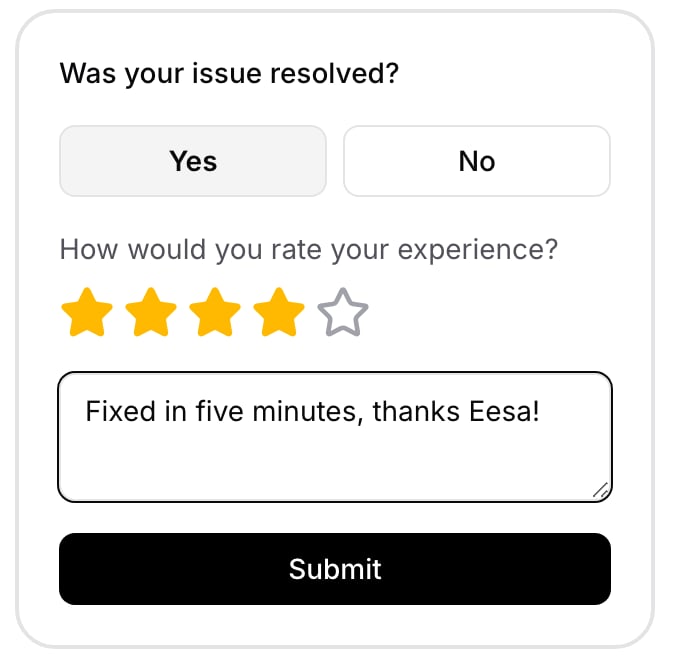

Answers are recorded in Freshchat’s CSAT reports if your Freshchat API token allows it. If Freshchat refuses the answer, Chatbase still marks the survey as answered in Activity > Conversations. If answers don’t appear in Freshchat, generate a new token in Freshchat, then reconnect the integration.
Frequently asked questions
Does the customer need to give an email before the handoff?
Does the customer need to give an email before the handoff?
Yes. The Action needs the customer’s email to create the Freshchat user, so the AI agent asks for it unless it already knows it.
Does the Freshchat agent see the whole conversation?
Does the Freshchat agent see the whole conversation?
With Conversation context set to Full conversation, yes: the chat so far is posted as “Visitor:” and “Bot:” lines, with files. With AI summary, the agent gets a summary and the attachments only. Every handoff also includes a link to the conversation in Chatbase.
Are Freshchat replies saved in Chatbase?
Are Freshchat replies saved in Chatbase?
Yes. The customer’s messages and the Freshchat agent’s replies during the handoff are saved in Chatbase, so the full conversation appears in Activity.
Can I use Freshchat live chat on WhatsApp or email?
Can I use Freshchat live chat on WhatsApp or email?
No. The Action runs on the Chat Bubble, Help Page, and Center Stage only. For other channels, use Chatbase Live Chat or Escalations.
Which plan do I need?
Which plan do I need?
The Basic plan or higher. Freshchat live chat isn’t available on HIPAA-compliant accounts.
Next steps
Freshchat integration
Connect or manage your Freshchat account.
Escalations
Open a ticket instead when the issue doesn’t need a live agent.