

What you can do:
Let the AI resolve routine questions on its own, and hand off to Gorgias the moment a case needs a person, with the full context already attached.
Before you start
- A Chatbase account on the Basic plan or higher, with an AI agent
- Your Gorgias subdomain, account email, and API key (see Find your Gorgias API key)
How to connect Gorgias
1
Open your Chatbase AI agent
Log in to your Chatbase dashboard and select the AI agent you want to connect.
2
Connect Gorgias
Choose Integrations, then click Connect under Gorgias.
3
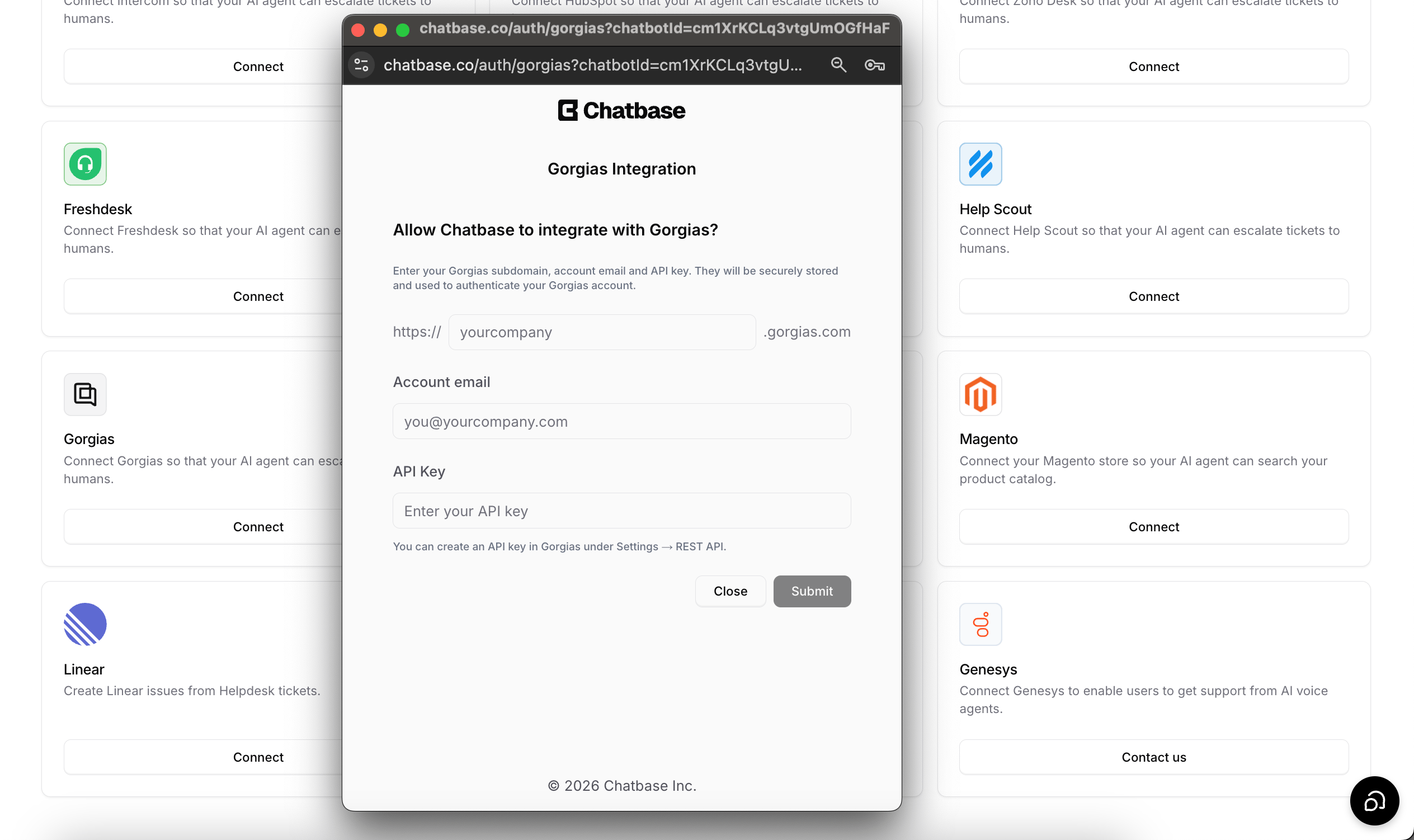
Enter your subdomain, email, and API key
To authorize the integration, you’ll need your Gorgias subdomain, account email, and API key. See Find your Gorgias API key below.Chatbase checks the email and API key together, so the email usually needs to be the one of the Gorgias user who owns the key. Escalation tickets are addressed to this email, and the internal notes Chatbase adds are posted as this user.
4
Create the Escalations Action
Configure your Escalations Action to route tickets to Gorgias. Follow the Escalations Action guide to set it up.
Find your Gorgias API key
- Log in to your Gorgias account.
- Go to Settings > REST API.
- Create a new API key, or copy an existing one.
- Paste the API key into the Chatbase integration form, along with your account email and subdomain.
Test the integration by asking your AI agent to speak to a human, and confirm a ticket appears in Gorgias with the conversation summary attached.
What the ticket contains
When the AI agent escalates, it first asks the customer for their email and name. If the channel or contact record already has them, such as the sender’s address on the email channel, those are used. Chatbase then creates the ticket through the Gorgias API:
Chatbase doesn’t set tags, priority, or custom ticket fields in Gorgias, and the Action has no Gorgias-specific options. Files and images the customer sent in the chat aren’t attached.
Example ticket
For example, a customer on the Chat Bubble asks to change the shipping address on an order they placed this morning. No Shopify Action can change the address, so the AI agent asks for their name and email and creates a ticket like this:- Subject: Change shipping address on recent order
- Customer: Jane Doe, jane@example.com
- First message: I placed an order this morning and need the shipping address changed to my new address before it ships.
- Internal note: conversation link in Chatbase, followed by the link to the conversation
Repeat escalations in the same conversation
If the same conversation already created a Gorgias ticket that’s still open, a new escalation doesn’t open a second ticket. The new request is added to the existing ticket as a message starting with “Update:”, and the AI agent tells the customer their existing ticket was updated. If that ticket is closed, deleted, or can’t be found, Chatbase creates a new one.Ecommerce escalation examples
Escalate to Gorgias when the AI agent can’t complete a request on its own. Common cases:- Order changes that no Action can make. Shopify Actions can’t cancel an order or change its shipping address. Add these to the Action’s When to use so the AI agent opens a Gorgias ticket for them. See When should the AI agent escalate?
- The customer asks for a person. For example, a customer unhappy with a delivery asks to speak to someone. The AI agent collects their email and name and creates the ticket.
- Questions the AI agent can’t answer from its content, after confirming with the customer, as the default When to use does.
What the customer sees
The AI agent tells the customer the ticket was created and shares the ticket number. On the Chat Bubble and other widget channels, a Ticket Created card also shows the ticket number and the name and email it was submitted with. If the ticket can’t be created, the card reads Failed to create ticket. On WhatsApp, Instagram, and email, the customer gets the AI agent’s message only. The AI agent keeps replying in the chat after the ticket is created. Because the ticket is an email ticket, your team’s replies from Gorgias usually reach the customer by email, not in the original chat. Nothing syncs back from Gorgias. Chatbase stores the ticket number on the conversation, but not the ticket’s status or your team’s replies.Troubleshooting
Connecting shows "Invalid email or API key."
Connecting shows "Invalid email or API key."
Gorgias rejected the email and key as a pair. Copy the key again from Settings > REST API in Gorgias, and check that the email is the one of the Gorgias user who owns the key.
Connecting shows "Invalid subdomain." or "Failed to connect to Gorgias. Please check your subdomain."
Connecting shows "Invalid subdomain." or "Failed to connect to Gorgias. Please check your subdomain."
The subdomain doesn’t match a Gorgias account. Enter only the part before
.gorgias.com, for example yourstore.The customer saw "Failed to create ticket"
The customer saw "Failed to create ticket"
Open the conversation in Activity and check the Result of the Action call for the error Gorgias returned. Common causes:
- The API key was revoked or regenerated. The Gorgias card still shows Connected, so disconnect and connect again with a current key.
- The customer didn’t give an email address. Gorgias may reject a ticket without one.
A second escalation didn't open a new ticket
A second escalation didn't open a new ticket
This is expected. While the conversation’s earlier Gorgias ticket is open, new requests are added to it as a message starting with “Update:”. Look for the update on the existing ticket.
Tickets aren't appearing in Gorgias
Tickets aren't appearing in Gorgias
Check that the Create ticket Action is enabled, uses Gorgias as the Ticket Platform, and is turned on for the channel you’re testing. Check its When to use instructions too, because the AI agent only creates a ticket when those conditions are met. If you saved changes, click Publish so the live AI agent uses them.
Failed tickets don’t send an email or alert. Check the conversation in Activity when a customer reports that escalation didn’t work.
Frequently asked questions
Why does the Gorgias ticket look like the customer emailed us?
Why does the Gorgias ticket look like the customer emailed us?
Chatbase creates the ticket on the email channel, with the AI-written summary as the customer’s first message. The summary is written from the customer’s point of view, and an internal note links to the full conversation in Chatbase.
Does Chatbase send the Shopify order number to Gorgias?
Does Chatbase send the Shopify order number to Gorgias?
No. Only the subject, the customer’s name and email, and the summary are sent. An order number appears on the ticket only if the AI agent includes it in the summary.
Can the AI agent tag the ticket or set ticket fields?
Can the AI agent tag the ticket or set ticket fields?
No. Gorgias tickets from Chatbase have no tags, priority, or custom fields.
Can my team reply to the customer in the chat from Gorgias?
Can my team reply to the customer in the chat from Gorgias?
No. Replies from Gorgias don’t appear in the Chat Bubble or any other Chatbase channel. Because the ticket is on the email channel, they usually reach the customer by email.
Does creating a ticket use extra message credits?
Does creating a ticket use extra message credits?
No. The ticket itself costs nothing extra. The reply in which the AI agent creates it is charged like any reply that calls an Action. See Credit usage.
What happens to my Escalations Actions if I disconnect Gorgias?
What happens to my Escalations Actions if I disconnect Gorgias?
Disconnecting deletes the Create ticket Actions that use Gorgias. A confirmation dialog lists them before anything is deleted.
Next steps
Escalations Action
Configure when your AI agent escalates, which details it collects first, and which channels it can escalate from.