

What you can do:
Let the AI resolve routine questions on its own, and hand off to Freshdesk the moment a case needs a person, with the full context already attached.
Before you start
- A Chatbase account on the Basic plan or higher, with an AI agent
- Your Freshdesk subdomain and API key (see Find your Freshdesk API key)
How to connect Freshdesk
1
Open your Chatbase AI agent
Log in to your Chatbase dashboard and select the AI agent you want to connect.
2
Connect Freshdesk
Choose Integrations, then click Connect under Freshdesk.
3
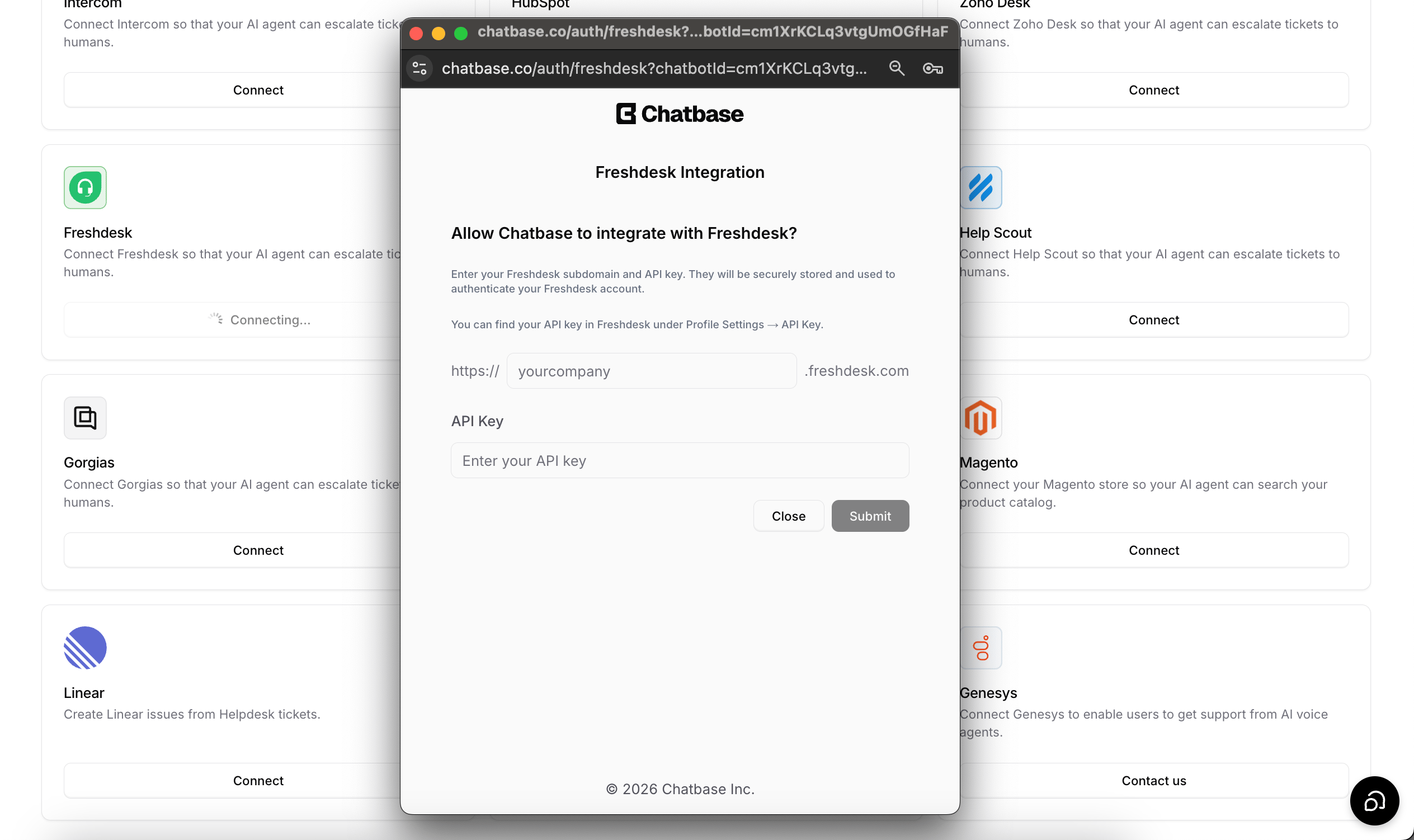
Enter your subdomain and API key
To authorize the integration, you’ll need your Freshdesk subdomain and API key. See Find your Freshdesk API key below.Enter only the subdomain, for example
yourcompany. The field already sits between https:// and .freshdesk.com, so don’t type the full address.4
Create the Escalations Action
Configure your Escalations Action to route tickets to Freshdesk. Follow the Escalations Action guide to set it up.
Find your Freshdesk API key
- Log in to your Freshdesk account.
- Click your profile picture (top-right corner).
- Select Profile Settings.
- On the right-hand side, locate Your API Key.
Test the integration by asking your AI agent to speak to a human, and confirm a ticket appears in Freshdesk with the conversation summary attached.
Setup checklist
Use this list to go from a Freshdesk account to working escalations:- Make sure your Chatbase plan is Basic or higher.
- Connect Freshdesk on the AI agent’s Integrations page, entering only the subdomain (for example
yourcompany), and check that the card shows Connected. - Create a Create ticket Action under Escalations with Freshdesk as the Ticket Platform, and write a clear When to use.
- If your Freshdesk marks Type as required, set the Action’s Freshdesk ticket type field.
- Turn the Action on for the channels where customers should be able to escalate.
- Publish your changes, then ask the AI agent to speak to a human and confirm the ticket appears in Freshdesk.
What the AI agent sends to Freshdesk
When the AI agent creates a ticket, it first asks the customer for their email and name. If the channel or contact record already has them, such as the sender’s address on the email channel, those are used. The AI agent then creates the ticket with these fields:
After the ticket is created, Chatbase adds a private note with a link to the conversation in your Chatbase dashboard, so your team can read the whole chat.
Chatbase doesn’t send tags, a group, or a source, so Freshdesk’s defaults apply to those. Files and images the customer sent in the chat aren’t attached to the ticket.
Example ticket
For example, a customer on the Chat Bubble writes that they were charged twice for one order and wants a refund. The AI agent asks for their name and email, then creates a ticket like this:- Subject: Double charge on order, refund requested
- Description: I was charged twice for the same order and would like the duplicate charge refunded.
- Requester: Jane Doe, jane@example.com
- Priority: High
- Status: Open
- Private note: conversation link in Chatbase, followed by the link to the conversation
What the customer sees
The AI agent tells the customer the ticket was created and shares the ticket number. On the Chat Bubble and other widget channels, a Ticket Created card also shows the ticket number and the name and email it was submitted with. If the ticket can’t be created, the card reads Failed to create ticket. On WhatsApp, Instagram, and email, the customer gets the AI agent’s message only. The AI agent keeps replying in the chat after the ticket is created. Your team’s replies from Freshdesk reach the customer the way Freshdesk sends them, which is usually by email, and don’t appear in the original chat. Nothing syncs back from Freshdesk. Chatbase stores the ticket number on the conversation, but not the ticket’s status or your team’s replies.Troubleshooting
Connecting shows "Invalid API key or subdomain."
Connecting shows "Invalid API key or subdomain."
Freshdesk rejected the key for that subdomain. Copy the key again from Profile Settings in Freshdesk, check that the subdomain belongs to the same account, and try again.
Connecting shows "Invalid subdomain" or "Failed to connect to Freshdesk. Please check your subdomain."
Connecting shows "Invalid subdomain" or "Failed to connect to Freshdesk. Please check your subdomain."
The subdomain doesn’t match a Freshdesk account. Enter only the part before
.freshdesk.com, for example yourcompany. If you reach Freshdesk through a custom domain, use your original freshdesk.com subdomain instead.The subdomain field says it can only contain alphanumeric characters and hyphens
The subdomain field says it can only contain alphanumeric characters and hyphens
You entered more than the subdomain, such as
yourcompany.freshdesk.com. Remove the dots and everything after them.The customer saw "Failed to create ticket"
The customer saw "Failed to create ticket"
Open the conversation in Activity and check the Result of the Action call for the error Freshdesk returned. Common causes:
- The API key was revoked or regenerated. The Freshdesk card still shows Connected, so disconnect and connect again with the current key.
- Your Freshdesk marks Type as required and the Action’s Freshdesk ticket type field is empty. The field warns you about this when you set up the Action.
- The customer didn’t give an email address. Freshdesk may reject a ticket without one.
Tickets aren't appearing in Freshdesk
Tickets aren't appearing in Freshdesk
Check that the Create ticket Action is enabled, uses Freshdesk as the Ticket Platform, and is turned on for the channel you’re testing. Check its When to use instructions too, because the AI agent only creates a ticket when those conditions are met. If you saved changes, click Publish so the live AI agent uses them.
Failed tickets don’t send an email or alert. Check the conversation in Activity when a customer reports that escalation didn’t work.
Frequently asked questions
Does Freshdesk receive the full conversation?
Does Freshdesk receive the full conversation?
No. The ticket description is an AI-written summary, and a private note links to the full conversation in Chatbase. Attachments from the chat aren’t added to the ticket.
Can my team reply to the customer in the chat from Freshdesk?
Can my team reply to the customer in the chat from Freshdesk?
No. Replies from Freshdesk go to the customer the way Freshdesk sends them, usually by email. They don’t appear in the Chat Bubble, WhatsApp, or any other Chatbase channel.
Can I set the ticket type or priority?
Can I set the ticket type or priority?
You can set a fixed ticket type in the Action’s Freshdesk ticket type field. Priority is chosen by the AI agent for each ticket, from Low to Urgent, based on the customer’s issue.
Can I connect more than one Freshdesk account?
Can I connect more than one Freshdesk account?
Each AI agent connects to one Freshdesk account. To use a different account, connect it on a different AI agent. Several AI agents can usually connect to the same Freshdesk account.
Does creating a ticket use extra message credits?
Does creating a ticket use extra message credits?
No. The ticket itself costs nothing extra. The reply in which the AI agent creates it is charged like any reply that calls an Action. See Credit usage.
What happens to my Escalations Actions if I disconnect Freshdesk?
What happens to my Escalations Actions if I disconnect Freshdesk?
Disconnecting deletes the Create ticket Actions that use Freshdesk. A confirmation dialog lists them before anything is deleted.
Next steps
Escalations Action
Configure when your AI agent escalates, which details it collects first, and which channels it can escalate from.